
1. Pengenalan
Thank you for choosing the Physionics ELTR01 Elliptical Trainer. This manual provides essential information for the safe assembly, operation, and maintenance of your fitness equipment. Please read it thoroughly before use and keep it for future reference.
The Physionics ELTR01 is designed to provide an effective full-body cardio workout in the comfort of your home, engaging various muscle groups while being gentle on your joints.

Image 1.1: Physionics ELTR01 Elliptical Trainer in use.
2. Maklumat Keselamatan
- Rujuk doktor sebelum memulakan sebarang program senaman baharu.
- Jauhkan kanak-kanak dan haiwan peliharaan daripada peralatan semasa digunakan.
- Place the trainer on a flat, stable surface with adequate clearance around it.
- Pastikan semua bolt dan nat diketatkan dengan selamat sebelum setiap penggunaan.
- Jangan melebihi berat pengguna maksimum 120 kg (265 lbs).
- Pakai pakaian senaman dan kasut yang sesuai.
- Berhenti bersenam serta-merta jika anda berasa pitam, pening, atau mengalami kesakitan.
- The equipment is for home use only, not for commercial or therapeutic purposes.

Image 2.1: Maximum user weight capacity of 120 kg (265 lbs).
3. Kandungan Pakej
Sila pastikan semua komponen ada dan tidak rosak. Jika mana-mana bahagian hilang atau rosak, hubungi khidmat pelanggan.
- Main Frame Components
- Pedal (2)
- Handlebars (2) with Pulse Sensors
- Monitor LCD
- Abdominal Support Pad
- Perkakasan Pemasangan (bolt, pencuci, nat)
- Alat Pemasangan (sepana, kunci Allen)
- Manual Pengguna
4. Persediaan dan Pemasangan
Assembly typically requires two people. Follow the numbered steps in the included assembly diagram. Ensure all connections are secure before use.
- Buka bungkusan semua komponen dan letakkannya di atas permukaan yang bersih dan rata.
- Pasangkan penstabil hadapan dan belakang pada rangka utama menggunakan bolt dan pencuci yang disediakan.
- Mount the main upright post to the base frame.
- Connect the handlebars and pedal arms to the main frame, ensuring proper alignment.
- Install the abdominal support pad onto its adjustable post.
- Attach the LCD monitor to its bracket and connect the sensor wires (pulse and speed).
- Secure the pedals to the pedal arms.
- Double-check all bolts and nuts for tightness.

Image 4.1: Product dimensions for placement planning.
5. Arahan Operasi
5.1 Bermula
Step onto the pedals one foot at a time, holding onto the handlebars for balance. Begin a smooth, elliptical motion. The movement should feel natural and fluid.

Image 5.1: Key features of the elliptical trainer.
5.2 Fungsi Monitor LCD
The digital LCD monitor tracks your workout progress. It typically displays the following functions:
- nadi: Your heart rate (when holding the pulse sensors).
- MASA: Tempoh senaman semasa anda.
- JUMLAH MASA: Cumulative workout time.
- KALORI: Anggaran kalori yang dibakar.
- RPM (Putaran Per Minit): Speed of your pedal strokes.
- IMBAS: Berkitar secara automatik melalui semua fungsi paparan.
Use the 'MODE' button to select a specific function or 'SCAN' mode. The 'RESET' button clears all values.

Image 5.2: Close-up of the LCD monitor and its functions.
5.3 Adjustable Abdominal Support
The abdominal support pad can be adjusted for height and depth to provide comfort and stability during your workout. Loosen the adjustment knob, position the pad, and then tighten the knob securely.

Image 5.3: Detail of the two-way adjustable abdominal support.
5.4 Grip Pulse Monitor
To measure your heart rate, firmly grasp the pulse sensors on the handlebars. Your pulse will be displayed on the LCD monitor after a few seconds.

Image 5.4: How to use the grip pulse monitor.
5.5 Non-Slip Pedals
The textured, non-slip pedals are designed to ensure stability and safety during your exercise. Always ensure your feet are centered and secure on the pedals.
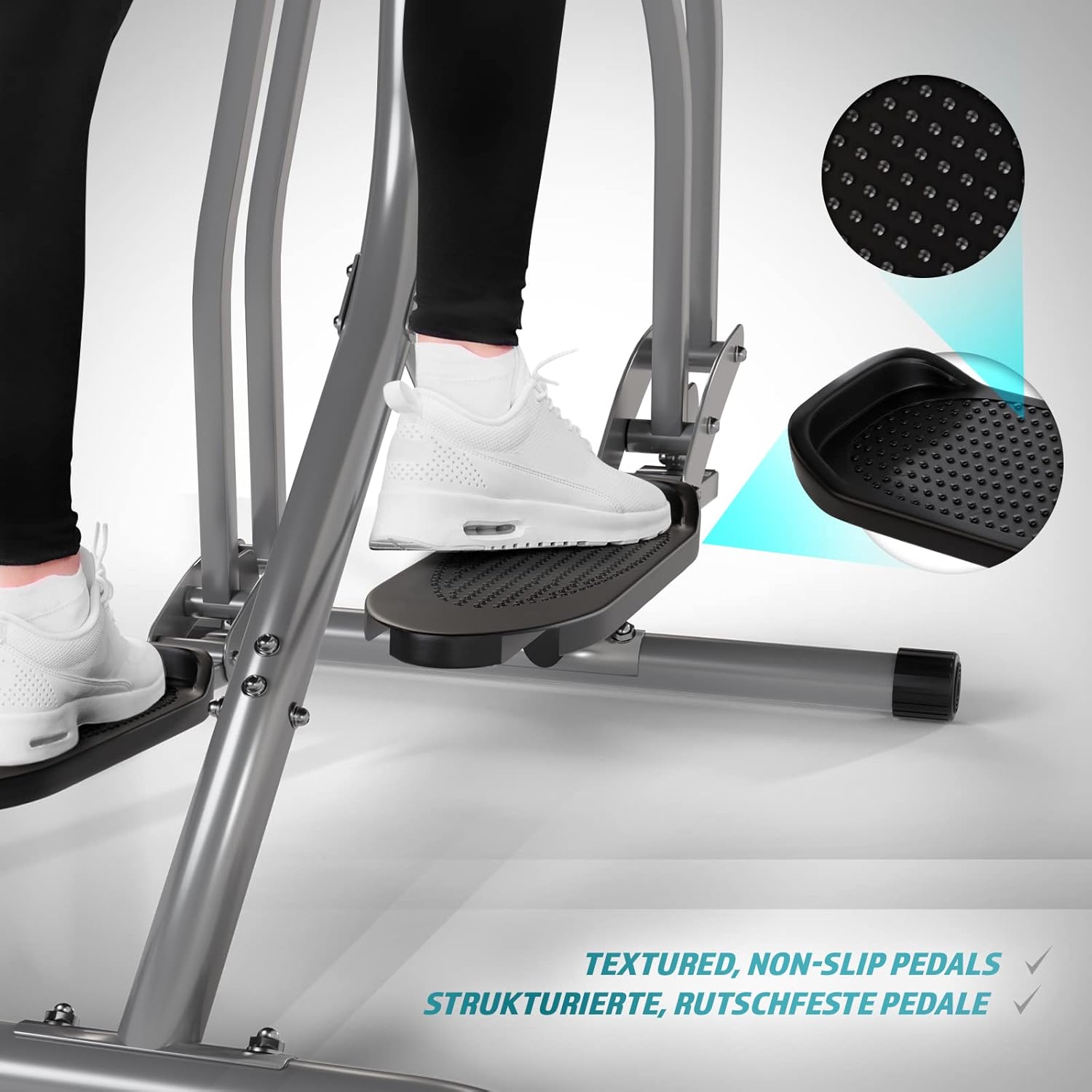
Image 5.5: Detail of the non-slip pedal surface.
5.6 Benefits of Elliptical Training
Elliptical training offers a low-impact workout that is beneficial for cardiovascular health, calorie burning, muscle toning, and improving balance and coordination. It is particularly gentle on joints compared to high-impact exercises.

Image 5.6: Elliptical training is gentle on joints.
6. Penyelenggaraan
- Pembersihan: Lap kasut latihan dengan iklanamp kain selepas setiap penggunaan untuk mengeluarkan peluh dan habuk. Jangan gunakan pembersih yang kasar.
- Pemeriksaan: Periksa semua bolt, nat dan bahagian yang bergerak secara berkala untuk memastikan ia ketat dan haus. Ketatkan sebarang pengikat yang longgar.
- Pelinciran: Apply a small amount of silicone-based lubricant to moving joints and pivot points every few months to ensure smooth operation and prevent squeaking.
- Storan: Store the trainer in a dry, cool place away from direct sunlight and moisture.
7. Penyelesaian masalah
| Masalah | Kemungkinan Punca | Penyelesaian |
|---|---|---|
| Monitor LCD tidak dipaparkan | Bateri mati; Sambungan sensor longgar | Replace batteries; Check and secure all sensor cables. |
| Bunyi berdecit atau berkisar | Bolt longgar; Kekurangan pelinciran; Bahagian haus | Tighten all bolts; Lubricate moving joints; Contact support if noise persists. |
| Bacaan nadi yang tidak tepat | Hands not firmly on sensors; Dry hands | Ensure firm, consistent contact with sensors; Slightly moisten hands if too dry. |
| Unstable during use | Uneven surface; Loose frame connections | Move to a level surface; Check and tighten all frame bolts. |
8. Spesifikasi
| Ciri | Perincian |
|---|---|
| Nama Model | Air Walker |
| Nombor Model | ELTR01 |
| Jenama | fizik |
| warna | Perak/Hitam |
| Dimensi Produk (L x W x H) | 97 x 60 x 144.5 cm |
| Berat Barang | 17 Kilogram |
| Bahan Utama | Steel, Plastic, Foam |
| Mekanisme Rintangan | Air, Manual |
| Cadangan Berat Maksimum | 120 Kilogram |
| Maximum Step Length | 90 Sentimeter |
| Saiz Paparan | 90 Centimeters (Note: This value from source data may refer to step length or a general display size, not the physical screen size of the LCD monitor.) |
| Pengeluar | FF Europe |
9. Waranti dan Sokongan
For warranty information, please refer to the documentation included with your purchase or contact your retailer. If you require technical assistance, have questions about assembly, or need replacement parts, please contact Physionics customer support through their official website or the contact details provided at the point of purchase.
Please have your model number (ELTR01) and purchase date ready when contacting support.


