1. Pengenalan
Terima kasih kerana membeliasing the astrum ST370 Wireless Barrel Speaker. This manual provides essential information for the safe and efficient operation of your device. Please read it thoroughly before use and retain it for future reference.
The astrum ST370 is a portable wireless speaker designed for outdoor use, offering robust sound with deep bass. It features multiple connectivity options including Bluetooth, FM radio, USB, Micro SD card, and AUX input, powered by a rechargeable battery.
2. Maklumat Keselamatan
- Jangan dedahkan pembesar suara kepada air, kelembapan atau suhu yang melampau.
- Elakkan daripada menjatuhkan atau menundukkan pembesar suara kepada impak yang kuat.
- Jangan cuba membuka, membaiki atau mengubah suai peranti. Ini akan membatalkan jaminan.
- Jauhkan pembesar suara daripada sumber haba, cahaya matahari langsung dan bahan mudah terbakar.
- Gunakan hanya kabel pengecasan yang disediakan atau setara yang diperakui.
- Jangan kendalikan pembesar suara pada kelantangan yang terlalu tinggi untuk tempoh yang lama bagi mengelakkan kerosakan pendengaran.
- Buang produk dan baterinya secara bertanggungjawab mengikut peraturan tempatan.
3. Kandungan Pakej
Sila tandai kotak untuk item berikut:
- 1 x astrum ST370 Wireless Speaker
- 1 x Kabel Pengecasan
- 1 x Kabel AUX
- 1 x Manual Pengguna
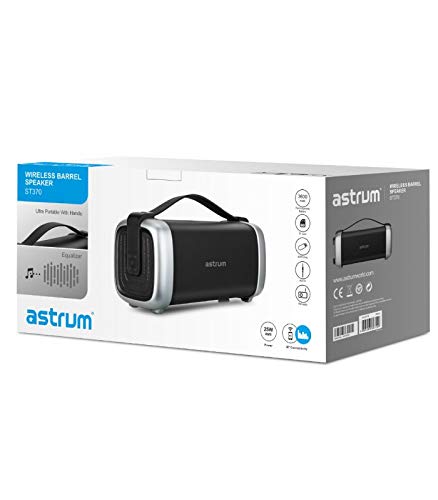
Image: The retail packaging for the astrum ST370 Wireless Barrel Speaker, showing the speaker and its key features.
4. Produk Lebihview
Familiarize yourself with the components and controls of your astrum ST370 speaker.
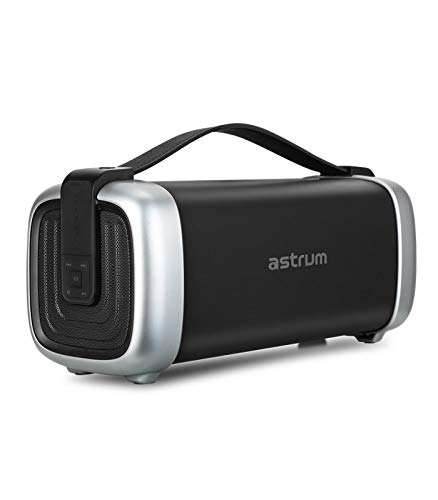
Imej: Depan view of the astrum ST370 Wireless Barrel Speaker, showcasing its black body, silver end caps, and integrated carrying handle.
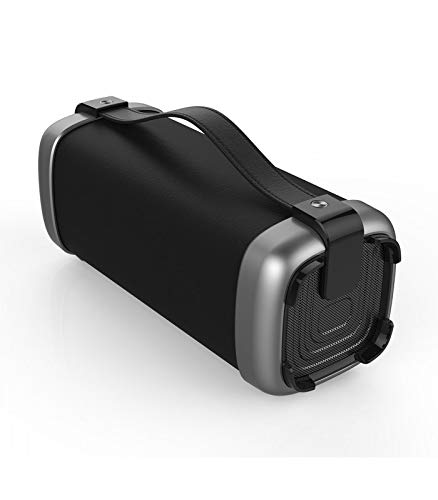
Imej: Bersudut view of the astrum ST370 speaker, highlighting the textured side panel and the robust carrying handle.
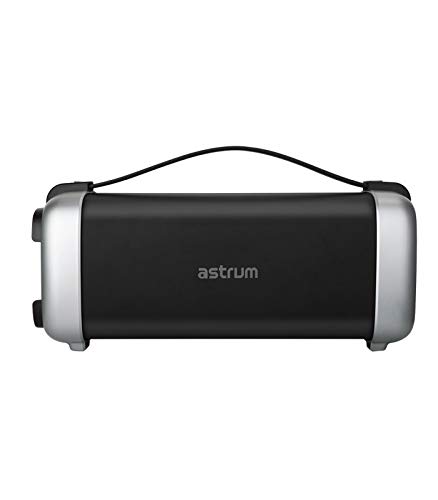
Imej: Depan view of the astrum ST370 speaker, displaying the control panel on the side with various buttons.
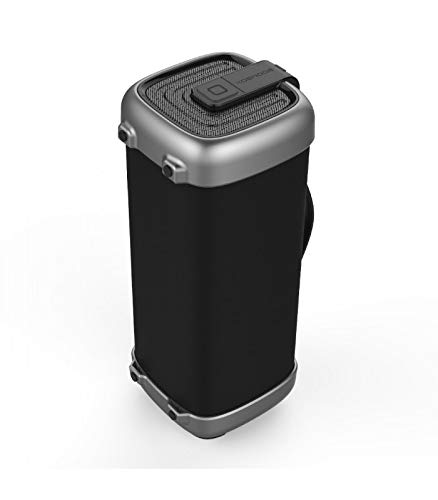
Imej: Side profile of the astrum ST370 speaker, illustrating its compact barrel design and stable base.
Controls and Ports (Refer to images for location)
- Butang Kuasa: Menghidupkan atau mematikan pembesar suara.
- Butang Mod: Switches between Bluetooth, FM, USB, Micro SD, and AUX modes.
- Butang Main/Jeda: Memainkan atau menjeda audio.
- Butang Naikkan Kelantangan / Trek Seterusnya: Meningkatkan kelantangan atau melangkau ke trek seterusnya.
- Butang Kelantangan Kurang / Trek Sebelumnya: Mengurangkan kelantangan atau pergi ke trek sebelumnya.
- Port USB: Untuk main balik pemacu USB.
- Slot Kad Mikro SD: Untuk main balik kad Mikro SD.
- Input AUX: Untuk menyambungkan peranti audio luaran melalui kabel 3.5mm.
- Port Pengecasan: Untuk menyambungkan kabel pengecasan.
5. Persediaan
5.1 Mengecas Speaker
- Sambungkan kabel pengecasan yang disediakan ke port pengecasan pembesar suara.
- Sambungkan hujung kabel pengecas yang satu lagi ke penyesuai kuasa USB (tidak disertakan) atau port USB komputer.
- Lampu penunjuk pengecasan akan menyala, biasanya merah, semasa pengecasan.
- Once fully charged, the indicator light may change color or turn off. Disconnect the speaker from the power source.
Nota: Untuk hayat bateri yang optimum, cas sepenuhnya pembesar suara sebelum penggunaan pertama.
5.2 Menghidupkan/Mematikan
- Untuk Menghidupkan: Press and hold the Power Button for a few seconds until you hear an audible prompt or see an indicator light.
- Untuk Mematikan: Press and hold the Power Button again for a few seconds until the speaker powers down.
6. Arahan Operasi
6.1 Mod Bluetooth
- Hidupkan pembesar suara. Ia akan memasuki mod gandingan Bluetooth secara automatik, ditunjukkan oleh lampu LED berkelip dan gesaan yang boleh didengar.
- Dayakan Bluetooth pada telefon pintar, tablet anda atau peranti lain yang didayakan Bluetooth.
- Cari untuk available devices and select "ST370" from the list.
- Once paired, the speaker will provide an audible confirmation, and the LED light will stop flashing.
- Anda kini boleh memainkan audio daripada peranti anda melalui pembesar suara.
Mod Radio 6.2 FM
- Press the Mode Button repeatedly until you enter FM Radio mode.
- To auto-scan for stations, press and hold the Play/Pause Button. The speaker will scan and save available FM stations.
- Gunakan butang Naikkan Kelantangan/Trek Seterusnya dan Turunkan Kelantangan/Trek Sebelumnya untuk menavigasi antara stesen yang disimpan.
6.3 Main Semula Kad USB / Mikro SD
- Insert a USB drive or a Micro SD card (with pre-loaded audio files) ke dalam port/slot masing-masing.
- The speaker will automatically detect the storage device and switch to USB or Micro SD mode, beginning playback. If not, press the Mode Button to select the correct mode.
- Gunakan butang Main/Jeda, Trek Seterusnya dan Trek Sebelumnya untuk mengawal main balik.
6.4 Mod Input AUX
- Connect one end of the provided 3.5mm AUX cable to the speaker's AUX input port.
- Connect the other end of the AUX cable to the audio output jack of your external device (e.g., MP3 player, laptop).
- Press the Mode Button until you enter AUX mode.
- Kawal main balik dan kelantangan terus daripada peranti luaran anda yang disambungkan.
6.5 Volume and Playback Control
- Pelarasan Kelantangan: Tekan sebentar butang Kelantangan Naik (+) atau Kelantangan Turun (-).
- Navigasi Trek: Long press the Volume Up (+) button for the next track, and long press the Volume Down (-) button for the previous track (in Bluetooth, USB, or Micro SD modes).
- Main/Jeda: Tekan sebentar butang Main/Jeda.
7. Penyelenggaraan
7.1 Pembersihan
- Lap bahagian luar pembesar suara dengan kain lembut, kering dan tidak berbulu.
- Jangan gunakan pembersih yang kasar, pelarut atau semburan kimia.
- Elakkan mendapatkan kelembapan ke dalam mana-mana bukaan.
7.2 Penyimpanan
- Simpan pembesar suara di tempat yang sejuk dan kering jauh dari cahaya matahari langsung dan suhu yang melampau.
- Jika menyimpan untuk tempoh yang lama, cas bateri kepada kira-kira 50% setiap beberapa bulan untuk mengekalkan kesihatan bateri.
8. Penyelesaian masalah
| Masalah | Kemungkinan Punca | Penyelesaian |
|---|---|---|
| Speaker tidak dihidupkan. | Bateri lemah. | Cas pembesar suara sepenuhnya. |
| Tidak boleh berpasangan melalui Bluetooth. | Speaker not in pairing mode; Bluetooth disabled on device; too far from speaker. | Ensure speaker is in Bluetooth mode; enable Bluetooth on your device; move device closer to speaker (within 10 meters). |
| Tiada bunyi. | Volume too low; incorrect mode selected; cable not connected properly (AUX). | Increase volume; press Mode button to select correct input; check AUX cable connection. |
| Penerimaan radio FM kurang baik. | Isyarat lemah. | Alihkan pembesar suara ke lokasi yang mempunyai penerimaan yang lebih baik. |
9. Spesifikasi
| Nama Model | ST370 |
| Kuasa Keluaran | 25 Watt |
| Teknologi Ketersambungan | Bluetooth, Auxiliary, USB, Wireless |
| Ciri Khas | Portable, Wireless, FM Radio, Micro SD Card Support |
| Sumber Kuasa | Dikuasakan Bateri |
| Purata Hayat Bateri | 8 Jam |
| Kaedah Kawalan | Sentuh |
| Diameter Subwoofer | 4 Inci |
| Diameter Tweeter | 1 inci |
| Dimensi Produk (LxWxH) | 32.7 x 13 x 14.2 cm |
| Berat Barang | 1.45 kg |
| warna | Hitam |
| Penggunaan yang Disyorkan | Luar |
10. Waranti dan Sokongan
The astrum ST370 Wireless Barrel Speaker comes with a Waranti 1 Tahun dari tarikh pembelian. Sila simpan bukti pembelian anda untuk tuntutan waranti.
For technical support, troubleshooting assistance beyond this manual, or warranty inquiries, please visit the official astrum website or contact their customer service department. Contact details can typically be found on the brand's official webtapak atau pada pembungkusan produk anda.
Pengeluar: Astrum Holdings Ltd, Unit-1618, Asia Trade Centre, 79 Lei Muk Road, Kwai Chung, New Territories, Hong Kong
Pengimport: Astrum Electronics India Pvt Ltd, Plot No.80&81, Gajulamandyam, Renigunta Mandal, Chittoor, Tirupati, Andhra Pradesh-517547


