1. Pengenalan
The Edifier S3000Pro Audiophile Active Speakers are designed to deliver high-fidelity audio with versatile connectivity options. Featuring Bluetooth 5.0 with aptX HD, USB audio, planar diaphragm tweeters, and 6.5-inch woofers, these speakers offer a premium listening experience. The innovative KleerNet wireless technology allows for a wire-free connection between the left and right speakers, providing flexible placement without compromising sound quality.
2. Kandungan Pakej
Sila pastikan semua item terdapat dalam pakej:
- Edifier S3000Pro Speakers (1 pair)
- Alat Kawalan Jauh
- Kabel Kuasa
- Kabel USB
- Kabel Optik
- RCA to RCA Audio Cable
- Kabel Audio 3.5mm ke RCA
- Manual Pengguna
3. Persediaan dan Sambungan
The Edifier S3000Pro speakers are designed for easy setup. The left and right speakers connect wirelessly to each other, eliminating the need for a speaker cable between them. Each speaker requires its own power connection.
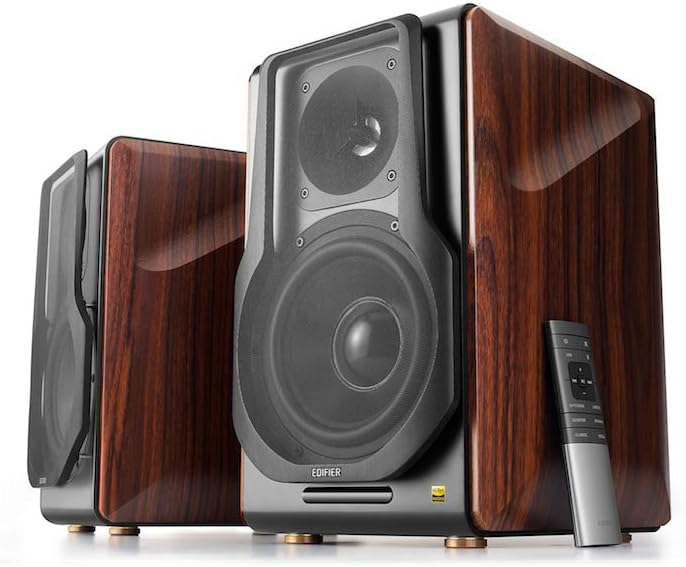
Figure 3.1: Edifier S3000Pro Speakers and Remote Control.
3.1 Penempatan Pembesar Suara
Place the speakers in your desired listening area. Due to their wireless inter-speaker connection, you have flexibility in positioning them. Ensure each speaker is near a power outlet.

Gambar 3.2: Cthample placement of Edifier S3000Pro speakers in a room.
3.2 Sambungan Kuasa
Connect the included power cables to each speaker and then to a wall outlet. The speakers will automatically attempt to pair with each other upon power-on.
3.3 Sambungan Input Audio
The active (right) speaker features a variety of input ports:
- Bluetooth 5.0 with aptX HD: Untuk penstriman audio tanpa wayar daripada peranti yang serasi.
- Audio USB: Connect directly to a computer for high-resolution audio playback.
- Optik: For digital audio connection from TVs, game consoles, etc.
- Sepaksi: Another digital audio input option.
- Talian Masuk (RCA): Standard analog input for various audio sources.
- Seimbang (XLR): Professional-grade input for balanced audio signals.

Figure 3.3: Rear panel of the active speaker with various input options.
3.4 Wireless Inter-Speaker Connection
The S3000Pro utilizes KleerNet wireless technology for lossless audio transmission between the left and right speakers. This connection is established automatically. If re-pairing is ever needed, refer to the troubleshooting section.
Video 3.1: Official Edifier S3000Pro Audiophile Active Speakers overview, demonstrating key features and connectivity.
4. Arahan Operasi
Control your S3000Pro speakers using the included wireless remote or the controls located on the active (right) speaker.
4.1 Fungsi Kawalan Jauh

Figure 4.1: The wireless remote control for Edifier S3000Pro speakers.
- Butang Kuasa: Turns the speakers on or off.
- Kawalan Kelantangan: Melaraskan tahap kelantangan keseluruhan.
- Redam: Membisukan atau menyahredamkan output audio.
- Pemilihan Input: Dedicated buttons for USB, Bluetooth, Optical/Coaxial, and Line/Balanced inputs.
- Kawalan Main Semula: Play/Pause, Skip Forward, Skip Backward (for Bluetooth and USB modes).
- Mod Bunyi: Buttons for Monitor, Dynamic, Classic, and Vocal sound profiles.
4.2 On-Speaker Controls
The active speaker features rotary knobs for direct control:
- Volume/Input Selection: Rotate to adjust volume; press to cycle through inputs.
- Kawalan Treble: Melaraskan output frekuensi tinggi.
- Kawalan Bes: Melaraskan output frekuensi rendah.
5. Ciri-ciri dan Reka Bentuk
The S3000Pro speakers are crafted with both acoustic performance and aesthetic appeal in mind.
5.1 Acoustic Design
- Planar Diaphragm Tweeters: Deliver clear, detailed high frequencies.
- 6.5-inch Aluminum Alloy Woofers: Provide powerful and accurate bass response.
- terbina dalam Amplebih hidup: Each speaker features a 78 watts amplifier, eliminating the need for external amppemberitahuan.
- Audio Hi-Res: Supports higher bit depth and sample rates (96 kHz or higher) for superior sound quality.
5.2 Construction and Aesthetics
The speaker cabinets are constructed from high-quality MDF (Medium-Density Fiberboard) with a brown wood finish, offering both durability and a classic aesthetic. The front features a matt black finish with removable cloth grilles.

Rajah 5.1: Depan view highlighting the drivers and finish.

Rajah 5.2: Sisi view tunjuk casing the wood finish.
6. Penyelenggaraan
To ensure the longevity and optimal performance of your Edifier S3000Pro speakers, follow these maintenance guidelines:
- Pembersihan: Use a soft, dry cloth to wipe down the speaker cabinets. Avoid using abrasive cleaners, waxes, or solvents.
- Berhabuk: Regularly dust the speaker grilles and drivers with a soft brush or vacuum cleaner with a brush attachment.
- penempatan: Elakkan meletakkan pembesar suara di bawah cahaya matahari langsung, berhampiran sumber haba atau di kawasan yang mempunyai kelembapan tinggi. Pastikan pengudaraan yang mencukupi di sekitar pembesar suara.
- Pengendalian: Handle the speakers with care. Avoid pressing on the speaker cones or tweeters.
7. Penyelesaian masalah
If you encounter issues with your S3000Pro speakers, refer to the following common solutions:
- Tiada Bunyi:
- Ensure both speakers are powered on and connected to an electrical outlet.
- Verify the correct input source is selected on the active speaker or remote.
- Periksa semua kabel audio untuk sambungan selamat.
- Increase the volume on both the speakers and the audio source.
- Speakers Not Pairing Wirelessly:
- Ensure both speakers are powered on. The wireless connection between them is factory-paired and should resume automatically.
- If the wireless connection fails, locate the small "Pair" button on the back panel of both the active (R) and passive (L) speakers. Press and hold the "Pair" button on the active speaker first, then on the passive speaker. The LED indicator on the passive speaker will blink rapidly during pairing.
- Isu Kesambungan Bluetooth:
- Ensure the speakers are in Bluetooth input mode.
- Delete the "Edifier S3000Pro" from your device's Bluetooth list and attempt to re-pair.
- Move your Bluetooth device closer to the speakers to reduce interference.
- Bunyi Herot:
- Kurangkan kelantangan pada kedua-dua pembesar suara dan sumber audio.
- Periksa kabel audio untuk kerosakan atau sambungan yang longgar.
- Ensure the audio source is not overdriving the input.
8. Spesifikasi
| Ciri | Spesifikasi |
|---|---|
| Jenama | edifier |
| Nama Model | S3000PRO |
| Jenis Pembesar Suara | Rak buku |
| bahan | MDF |
| Teknologi Ketersambungan | Bluetooth, USB |
| Teknologi Komunikasi Tanpa Wayar | Bluetooth |
| Versi Bluetooth | 5.0 dengan aptX HD |
| Diameter Woofer | 6.5 Inci |
| Jenis Tweeter | Planar Diaphragm |
| Kuasa Output Maksimum Pembesar Suara | 256 Watt |
| Nisbah Isyarat-ke-Bunyi | 85 dB |
| Dimensi Produk | 21.6"D x 13.4"W x 17.3"H |
| Berat Barang | 3.3 paun (1.5 Kilogram) |
| Komponen yang Disertakan | produk, manual |
9. Waranti dan Sokongan
The Edifier S3000Pro speakers come with a full warranty. For detailed warranty information, product registration, or technical support, please visit the official Edifier webtapak atau hubungi perkhidmatan pelanggan mereka. Simpan resit pembelian anda untuk tuntutan waranti.
Untuk bantuan lanjut, anda boleh melawati Kedai Edifier di Amazon.


