Timex Marathon Digital Dial Silicone Strap Ladies Watch TW5M14200
pengenalan
This manual provides comprehensive instructions for the setup, operation, and maintenance of your Timex Marathon Digital Dial Silicone Strap Ladies Watch, model TW5M14200. Please read this manual carefully to ensure proper use and to maximize the lifespan of your watch.
Produk Selesaiview dan Ciri
The Timex Marathon Digital Watch is designed for active individuals, offering a blend of sporty aesthetics and practical digital functions. Key features include:
Paparan Digital: Paparan masa digital yang jelas dan mudah dibaca.
Fungsi Kalendar: Displays Day and Date.
Jam randik: Untuk aktiviti masa.
Masa Ganda: Allows tracking of a second time zone.
penggera: Programmable daily alarm.
Indiglo Light: Timex's signature night-light for low-light visibility.
Tahan Air: Rated for 5 bars (50 meters), suitable for showering or swimming in shallow water.
Durable Strap: High-quality silicone strap for comfort and longevity.
Depan view of the Timex Marathon Digital Watch, highlighting the digital display and control buttons.
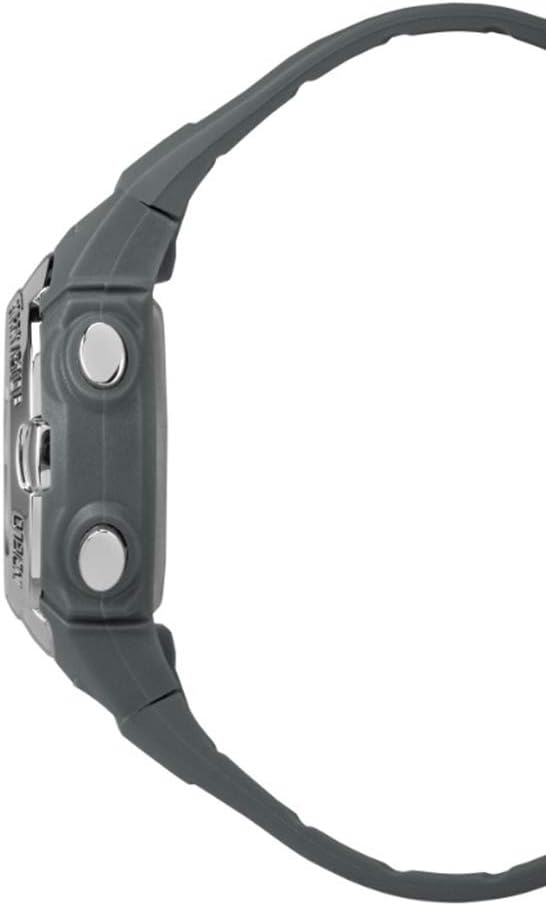
Pro sampinganfile of the watch, illustrating its ergonomic design and button placement.
Detail of the durable silicone strap and buckle mechanism.
The watch as worn on a wrist, demonstrating its fit and appearance.
Persediaan dan Konfigurasi Awal
Before using your watch, it is recommended to set the correct time, date, and any desired alarms.
Menetapkan Masa dan Tarikh
Tekan ke MODE butang berulang kali sehingga mod tetapan masa dipaparkan (selalunya ditunjukkan dengan digit berkelip).
Gunakan SET butang untuk memilih digit atau tetapan yang ingin anda laraskan (cth, jam, minit, tahun, bulan, hari).
Gunakan MULA/BERHENTI button to increase the value of the selected digit. Hold to advance rapidly.
Setelah semua tetapan betul, tekan butang MODE butang untuk keluar dari mod tetapan dan kembali ke paparan masa biasa.
Menetapkan Penggera
Tekan ke MODE button until the alarm time is displayed.
Tekan ke SET button to activate the alarm setting. The hour digits will flash.
Gunakan MULA/BERHENTI butang untuk menyesuaikan jam.
Tekan SET again to move to the minute digits, then use MULA/BERHENTI untuk menyesuaikan diri.
Tekan MODE to save the alarm setting and return to the alarm display.
To turn the alarm on or off, typically press MULA/BERHENTI while in the alarm display mode. An alarm icon will appear when active.
Mod Pengendalian
Your Timex Marathon watch features several useful operating modes:
Fungsi Jam randik
Tekan ke MODE button until the stopwatch display appears (usually showing 00:00:00).
Tekan MULA/BERHENTI untuk memulakan masa.
Tekan MULA/BERHENTI sekali lagi untuk menjeda jam randik.
Untuk menetapkan semula jam randik, tekan butang SET butang semasa jam randik dijeda.
Mod Masa Ganda
Tekan ke MODE button until the Dual Time (T2) display appears.
To set the Dual Time, press SET dan gunakan MULA/BERHENTI to adjust the hours and minutes, similar to setting the main time.
Tekan MODE untuk menyimpan dan keluar.
Cahaya Malam Indiglo
To activate the Indiglo night-light, press the INIGLO button (often located on the top right or as part of the main display button). The light will illuminate the display for a few seconds, allowing visibility in low-light conditions.
Penjagaan dan Penyelenggaraan
Penjagaan yang betul akan memastikan jangka hayat dan prestasi jam tangan Timex anda.
Tahan Air: Your watch is water resistant to 50 meters (5 ATM). This means it is suitable for showering, swimming in shallow water, or brief immersion. Do NOT press any buttons while the watch is wet or submerged, as this can compromise the water seal. Avoid exposure to hot water or steam.
Pembersihan: Bersihkan jam tangan anda dengan kerap menggunakan kain lembut, damp cloth. For the silicone strap, mild soap and water can be used. Ensure the watch is completely dry before storing.
Penggantian Bateri: The watch uses 1 Lithium Metal battery (included). When the display dims or functions become erratic, it may be time to replace the battery. It is recommended to have the battery replaced by a qualified watch technician to ensure the water resistance is maintained.
Storan: Simpan jam tangan anda di tempat yang sejuk dan kering, jauh daripada cahaya matahari langsung dan suhu yang melampau.
Menyelesaikan masalah
If you encounter issues with your watch, please refer to the following common solutions:
Masalah
Kemungkinan Punca
Penyelesaian
Paparan kosong atau malap.
Bateri lemah atau mati.
Gantikan bateri.
Butang tidak bertindak balas.
Jam tangan mungkin dalam mod terkunci atau isu dalaman.
Try pressing all buttons firmly. If unresponsive, a battery reset (removal and reinsertion) might be needed by a technician.
Masa tidak betul.
Time was not set correctly or watch was reset.
Refer to the "Setting Time and Date" section to re-set the time.
Air di dalam jam tangan.
Water resistance compromised (e.g., buttons pressed underwater, seal failure).
Segera bawa jam tangan ke pusat servis bertauliah. Jangan cuba mengeringkannya sendiri.
If the problem persists after attempting these solutions, please contact Timex customer support or an authorized service center.
Spesifikasi Teknikal
Ciri
Perincian
Nombor Model
TW5M14200
Jenama
Timex
Diameter Kes
33 mm
Ketebalan Kes
13 mm
Bahan Tali
Plastik (Silikon)
Panjang Tali
19 sm
Lebar tali
15 mm
Berat badan
30 g
Tahan Air
5 bar (50 meter)
Jenis Bateri
Lithium Metal (1 required, included)
Fungsi
Day-Date, Stopwatch, Dual Time, Alarm, Indiglo Light
Waranti dan Sokongan
Your Timex Marathon Digital Dial Silicone Strap Ladies Watch TW5M14200 comes with a Waranti 2 tahun dari tarikh pembelian, meliputi kecacatan pembuatan. Sila simpan bukti pembelian anda untuk tuntutan waranti.
For warranty service, technical support, or further inquiries, please visit the official Timex website or contact their customer service department. Contact information can typically be found on the Timex official webtapak atau dalam bahan pembungkusan.
Note: The warranty does not cover normal wear and tear, damage caused by improper use, accidents, or unauthorized repairs.