1. Pengenalan
Thank you for choosing the MIATONE BOOMBOX Bluetooth Speaker. This portable and waterproof wireless speaker is designed to deliver high-quality audio for various environments, from indoor relaxation to outdoor adventures. Please read this manual carefully before using the product to ensure proper operation and to maximize its lifespan.

Audio Resolusi Tinggi: Experience crisp highs, rich mids, and deep bass with advanced DSP-enhanced sound technology.
2. Maklumat Keselamatan
- Do not expose the speaker to extreme temperatures (heat or cold) or high humidity.
- Elakkan daripada menjatuhkan atau menundukkan pembesar suara kepada impak yang kuat.
- Jangan buka, baiki atau ubah suai pembesar suara itu sendiri. Rujuk kepada kakitangan perkhidmatan yang berkelayakan.
- Keep the speaker away from medical devices, as its magnetic field may interfere with their operation.
- Ensure the charging port cover is securely closed when using the speaker near water to maintain its waterproof rating.
- Gunakan hanya kabel pengecasan yang disediakan atau setara yang diperakui.
- Do not listen at excessively high volumes for prolonged periods to prevent hearing damage.
3. Kandungan Pakej
Sila semak pakej untuk item berikut:
- MIATONE BOOMBOX Bluetooth Speaker
- Kabel Pengecas USB Mikro
- Kabel Input Tambahan
- Panduan Pengguna
4. Produk Lebihview
Familiarize yourself with the various parts and controls of your MIATONE BOOMBOX speaker.
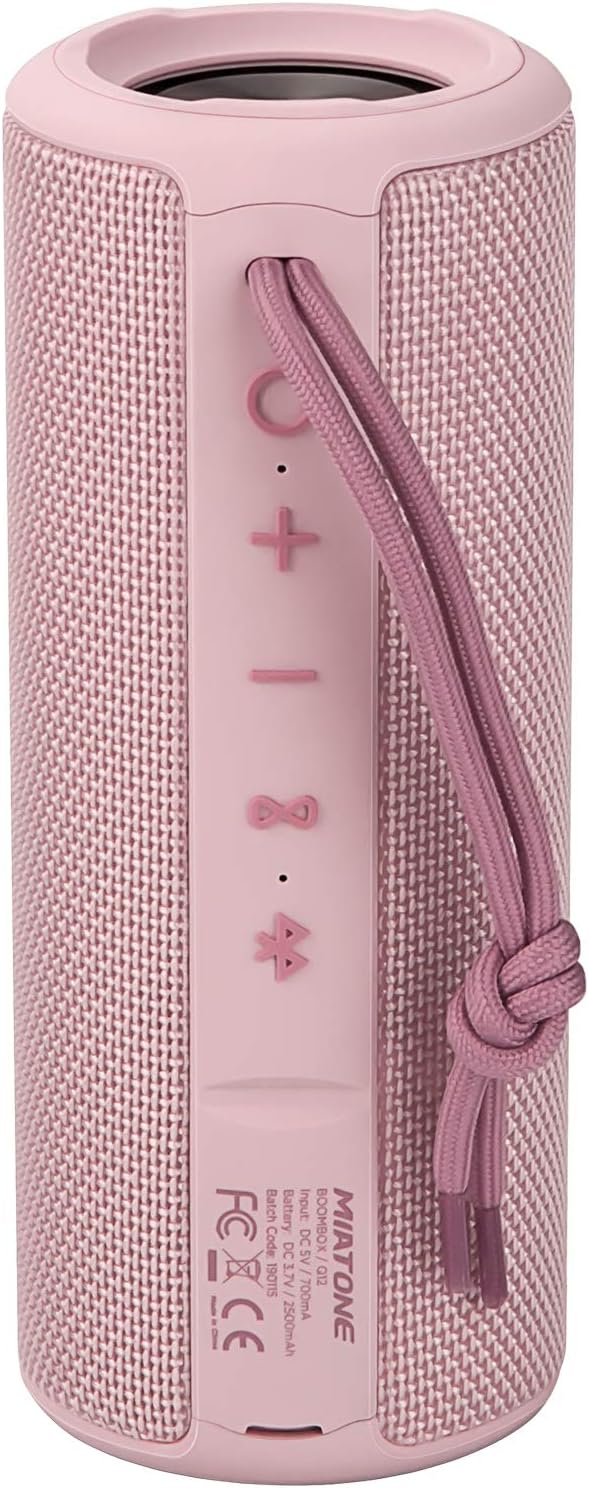
Depan View: Shows the speaker grille and the MIATONE logo.

belakang View: Displays the control buttons (+, -, Play/Pause, Bluetooth, TWS) and the charging/AUX ports under a protective flap.

Reinforced Silicone End Caps: The speaker features durable silicone bumpers on both ends to absorb impact and prevent slipping.
Fungsi Butang:
| Butang | Fungsi |
|---|---|
| + | Short press: Volume Up; Long press: Next Track |
| - | Short press: Volume Down; Long press: Previous Track |
| Main/Jeda | Short press: Play/Pause; Short press (incoming call): Answer/End Call; Long press (incoming call): Reject Call |
| Ikon Bluetooth | Long press: Disconnect current Bluetooth device and enter pairing mode |
| Ikon TWS | Short press: Initiate TWS pairing (True Wireless Stereo) |
| Butang Kuasa | Tekan lama: Kuasa Hidup/Mati |
5. Persediaan
5.1 Mengecas Speaker
- Open the protective flap on the back of the speaker to reveal the charging port.
- Connect the Micro USB charging cable to the speaker's charging port and the other end to a USB power adapter (not included) or a computer's USB port.
- Penunjuk LED akan menunjukkan status pengecasan (cth., merah untuk pengecasan, mati apabila dicas sepenuhnya).
- A full charge takes approximately 12 hours. Ensure the protective flap is sealed after charging.
5.2 Menghidupkan/Mematikan
- Hidupkan kuasa: Long press the Power button until you hear a power-on prompt.
- Matikan: Long press the Power button until you hear a power-off prompt.
5.3 Berpasangan Bluetooth
- Ensure the speaker is powered on and in Bluetooth pairing mode (indicated by a flashing blue LED). If not, long press the Bluetooth icon button.
- Dayakan Bluetooth pada peranti anda (telefon pintar, tablet, komputer).
- Cari untuk "BOOMBOX" in your device's Bluetooth list.
- Select "BOOMBOX" to connect. You will hear a confirmation sound once paired.
- The speaker will automatically reconnect to the last paired device when powered on, if within range.

Bluetooth 5.3 yang Dinaik Taraf: Provides faster and more stable wireless connections.
5.4 TWS (Stereo Wayarles Sejati) Berpasangan
TWS allows you to pair two MIATONE BOOMBOX speakers together for a true stereo sound experience.
- Ensure both BOOMBOX speakers are powered on and not connected to any Bluetooth device.
- On one speaker (this will be the primary speaker), short press the TWS icon button. It will enter TWS pairing mode.
- Kedua-dua pembesar suara akan bersambung secara automatik antara satu sama lain. Anda akan mendengar bunyi pengesahan sebaik sahaja pasangan TWS berjaya.
- Once TWS paired, connect your device to the primary speaker via Bluetooth as described in section 5.3.
- To disconnect TWS, short press the TWS icon button on either speaker.
6. Arahan Operasi
6.1 Main balik Muzik
- Main/Jeda: Tekan sebentar butang Main/Jeda.
- Kelantangan: Tekan pendek + butang.
- Perlahankan suara: Tekan pendek - butang.
- Lagu Seterusnya: Tekan lama + butang.
- Trek Sebelumnya: Tekan lama - butang.
6.2 Panggilan Bebas Tangan
- Jawab Panggilan: Short press the Play/Pause button when an incoming call rings.
- Tamatkan Panggilan: Tekan sebentar butang Main/Jeda semasa panggilan.
- Tolak Panggilan: Tekan lama butang Main/Jeda apabila panggilan masuk berdering.
6.3 Auxiliary Input (AUX Mode)
You can connect non-Bluetooth devices to the speaker using the provided 3.5mm auxiliary cable.
- Open the protective flap on the back of the speaker.
- Connect one end of the 3.5mm AUX cable to the speaker's AUX port and the other end to your audio device's headphone jack.
- Pembesar suara secara automatik akan bertukar kepada mod AUX.
- Kawal main balik dan kelantangan daripada peranti anda yang disambungkan.
- Ensure the protective flap is sealed after use to maintain water resistance.
7. Penyelenggaraan
7.1 Pembersihan
- Lap pembesar suara dengan lembut, damp kain.
- Jangan gunakan pembersih yang melelas, alkohol atau pelarut kimia.
- Pastikan pembesar suara benar-benar kering sebelum mengecas atau menyimpan.
7.2 Penyimpanan
- Simpan pembesar suara di tempat yang sejuk dan kering jauh dari cahaya matahari langsung dan suhu yang melampau.
- If storing for a long period, charge the battery to about 50% every few months to preserve battery life.
7.3 Penjagaan Kalis Air (IPX6)
The MIATONE BOOMBOX is IPX6 waterproof, meaning it can withstand powerful water jets. It is not designed for submersion.
- Always ensure the charging port and AUX port protective flap is securely closed before exposing the speaker to water.
- If the speaker gets wet, wipe it dry with a clean cloth before opening the port flap or charging.
- Do not charge the speaker if the ports are wet.

IPX6 Waterproof Speaker: Designed to float and withstand water splashes, making it ideal for poolside or beach use.
8. Penyelesaian masalah
| Masalah | Kemungkinan Punca | Penyelesaian |
|---|---|---|
| Pembesar suara tidak akan dihidupkan. | Bateri lemah atau mati. | Cas pembesar suara sepenuhnya. |
| Tidak boleh berpasangan dengan peranti Bluetooth. | Speaker is not in pairing mode; device's Bluetooth is off; speaker is already connected to another device; device list needs refresh. | Ensure speaker is in pairing mode (flashing blue LED). Turn device's Bluetooth off and on. Disconnect from other devices. Forget "BOOMBOX" on your device and re-scan. |
| Tiada bunyi atau kelantangan rendah. | Volume too low on speaker or device; incorrect input mode; speaker not connected. | Increase volume on both speaker and device. Ensure correct input mode (Bluetooth/AUX). Re-establish Bluetooth connection. |
| Penyelewengan bunyi. | Kelantangan terlalu tinggi; bateri rendah; gangguan. | Reduce volume. Charge the speaker. Move speaker closer to the device or away from other electronic devices. |
| Gandingan TWS gagal. | Pembesar suara terlalu jauh; satu pembesar suara sudah disambungkan ke peranti. | Pastikan kedua-dua pembesar suara berdekatan antara satu sama lain dan tidak disambungkan ke mana-mana peranti Bluetooth sebelum memulakan pemasangan TWS. |
9. Spesifikasi
| Ciri | Perincian |
|---|---|
| Nama Model | BOOMBOX (Q12) |
| Teknologi Ketersambungan | Bluetooth 5.3, USB, AUX |
| Jenis Pembesar Suara | Portable Speaker, Bluetooth Speaker |
| Kuasa Output Maksimum | 20 Watt |
| Respons Kekerapan | 20 KHz |
| Hayat Bateri | Sehingga 17 jam (pada volum 50%) |
| Masa Mengecas | 12 jam |
| Penilaian Kalis Air | IPX6 |
| Julat Bluetooth | Sehingga 100 kaki (30.5 meter) |
| Dimensi (L x W x H) | 7.11 x 7.11 x 18.54 cm (2.8 x 2.8 x 7.3 inci) |
| Berat badan | 421.84 gram (0.93 lbs) |
| bahan | aluminium |
| Peranti Serasi | Personal Computer, Laptop, Tablet, Smartphone |

Masa Main Tahan Lama: Enjoy up to 17 hours of playback at 50% volume.
10. Waranti dan Sokongan
MIATONE products are designed and manufactured to the highest quality standards. For information regarding warranty coverage, technical support, or service inquiries, please refer to the contact information provided on the product packaging or visit the official MIATONE webtapak.
Sila simpan bukti pembelian anda untuk tuntutan waranti.


