1. Pengenalan
This manual provides essential information for the safe and efficient operation of your Intex SH4004 40-inch HD Ready LED Smart TV. Please read these instructions carefully before using the product and retain them for future reference. Your Intex SH4004 TV features a 40-inch HD Ready LED display, smart TV capabilities with Android OS, built-in Wi-Fi, and multiple connectivity options.
2. Maklumat Keselamatan
Sentiasa ikuti langkah berjaga-jaga keselamatan asas apabila menggunakan televisyen ini untuk mengurangkan risiko kebakaran, renjatan elektrik dan kecederaan.
- Sumber Kuasa: Pastikan TV disambungkan kepada bekalan kuasa dalam volum yang ditentukantagjulat e. Jangan bebankan soket kuasa secara berlebihan.
- Pengudaraan: Jangan sekat bukaan pengudaraan. Benarkan ruang yang mencukupi di sekeliling TV untuk aliran udara yang betul untuk mengelakkan terlalu panas.
- Air dan Kelembapan: Jangan dedahkan TV kepada hujan atau lembapan. Jangan letakkan objek yang diisi dengan cecair, seperti pasu, di TV.
- Pembersihan: Cabut plag TV dari salur keluar kuasa sebelum membersihkan. Gunakan kain lembut dan kering. Jangan gunakan pembersih cecair atau pembersih aerosol.
- penempatan: Letakkan TV pada permukaan yang stabil dan rata. Elakkan meletakkannya di bawah cahaya matahari langsung atau berhampiran sumber haba.
- Servis: Jangan cuba servis produk ini sendiri. Rujuk semua perkhidmatan kepada pegawai perkhidmatan yang berkelayakan.
3. Kandungan Pakej
Sahkan bahawa semua item terdapat dalam pakej:
- Intex SH4004 40-inch HD Ready LED Smart TV
- Alat Kawalan Jauh
- Stand TV (2 keping)
- Skru untuk Kaki TV
- Kabel Kuasa
- Manual Pengguna
4. Produk Lebihview
4.1 Depan View
The front of the Intex SH4004 TV features the 40-inch LED display and the Intex brand logo at the bottom center.

Rajah 4.1: Depan view of the Intex SH4004 Smart TV.
4.2 Belakang View dan Port Kesambungan
The rear panel houses various input and output ports for connecting external devices.

Rajah 4.2: Belakang view of the Intex SH4004 Smart TV, highlighting port locations.
Pelabuhan Tersedia:
- Port HDMI (x2): For connecting set-top boxes, Blu-ray players, gaming consoles, and other HDMI-enabled devices.
- Port USB (x1): For connecting USB hard drives, flash drives, and other USB devices for media playback.
- Input Antena: For connecting an aerial for terrestrial TV channels.
- Input Audio/Video: For connecting older devices using composite cables.
- Pelabuhan Ethernet: Untuk sambungan internet berwayar.
4.3 Dimensi
The physical dimensions of the TV are important for placement and installation.
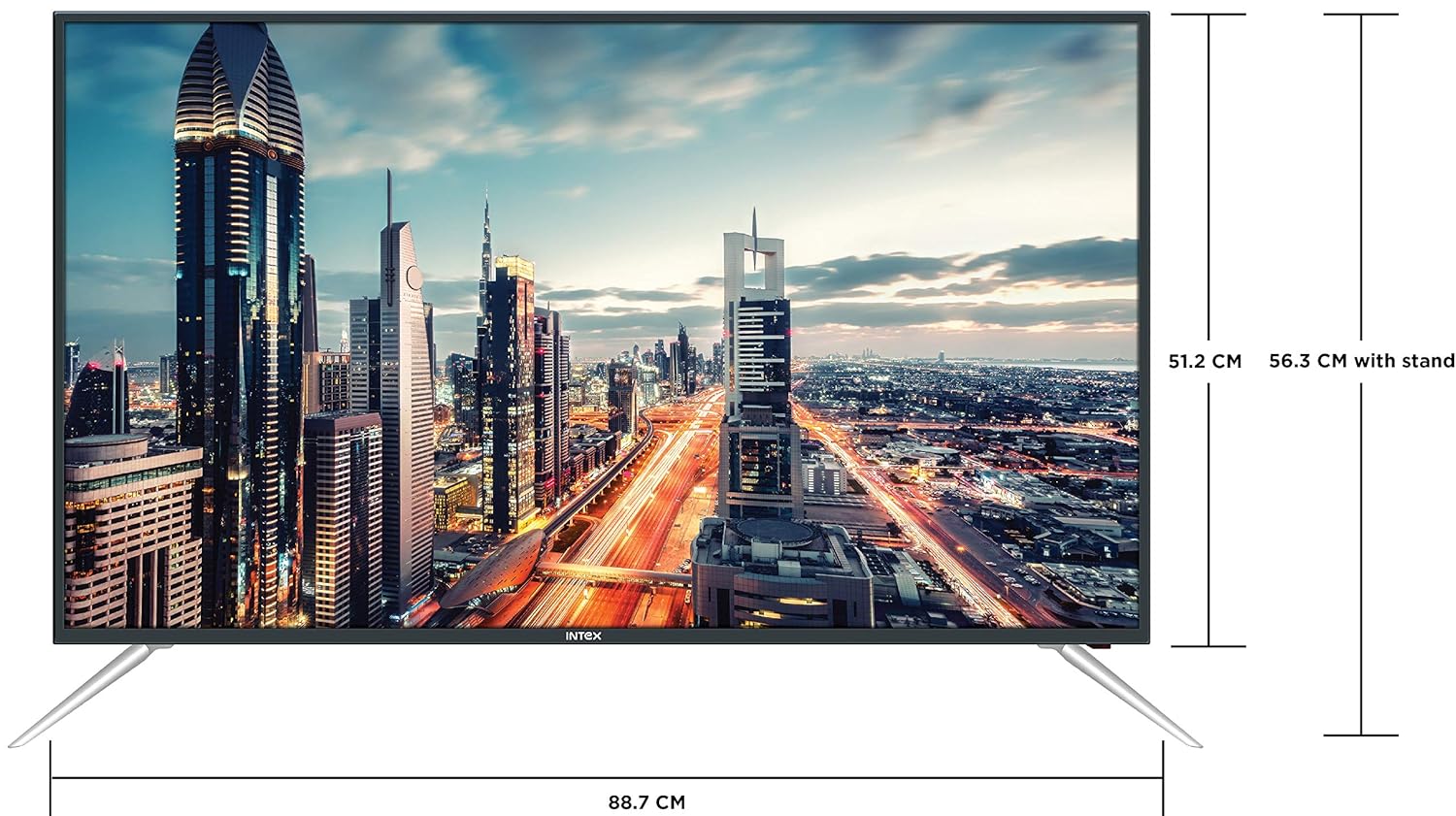
Figure 4.3: Intex SH4004 Smart TV dimensions.
- Saiz Skrin: 40 inci (98 cm)
- Lebar: Lebih kurang 88.7 cm
- Ketinggian (tanpa pendirian): Lebih kurang 51.2 cm
- Ketinggian (dengan pendirian): Lebih kurang 56.3 cm
- Dimensi Pakej: 102 x 60.5 x 16 cm
- Berat Barang: 10.8 kg
5. Persediaan
5.1 Memasang Stand TV
- Letakkan TV menghadap ke bawah dengan berhati-hati pada permukaan yang lembut dan bersih untuk mengelakkan kerosakan skrin.
- Align the stand pieces with the corresponding slots at the bottom of the TV.
- Selamatkan kepingan dirian menggunakan skru yang disediakan. Pastikan ia diketatkan dengan kuat.
5.2 Pemasangan Dinding
If you prefer to wall mount your TV, please contact Intex support for professional installation. Refer to the Warranty and Support section for contact details. Ensure you use a compatible VESA wall mount kit (not included) and follow its instructions carefully.
5.3 Kuasa Penyambung
Connect the power cable to the TV's power input and then plug the other end into a wall outlet.
5.4 Menyambung Peranti Luaran
- HDMI: Use an HDMI cable to connect devices like set-top boxes, gaming consoles, or Blu-ray players to the HDMI ports on the TV's rear panel.
- USB: Insert USB flash drives or external hard drives into the USB port for media playback.
- Antena: Connect your antenna cable to the ANTENNA IN port for receiving broadcast channels.
5.5 Wizard Persediaan Awal
Setelah dihidupkan pertama, TV akan membimbing anda melalui proses persediaan awal:
- Pemilihan Bahasa: Pilih bahasa pilihan anda.
- Persediaan Rangkaian: Connect to your Wi-Fi network or use a wired Ethernet connection. Enter your Wi-Fi password if prompted.
- Imbasan Saluran: TV akan mengimbas saluran siaran yang tersedia.
- Zon Waktu: Tetapkan zon waktu tempatan anda.
6. Arahan Operasi
6.1 Fungsi Kawalan Jauh
The remote control allows you to navigate the TV's features. Common buttons include Power, Volume Up/Down, Channel Up/Down, Input Source, Menu, Navigation (Up/Down/Left/Right), OK, Back, Home, and Smart TV app shortcuts.
6.2 Fungsi Asas TV
- Hidupkan/Mati Kuasa: Tekan butang Kuasa pada alat kawalan jauh atau TV.
- Pelarasan Kelantangan: Gunakan butang Kelantangan Naik/Turun.
- Pemilihan Saluran: Gunakan butang Saluran Atas/Bawah atau masukkan terus nombor saluran.
- Sumber Input: Press the Input/Source button to switch between HDMI, USB, AV, and TV inputs.
6.3 Ciri TV Pintar (OS Android)
Your Intex SH4004 runs on Android OS, providing access to various smart features:
- Kesambungan Wi-Fi: Sambungkan ke rangkaian rumah anda untuk akses internet.
- App Store: Download and install applications. Supported internet services include Sony, TV Store, YouTube, and Zee5.
- Main balik Media: Mainkan video, muzik dan view foto daripada peranti USB yang disambungkan.
- Motion Sensor Gaming: The TV supports motion sensor gaming. An in-built tennis game is included for entertainment.
- Penjimatan Kuasa Pintar: Features designed to optimize energy consumption.
- Eye Safe-T Matrix: Display technology aimed at reducing eye strain.
7. Penyelenggaraan
7.1 Membersihkan TV
- Sentiasa cabut plag TV sebelum membersihkan.
- Gunakan kain lembut, kering dan bebas serabut untuk mengelap skrin dan kabinet dengan perlahan.
- Untuk tanda degil pada skrin, ringan dampen the cloth with water or a specialized screen cleaner (ensure it's suitable for LED screens) and wipe gently. Do not spray liquid directly onto the screen.
- Elakkan daripada menggunakan pembersih yang melelas, lilin atau pelarut.
7.2 Penjagaan Am
- Jauhkan TV daripada cahaya matahari langsung dan sumber haba.
- Pastikan pengudaraan yang betul di sekeliling TV.
- If the TV will not be used for an extended period, unplug it from the power outlet.
8. Penyelesaian masalah
Before contacting support, try these basic troubleshooting steps for common issues.
| Masalah | Kemungkinan Punca | Penyelesaian |
|---|---|---|
| Tiada Kuasa | Power cable disconnected; Power outlet fault. | Check power cable connection; Try a different outlet; Press power button on TV/remote. |
| Tiada Gambar, tetapi Bunyi Hadir | Sumber input yang dipilih salah; Isu peranti luaran. | Press the 'Input/Source' button to select the correct input; Check external device connections. |
| Tiada Bunyi, tetapi Gambar Hadir | Kelantangan diredam atau terlalu rendah; Isu sistem audio luaran. | Unmute volume or increase level; Check audio cables to external sound system. |
| Isu Sambungan Wi-Fi | Incorrect password; Router too far; Router issue. | Re-enter Wi-Fi password; Move TV closer to router or use Ethernet; Restart router. |
| Alat Kawalan Jauh Tidak Berfungsi | Bateri habis; Halangan antara alat kawalan jauh dan TV. | Replace remote batteries; Remove any obstructions; Point remote directly at TV sensor. |
9. Spesifikasi
Detailed technical specifications for the Intex SH4004 Smart TV.
| Ciri | Spesifikasi |
|---|---|
| Jenama | Intex |
| Nama Model | SH4004 |
| Teknologi Paparan | LED |
| Saiz Skrin | 40 Inci (98 cm) |
| Resolusi | Sedia HD (1366 x 768 piksel) |
| Kadar Segar Semula | 60 Hz |
| Viewsudut | 178 Darjah |
| Nisbah Aspek | 16:9 |
| Sistem Operasi | Android |
| Pemproses | 1.2GHz Quad core Mali 450 |
| RAM | 512MB |
| Memori Dalaman | 4GB |
| Ketersambungan | 2 HDMI ports, 1 USB port, Built-In-Wifi, Ethernet |
| Keluaran Bunyi | 20 Watts (2 speakers, Stereo) |
| Perkhidmatan Internet yang Disokong | Sony, TV Store, Youtube, Zee5 |
| Jenis Pemasangan | Pemasangan Dinding / Bahagian Atas Meja |
| Berat Barang | 10.8 kg |
10. Waranti dan Sokongan
Maklumat Waranti:
- The product comes with a 1-year manufacturer warranty from the date of purchase.
- An additional 2 years of extended warranty is provided by Intex.
Pemasangan dan Sokongan:
For requesting installation, wall mounting, or a product demonstration after delivery, please contact Intex support directly.
Intex Support Contact:
- telefon: 0120-4895555
When contacting support, please provide the product's model name (SH4004) and seller's details as mentioned on your invoice.


