1. Pengenalan
Thank you for choosing the KWANWA Digital Alarm Clock, Model KW616-3N. This manual provides detailed instructions for setting up, operating, and maintaining your new clock. Designed for clear visibility and convenience, this battery-operated clock features an 8-inch extra-large LED display with 3-inch digits, adjustable brightness, and versatile placement options.

Figure 1: KWANWA Digital Alarm Clock (Model KW616-3N) with large red LED display.
2. Ciri-ciri Produk
- Paparan Mudah Dibaca: 3-inch huge LED time display against a large black backlit screen for excellent visibility.
- Dikendalikan Bateri: Operates on 2 D-cell batteries (not included), eliminating messy cords and allowing flexible placement.
- Peletakan Serbaguna: Features two unfoldable stand legs for table-top use and three wall-mounting hang holes for wall installation.
- Kecerahan boleh laras: Offers 3-level manual brightness adjustment and an automatic night mode (8 PM - 6 AM) to dim the display.
- Ketepatan Tinggi: Maintains time accuracy within ±30 seconds per month.
- Penggera Harian: Includes a daily alarm with a gradually increasing volume for up to 2 minutes.
3. Kandungan Pakej
- KWANWA Digital Alarm Clock (Model KW616-3N)
- Manual Pengguna
4. Persediaan
4.1. Pemasangan Bateri
- Cari petak bateri di belakang jam.
- Buka penutup petak bateri.
- Insert two (2) D-cell alkaline batteries (not included), ensuring correct polarity (+/-).
- Tutup penutup petak bateri dengan selamat.
4.2. penempatan
The clock offers two convenient placement options:
- Table-top: Unfold the two stand legs located on the back of the clock to place it on a desk, table, bedside, or nightstand.
- Dipasang di dinding: Use the three wall-mounting hang holes on the back of the clock to securely hang it on a wall.
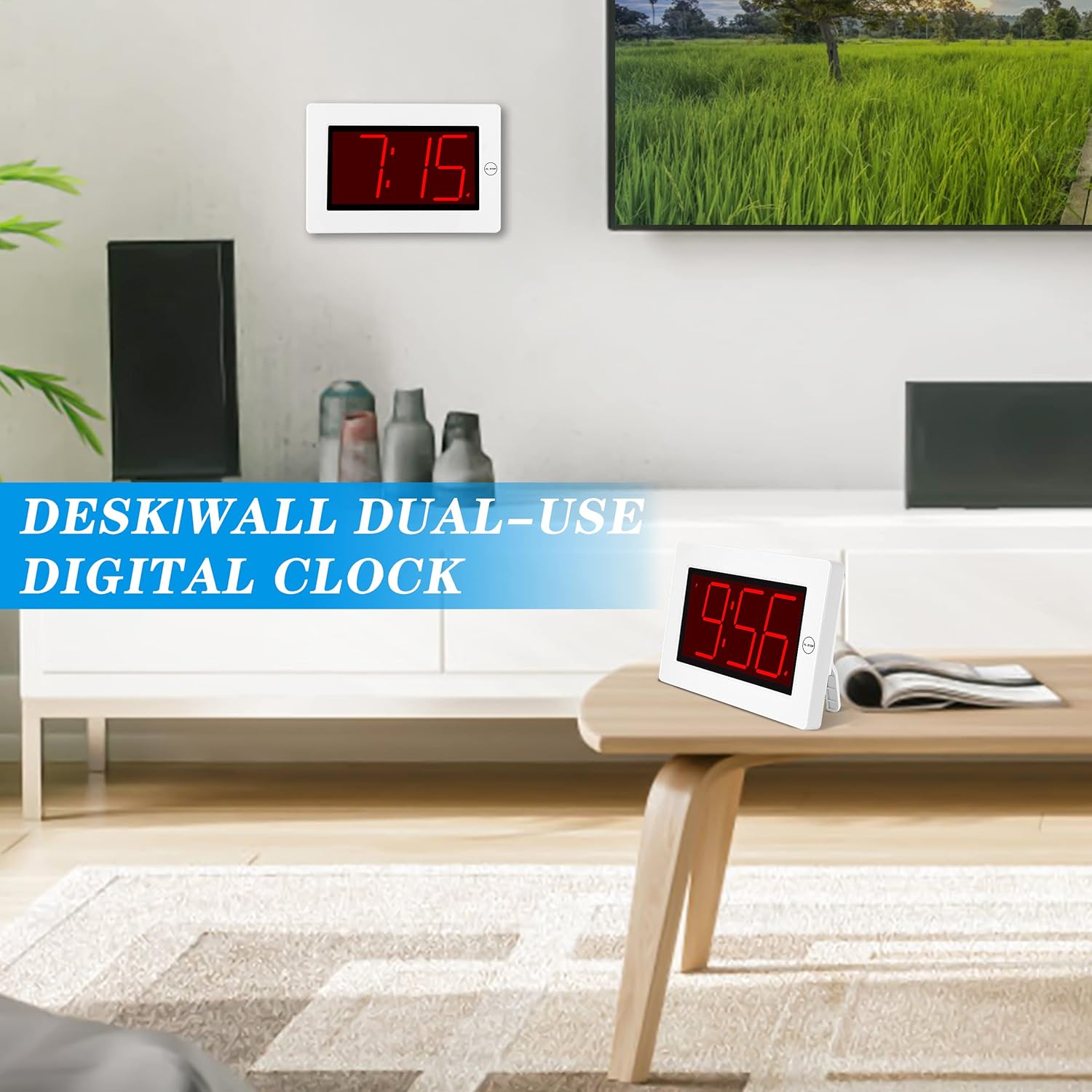
Figure 2: The clock can be used as a table-top or wall-mounted device.
5. Arahan Operasi
All control buttons are located on the back of the clock for easy access.

Rajah 3: Belakang view of the clock with labeled control buttons.
5.1. Penetapan Masa
- Tekan dan tahan butang MASA DITETAPKAN butang selama 2 saat untuk memasuki mod tetapan masa. Digit jam akan berkelip.
- Tekan ke JAM butang untuk menyesuaikan jam.
- Tekan ke MIN butang untuk menyesuaikan minit.
- Tekan MASA DITETAPKAN sekali lagi untuk mengesahkan dan keluar.
5.2. Penetapan Penggera
- Tekan dan tahan butang SET ALARM butang selama 2 saat untuk memasuki mod tetapan penggera. Digit jam penggera akan berkelip.
- Tekan ke JAM butang untuk menyesuaikan jam penggera.
- Tekan ke MIN butang untuk melaraskan minit penggera.
- Tekan SET ALARM sekali lagi untuk mengesahkan dan keluar.
5.3. Alarm On/Off & Snooze
- Penggera Hidup/Mati: Tekan ke ALARM ON / OFF button on the back to activate or deactivate the alarm. An alarm icon will appear/disappear on the display.
- Tunda: Apabila penggera berbunyi, tekan besar AL STOP button on the top of the clock to activate snooze. The alarm will pause for a short period and sound again later.
- Berhenti Penggera: To stop the alarm for the day, press any button on the back of the clock.

Figure 4: Interacting with the alarm and snooze button.
5.4. Penyesuaian Kecerahan
The clock offers both manual and automatic brightness control:
- Pemalap Manual: Tekan ke MANUAL DIMMER button on the back to cycle through 3 brightness levels (High, Medium, Low) or turn the display OFF.
- Auto Dimmer: The clock automatically dims the LED display between 8 PM and 6 AM to protect your eyes and save energy. This feature can be toggled ON/OFF using the AUTO DIMMER ON/OFF butang di belakang.

Figure 5: Visual representation of the three brightness levels.
5.5. Waktu Penjimatan Siang (DST)
Tekan ke DST button on the back to adjust the time for Daylight Saving Time. This will advance or set back the time by one hour.
5.6. Pelarasan Kelantangan
Gunakan JILID button on the back to adjust the alarm volume to your preference.
6. Penyelenggaraan
- Clean the clock's exterior with a soft, dry cloth. Avoid using abrasive cleaners or solvents.
- If the clock will not be used for an extended period, remove the batteries to prevent leakage.
7. Penyelesaian masalah
- Paparan malap atau dimatikan: Check battery levels and replace if necessary. Ensure the manual dimmer is not set to 'OFF' or the lowest setting.
- Penggera tidak berbunyi: Verify that the alarm is activated (alarm icon visible on display). Check the alarm volume setting.
- Masa yang salah: Re-set the time following the instructions in section 5.1. Ensure DST setting is correct for your region.
8. Spesifikasi
| Ciri | Perincian |
|---|---|
| Jenama | KWANWA |
| Nombor Model | KW616-3N |
| Jenis Paparan | LED digital |
| Saiz Paparan | 8 inches (3-inch digits) |
| Dimensi Produk | 8.7"W x 5.6"H |
| Sumber Kuasa | Battery Powered (2 D batteries required) |
| Jenis Pemasangan | Table-top/Wall-mounted |
| bahan | plastik |
| Berat Barang | 11.7 auns |
| Ciri Khas | Cordless, Adjustable Brightness, Alarm |
9. Waranti dan Sokongan
This product comes with a limited warranty. For warranty claims, technical support, or any inquiries regarding your KWANWA Digital Alarm Clock, please contact KWANWA customer service at sales@us-myhome.com.


