1. Maklumat Keselamatan
Sila baca semua arahan dengan teliti sebelum pemasangan dan penggunaan. Simpan manual ini untuk rujukan masa hadapan.
- Perhimpunan Diperlukan: This desk requires self-assembly. Follow the provided assembly instructions meticulously to prevent injuries.
- Had Berat: This desk is not designed to carry heavy objects. The maximum weight capacity is approximately 17 kg (37.5 lbs) to ensure stability.
- Penyeliaan: Children should be supervised while using the desk, especially during adjustments.
- penempatan: Letakkan meja di atas permukaan yang rata dan stabil.
2. Produk Lebihview
The TecTake Children's Desk is designed to provide a comfortable and adaptable workspace for various activities such as drawing, homework, and crafts. Its thoughtful design allows for height and tilt adjustments to suit the user's needs.
Ciri-ciri Utama:
- Tilting Desktop: The work surface can be tilted to provide an ergonomic position for different tasks.
- Tinggi boleh laras: The desk legs are adjustable in 7 steps, allowing the desk to grow with your child.
- Laci Bersepadu: A convenient drawer provides storage for school supplies, drawing materials, and other items.
- Removable Stopper Strips: Two removable stopper strips on the lower edge of the desktop prevent materials from sliding off when the surface is tilted.
- Pembinaan Stabil: Built with robust materials for durability and stability during daily use.
- Sudut Bulat: The desktop features rounded corners for enhanced safety.
- Mudah dibersihkan: The surface is washable with a damp kain.

Figure 1: TecTake Children's Desk, showcasing reka bentuk dan ciri-cirinya.

Gambar 2: Lebihview of key features including adjustable height, tilting desktop, and storage.
3. Persediaan
The desk comes with detailed assembly instructions in the package. Please refer to the included manual for step-by-step guidance on assembling your TecTake Children's Desk.
Langkah Perhimpunan Agung:
- Buka bungkusan semua komponen dan sahkan terhadap senarai bahagian dalam manual yang disertakan.
- Assemble the main frame structure using the provided hardware.
- Attach the desktop to the frame, ensuring the tilting mechanism is correctly installed.
- Install the storage drawer and stopper strips.
- Pastikan semua skru dan pengikat diketatkan dengan selamat sebelum digunakan.

Figure 3: The desk's flexible design allows for various adjustments to suit user needs.
4. Arahan Operasi
4.1 Melaraskan Ketinggian Meja
- Locate the height adjustment mechanisms on the desk legs.
- Carefully loosen the fasteners or pins that secure the legs at their current height.
- Adjust the desk to one of the 7 available height positions (from approximately 63 cm to 94 cm).
- Ensure both sides are adjusted to the same height and securely fasten the mechanisms before use.
4.2 Tilting the Desktop
- The desktop features a tilting mechanism for ergonomic positioning.
- To tilt, lift the desktop slightly and adjust it to the desired angle.
- Ensure the desktop is securely locked into place at the chosen angle.
- Utilize the two removable stopper strips to prevent items from sliding off the tilted surface.
4.3 Menggunakan Laci Penyimpanan
- The integrated drawer provides convenient storage.
- Pull the drawer out to access its contents.
- Push the drawer back in until it is fully closed to keep items secure and maintain a tidy workspace.
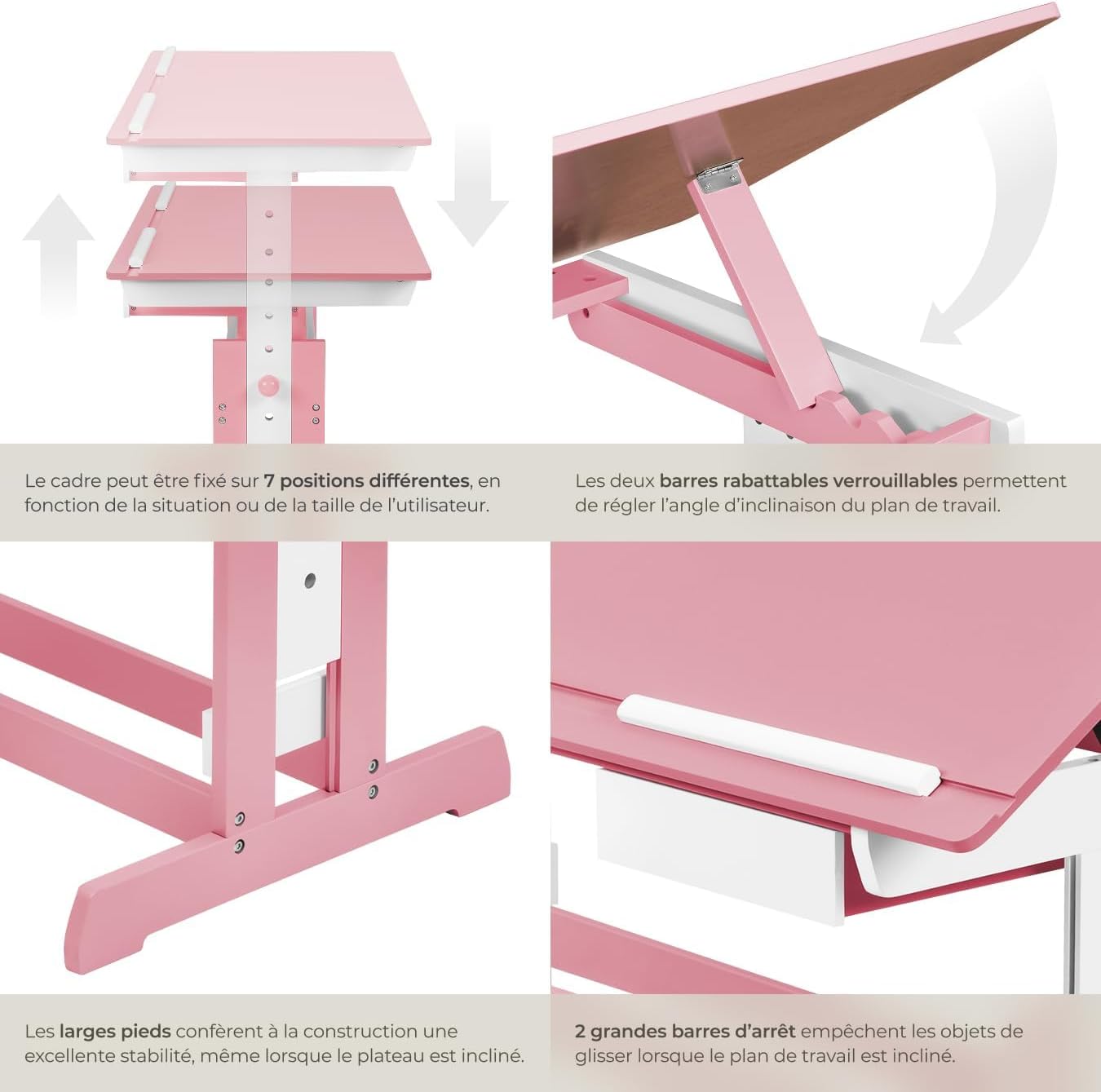
Figure 4: Close-up of the height adjustment and tilting mechanism.
5. Penyelenggaraan
- Pembersihan: Lap permukaan meja dengan iklanamp kain. Elakkan pembersih yang melelas atau bahan kimia keras yang boleh merosakkan kemasan.
- Pemeriksaan: Periksa semua skru dan pengikat secara berkala untuk memastikan ia kekal ketat. Ketatkan semula jika perlu.
- Elakkan Kelembapan Berlebihan: Do not expose the desk to excessive moisture or direct sunlight for prolonged periods to prevent warping or discoloration.
6. Penyelesaian masalah
If you encounter any issues with your TecTake Children's Desk, please refer to the following common solutions:
- Meja goyang: Ensure the desk is placed on a level surface. Check that all assembly screws and bolts are securely tightened.
- Difficulty Adjusting Height/Tilt: Verify that no obstructions are present in the adjustment mechanisms. Ensure fasteners are sufficiently loosened before attempting to adjust.
- Bahagian Hilang atau Rosak: If any parts are missing or damaged upon arrival, please contact TecTake customer support for assistance.
7. Spesifikasi
| Ciri | Spesifikasi |
|---|---|
| Jenama | TecTake |
| Nombor Model | 800117 |
| Dimensi Permukaan Kerja | lebih kurang 109 x 55 cm (43 x 21.7 inci) |
| Julat Pelarasan Tinggi | Approx. 63 cm to 94 cm (24.8 to 37 inches) in 7 steps |
| Drawer Interior Dimensions (HxWxD) | Lebih kurang 6 x 27 x 22 cm (2.4 x 10.6 x 8.7 inci) |
| Berat badan | lebih kurang 17 kg (37.5 paun) |
| bahan | Plywood (lacquered) / Metal |
| Ciri Khas | Adjustable, Tilting Desktop |
| Arahan Penjagaan | Lap dengan iklanamp kain |

Figure 5: Detailed dimensions and technical specifications of the desk.
8. Waranti dan Sokongan
For warranty information, product support, or to order replacement parts, please refer to the documentation included with your purchase or visit the official TecTake website. Please have your model number (800117) and purchase date ready when contacting support.