pengenalan
This manual provides essential instructions for the safe and efficient use of your Smart Kingfisher Rechargeable Lithium Battery and USB Charger. Please read this manual thoroughly before use and retain it for future reference.
Maklumat Keselamatan
- Amaran: Jangan cuba mengecas bateri yang tidak boleh dicas semula.
- Amaran: Do not charge batteries from other suppliers unless explicitly stated as compatible.
- Jauhkan pengecas dan bateri daripada air dan kelembapan.
- Do not disassemble, crush, or puncture the batteries or charger.
- Elakkan mendedahkan bateri kepada suhu yang melampau atau cahaya matahari langsung.
- Buang bateri secara bertanggungjawab mengikut peraturan tempatan.
Kandungan Pakej
Sahkan bahawa semua item terdapat dalam pakej anda:
- 2 x 425 Rechargeable Lithium Batteries
- 1 x Dual-Port USB Charger
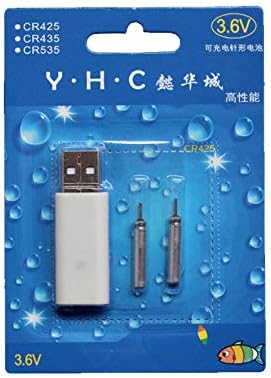
Image: Retail packaging showing the USB charger and two 425 rechargeable batteries.

Image: A pair of Smart Kingfisher 425 rechargeable lithium batteries.
Persediaan
The Smart Kingfisher USB charger is designed for ease of use. No complex setup is required.
- Identify the USB charger and the 425 rechargeable batteries.
- Connect the USB charger to a compatible power source (see "Operating Instructions" for options).

Image: The USB charger unit with its two charging pins visible.
Arahan Operasi
Mengecas Bateri
The charger features two ports, allowing for simultaneous charging of two batteries.
- Insert the 425 rechargeable batteries into the charging ports of the USB charger. Ensure a secure connection.
- Connect the USB charger to a power source. Compatible power sources include:
- USB power adapter (wall charger)
- Bank kuasa
- Pengecas kereta
- Laptop or PC USB port
- Observe the LED indicator on the charger:
- A LED hijau indicates that the batteries are currently charging.
- A LED merah indicates that the batteries are fully charged.
- Pengecasan biasanya mengambil masa kira-kira 3 jam untuk cas penuh.
- Once fully charged, disconnect the charger from the power source and remove the batteries.
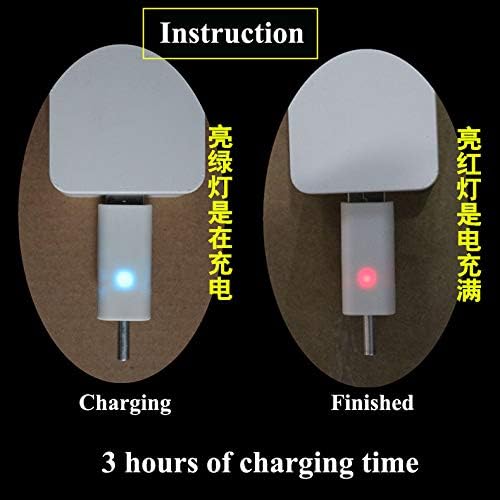
Image: Visual guide for charging status: green light for charging, red light for fully charged. Indicates a 3-hour charging time.

Image: Diagram illustrating multiple methods for charging the device, including car chargers, wall adapters, power banks, and laptops.
Penyelenggaraan
- Clean the charger and batteries with a dry, soft cloth. Do not use liquids or abrasive cleaners.
- Store the batteries and charger in a cool, dry place when not in use.
- Avoid storing fully discharged batteries for extended periods to prolong their lifespan.
Menyelesaikan masalah
| Masalah | Kemungkinan Punca | Penyelesaian |
|---|---|---|
| Batteries not charging (no LED indication) |
|
|
| Charging takes longer than 3 hours |
|
|
| Red LED does not turn on after extended charging |
|
|
Spesifikasi
- Bahan: plastik
- Berat produk: 20 g (total for charger and batteries)
- Jenis Bateri: 425 Rechargeable Lithium Battery (compatible with CR425, CR435, CR535)
- Jenis Pengecas: Pengecas USB Dwi-Port
- Input: USB (compatible with various USB power sources)
- Penunjuk Pengecasan: Green LED (charging), Red LED (fully charged)
- Anggaran Masa Pengecasan: 3 jam
Waranti dan Sokongan
Untuk maklumat jaminan atau sokongan teknikal, sila rujuk dasar pemulangan peruncit atau hubungi pengilang secara langsung. Simpan resit pembelian anda sebagai bukti pembelian.
Untuk bantuan tambahan, anda boleh layari halaman produk di Amazon.com.mx.


