1. Pengenalan
Terima kasih kerana membeliasing the Mistral Stand Fan MSF040. This manual provides essential information for the safe and efficient operation, assembly, maintenance, and troubleshooting of your new fan. Please read these instructions thoroughly before use and retain them for future reference.

Figure 1: Fully assembled Mistral Stand Fan MSF040. This image displays the fan's overall design, including the circular base, adjustable stand pole, and the fan head with its protective grille.
2. Arahan Keselamatan Penting
Untuk mengurangkan risiko kebakaran, kejutan elektrik atau kecederaan, sentiasa ikuti langkah berjaga-jaga keselamatan asas ini:
- Baca semua arahan sebelum menggunakan kipas ini.
- Pastikan bekalan kuasa voltage sepadan dengan label penarafan pada kipas.
- Do not operate any fan with a damaged cord or plug. If the cord or plug is damaged, contact qualified service personnel for repair or replacement.
- Cabut plag kipas daripada soket kuasa apabila tidak digunakan, sebelum membersihkan atau sebelum mengalihkannya.
- Jangan rendam kipas, palam atau kord di dalam air atau cecair lain.
- Jauhkan kipas daripada kanak-kanak dan haiwan peliharaan. Pengawasan rapi adalah perlu apabila kipas digunakan berhampiran kanak-kanak.
- Do not insert fingers or any objects through the grille when the fan is operating.
- Place the fan on a stable, level surface to prevent it from tipping over.
- Jangan gunakan kipas dalam keadaan basah atau damp lokasi, seperti bilik mandi atau kawasan dobi.
- Jangan halang bukaan udara atau kendalikan berhampiran langsir atau bahan lain yang boleh menyekat aliran udara.
3. Kandungan Pakej
Selepas membuka bungkusan, sila pastikan semua komponen berikut hadir:
- Fan Motor Unit with Rear Grille
- Bilah kipas
- Gril Depan
- Grille Locking Nut
- Tutup Bilah
- Stand Pole (Upper and Lower sections)
- Tapak Bulat
- Skru Pembetulan Pangkalan
- Kord Kuasa (bersepadu)
- Manual Pengguna
4. Arahan Perhimpunan
Follow these steps to assemble your Mistral Stand Fan MSF040:
- Pasang Pangkalan: Place the stand pole onto the round base. Secure it from underneath the base using the provided base fixing screw. Ensure it is tightened firmly.
- Pasang Unit Motor: Insert the fan motor unit onto the top of the stand pole. Secure it with the pole locking screw, if present, or by twisting until it clicks into place.
- Pasang Gril Belakang: Place the rear grille onto the motor unit, aligning the notches. Secure it with the grille locking nut, turning clockwise until tight.
- Mount the Fan Blade: Slide the fan blade onto the motor shaft, ensuring the pin on the shaft aligns with the groove on the blade. Secure it with the blade cap, turning counter-clockwise until tight.
- Pasangkan Gril Depan: Position the front grille over the rear grille, aligning the clips. Secure the front grille by pressing the clips firmly around the edge until it is fully closed.
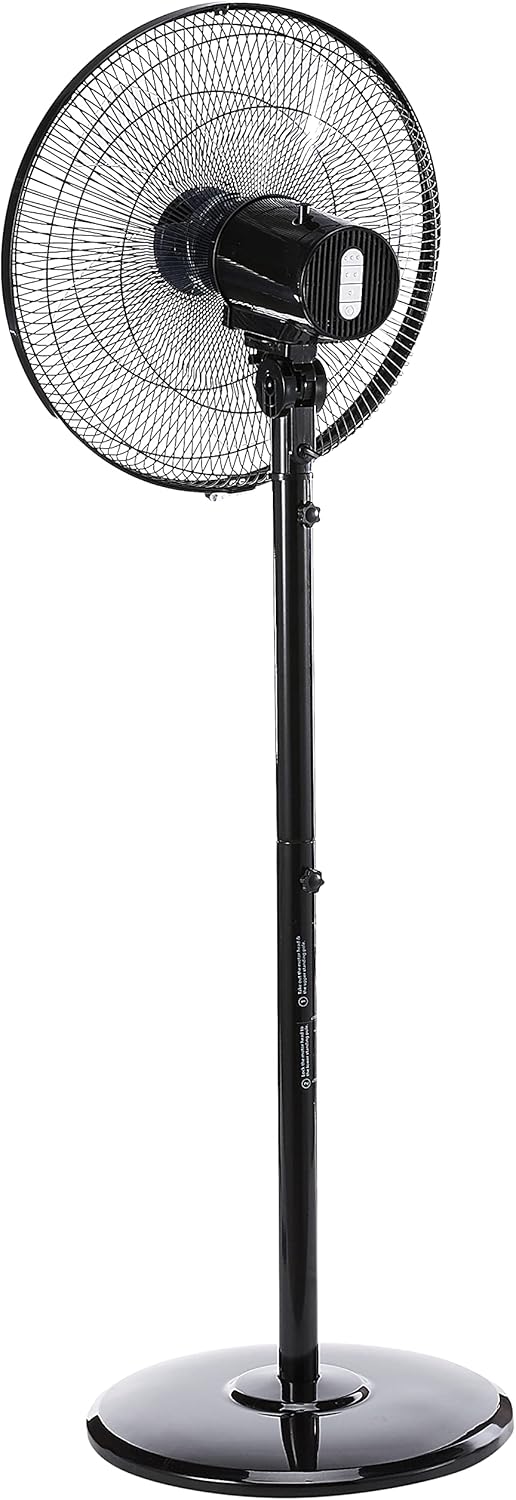
Rajah 2: Sisi view of the fan, illustrating the adjustable height feature of the stand pole. The pole can be extended or retracted to suit different user preferences.
5. Arahan Operasi
Once assembled, your Mistral Stand Fan MSF040 is ready for operation:
- Sambungan Kuasa: Masukkan palam kuasa ke dalam salur keluar elektrik yang sesuai.
- Hidupkan/Mati Kuasa: Use the power button on the control panel to turn the fan on or off.
- Pemilihan Kelajuan: The fan offers 3 speed selections. Press the speed control buttons on the control panel to cycle through low, medium, and high settings.
- Pengayun: To activate the left and right oscillation, press the oscillation button on the control panel. Press it again to stop oscillation.
- Pelarasan Kecondongan: The fan head can be tilted 30° up or down. Gently adjust the fan head to your desired angle.
- Pelarasan Ketinggian: The stand pole features a convertible height mechanism. Loosen the height adjustment knob on the stand pole, adjust to the desired height, and then tighten the knob firmly.

Rajah 3: Jarak dekat view of the fan's control panel, featuring tactile buttons for power, speed selection, and oscillation.
6. Penyelenggaraan dan Pembersihan
Regular cleaning and maintenance will ensure optimal performance and extend the lifespan of your fan:
- Sentiasa cabut plag kipas daripada salur keluar kuasa sebelum dibersihkan.
- Lap permukaan luar kipas dengan lembut, damp kain. Jangan gunakan pembersih atau pelarut yang melelas.
- For thorough cleaning of the fan blades, the front grille can be carefully removed. Refer to the assembly instructions in reverse order for safe disassembly and reassembly.
- Pastikan semua bahagian kering sepenuhnya sebelum memasang semula kipas dan mengendalikannya.
- Simpan kipas di tempat yang sejuk dan kering apabila tidak digunakan untuk tempoh yang lama.
7. Penyelesaian masalah
Jika anda menghadapi sebarang masalah dengan kipas anda, sila rujuk masalah dan penyelesaian biasa berikut:
- Kipas tidak dihidupkan:
- Periksa sama ada kord kuasa dipasang dengan selamat ke salur keluar elektrik yang berfungsi.
- Ensure the power button on the control panel is pressed.
- Verify that the household circuit breaker or fuse has not tripped.
- Fan makes unusual noise:
- Unplug the fan and check for any obstructions (e.g., loose debris, wires) in the fan blades or grilles.
- Ensure all parts are securely assembled and tightened.
- Fan does not oscillate:
- Ensure the oscillation button on the control panel has been pressed.
Jika masalah berterusan selepas menyemak titik ini, sila hubungi sokongan pelanggan.
8. Spesifikasi
| Ciri | Perincian |
|---|---|
| Jenama | MISTRAL |
| Model | MSF040 |
| Reka Bentuk Kipas Elektrik | Kipas Lantai / Kipas Alas |
| Jenis Bilah | 5 ABS blade |
| Pemilihan Kelajuan | 3 kelajuan |
| Oscillation | Left & right oscillation |
| Pelarasan Kecondongan | 30° up & down |
| Pelarasan Ketinggian | Convertible height |
| Jenis Pengawal | Button Control (Tactile) |
| bahan | plastik |
| warna | Hitam |
| Sumber Kuasa | Elektrik Bertali |
| Berat Barang | 5.35 Kilogram |
| Komponen yang Disertakan | Kord |

Figure 4: Close-up of the power plug, indicating the corded electric power source for the fan.
9. Waranti dan Sokongan
Your Mistral Stand Fan MSF040 comes with a 2 Tahun Waranti Tempatan (Singapura).. Sila simpan bukti pembelian anda untuk tuntutan waranti.
For technical support, service, or warranty inquiries, please contact Mistral customer service through their official channels. Refer to the product packaging or the official Mistral weblaman web untuk maklumat hubungan.


