pengenalan
This manual provides essential information for the safe and efficient use of your Amazon Basics 10-12 Sheet Cross-Cut Paper and Credit Card Shredder, Model AU1202XB. Please read these instructions thoroughly before operating the device and retain them for future reference.
Arahan Keselamatan Penting
- Always keep hands, loose clothing, jewelry, hair, and other foreign objects away from the shredder opening.
- Do not allow children or pets near the shredder. The shredder blades are designed to be inaccessible during normal operation, but caution is always advised.
- Unplug the shredder from the power outlet when not in use or before cleaning, moving, or emptying the waste bin.
- Do not shred metal objects, large paper clips, or adhesive labels as these can damage the blades. Small staples are generally acceptable.
- Do not spray any flammable products or lubricants into the shredder. Only use shredder-specific lubricants.
- Avoid operating the shredder continuously for more than 5 minutes to prevent overheating. Allow a cool-down period of at least 30 minutes after continuous use.
- Do not attempt to shred more than the specified sheet capacity (10-12 sheets of 20 lb bond paper) or one credit card at a time.
- Pastikan mesin pencincang diletakkan di atas permukaan yang stabil dan rata.
Kandungan Pakej
Sila semak pakej untuk item berikut:
- Amazon Basics 10-12 Sheet Cross-Cut Shredder Head
- Tong Sampah
- Manual Pengguna (dokumen ini)
Produk Selesaiview
Familiarize yourself with the components of your shredder.

Rajah 1: Bahagian depan view of the Amazon Basics 10-12 Sheet Cross-Cut Shredder. This image shows the main shredder unit with its black casing and a transparent window on the waste bin to monitor shredded paper levels.

Rajah 2: Atas view of the shredder head, highlighting the control panel. The control panel includes a slide switch for REV (Reverse), OFF, and AUTO/FWD (Forward) modes, along with indicator lights for Overload, Overheat, and Power. The paper and credit card entry slots are also visible.

Rajah 3: The Amazon Basics shredder positioned in a typical office or home office setting, next to a desk with books and a plant, demonstrating its compact size and integration into a workspace.
- Slot Kemasukan Kertas: For inserting paper documents.
- Credit Card Entry Slot: A dedicated slot for shredding credit cards.
- Suis Kawalan: Selects operation mode (REV, OFF, AUTO/FWD).
- Penunjuk Kuasa: Menyala apabila mesin pencincang dihidupkan.
- Penunjuk Lebihan: Menyala jika terlalu banyak kertas dimasukkan.
- Penunjuk Terlalu Panas: Illuminates if the motor temperature exceeds safe limits.
- Tong Sampah: Collects shredded materials.
- Viewdalam Tetingkap: Allows monitoring of shredded waste level.
Persediaan
- Keluarkan semua komponen dari pembungkusan dengan berhati-hati.
- Letakkan tong sampah di atas permukaan yang rata dan stabil.
- Position the shredder head securely onto the waste bin. Ensure it is properly seated to activate the safety interlock (if present).
- Plug the power cord into a standard electrical outlet. The Power indicator light should illuminate.
Arahan Operasi
Carik Kertas
- Ensure the control switch is set to AUTO/FWD. The shredder is now in standby mode.
- Insert up to 10-12 sheets of paper (20 lb bond) straight into the paper entry slot. The shredder will automatically start and stop once the paper has passed through.
- For optimal performance and to prevent jams, avoid exceeding the maximum sheet capacity.

Rajah 4: A document being inserted into the paper entry slot of the shredder. Ensure paper is inserted straight to prevent jams.
Menghancurkan Kad Kredit
- Ensure the control switch is set to AUTO/FWD.
- Insert one credit card at a time into the dedicated credit card entry slot. The shredder will automatically start and stop.
Control Switch Functions
- AUTO/FWD: The shredder is ready to operate. It will automatically start when paper or a credit card is detected and stop when shredding is complete.
- MATI: The shredder is powered off. It is recommended to set the switch to OFF when not in use or during maintenance.
- REV (Terbalik): This function is used to clear paper jams. When selected, the shredder blades will rotate in reverse, pushing the paper back out of the entry slot.
Masa Operasi Berterusan
The shredder is designed for intermittent use. It can operate continuously for approximately 5 minutes before requiring a cool-down period of 30 minutes. The Overheat indicator will illuminate if this limit is exceeded.
Penyelenggaraan
Mengosongkan Tong Sampah
Periksa secara berkala viewing window and empty the waste bin when it is full. Unplug the shredder before lifting the shredder head to empty the bin.
Pelinciran
To maintain optimal performance and extend the life of your shredder, lubricate the cutting blades regularly, especially after emptying the waste bin multiple times or if performance decreases. Use shredder-specific lubricating sheets or oil. Follow the lubricant manufacturer's instructions.
Pembersihan
Unplug the shredder before cleaning. Wipe the exterior of the shredder with a soft, dry cloth. Do not use abrasive cleaners or solvents. Do not immerse the shredder head in water.
Menyelesaikan masalah
| Masalah | Kemungkinan Punca | Penyelesaian |
|---|---|---|
| Shredder tidak boleh dihidupkan. | No power, shredder head not seated correctly, control switch in OFF position. | Ensure power cord is securely plugged in. Re-seat the shredder head on the waste bin. Set control switch to AUTO/FWD. |
| Kertas jem. | Too much paper inserted, paper inserted incorrectly. | Set control switch to REV to clear the jam. If necessary, unplug the shredder and carefully remove paper manually. Reduce paper quantity for future shredding. |
| Shredder stops during operation and Overheat indicator is on. | Continuous operation exceeded the duty cycle. | Matikan mesin pencincang dan biarkan ia sejuk selama sekurang-kurangnya 30 minit. |
| Shredder runs but does not shred. | Waste bin is full, blades are dull or dirty. | Empty the waste bin. Lubricate the blades. |
Spesifikasi
| Ciri | Perincian |
|---|---|
| Jenama | Asas Amazon |
| Nombor Model | AU1202XB |
| Jenis Potong | Potong Palang |
| Kapasiti Helaian | 10-12 sheets (20 lb bond paper) |
| Carik Kad Kredit | Yes (1 card at a time) |
| Dimensi (L x W x H) | 22 sm x 38.4 sm x 38.4 sm (lebih kurang) |
| bahan | Plastik, Logam |
| Sumber Kuasa | Elektrik Bertali |
| Ciri Khas | Mudah alih |
| Masa Larian Berterusan | 5 minit (lebih kurang) |
| Masa Penyejukan | 30 minit (lebih kurang) |
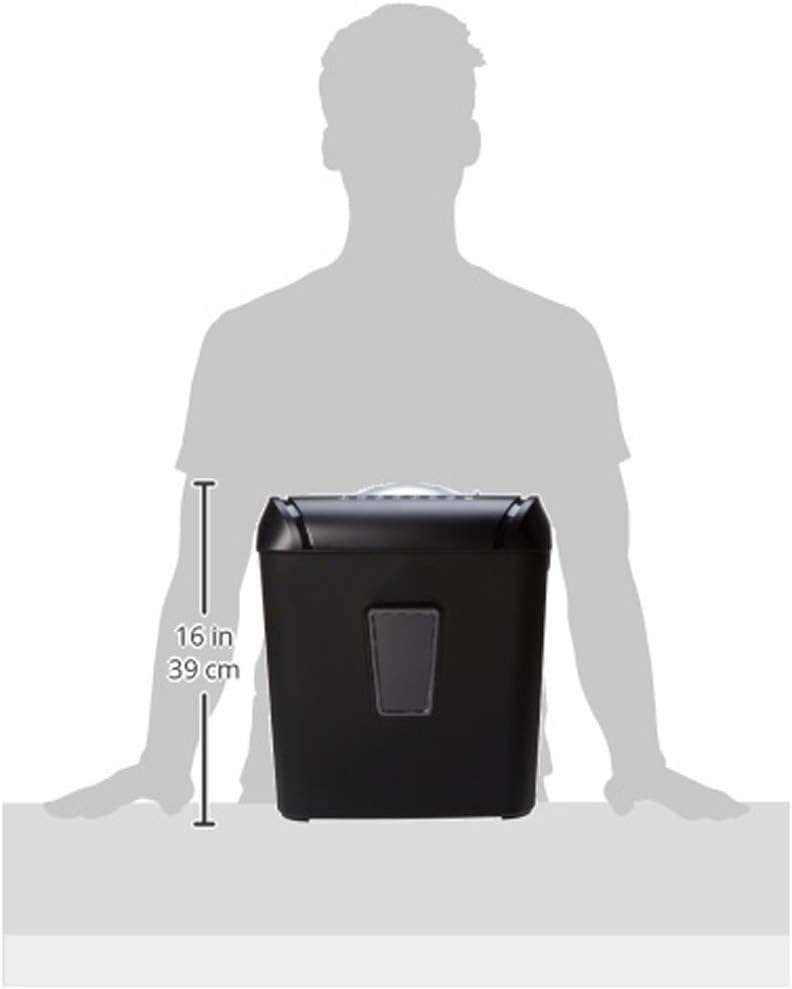
Rajah 5: A diagram illustrating the approximate height of the shredder, which is 16 inches (39 cm).
Waranti dan Sokongan
For warranty information or technical support, please refer to the Amazon Basics official weblaman web atau hubungi khidmat pelanggan Amazon secara langsung. Simpan resit pembelian anda untuk tuntutan jaminan.