1. Pengenalan
This manual provides essential information for the setup, operation, and maintenance of your Blackweb BWC18SB001 2.0 Channel Google Assistant Smart Soundbar. Please read these instructions carefully before using the product to ensure proper functionality and to maximize your audio experience. This smart soundbar integrates speaker functionality with Google Assistant capabilities, enhancing your home entertainment system.
2. Apa yang ada di dalam Kotak
Sahkan bahawa semua komponen hadir semasa membongkar:
- Hitamweb BWC18SB001 2.0 Channel Google Assistant Smart Soundbar
- Alat Kawalan Jauh
- Penyesuai Kuasa
- Relevant Audio Cables (e.g., Optical, Aux)
- Manual Pengguna (dokumen ini)
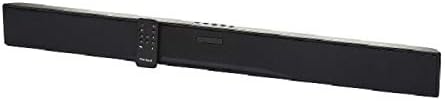
Imej: Si Hitamweb BWC18SB001 Smart Soundbar, shown with its included remote control. The soundbar is black and rectangular, designed to sit beneath a television.
3. Ciri-ciri Produk
- 2.0 Audio Saluran: Delivers clear stereo sound for an enhanced listening experience.
- Pembantu Google Bersepadu: Kawal bar bunyi dan peranti rumah pintar anda menggunakan arahan suara.
- Pelbagai Pilihan Kesambungan: Supports HDMI, Optical, AUX, and Bluetooth for versatile audio input.
- Kaedah Kawalan: Features on-device buttons and a dedicated remote control for easy operation.
- Reka bentuk padat: Designed to fit seamlessly into your home theater setup.
4. Persediaan
4.1 Penempatan
Place the soundbar on a stable, flat surface directly in front of your television or mount it on a wall (mounting hardware not included). Ensure there is adequate ventilation around the unit.
4.2 Sambungan Kuasa
- Connect the power adapter to the DC IN port on the back of the soundbar.
- Palamkan hujung satu lagi penyesuai kuasa ke dalam salur keluar dinding.
4.3 Sambungan Audio
Choose one of the following methods to connect your soundbar to your TV or other audio source:
- HDMI (Recommended): Connect an HDMI cable (not included) from the HDMI ARC port on your TV to the HDMI ARC port on the soundbar. This allows for high-quality audio and control via your TV remote.
- Optik: Connect an Optical cable (included) from the OPTICAL OUT port on your TV to the OPTICAL IN port on the soundbar.
- AUX: Connect a 3.5mm audio cable (included) from the AUX OUT port on your TV or audio device to the AUX IN port on the soundbar.
5. Arahan Operasi
5.1 Hidupkan/Mati Kuasa
- Tekan butang Kuasa (U) on the soundbar or the remote control to turn the unit on or off.
- A green indicator light on the soundbar signifies that it is powered on.
5.2 Kawalan Kelantangan
- Gunakan Kelantangan Naik (VOL+) dan Kelantangan Turun (vol-) buttons on the soundbar or remote control to adjust the volume.
- Tekan butang Bisu (X) on the remote to mute or unmute the sound.
5.3 Pemilihan Input
Tekan butang Input (M) on the soundbar or the corresponding input buttons (AUX, OPTICAL, HDMI, Bluetooth) on the remote control to switch between audio sources.
6. Google Assistant Integration
Hitam Andaweb soundbar features integrated Google Assistant. To activate, ensure the soundbar is connected to your home Wi-Fi network (refer to the separate Google Home app setup guide for detailed instructions). Once connected, you can use voice commands:
- Say "Hey Google" or "Ok Google" followed by your command.
- Examples: "Hey Google, play music," "Ok Google, what's the weather?" "Hey Google, turn up the volume."
You can also mute the Google Assistant microphone using the dedicated button on the soundbar or remote control if you prefer privacy.
7. Kesambungan Bluetooth
Untuk menyambungkan peranti Bluetooth:
- Tekan butang Bluetooth (BT) on the remote control or cycle through inputs on the soundbar until "BT" is displayed or indicated. The soundbar will enter pairing mode.
- Pada peranti mudah alih anda (telefon pintar, tablet, komputer riba), dayakan Bluetooth dan cari peranti yang tersedia.
- Select "Blackweb BWC18SB001" from the list of devices.
- Setelah dipasangkan, bar bunyi akan menunjukkan sambungan yang berjaya, dan anda boleh memainkan audio daripada peranti anda.
Julat Bluetooth adalah lebih kurang 10 meter (33 kaki).
8. Penyelenggaraan
Untuk memastikan jangka hayat dan prestasi optimum bar bunyi anda:
- Pembersihan: Use a soft, dry cloth to wipe the exterior of the soundbar. Do not use liquid cleaners or abrasive materials.
- Pengudaraan: Pastikan bukaan pengudaraan tidak disekat.
- Persekitaran: Elakkan mendedahkan bar bunyi kepada suhu, kelembapan atau cahaya matahari langsung yang melampau.
9. Penyelesaian masalah
- Tiada Kuasa: Ensure the power adapter is securely connected to both the soundbar and a working wall outlet.
- Tiada Bunyi:
- Check that the soundbar is powered on and not muted.
- Sahkan bahawa sumber input yang betul telah dipilih pada bar bunyi.
- Ensure audio cables (HDMI, Optical, AUX) are securely connected to both the soundbar and your TV/audio source.
- Adjust the volume on both the soundbar and your TV/audio source.
- Bluetooth Tidak Bersambung:
- Pastikan bar bunyi berada dalam mod berpasangan Bluetooth.
- Pastikan Bluetooth peranti anda didayakan dan dalam julat.
- Cuba nyahgandingkan dan pasangkan semula peranti.
- Pembantu Google Tidak Menjawab:
- Semak sambungan Wi-Fi anda.
- Ensure the Google Assistant microphone is not muted.
- Verify the soundbar is properly set up in the Google Home app.
10. Spesifikasi
| Ciri | Spesifikasi |
|---|---|
| Nama Model | BWC18SB001 |
| Jenis Pembesar Suara | Bar bunyi |
| Konfigurasi Saluran Bunyi Sekeliling | 2.0 |
| Kaedah Kawalan | Voice, Remote, On-device Buttons |
| Teknologi Ketersambungan | HDMI, Optical, AUX, Bluetooth |
| Julat Bluetooth | 10 Meter |
| Kuasa Output Maksimum Pembesar Suara | 150 Watt |
| Mod Keluaran Audio | Stereo, Surround |
| Sumber Kuasa | Elektrik Bertali |
| Dimensi Produk | 32 x 2.77 x 3.26 inci |
| Berat Barang | 3.97 paun |
| UPC | 681131237703 |
11. Waranti dan Sokongan
For warranty information and technical support, please refer to the documentation provided at the time of purchase or visit the official Blackweb webtapak. Simpan bukti pembelian anda untuk tuntutan waranti.


