pengenalan
This manual provides comprehensive instructions for the installation and operation of your Tempur-Pedic Ergo Grand or Premier Replacement Conversion Kit. This kit is designed to replace the old, discontinued remote control system for your adjustable base, providing a seamless transition to a new, authentic replacement remote and control unit.
Produk Selesaiview
The conversion kit includes all necessary components to upgrade your adjustable bed's remote system. Key features include:
- Replaces the discontinued Ergo Premier Remote system.
- Comes with a new power supply, a new control box, and a new authentic white replacement remote.
- Designed for plug-and-play installation, simplifying the setup process.
- Enables control of head and foot adjustments (up and down) and massage intensity.
- Nota: This kit does not support one-touch flat or preset memory functions.

Gambar 1: Lebihview of the Tempur-Pedic Remote Conversion Kit components, including the old discontinued remotes for comparison, the new white replacement remote, and the new control box with its associated wiring.
Arahan Persediaan
Follow these steps to install your new remote conversion kit:
- Buka Pembungkusan Komponen: Carefully remove all items from the packaging. Verify you have the new control box, new power supply, and the new white replacement remote.
- Locate Existing Connections: Underneath your adjustable bed, identify the two motor plugs and two massage plugs connected to your old control system.
- Disconnect Old Plugs: Gently disconnect the two motor plugs and the two massage plugs from the old control system.
- Connect to New Control Box: The new control box is designed with adapters. Simply click the disconnected motor plugs and massage plugs into the corresponding adapters on the new control box. Ensure connections are secure.
- Sambungkan Bekalan Kuasa: Plug the new power supply into the new control box, and then plug the power supply into a wall outlet.
- Kefungsian Ujian: Once all connections are made, test the new remote to ensure all functions (head/foot movement, massage) are operating correctly.
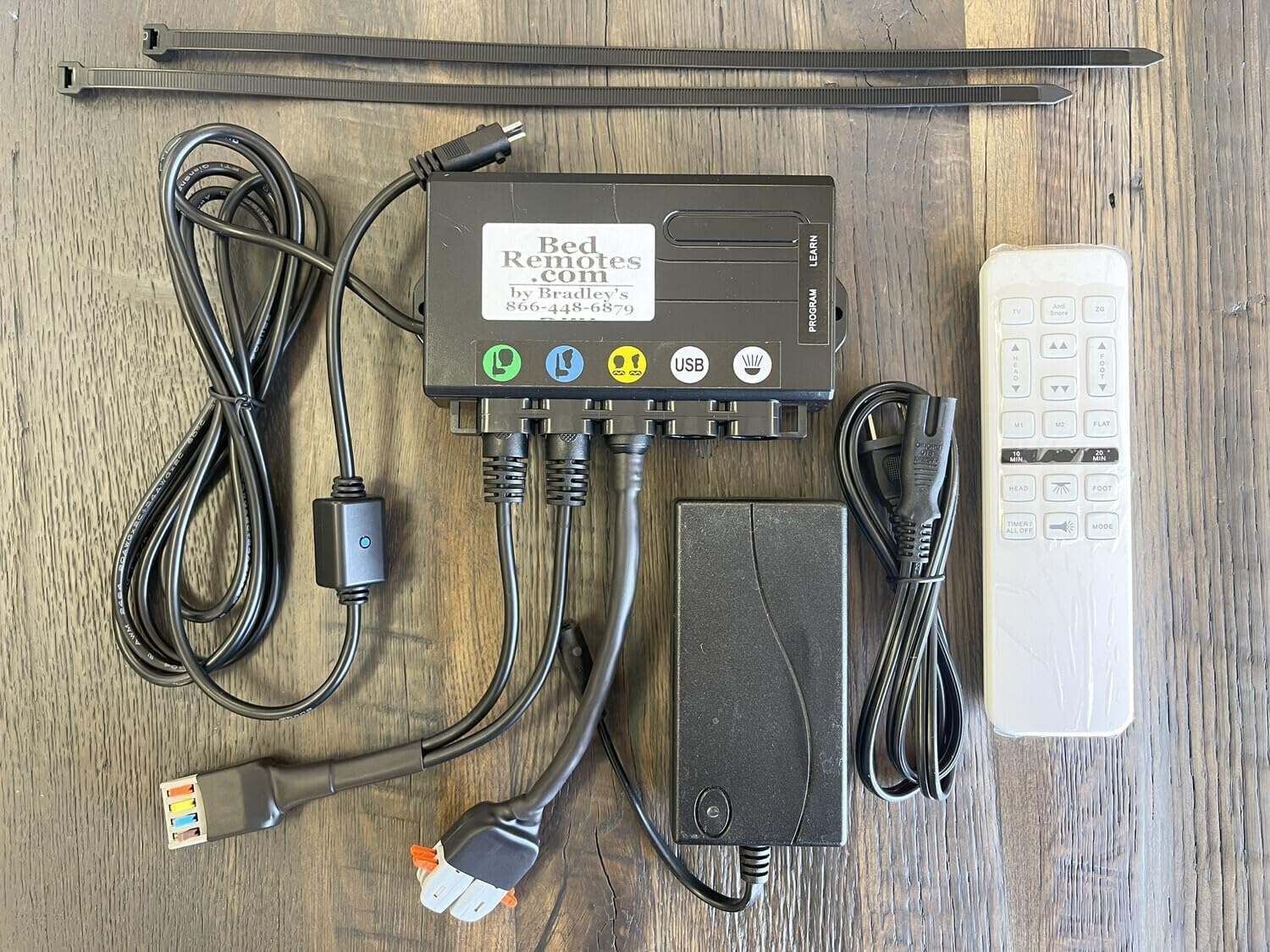
Figure 2: All components of the conversion kit laid out, illustrating the new control box, power supply, various cables, and the new white remote control, ready for installation.
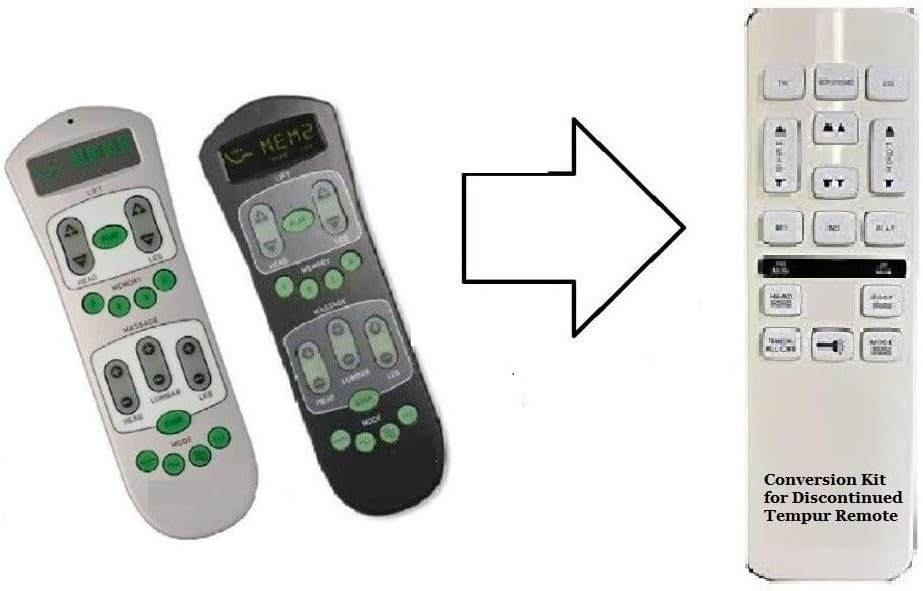
Figure 3: Visual representation of the conversion, showing how the two older, discontinued Tempur-Pedic remotes are replaced by the single new white conversion kit remote.
Arahan Operasi
The new white replacement remote provides intuitive control over your adjustable bed's primary functions:
- Pelarasan Kepala: Use the designated buttons to raise or lower the head section of your bed.
- Pelarasan Kaki: Use the designated buttons to raise or lower the foot section of your bed.
- Massage Control: Activate and adjust the intensity of the massage function using the relevant buttons.
Nota Penting:
This conversion kit and its remote do not support the "one-touch flat" function or any pre-set memory positions that might have been available on your original discontinued remote. All adjustments are manual.
Penyelenggaraan
To ensure the longevity and optimal performance of your conversion kit, consider the following maintenance tips:
- Pembersihan: Wipe the remote and control box with a soft, dry cloth. Avoid using liquid cleaners or abrasive materials.
- Semakan Sambungan: Periodically check that all cables and plugs are securely connected to the control box and power supply.
- Bekalan Kuasa: Ensure the power supply is not obstructed and has adequate ventilation.
- Penjagaan Jauh: Protect the remote from drops, spills, and extreme temperatures.
Menyelesaikan masalah
If you encounter issues with your conversion kit, try the following troubleshooting steps:
| Masalah | Kemungkinan Punca | Penyelesaian |
|---|---|---|
| Bed does not respond to remote. | No power to the control box; loose connections; remote not communicating. |
|
| Head/Foot adjustment not working. | Motor plug disconnected; motor malfunction. |
|
| Fungsi urutan tidak berfungsi. | Massage plug disconnected; massage unit malfunction. |
|
Spesifikasi
- Nombor Model: 8541715520
- Jenama: Tempur-Pedic (Conversion Kit for)
- Pengeluar: Adjustable Bed Replacement Remotes
- Teknologi Ketersambungan: Inframerah
- Bilangan Maks Peranti yang Disokong: 1 (the adjustable bed)
- Peranti Serasi: Adjustable beds (specifically Tempur-Pedic Ergo Grand or Premier models designed for this conversion)
- Ciri Khas: Ergonomic remote design
Waranti dan Sokongan
For warranty information and technical support regarding your Tempur-Pedic Ergo Grand or Premier Replacement Conversion Kit, please contact the manufacturer, Adjustable Bed Replacement Remotes. Refer to the product packaging or the manufacturer's official weblaman web untuk terma jaminan khusus dan butiran perhubungan.
For general inquiries or to purchase additional accessories, you may visit the Tempur-Pedic Store on Amazon.


