1. Pengenalan
This user manual provides comprehensive instructions for the setup, operation, and maintenance of your SHARP LC-32HI5012E HD Ready Smart LED TV. Please read this manual thoroughly before using your television to ensure proper functionality and safety.
The SHARP LC-32HI5012E is an 81 cm (32-inch) HD Ready Smart LED TV featuring Active Motion 200 technology for enhanced picture quality and a Triple Tuner for versatile reception options. It includes integrated Wi-Fi and a Harman/Kardon sound system for a complete entertainment experience.
2. Kandungan Pakej
Selepas membuka pakej, sila sahkan bahawa semua item berikut disertakan:
- SHARP LC-32HI5012E Main Unit
- Alat Kawalan Jauh (dengan bateri)
- Manual Pengguna (dokumen ini)

Imej: Depan view of the SHARP LC-32HI5012E television, displaying a vibrant city skyline on its screen. This image shows the slim bezel design and the central SHARP logo.
3. Persediaan
3.1 Memasang Pendirian
Carefully place the TV screen-down on a soft, flat surface to prevent damage. Attach the two stand feet to the designated slots at the bottom of the TV, securing them with the provided screws. Ensure the stand is firmly attached before proceeding.
3.2 Menyambung Peranti
TV anda menawarkan pelbagai pilihan sambungan untuk peranti luaran:
- Port HDMI (x3): Sambungkan pemain Blu-ray, konsol permainan atau kotak set atas.
- Port USB (x2): Untuk main balik media daripada pemacu USB.
- Antenna In (RF): Connect your terrestrial antenna for DVB-T/T2HD reception.
- Duduk di: Connect your satellite dish for DVB-S/S2 reception.
- RJ45 (LAN): Untuk sambungan internet berwayar.
- Pelabuhan CI+: For conditional access modules (CAM) to view saluran yang disulitkan.
- Mini Component/YPbPr, Mini AV Composite: Untuk peranti analog yang lebih lama.
- Output Audio Optik Digital: Untuk menyambung ke sistem audio luaran.
- Audio out / Headphone: Untuk fon kepala atau pembesar suara luaran.

Imej: Belakang view of the SHARP LC-32HI5012E television, highlighting the arrangement of various input and output ports for connecting external devices.
3.3 Kuasa Awal Hidup dan Persediaan Kali Pertama
After connecting all necessary cables, plug the power cord into an electrical outlet. Press the power button on the remote control or the TV. The first-time setup wizard will guide you through:
- Pemilihan bahasa.
- Network connection (Wi-Fi or wired LAN).
- Channel scanning for DVB-C, DVB-S/S2, or DVB-T/T2HD.
- Time zone and other basic settings.
4. Arahan Operasi
4.1 Fungsi Asas TV
- Hidupkan/Mati Kuasa: Gunakan butang kuasa pada alat kawalan jauh atau TV.
- Kawalan Kelantangan: Gunakan butang VOL +/-.
- Pemilihan Saluran: Use CH +/- or number buttons.
- Sumber Input: Press the SOURCE button to switch between HDMI, AV, TV, etc.
- Navigasi Menu: Use arrow keys and OK button to navigate menus.
4.2 Ciri TV Pintar
Your SHARP LC-32HI5012E is equipped with integrated Wi-Fi and offers access to various smart features:
- Apl prapasang: Access popular streaming services like Netflix and YouTube directly.
- Web pelayar: Semak imbas internet terus dari TV anda.
- Aquos Net+: Access additional online content and services provided by Sharp.
Ensure your TV is connected to the internet for full Smart TV functionality.
4.3 Sistem Audio
The integrated Harman/Kardon sound system provides a high-quality audio experience with excellent dynamics and clarity. Adjust audio settings in the TV menu to customize your sound preferences.
5. Penyelenggaraan
5.1 Membersihkan Skrin
Untuk membersihkan skrin, lap perlahan-lahan dengan kain lembut yang tidak berbulu. Untuk tanda degil, sedikit dampen kain dengan air atau pembersih skrin khusus. jangan sembur cecair terus ke skrin.
5.2 Penjagaan Am
- Jauhkan TV daripada cahaya matahari langsung dan sumber haba.
- Pastikan pengudaraan yang mencukupi di sekeliling TV.
- Cabut palam TV daripada soket kuasa semasa ribut petir atau apabila dibiarkan tanpa pengawasan untuk tempoh yang lama.
6. Penyelesaian masalah
If you encounter any issues with your TV, please refer to the following common problems and solutions before contacting support.
| Masalah | Kemungkinan Punca | Penyelesaian |
|---|---|---|
| Tiada Kuasa | Power cord unplugged, power outlet issue. | Check power cord connection. Try a different outlet. |
| Tiada Gambar, tetapi Bunyi Hadir | Sumber input tidak betul, kabel rosak. | Sahkan sumber input yang betul. Periksa sambungan kabel HDMI/AV. |
| Tiada Bunyi | Kelantangan diredam atau terlalu rendah, isu sistem audio luaran. | Unmute volume, increase volume. Check external audio connections. |
| Tidak Dapat Menyambung ke Wi-Fi | Incorrect password, router issue, TV too far from router. | Masukkan semula kata laluan. Mulakan semula penghala. Dekatkan TV atau gunakan sambungan berwayar. |
7. Spesifikasi
| Ciri | Perincian |
|---|---|
| Jenama | TAJAM |
| Nombor Model | LC-32HI5012E |
| Teknologi Skrin | LED |
| Resolusi | Sedia HD (1366 x 768 piksel) |
| Pepenjuru Skrin | 81.3 cm (32 inci) |
| Kadar Segar Semula | 60 Hz |
| Ciri Khas | Internet (TV Pintar) |
| Perkhidmatan Internet yang Disokong | Netflix, YouTube, Browser |
| Teknologi Ketersambungan | USB, HDMI, LAN, Wi-Fi |
| Penala | DVB-C, DVB-S/S2, DVB-T/T2HD |
| Sistem Audio | Harman/Kardon |
| Dimensi Produk (W x H x D) | 74 x 49.1 x 18 cm (dengan dirian) |
| Berat badan | 4.8 Kilogram |
| Jenis Pemasangan | Lekap Meja |
7.1 Kecekapan Tenaga
The SHARP LC-32HI5012E has an energy efficiency rating of F. For detailed energy consumption information, please refer to the energy label and product information sheet.

Image: Energy efficiency label for the SHARP LC-32HI5012E television, showing its energy class F and power consumption details.
Untuk butiran lanjut, lawati pangkalan data rasmi EPREL: https://eprel.ec.europa.eu/qr/402565
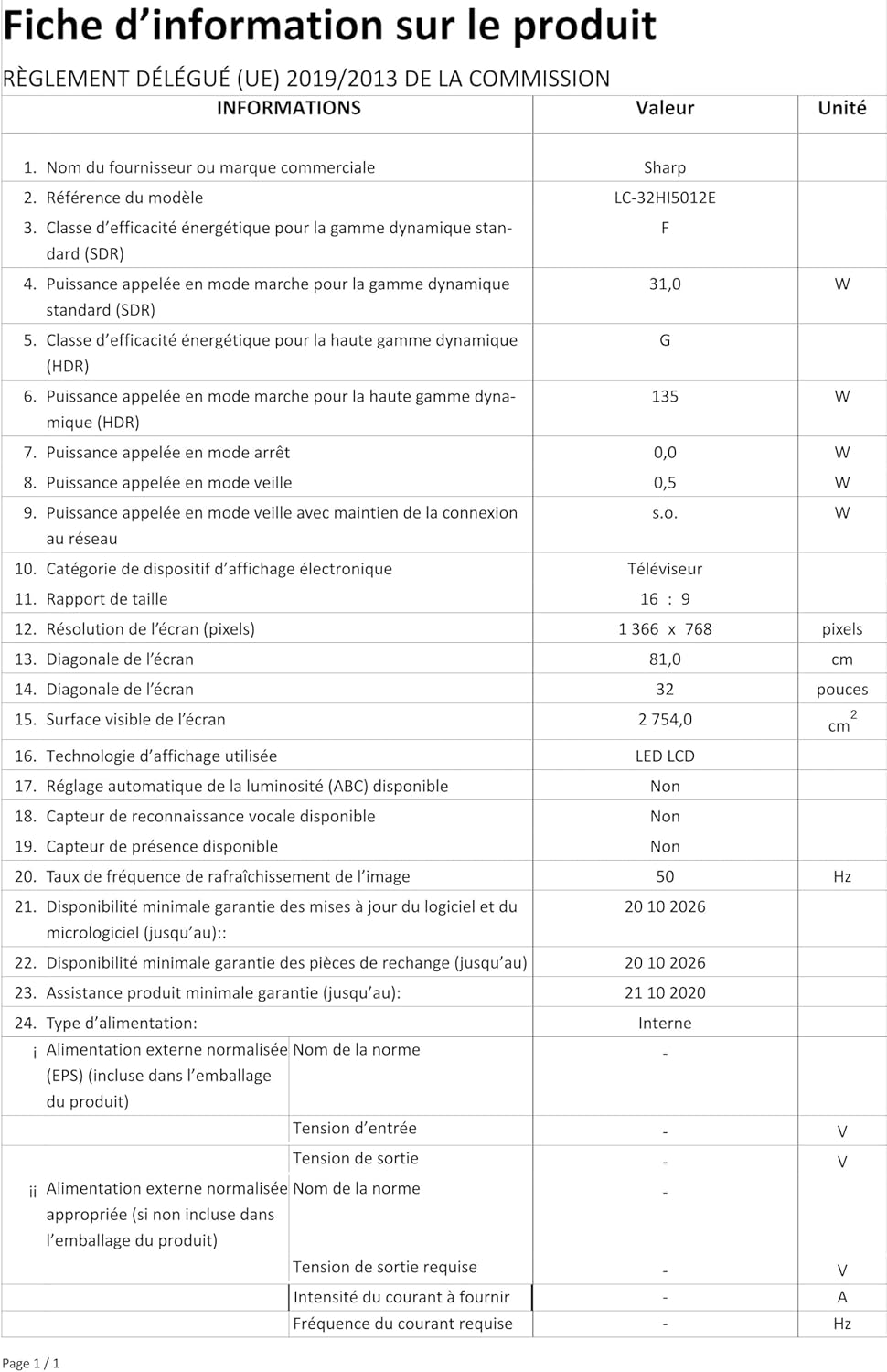
Image: Product information sheet detailing technical specifications and compliance information for the SHARP LC-32HI5012E television.
8. Waranti dan Sokongan
For warranty information, please refer to the warranty card included with your product or visit the official SHARP webtapak. Simpan resit pembelian anda sebagai bukti pembelian untuk sebarang tuntutan waranti.
For technical support or service inquiries, please contact SHARP customer service. Contact details can typically be found on the SHARP official webtapak atau dalam pembungkusan produk.


