1. Pengenalan
This manual provides detailed instructions for the TRACER GAMEZONE IGNIS AVAGO 3050 4000DPI USB Gaming Mouse. Please read this manual thoroughly before using the product to ensure proper operation and to maximize your gaming experience.
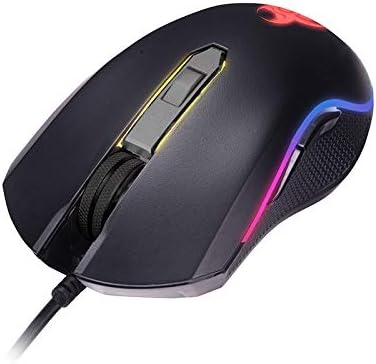
Imej 1.1: Selesaiview of the TRACER GAMEZONE IGNIS AVAGO 3050 Gaming Mouse. This image shows the mouse from a slightly elevated angle, highlighting its ergonomic design, scroll wheel, and the integrated RGB lighting along its sides.
2. Kandungan Pakej
Pastikan semua item ada dalam pakej:
- TRACER GAMEZONE IGNIS AVAGO 3050 4000DPI USB Gaming Mouse
- Manual Pengguna (dokumen ini)
3. Ciri-ciri Produk
- High Precision Optical Laser: Equipped with an AVAGO 3050 optical sensor for superior tracking accuracy.
- DPI boleh laras: Supports DPI switching up to 4000 DPI for customizable sensitivity.
- 6 Customizable Buttons: Provides six programmable buttons for enhanced control during gameplay.
- Pencahayaan RGB: Integrated internal RGB lighting for a modern and aggressive aesthetic.
- Kesambungan USB: Standard USB connection for wide compatibility with PC and Mac platforms.
- Sliding Base: Designed for smooth operation on various surfaces, including mouse mats.

Imej 3.1: Sisi view of the gaming mouse, showcasing the ergonomic shape, textured grip on the side, and the vibrant RGB light strip running along the edge.
4. Persediaan
Follow these steps to set up your TRACER GAMEZONE IGNIS AVAGO 3050 Gaming Mouse:
- Buka bungkusan Tetikus: Keluarkan tetikus dari bungkusannya dengan berhati-hati.
- Sambung ke Komputer: Plug the USB connector of the mouse into an available USB port on your PC or Mac.
- Pemasangan Pemandu: The mouse is plug-and-play. Your operating system will automatically detect and install the necessary drivers. No additional software installation is typically required for basic functionality.
- penempatan: Place the mouse on a flat, clean surface or a mouse pad for optimal performance.

Imej 4.1: Depan view of the gaming mouse, showing the USB cable extending from the front, the scroll wheel, and the primary left and right click buttons.
5. Arahan Operasi
The TRACER GAMEZONE IGNIS AVAGO 3050 Gaming Mouse is designed for intuitive use. Here are the basic operating principles:
5.1. Fungsi Asas Tetikus
- Klik Kiri: Butang tindakan utama.
- Klik kanan: Secondary action button, often used for context menus.
- Roda Tatal: Used for vertical scrolling. Can also be pressed as a middle button.
5.2. Pelarasan DPI
The mouse features a dedicated DPI button (usually located behind the scroll wheel) to cycle through different sensitivity settings. Press this button to instantly change the DPI (Dots Per Inch) to match your preference or game requirements. The mouse supports multiple DPI levels up to 4000 DPI.
5.3. Penyesuaian Butang
The TRACER GAMEZONE IGNIS AVAGO 3050 mouse has 6 customizable buttons. While basic functionality is plug-and-play, advanced customization (such as remapping buttons or creating macros) typically requires third-party software compatible with generic gaming mice, as Tracer may not provide proprietary software for this model. Refer to your operating system's mouse settings or third-party utility software for advanced configuration options.
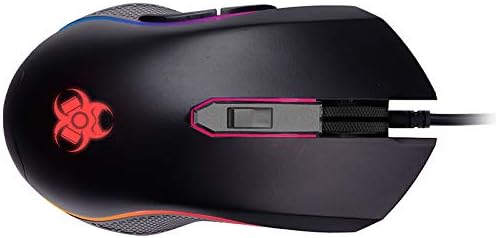
Imej 5.1: Atas-bawah view of the gaming mouse, clearly showing the scroll wheel, the DPI adjustment button behind it, and the left and right click buttons. The Tracer logo with RGB lighting is visible at the rear.
6. Penyelenggaraan
To ensure the longevity and optimal performance of your gaming mouse, follow these maintenance guidelines:
- Pembersihan: Gunakan kain lembut dan kering untuk mengelap permukaan tetikus. Untuk kotoran degil, sedikit dampen kain dengan air atau larutan pembersih lembut. Elakkan bahan kimia yang keras atau bahan yang melelas.
- Pembersihan Sensor: Periodically clean the optical sensor on the underside of the mouse with a cotton swab lightly dampened with rubbing alcohol. Ensure no lint is left behind.
- Penjagaan Kabel: Elakkan selekoh tajam atau tarikan berlebihan pada kabel USB untuk mengelakkan kerosakan.
- Storan: Simpan tetikus di persekitaran yang bersih dan kering, jauh daripada suhu ekstrem dan cahaya matahari langsung apabila tidak digunakan.
7. Penyelesaian masalah
If you encounter issues with your TRACER GAMEZONE IGNIS AVAGO 3050 Gaming Mouse, refer to the following common problems and solutions:
| Masalah | Kemungkinan Punca | Penyelesaian |
|---|---|---|
| Tetikus tidak bertindak balas | Sambungan USB longgar, port USB rosak, isu pemandu. |
|
| Kursor tidak menentu atau tidak bergerak dengan lancar | Sensor optik kotor, permukaan yang tidak sesuai, gangguan perisian. |
|
| Butang DPI tidak mengubah kepekaan | Button malfunction, software conflict. |
|
8. Spesifikasi
| Ciri | Perincian |
|---|---|
| Nama Model | GAMEZONE IGNIS AVAGO 3050 4000DPI |
| Nombor Model Item | TRAMYS46085 |
| Jenama | Pengesan |
| Teknologi Ketersambungan | USB |
| Teknologi Pengesanan Pergerakan | Laser, Optical (AVAGO 3050) |
| Julat DPI | Sehingga 4000 DPI (boleh laras) |
| Bilangan Butang | 6 |
| Platform Perkakasan | Mac, PC |
| Berat Barang | 12.3 auns (lebih kurang 348.7 gram) |
| Dimensi Pakej | 7.87 x 5.91 x 1.97 inci |
| Pengeluar | PENGESAN |
| Tarikh Tersedia Pertama | 4 Februari 2019 |
9. Waranti dan Sokongan
For warranty information and technical support, please refer to the official Tracer website or contact your local retailer where the product was purchased. Keep your proof of purchase for warranty claims.
Pengeluar: PENGESAN


