1. Pengenalan
Terima kasih kerana membeliasing the Alpha EK-60 61-Key Electronic Piano Keyboard. This manual provides detailed instructions for the proper setup, operation, and maintenance of your new instrument. The EK-60 is designed to offer a rich musical experience with its versatile features, including a wide range of tones and rhythms, intelligent teaching functions, and various connectivity options. Please read this manual thoroughly before using the product to ensure optimal performance and longevity.
2. Maklumat Keselamatan
To prevent electric shock, fire, or damage to the unit, please observe the following precautions:
- Do not expose the keyboard to rain or moisture.
- Do not place objects filled with liquids, such as vases, on the keyboard.
- Jangan sekat sebarang bukaan pengudaraan.
- Gunakan hanya penyesuai kuasa yang ditentukan.
- Jangan buka atau ubah suai unit. Rujuk semua servis kepada kakitangan yang berkelayakan.
- Jauhkan daripada kanak-kanak kecil.
3. Kandungan Pakej
Sila pastikan semua item berikut disertakan dalam pakej anda:
- 1 x Alpha 61-Key Standard Keyboard EK-60
- 1 x Pendirian Boleh Laras
- 1 x Pemegang Helaian Muzik
- 1 x Penyesuai Kuasa
- 1 x Manual Pengguna (dokumen ini)
4. Produk Lebihview
Familiarize yourself with the components of your Alpha EK-60 keyboard.
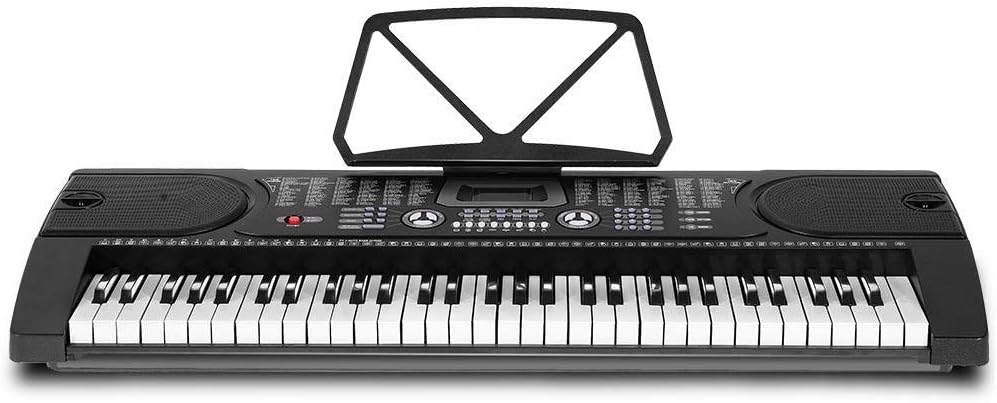
Rajah 4.1: Atas-bawah view of the Alpha EK-60 keyboard, highlighting the control panel, integrated speakers, and the 61 standard piano keys.

Figure 4.2: Detail of the LED display for convenient settings adjustment and the battery compartment for portable use.

Rajah 4.3: View of the multiple jacks including Audio Input, Microphone Input, and Headphone Output for versatile connectivity.
Ciri-ciri Utama:
- 61-Key Standard Piano Keyboard
- LED display for easy navigation
- 24 lagu demo
- 255 timbres (instrument sounds)
- 255 rhythms (accompaniment styles)
- 61 kinds of keyboard percussions
- 8 Panel Percussions
- Master volume, accompaniment volume, and tempo control
- Intelligent teaching function: one-key, follow and ensemble function
- Fungsi pengaturcaraan irama
- Auto chord and chord timbre option
- Fungsi rekod dan main balik
- Sustain and vibrato effects
- Microphone input and speaker output
- Headphone jack for silent practice
- Battery powered option (6 x AA-size batteries, not included)
5. Persediaan
5.1 Memasang Pendirian
- Unpack all components of the adjustable stand.
- Connect the horizontal support bars to the vertical legs, ensuring they are securely fastened.
- Adjust the height of the stand to your preferred playing position using the adjustment knobs. The stand is adjustable from 59cm to 79cm in height.
- Place the keyboard securely on top of the assembled stand.
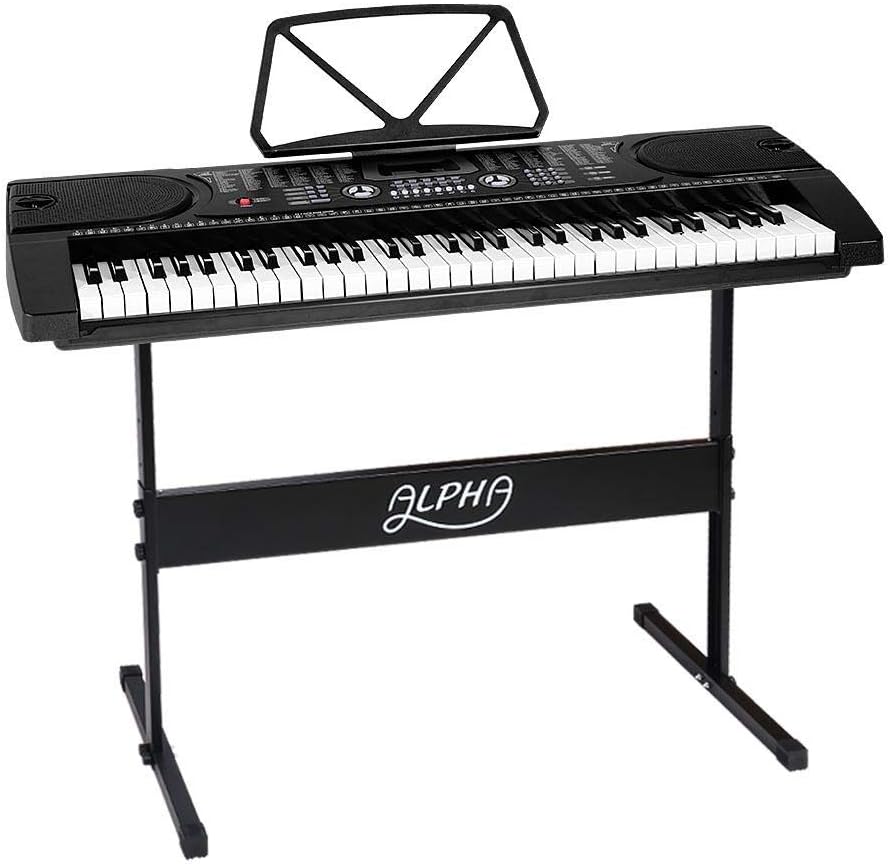
Figure 5.1: The Alpha EK-60 keyboard fully assembled on its adjustable stand, ready for use.
5.2 Menguasakan Papan Kekunci
The Alpha EK-60 can be powered by the included AC adaptor or by batteries.
Menggunakan Penyesuai AC:
- Connect the DC plug of the power adaptor to the DC 9V input jack on the rear of the keyboard.
- Plug the AC adaptor into a standard wall outlet.
Menggunakan Bateri:
- Cari petak bateri di bahagian bawah papan kekunci.
- Buka penutup petak bateri.
- Insert 6 x AA-size batteries (not included), ensuring correct polarity (+/-).
- Tutup penutup petak bateri dengan selamat.
Note: When using batteries, disconnect the AC adaptor. The keyboard will automatically switch to battery power if the adaptor is removed.
6. Arahan Operasi
6.1 Operasi Asas
- Hidupkan/Mati Kuasa: Tekan ke KUASA butang untuk menghidupkan atau mematikan papan kekunci.
- Kawalan Kelantangan: Gunakan VOLUME MASTER tombol untuk melaraskan tahap bunyi keseluruhan.
- Kawalan Tempo: Gunakan TEMPO buttons to adjust the speed of rhythms and demo songs.
6.2 Memilih Nada dan Ritma
- Tones (Timbre): Tekan ke TIMBRE button, then use the number pad or +/- buttons to select from 255 different instrument sounds. The selected timbre number will appear on the LED display.
- Irama: Tekan ke RITMA button, then use the number pad or +/- buttons to select from 255 accompaniment rhythms. Press MULA/BERHENTI untuk memulakan atau menamatkan ritma.
6.3 Intelligent Teaching Function
The EK-60 features a 3-step intelligent teaching system to help you learn to play.
- Satu Kekunci: Plays the melody of a demo song by pressing any key.
- ikuti: Waits for you to play the correct note before proceeding with the melody.
- Bersama: Plays the accompaniment while you play the melody.
To use, select a demo song, then press the desired teaching mode button (SATU-KUNCI, IKUT, atau ENSEMBLE).
6.4 Rakaman dan Main semula
The keyboard allows you to record your performances.
- Tekan ke REC button to start recording. The LED display will indicate recording mode.
- Mainkan melodi yang anda inginkan.
- Tekan ke BERMAIN button to stop recording and play back your recorded performance.
6.5 Ketersambungan
- Jack fon kepala: Sambungkan fon kepala ke Fon kepala jack for silent practice.
- Input Mikrofon: Sambungkan mikrofon ke INPUT MIC jack untuk menyanyi bersama sambil bermain.
- Input/Output Audio: Gunakan INPUT AUDIO to connect external audio devices (e.g., MP3 player) and the HASIL AUDIO to connect to external speakers or an amplebih hidup.
7. Penyelenggaraan
Proper care will ensure the longevity of your Alpha EK-60 keyboard.
- Pembersihan: Lap papan kekunci dengan kain lembut dan kering. Untuk kotoran degil, gunakan sedikit kain lembapamp cloth and then wipe dry immediately. Do not use abrasive cleaners, waxes, or solvents.
- Storan: When not in use for extended periods, store the keyboard in a cool, dry place away from direct sunlight and extreme temperatures. If using batteries, remove them before long-term storage to prevent leakage.
- Pengendalian: Elakkan daripada menjatuhkan papan kekunci atau terkena impak yang kuat.
8. Penyelesaian masalah
If you encounter any issues with your keyboard, refer to the following table for common problems and solutions.
| Masalah | Kemungkinan Punca | Penyelesaian |
|---|---|---|
| Tiada bunyi | Volume is too low; Power is off; Headphones connected; Faulty power connection. | Increase master volume; Turn on power; Disconnect headphones; Check power adaptor or replace batteries. |
| Kunci tidak bertindak balas | Keyboard is in a teaching mode; Internal malfunction. | Exit teaching mode; Power cycle the keyboard. If issue persists, contact support. |
| Rhythm/Demo song not playing | Rhythm/Demo song not selected; START/STOP button not pressed. | Select a rhythm/demo song; Press START/STOP. |
| Bunyi herot | Volume too high; External device connected incorrectly. | Reduce volume; Check connections of external devices. |
Jika masalah berterusan selepas mencuba penyelesaian ini, sila hubungi sokongan pelanggan.
9. Spesifikasi
| Ciri | Penerangan |
|---|---|
| Model | EK-60 |
| kunci | 61 Standard Piano Keys |
| Key Width | 1.9 sm |
| Tones (Timbres) | 255 |
| Irama | 255 |
| Lagu Demo | 24 |
| Polifoni Maksimum | 8 |
| Ketersambungan | Audio Input, Audio Output, Headphone Jack (3.5mm), Microphone Input (3.5mm) |
| Bekalan Kuasa | AC Adaptor (DC 9V) or 6 x AA-size batteries (not included) |
| Dimensi (Papan Kekunci) | 86cm (L) x 32.5cm (W) |
| Dimensions (Overall with Stand) | 86cm (L) x 32.5cm (W) x 59-79cm (H) |
| Berat badan | 6.2 Kilogram |
| warna | Hitam |

Figure 9.1: Detailed dimensions of the Alpha EK-60 keyboard and its adjustable stand.
10. Waranti dan Sokongan
10.1 Maklumat Waranti
The Alpha EK-60 keyboard comes with a Waranti 1 tahun from the date of purchase. This warranty covers manufacturing defects and ensures the product is free from defects in material and workmanship under normal use. It does not cover damage caused by misuse, accident, unauthorized modification, or normal wear and tear.
10.2 Sokongan Pelanggan
For any queries, technical assistance, or warranty claims, please contact the seller or manufacturer directly. Please have your purchase receipt and product model number (EK-60) ready when contacting support.


