1. Pengenalan
The Segway Ninebot Gokart Pro 2 is a high-performance electric go-kart designed for ages 14 and up, offering an exhilarating driving experience with speeds up to 23 mph and a range of 15.5 miles. It features a robust design, advanced control options, and a versatile setup that allows for both racing and drifting.

Figure 1: Segway Ninebot Gokart Pro 2
2. Maklumat Keselamatan
Your safety is paramount. Always wear a helmet and appropriate protective gear when operating the Gokart Pro 2. This product is UL-2272 certified by TUV Rheinland for safety standards. Key safety features include:
- Kerangka Keluli Kekuatan Tinggi: Menyokong sehingga 220 lbs.
- Triple Anti-Collision Protection: Integrated design for enhanced safety.
- Manual Handbrake: For emergency stops and controlled drifting.
- Muatan Boleh Laras: Accommodates riders from 4'5" to 6'3".
Always operate the go-kart in a safe, open environment, away from traffic and pedestrians. Ensure all components are securely fastened before each use.

Figure 2: Triple front protection system
3. Kandungan Pakej
Before assembly, verify that all items listed below are present in your package:

Figure 3: Packing List for Gokart Pro Kit + Ninebot S MAX
- Manual Pengguna
- (AA) battery x 6
- Skru x 6
- Hex wrenches (4mm, 5mm, 2.5mm)
- Alat untuk menanggalkan pendakap bar stereng
- Komponen pelepasan cepat roda stereng
- Pengecas Bateri
- Pembesar Suara Enjin Ninebot
- Spoiler belakang
- Bar stereng
4. Persediaan
The Gokart Pro 2 comes mostly pre-assembled. Follow these steps for final setup:
- Adjust Frame Length: Extend the frame to fit the rider's height (4'5" to 6'3"). Secure with the provided screws and hex wrenches.
- Adjust Steering Wheel: Use the quick-release mechanism to adjust the steering wheel column height for comfortable reach.
- Install Rear Spoiler: Attach the rear spoiler to the designated slots at the back of the seat.
- Install Ninebot Engine Speaker: Secure the Bluetooth speaker to the frame using the provided straps.
- Pasang Bendera Keselamatan: Mount the optional safety flag at the rear for increased visibility.
- Mengecas Bateri: Fully charge the battery before first use. Refer to the 'Maintenance' section for charging details.
Video 1: Detailed setup and feature overview of the Segway Ninebot Gokart Pro.
5. Arahan Operasi
Familiarize yourself with the controls and driving modes before operating the Gokart Pro 2.
- Hidupkan/Mati Kuasa: Use the power button located on the Ninebot S MAX unit at the rear of the go-kart.
- Mod Memandu: The Gokart Pro 2 offers four driving modes:
- Mod Keselamatan: Up to 4.97 mph (for beginners).
- Mod Biasa: Up to 11.2 mph.
- Mod Sukan: Up to 17.4 mph.
- Mod Perlumbaan: Up to 23 mph.
- Acceleration & Braking: Use the foot pedals for acceleration and braking. The manual handbrake can be used for drifting and emergency stops.
- Drifting: The special TPE rear tires and powerful rear-wheel drive allow for controlled drifting. Adjust drifting assistance levels via the Segway app.
- Smart Control (Segway App): Connect your smartphone via Bluetooth to the Segway app to:
- Switch driving modes.
- Adjust drifting assistance levels.
- Control ambient lights.
- Monitor battery status and mileage.
- Lakukan kemas kini perisian tegar.
- Immersive Engine Sounds: The Ninebot Engine Speaker simulates various engine sounds (single-cylinder, V8, double cylinder, V12) that synchronize with acceleration. It can also function as a Bluetooth speaker for music.

Figure 4: Four available driving modes

Figure 5: Ninebot Engine Sounds Simulator

Figure 6: Segway App Integration
Video 2: A closer look at the Segway Ninebot Gokart Pro, demonstrating features and operation.
6. Penyelenggaraan
Regular maintenance ensures optimal performance and longevity of your Gokart Pro 2.
- Pengecasan Bateri: Connect the provided charger to the charging port on the Ninebot S MAX unit. The battery level indicator will show charging progress.
- Pemeriksaan Tayar: Regularly inspect tires for wear and tear. Replace worn tires promptly to maintain performance and safety. Rear TPE tires are designed for drifting and may wear faster.
- Pembersihan: Bersihkan go-kart dengan iklanamp cloth. Avoid using high-pressure water or harsh chemicals.
- Storan: Store the go-kart in a dry, cool place. The Gokart Pro 2 is collapsible for easy transport and storage.
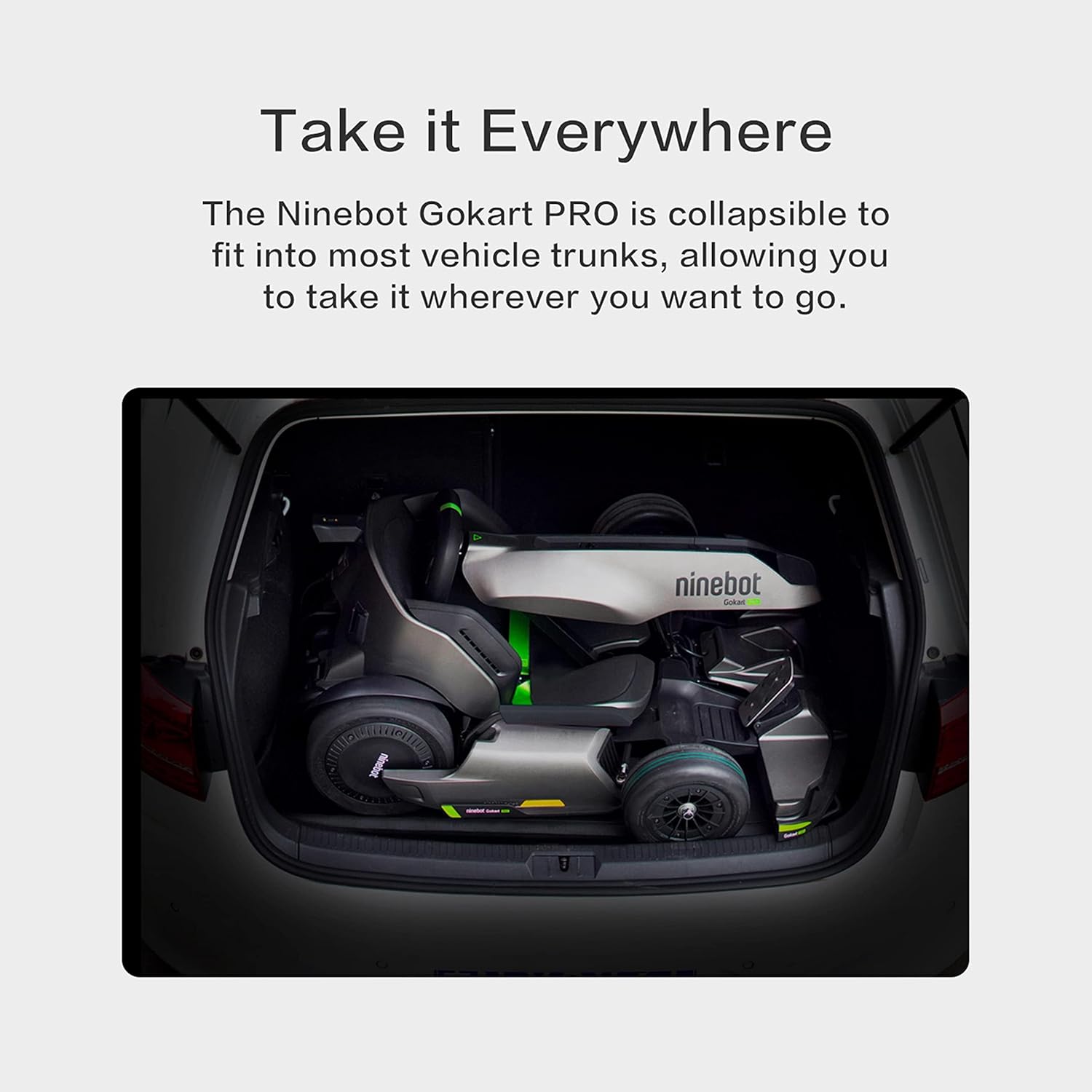
Figure 7: Gokart Pro 2 in collapsed state for transport
7. Penyelesaian masalah
If you encounter any issues with your Gokart Pro 2, refer to the following common troubleshooting tips:
- Go-kart not powering on: Ensure the battery is charged and properly connected. Check the power button on the Ninebot S MAX unit.
- Reduced speed or range: This may indicate a low battery charge. Fully charge the battery. Performance can also be affected by rider weight, terrain, and driving mode.
- Isu sambungan apl: Ensure Bluetooth is enabled on your smartphone and the go-kart. Try restarting both the app and the go-kart.
- Bunyi luar biasa: Inspect for any loose parts or obstructions around the wheels and frame. If the noise persists, contact customer support.
8. Spesifikasi
| Ciri | Spesifikasi |
|---|---|
| Nama Model | Transformers Electric GoKart Pro |
| Dimensi Pakej Item L x W x H | 45 x 36 x 21.05 inci |
| Berat Pakej | 65.77 Kilogram |
| Dimensi Item LxWxH | 55.9 x 33.5 x 23.6 inci |
| Berat Barang | 112.9 paun |
| Nama Jenama | Segway |
| warna | Hitam |
| bahan | aluminium |
| Pengguna yang Dicadangkan | Uniseks-Dewasa |
| Pengeluar | Ninebot (Changzhou) Tech Co., Ltd. |
| Nombor Bahagian | N3M432 |
| Tahun Model | 2021 |
| Gaya | Gokart Pro |
| Komponen yang Disertakan | Frame, Accessories |
| Saiz | Lebih Besar |
9. Waranti & Sokongan
The Segway Ninebot Gokart Pro 2 comes with a Waranti Terhad 1 Tahun. For any product inquiries, technical assistance, or warranty claims, please contact Segway Customer Support. You can find contact information on the official Segway website or through the Segway app.


