1. Pengenalan dan Maklumat Keselamatan
Thank you for choosing the UlTiMa AC-3500 Treadmill. This manual provides essential information for the safe and effective use, assembly, operation, and maintenance of your new fitness equipment. Please read this manual thoroughly before operating the treadmill and retain it for future reference.
Langkah-langkah Keselamatan Penting:
- Rujuk doktor sebelum memulakan sebarang program senaman.
- Jauhkan kanak-kanak dan haiwan peliharaan dari treadmill semasa operasi.
- Letakkan treadmill di atas permukaan yang rata dan stabil dengan ruang yang mencukupi di sekelilingnya.
- Pakai kasut dan pakaian sukan yang sesuai.
- Jangan kendalikan treadmill jika ia rosak atau tidak berfungsi.
- Always use the safety key during operation.
- Do not attempt to lubricate or adjust the belt while the treadmill is in motion.
- Cabut palam treadmill dari salur keluar kuasa apabila tidak digunakan atau sebelum pembersihan/penyelenggaraan.
2. Produk Lebihview
The UlTiMa AC-3500 is a home-use treadmill designed for effective cardiovascular exercise. It features a robust motor, adjustable speed, and manual incline settings.
Ciri-ciri Utama:
- Motor: 2.75 hp DC motor
- Julat Kelajuan: 1-14 km/j
- Running Belt Dimensions: 126 x 43 cm
- Condong: 3-level manual incline
- Berat Pengguna Maksimum: 110 kg
- Ciri-ciri tambahan: Foldable design, automatic lubrication, portable.
Komponen:
Familiarize yourself with the main components of your treadmill:
- Console with display and control buttons
- Handrails with integrated speed/incline controls (if applicable)
- Tali pinggang lari
- Penutup motor
- Bingkai dan asas
- Kunci keselamatan
- Roda pengangkutan

Imej 2.1: The control console of the UlTiMa AC-3500 treadmill, showing the display, speed, and program buttons, along with cup holders.

Imej 2.2: jarak dekat view of the handlebar controls on the UlTiMa AC-3500 treadmill, featuring speed adjustment buttons.
3. Persediaan dan Pemasangan
Before assembly, ensure all parts are present and undamaged. It is recommended to have two people for assembly.
Langkah Perhimpunan:
- Bongkar: Keluarkan semua komponen dari pembungkusan dengan berhati-hati.
- jawatan: Place the main frame on a clear, level surface.
- Buka lipatan (jika berkenaan): If the treadmill is in a folded position, carefully unfold the running deck until it locks into place.
- Pasangkan Tegak: Secure the upright posts to the main frame using the provided bolts and tools.
- Pasang Konsol: Attach the console to the top of the upright posts, ensuring all cables are connected correctly.
- Semak Sambungan: Verify all bolts are tightened and cables are securely connected.
- Sambungan Kuasa: Palamkan kord kuasa ke salur keluar elektrik yang dibumikan.
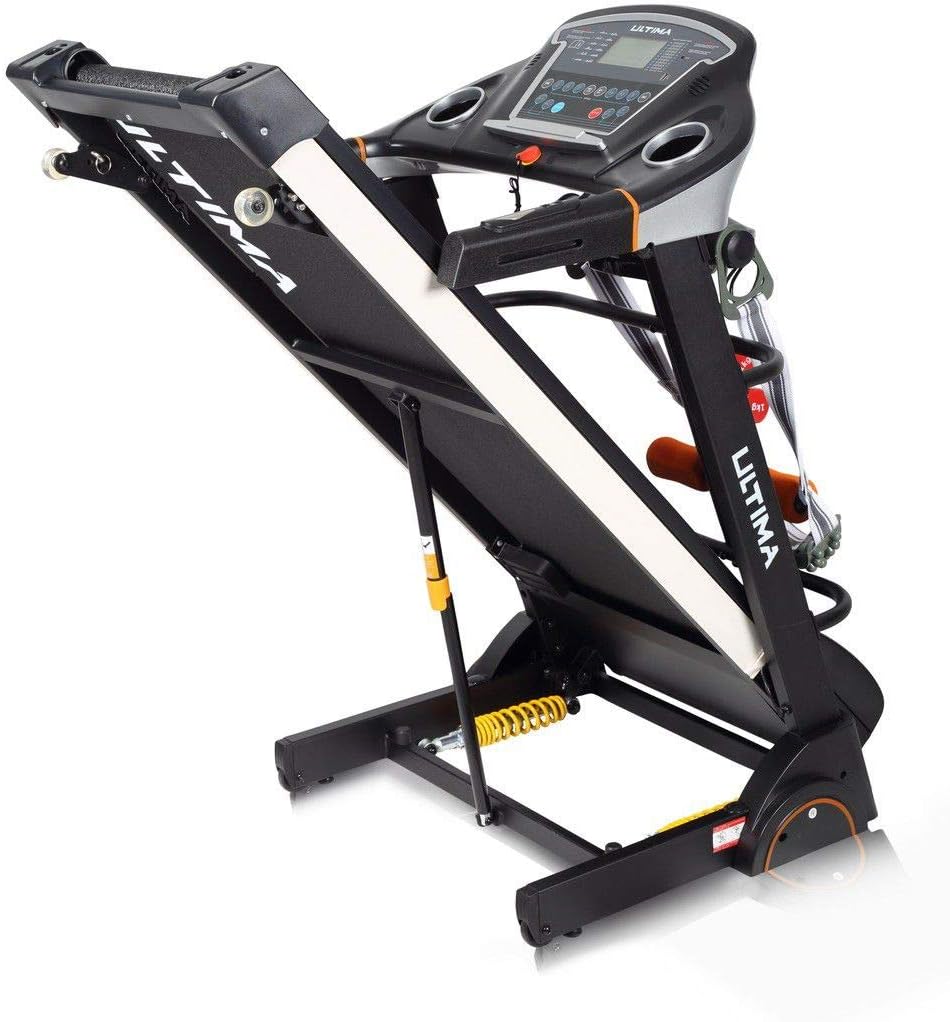
Imej 3.1: The UlTiMa AC-3500 treadmill in its unfolded, ready-to-use position, showing the running deck and console.

Imej 3.2: The UlTiMa AC-3500 treadmill in its folded position, demonstrating its space-saving design for storage.
4. Arahan Operasi
Before each use, ensure the safety key is properly attached to the console and your clothing.
Operasi asas:
- Hidupkan kuasa: Plug the treadmill into a grounded outlet and flip the main power switch (usually located near the front of the treadmill base).
- Lampirkan Kunci Keselamatan: Clip the safety key to your clothing and place the magnetic end onto the designated area on the console. The display will illuminate.
- Mulakan Senaman: Press the "START" button. The belt will begin to move at a low speed after a short countdown.
- Laraskan Kelajuan: Use the "SPEED +" and "SPEED -" buttons on the console or handrails to increase or decrease the running speed.
- Laraskan Kecondongan: The AC-3500 features a 3-level manual incline. To adjust, stop the treadmill, lift the running deck, and manually adjust the incline pins at the rear of the treadmill. Ensure both sides are set to the same level before resuming exercise.
- Stop Exercise: Press the "STOP" button to gradually slow down and stop the belt. In an emergency, pull the safety key to immediately stop the treadmill.
- Matikan: After your workout, remove the safety key, and turn off the main power switch. Unplug the treadmill if it will not be used for an extended period.
5. Penyelenggaraan
Penyelenggaraan tetap memastikan umur panjang dan prestasi optimum treadmill anda.
Pembersihan:
- Lap konsol dan permukaan lain dengan iklanamp kain selepas setiap penggunaan.
- Jangan gunakan pembersih atau pelarut yang melelas.
- Keep the area around the treadmill clean and free of dust.
Pelinciran tali pinggang:
The UlTiMa AC-3500 features automatic lubrication. Refer to the specific instructions provided with your treadmill for details on how to check and refill the lubrication system. Generally, check the lubrication level every 3-6 months depending on usage.
Pelarasan Tali Pinggang:
The running belt may require occasional adjustment to ensure it remains centered and properly tensioned. If the belt slips or drifts to one side, consult the detailed instructions in the full manual or contact customer support.
6. Penyelesaian masalah
Bahagian ini menangani isu biasa yang mungkin anda hadapi. Untuk masalah yang tidak disenaraikan di sini, hubungi sokongan pelanggan.
| Masalah | Kemungkinan Punca | Penyelesaian |
|---|---|---|
| Treadmill tidak dihidupkan. | Power cord unplugged, main switch off, safety key not in place, circuit breaker tripped. | Check power cord, turn on main switch, ensure safety key is correctly placed, reset circuit breaker. |
| Tali pinggang lari tergelincir. | Belt too loose, worn belt, insufficient lubrication. | Adjust belt tension (refer to full manual), lubricate belt, contact support for belt replacement. |
| Bunyi luar biasa semasa operasi. | Loose components, motor issues, belt friction. | Check and tighten all bolts, lubricate belt, contact customer support if noise persists. |
| Console display not working correctly. | Sambungan kabel longgar, konsol rosak. | Check console cable connections, power cycle the treadmill, contact customer support. |
7. Spesifikasi
| Ciri | Perincian |
|---|---|
| Jenama | UlTiMa |
| Model | AC-3500 |
| Motor | 2.75 hp DC |
| Julat Kelajuan | 1-14 km/j |
| Saiz Tali Pinggang Larian | 126 x 43 cm |
| condong | 3-level Manual |
| Berat Pengguna Maksimum | 110 kg |
| Kelas Produk | kegunaan rumah |
| Ciri-ciri Utama | Foldable, Manual Incline, Automatic Lubrication, Portable |
| Penggunaan yang Disyorkan | Bersenam |
| Khalayak Sasaran | Young, Adult |
8. Waranti dan Sokongan
For warranty information, please refer to the warranty card included with your product or visit the official UlTiMa website. If you require technical assistance, spare parts, or have any questions regarding your UlTiMa AC-3500 treadmill, please contact UlTiMa customer support. Have your model number and purchase date ready when contacting support.
Contact information for UlTiMa customer support can typically be found on the manufacturer's webtapak atau pada resit pembelian anda.


