pengenalan
The Altec Lansing Evolution 2 Bluetooth Headphones (Model MZX668-BLK) are designed to provide a high-quality audio experience with convenient wireless connectivity. Featuring 40mm neodymium drivers, these headphones deliver powerful and crisp sound. With up to 8 hours of battery life and soft cushioned earcups, they are built for extended listening comfort. The integrated controls allow for easy navigation of music and calls, and the "Just Ask" feature provides direct access to Siri and Google Voice Assistant.
Ciri-ciri utama termasuk:
- Just Ask Integration: Access Siri and Google Voice Assistant directly from your headphones.
- Masa Main Dilanjutkan: Up to 8 hours of battery life for prolonged listening.
- Reka bentuk yang selesa: Soft cushion headband and earcups for all-day wear.
- Bunyi Dinamik: 40mm neodymium drivers for powerful and clear audio.
- Pilihan Berwayar: Includes an AUX-in cable for continued listening when battery runs low.
- Kawalan Mudah: Integrated microphone with wind cancellation, song navigation, and telephony buttons.
Panduan Persediaan
1. Kandungan Pakej
Sebelum anda mula, pastikan semua item terdapat dalam pakej:
- Altec Lansing MZX668-BLK Evolution 2 Bluetooth Headphones
- Kabel Pengecas USB
- 3.5mm AUX-in Cable
- Manual Pengguna (dokumen ini)
2. Mengecas Fon Kepala
For optimal performance, fully charge your headphones before first use.
- Locate the charging port on the headphones.
- Connect the small end of the USB charging cable to the headphone's charging port.
- Connect the large end of the USB charging cable to a USB power source (e.g., computer USB port, USB wall adapter).
- The LED indicator light will illuminate during charging and turn off when charging is complete. A full charge typically takes approximately 2-3 hours.

Imej: Sisi view of the Altec Lansing MZX668-BLK headphones, highlighting the location of the charging port and control buttons on the earcup.
3. Berpasangan Bluetooth
Pasangkan fon kepala anda dengan peranti berkemampuan Bluetooth anda (telefon pintar, tablet, komputer riba).
- Pastikan fon kepala dicas sepenuhnya dan dimatikan.
- Press and hold the Power button on the headphones for approximately 5-7 seconds until the LED indicator light flashes blue and red alternately. This indicates pairing mode.
- Pada peranti anda, pergi ke tetapan Bluetooth.
- Hidupkan Bluetooth dan imbas peranti yang tersedia.
- Select "MZX668-BLK" from the list of found devices.
- Once paired, the LED indicator on the headphones will flash blue slowly, and you will hear an audible confirmation.
- Jika digesa untuk kata laluan, masukkan "0000".
Nota: Fon kepala akan cuba menyambung semula secara automatik ke peranti pasangan terakhir apabila dihidupkan.
Arahan Operasi
1. Hidupkan/Mati Kuasa
- Hidupkan kuasa: Tekan dan tahan butang Kuasa selama 3 saat. LED akan berkelip biru.
- Matikan: Tekan dan tahan butang Kuasa selama 3 saat. LED akan dimatikan.
2. Kawalan Main Semula Muzik

Imej: Depan view of the Altec Lansing MZX668-BLK headphones, showing the layout of the control buttons on the left earcup.
| Butang/Tindakan | Fungsi |
|---|---|
| Butang Main/Jeda (Center button) | Tekan sekali untuk Main/Jeda muzik. |
| Kelantangan Naik (+) | Tekan sekali untuk meningkatkan kelantangan. |
| Perlahankan suara (-) | Tekan sekali untuk mengurangkan kelantangan. |
| Next Track (>>) | Press and hold Volume Up (+) for 2 seconds. |
| Previous Track (<<) | Press and hold Volume Down (-) for 2 seconds. |
3. Pengurusan Panggilan
| Butang/Tindakan | Fungsi |
|---|---|
| Jawab/Tamatkan Panggilan (Center button) | Press once during an incoming call to answer. Press once during a call to end. |
| Tolak Panggilan (Center button) | Press and hold for 2 seconds during an incoming call. |
| Dail Semula Nombor Terakhir (Center button) | Double-press quickly. |
4. Voice Assistant (Just Ask)
The "Just Ask" feature allows you to access your smartphone's voice assistant (Siri or Google Assistant) directly through the headphones.
- Ensure your headphones are paired and connected to your smartphone.
- Tekan ke Butang Pembantu Suara (often the Power button, or a dedicated button if present, refer to diagram) once.
- You will hear a prompt, indicating that your voice assistant is active.
- Speak your command clearly into the microphone.
5. Sambungan Berwayar (Mod AUX)
If your headphones run out of battery or you prefer a wired connection, use the included 3.5mm AUX-in cable.
- Plug one end of the 3.5mm AUX-in cable into the AUX port on the headphones.
- Palamkan hujung yang satu lagi ke dalam bicu audio 3.5mm peranti anda.
- The headphones will automatically switch to wired mode. Note that controls on the headphones may not function in wired mode; control playback directly from your device.
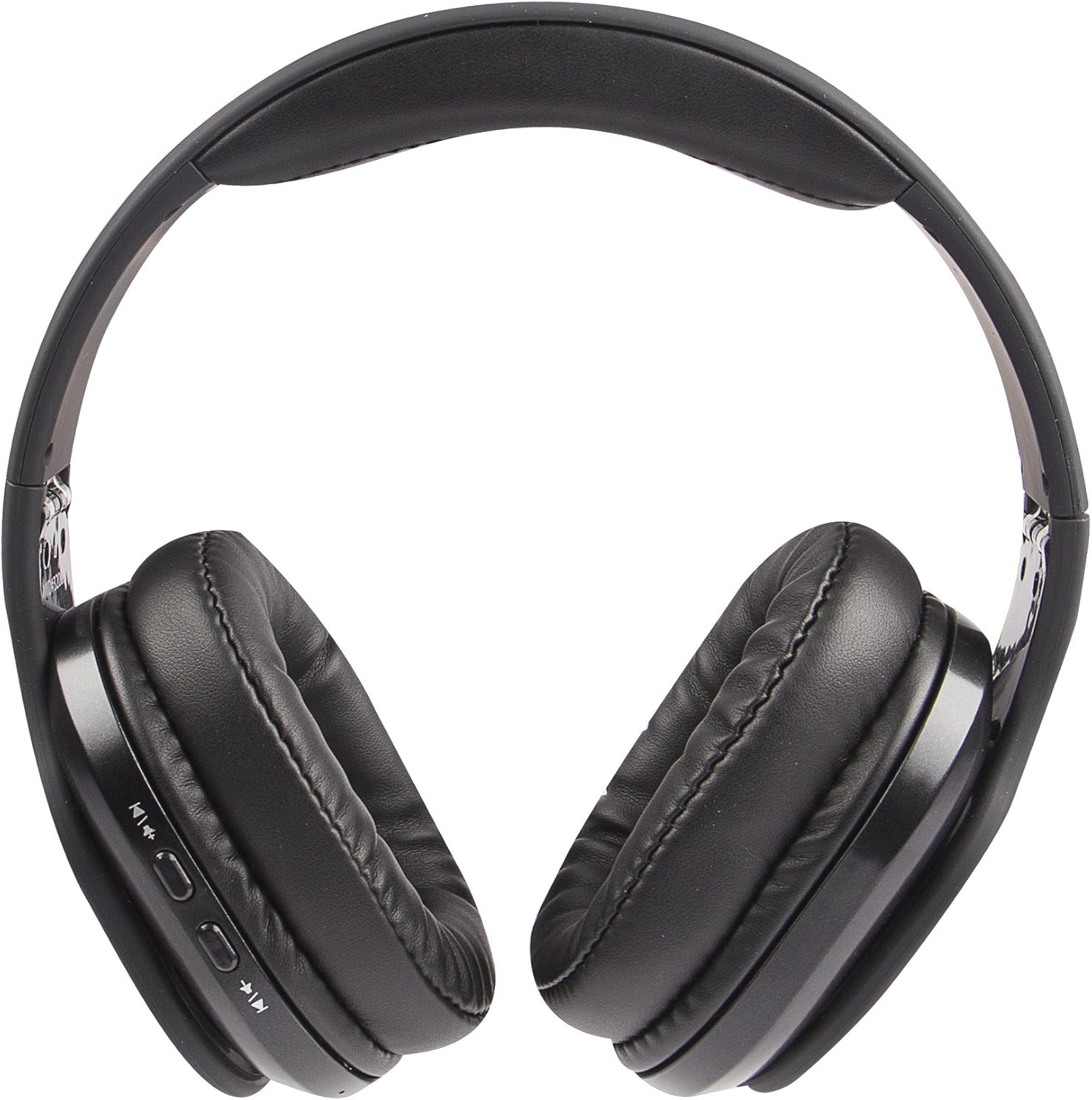
Image: The Altec Lansing MZX668-BLK headphones laid flat, providing a clear view of the earcups and the location of the AUX-in port.
Penyelenggaraan
1. Pembersihan
- Gunakan kain lembut, kering dan tidak berbulu untuk membersihkan permukaan fon kepala.
- Untuk penutup telinga, lap perlahan-lahan dengan sedikitamp cloth if necessary, then dry immediately.
- Do not use abrasive cleaners, alcohol, benzene, or other harsh chemicals, as these may damage the finish or internal components.
- Elakkan mendapatkan kelembapan ke dalam mana-mana bukaan atau port.
2. Penyimpanan
- Simpan fon kepala di tempat yang sejuk dan kering jauh dari cahaya matahari langsung dan suhu yang melampau.
- Avoid storing in areas with high humidity.
- When not in use for extended periods, it is recommended to charge the headphones at least once every three months to maintain battery health.

Image: A person wearing the Altec Lansing MZX668-BLK headphones while sitting outdoors, demonstrating typical usage and comfort.
3. Penjagaan Bateri
- Jangan dedahkan bateri kepada haba yang berlebihan, seperti cahaya matahari langsung, api atau yang serupa.
- Do not attempt to replace the battery yourself. Contact customer support if battery issues arise.
- Buang bateri mengikut peraturan tempatan.
Menyelesaikan masalah
| Masalah | Kemungkinan Punca | Penyelesaian |
|---|---|---|
| Fon kepala tidak dihidupkan. | Caj bateri rendah atau tiada. | Charge the headphones fully using the provided USB cable. |
| Tidak boleh berpasangan dengan peranti. | Headphones not in pairing mode; Device Bluetooth off; Too far from device; Interference. | Ensure headphones are in pairing mode (flashing blue/red). Turn Bluetooth off/on on your device. Move headphones closer to device. Avoid strong Wi-Fi signals or other Bluetooth devices. |
| Tiada bunyi atau kelantangan rendah. | Volume too low on headphones or device; Not properly connected; Incorrect audio output selected. | Increase volume on both headphones and device. Re-pair the headphones. Check audio output settings on your device. If using AUX cable, ensure it's fully inserted. |
| Sound is distorted or cuts out. | Too far from device; Obstructions; Low battery. | Move closer to your device (within 30 feet/10 meters). Ensure no major obstructions. Charge the headphones. |
| Voice Assistant not responding. | Not connected to smartphone; Voice assistant not enabled on phone. | Ensure headphones are paired and connected to your smartphone. Check your smartphone's settings to ensure Siri/Google Assistant is enabled. |

Image: A person wearing the Altec Lansing MZX668-BLK headphones in a winter environment, illustrating their use in various conditions.
Spesifikasi
| Ciri | Perincian |
|---|---|
| Nama Model | MZX668-BLK |
| Jenama | Altec Lansing |
| Teknologi Ketersambungan | Wayarles (Bluetooth) |
| Teknologi Komunikasi Tanpa Wayar | Bluetooth |
| Julat Bluetooth | 10 Meter (30 Kaki) |
| Saiz Pemacu Audio | 40 Milimeter |
| Jenis Pemacu Audio | Pemandu Dinamik |
| Julat Kekerapan | 20 Hz - 20,000 Hz |
| Hayat Bateri | Sehingga 8 Jam |
| Bateri Diperlukan | 1 bateri Lithium Ion (termasuk) |
| Jack Fon Kepala | 3.5 mm Jack (for wired use) |
| Jenis Kawalan | Kawalan Suara, Kawalan Butang |
| Peranti Serasi | Cellphones, Laptops, Desktops, Tablets, Telephones, Smart Speaker |
| Dimensi Produk | 8.27 x 3.15 x 6.69 inci |
| Berat Barang | 0.007 auns (lebih kurang 0.21 Gram) |
| warna | Hitam |
| UPC | 021331979483 |
| Pengeluar | Sakar International, Inc. |

Imej: Side profile of the Altec Lansing MZX668-BLK headphones, illustrating the adjustable headband and comfortable earcup design.
Waranti dan Sokongan
Maklumat Waranti
Altec Lansing products are covered by a standard manufacturer's warranty against defects in materials and workmanship. The specific warranty period may vary by region and product. Please retain your proof of purchase for warranty claims.
For detailed warranty terms and conditions, please refer to the warranty card included with your product or visit the official Altec Lansing webtapak.
Sokongan Pelanggan
If you encounter any issues or have questions regarding your Altec Lansing MZX668-BLK Evolution 2 Bluetooth Headphones that are not covered in this manual, please contact Altec Lansing customer support.
- Sokongan dalam talian: Visit the Altec Lansing support page on their official webtapak untuk Soalan Lazim, panduan penyelesaian masalah dan borang hubungan.
- Sokongan Telefon: Rujuk maklumat perhubungan yang diberikan pada pembungkusan produk atau maklumat rasmi webtapak untuk waktu sokongan telefon.
When contacting support, please have your product model number (MZX668-BLK) and proof of purchase ready.


