1. Pengenalan
The ViewSonic VP2458 is a professional-grade 24-inch (23.8-inch viewable) Full HD monitor designed for enterprise professionals and home office users. It features 100% sRGB color coverage and Delta E <2 color accuracy, ensuring precise color performance. SuperClear IPS panel technology provides wide-angle viewing and vivid colors, while the 4-sided frameless design offers a seamless viewing experience, ideal for multi-monitor setups. Advanced ergonomic features, including tilt, swivel, pivot, and height adjustment, ensure a comfortable viewing experience from any vantage point. Extensive connectivity options such as VGA, HDMI, and DisplayPort allow for versatile connections to various HD and analog devices. Additionally, Flicker-Free technology and a Blue Light Filter are integrated to minimize eyestrain during extended viewdalam tempoh.
2. Apa yang ada di dalam Kotak
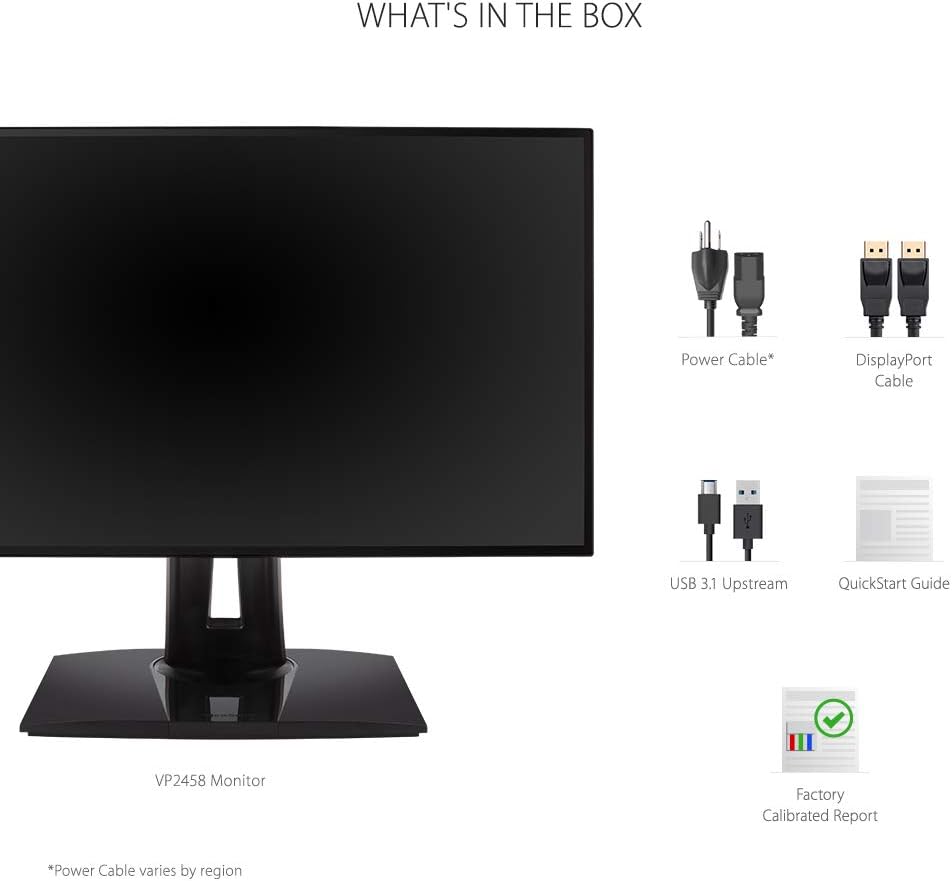
Upon unpacking your ViewSonic VP2458 monitor, please ensure all the following items are present:
- LCD Display (ViewSonic VP2458 Monitor)
- Kabel Kuasa
- Kabel DP ke DP
- Kabel Hulu USB 3.1
- Panduan Mula Pantas
- Laporan Ditentukur Kilang
3. Persediaan
3.1 Perhimpunan Monitor
The ViewSonic VP2458 monitor is designed for easy assembly. The stand typically attaches without the need for tools, often using a simple click-and-lock mechanism. For detailed instructions, refer to the included Quick Start Guide.

3.2 Menyambung ke Peranti Anda
Connect the monitor to your computer or other devices using the appropriate cables. The VP2458 offers a variety of input options:
- HDMI: Use the provided HDMI cable for high-definition video and audio.
- DisplayPort: Use the provided DisplayPort cable for high-resolution video and audio.
- VGA: Connect older devices using a VGA cable (not included).
- USB 3.1 Huluan: Connect the USB 3.1 upstream cable from your computer to the monitor to enable the monitor's USB downstream ports.
After connecting the cables, plug the power cable into the monitor and a power outlet. Press the power button to turn on the monitor.
4. Arahan Operasi
4.1 Pelarasan Ergonomik
The ViewSonic VP2458 offers advanced ergonomic adjustments to optimize your viewkeselesaan:
- Pelarasan Ketinggian: Raise or lower the monitor to align the top of the screen with your eye level.
- Condong: Laraskan sudut menegak skrin (ke hadapan atau ke belakang) untuk mengurangkan silau dan bertambah baik viewing.
- Pusing: Rotate the monitor horizontally to share your screen or adjust your viewing angle without moving the base.
- Pivot: Rotate the screen 90 degrees to switch between landscape and portrait orientation, ideal for document viewing atau pengekodan.


4.2 Tetapan dan Ciri Paparan
The VP2458 monitor offers several features to enhance your visual experience and reduce eye fatigue:
- 100% sRGB & Delta E <2 Color Accuracy: Ensures accurate and consistent color reproduction, crucial for graphic design and photography.
- SuperClear IPS Panel: Provides wide 178-degree viewing angles, maintaining consistent image quality from various positions.
- Teknologi Tanpa Kelipan: Eliminates screen flickering, which can cause eyestrain and discomfort.
- Penapis Cahaya Biru: Reduces harmful blue light emissions, helping to alleviate eye fatigue during prolonged use.


4.3 Menu Paparan Pada Skrin (OSD).
The OSD menu allows you to adjust various monitor settings. Typically, buttons located on the bottom or rear of the monitor provide access to the OSD. Use these buttons to navigate through options such as brightness, contrast, color modes, input selection, and more. Refer to the Quick Start Guide for specific button functions and menu navigation.
5. Penyelenggaraan
Untuk memastikan jangka hayat dan prestasi optimum anda ViewMonitor Sonic VP2458, ikuti garis panduan penyelenggaraan ini:
- Membersihkan Skrin: Lap skrin perlahan-lahan dengan kain lembut yang tidak berbulu. Untuk tanda degil, ringankan dampLap kain dengan air atau pembersih skrin yang lembut dan tidak kasar. Elakkan menggunakan pembersih berasaskan alkohol atau bahan kimia yang keras.
- Membersihkan Casing: Gunakan kain lembut dan kering untuk membersihkan monitor casing.
- Pengudaraan: Pastikan bukaan pengudaraan pada monitor tidak disekat untuk mengelakkan terlalu panas.
- Matikan: Always turn off the monitor when not in use for extended periods.
6. Penyelesaian masalah
Jika anda menghadapi masalah dengan anda ViewSonic VP2458 monitor, try the following troubleshooting steps:
- Tiada Kuasa: Pastikan kabel kuasa disambungkan dengan kukuh pada monitor dan soket kuasa yang berfungsi. Periksa sama ada lampu penunjuk kuasa menyala.
- Tiada Imej/Isyarat: Verify that the video cable (HDMI, DisplayPort, or VGA) is correctly connected to both the monitor and your computer. Ensure the correct input source is selected via the OSD menu.
- Fuzzy or Unclear Image: Check the display resolution settings on your computer to ensure they match the monitor's native resolution (1920x1080).
- Color Problems: Reset the monitor's color settings to factory defaults via the OSD menu. Ensure your graphics card drivers are up to date.
- Isu Bunyi (jika berkenaan): Check the volume settings on both the monitor and your computer. Ensure the audio cable (if separate) is connected or that audio is being transmitted via HDMI/DisplayPort.
For further assistance, consult the detailed troubleshooting section in the Quick Start Guide or visit the ViewSokongan sonik webtapak.
7. Spesifikasi
Spesifikasi teknikal utama untuk ViewSonic VP2458 monitor:
| Ciri | Spesifikasi |
|---|---|
| Nombor Model | VP2458 |
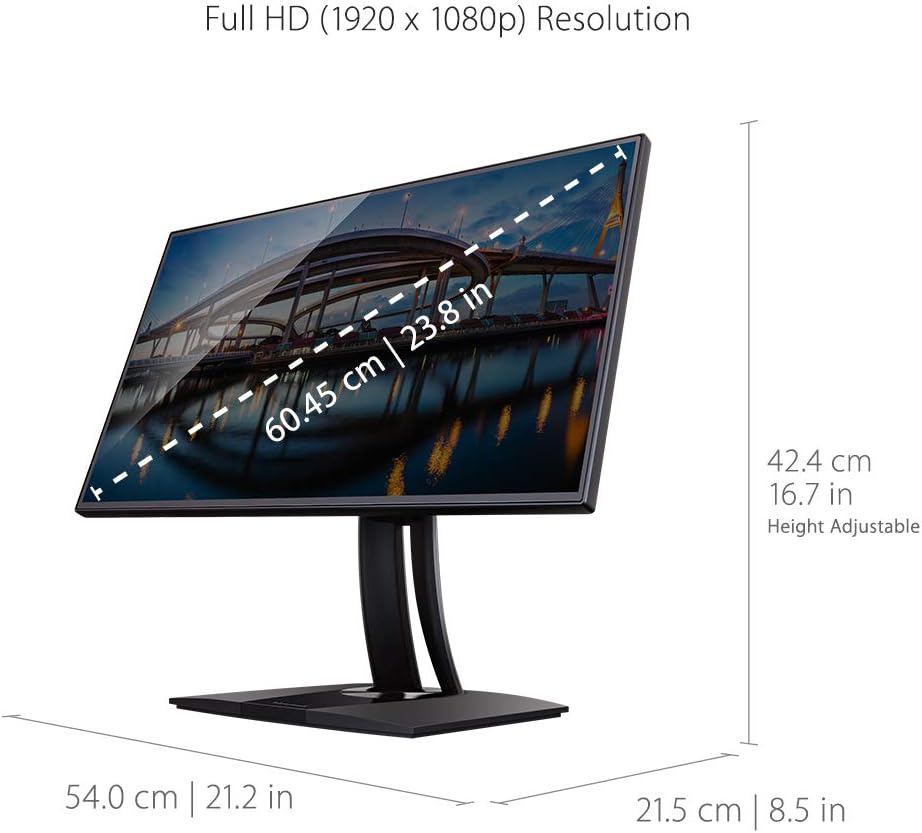
| Saiz Skrin | 24 Inci (23.8" viewmampu) |
| Jenis Panel | IPS |
| Resolusi Asli | HD Penuh (1920 x 1080) |
| Nisbah Aspek | 16:9 |
| Kadar Segar Semula | 60Hz |
| Warna Gamut | 100% sRGB |
| Ketepatan Warna | Delta E <2 |
| Ketersambungan | 1x HDMI 1.4, 1x VGA, 1x DisplayPort In, 3x USB 3.1 (2 up/1 down), 5x USB (4 up/1 down) |
| Ergonomik | Tilt, Swivel, Pivot, Height Adjust |
| VESA Mount Serasi | ya |
| Dimensi (LxWxH) | 8.5 x 21.2 x 16.7 inci |
| Berat Barang | 12.1 paun |
8. Waranti dan Sokongan
For warranty information, please refer to the warranty card included in your product packaging or visit the official ViewSonic website. For technical support, driver downloads, and additional user guides, please visit the ViewSonic support page for your specific model.
You can also find helpful resources and contact information on the ViewKedai Sonic di Amazon.


