1. Produk Lebihview
The MIFA A20 is a portable Bluetooth speaker designed to deliver high-quality audio with powerful bass and True Wireless Stereo (TWS) capabilities. Its robust aluminum alloy housing ensures durability and a premium aesthetic. This manual will guide you through its features, setup, and operation.


2. Ciri-ciri
- Exceptional Wireless Stereo: Connect two A20 speakers via a single device for huge stereo sound and double the volume; two exposed radiators let you see the sound.
- Impressive Bass: Dual drivers, triple radiators and Class-D chips ensure distortion-free crystal loud sound and strong bass with 30W peak power output.
- Long Playback: 4000 mAh rechargeable Li-ion battery offers 12 hours playtime at 70% volume; LED indicators to tell you the battery remaining; can play while charging.
- Endless Audio Options: Aux capability for non-Bluetooth devices; 32GB Micro SD card supported to save your phone's battery; built-in microphone for HD hands-free calls.
- Bluetooth 4.2: Instantly pairs with your Smartphone, Tablet, Laptop, iPhone, Samsung, etc.; auto-reconnects to the last used device within 66 feets away.
3. Kandungan Pakej
Sila tandai kotak untuk item berikut:
- MIFA A20 Bluetooth Speaker
- Kabel Pengecas USB
- Kabel Audio 3.5mm (AUX)
- Manual Pengguna
4. Product Diagram and Controls
Biasakan diri anda dengan susun atur dan butang kawalan pembesar suara.
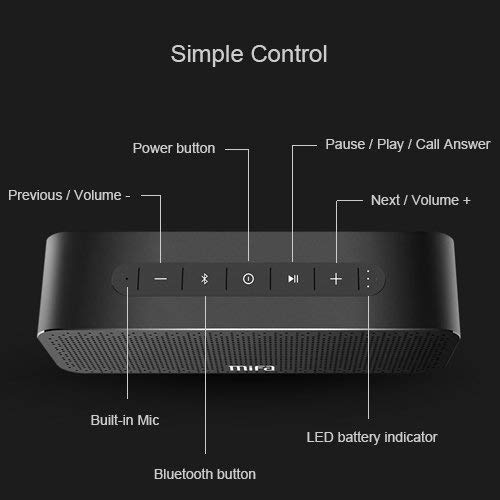
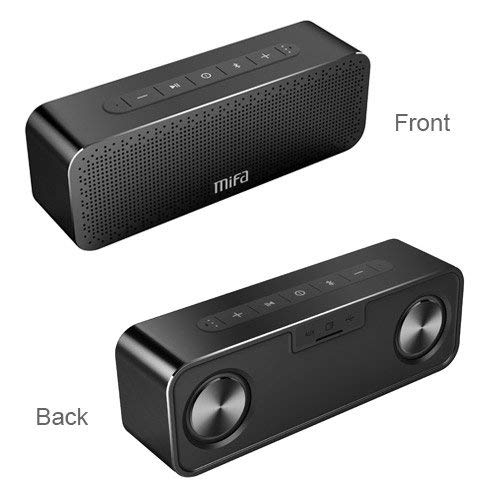
Butang Kawalan:
- Butang Kuasa: Tekan dan tahan untuk menghidupkan/mematikan.
- Butang Bluetooth: Tekan untuk memasuki mod berpasangan Bluetooth.
- Play/Pause / Call Answer Button: Press to play/pause music; press to answer/end calls.
- Previous / Volume - Button: Press to go to previous track; press and hold to decrease volume.
- Next / Volume + Button: Press to go to next track; press and hold to increase volume.
Indicators and Ports:
- Mikrofon terbina dalam: Untuk panggilan bebas tangan.
- Penunjuk Bateri LED: Menunjukkan status bateri.
- Port Pengecasan: Port USB untuk mengecas.
- Input AUX: Bicu 3.5mm untuk sambungan audio berwayar.
- Slot Kad Mikro SD: For playing music directly from a Micro SD card (up to 32GB).
5. Persediaan
5.1 Mengecas Speaker
Before first use, fully charge the speaker. Connect the provided USB charging cable to the speaker's charging port and the other end to a USB power adapter (not included) or a computer's USB port. The LED indicator will show charging status and turn off when fully charged.
5.2 Berpasangan Bluetooth
- Turn on the MIFA A20 speaker by pressing and holding the Power button.
- The speaker will automatically enter Bluetooth pairing mode, indicated by a flashing blue LED. If not, press the Bluetooth button.
- Pada peranti anda (telefon pintar, tablet, komputer riba), dayakan Bluetooth dan cari peranti yang tersedia.
- Select "MIFA A20" from the list of devices.
- Setelah dipasangkan, penunjuk LED akan bertukar menjadi biru pekat dan anda akan mendengar bunyi pengesahan.
- The speaker will automatically reconnect to the last paired device when turned on, if within range.
5.3 Penggandingan Stereo Tanpa Wayar Sebenar (TWS)
To achieve a wider stereo soundstage, you can pair two MIFA A20 speakers together.
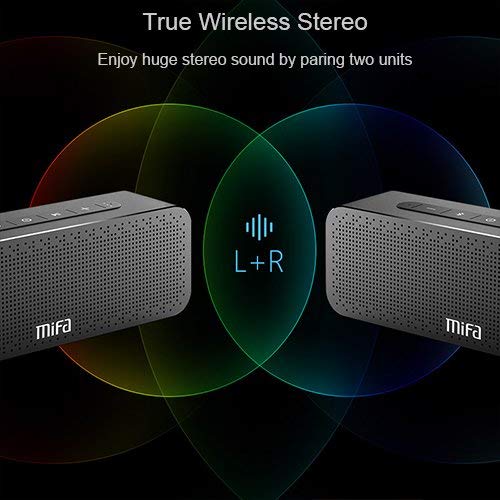
- Ensure both MIFA A20 speakers are turned on and not connected to any Bluetooth device.
- On one speaker (this will be the primary speaker), press and hold the Bluetooth button until you hear a prompt indicating TWS pairing mode.
- The two speakers will automatically search for and connect to each other. This may take a few seconds.
- Once connected, you will hear a confirmation sound, and the LED indicators on both speakers will change to reflect the TWS connection.
- Sekarang, sambungkan peranti anda kepada pembesar suara utama melalui Bluetooth seperti yang diterangkan dalam bahagian 5.2. Audio akan dimainkan melalui kedua-dua pembesar suara dalam stereo.
5.4 Using Micro SD Card
Insert a Micro SD card (up to 32GB, formatted to FAT32) with your music files into the Micro SD card slot. The speaker will automatically switch to Micro SD card mode and begin playing music.
5.5 Menggunakan Input AUX
Connect one end of the 3.5mm audio cable to the AUX input port on the speaker and the other end to the audio output jack of your non-Bluetooth device. The speaker will automatically switch to AUX mode.
6. Mengendalikan Speaker
6.1 Main balik Muzik
- Main/Jeda: Tekan butang Main/Jeda.
- Kelantangan: Tekan dan tahan butang Kelantangan +.
- Perlahankan suara: Tekan dan tahan butang Kelantangan -.
- Lagu Seterusnya: Short press the Next / Volume + button.
- Trek Sebelumnya: Short press the Previous / Volume - button.
6.2 Panggilan Bebas Tangan
Apabila disambungkan melalui Bluetooth, pembesar suara boleh digunakan untuk panggilan bebas tangan.
- Jawab Panggilan: Press the Play/Pause / Call Answer button.
- Tamatkan Panggilan: Press the Play/Pause / Call Answer button during a call.
- Tolak Panggilan: Press and hold the Play/Pause / Call Answer button when a call comes in.
7. Penyelenggaraan
- Pembersihan: Gunakan kain lembut dan kering untuk membersihkan pembesar suara. Jangan gunakan pembersih atau pelarut yang kasar.
- Penjagaan Bateri: Untuk memanjangkan hayat bateri, elakkan daripada menyahcas sepenuhnya pembesar suara dengan kerap. Mengecasnya dengan kerap, walaupun tidak digunakan untuk tempoh yang lama.
- Storan: Simpan pembesar suara di tempat yang sejuk dan kering jauh dari cahaya matahari langsung dan suhu yang melampau.
- Tahan Air: The speaker is designed to be waterproof (as per specifications). However, avoid submerging it in water for extended periods or exposing it to high-pressure water jets. Ensure charging port cover is securely closed when near water.
8. Penyelesaian masalah
| Masalah | Kemungkinan Punca | Penyelesaian |
|---|---|---|
| Speaker tidak dihidupkan | Bateri lemah | Cas pembesar suara sepenuhnya. |
| Tiada bunyi | Kelantangan terlalu rendah; Peranti tidak disambungkan; Mod input salah | Increase volume on speaker and device; Ensure successful Bluetooth pairing or AUX connection; Check if correct input mode (Bluetooth/AUX/SD card) is selected. |
| Tidak boleh berpasangan melalui Bluetooth | Speaker not in pairing mode; Device Bluetooth off; Too far from speaker; Interference | Ensure speaker is in pairing mode (flashing blue LED); Turn on Bluetooth on your device; Move device closer to speaker; Turn off other Bluetooth devices nearby. |
| Bunyi herot | Volume too high; Low battery; Device too far | Reduce volume; Charge speaker; Move device closer to speaker. |
| Gandingan TWS gagal | Speakers already connected to a device; Not in TWS pairing mode | Disconnect both speakers from any Bluetooth devices; Ensure both speakers are in TWS pairing mode. |
9. Spesifikasi

| Ciri | Perincian |
|---|---|
| Nama Model | A20 |
| bahan | aluminium |
| Jenis Pembesar Suara | Woofer |
| Teknologi Ketersambungan | Bluetooth, Auxiliary, Wireless |
| Versi Bluetooth | 4.2 |
| Julat Tanpa Wayar | Sehingga 66 kaki (20 meter) |
| Kuasa Output Maksimum Pembesar Suara | 30 Watt |
| Mod Keluaran Audio | Stereo |
| Konfigurasi Saluran Bunyi Sekeliling | 2.0 |
| Kapasiti Bateri | 4000 mAh |
| Hayat Bateri | Sehingga 12 Jam (pada volum 70%) |
| Sokongan Kad SD Mikro | Sehingga 32GB |
| Mikrofon Terbina dalam | ya |
| Adakah Kalis Air | ya |
| warna | Hitam |
10. Waranti dan Sokongan
Maklumat Waranti
The MIFA A20 Bluetooth Speaker comes with a Waranti 30 hari dari tarikh pembelian, meliputi kecacatan pembuatan. Sila simpan bukti pembelian anda untuk tuntutan waranti.
Sokongan Pelanggan
For any questions, technical assistance, or warranty inquiries, please contact MIFA customer support through the retailer's platform or the official MIFA weblaman web. Sila sediakan model produk dan butiran pembelian anda semasa menghubungi sokongan.


