1. Pengenalan
Terima kasih kerana membeliasing the MIFA A30 Bluetooth Speaker. This manual provides essential information for setting up, operating, and maintaining your device. Please read it thoroughly before use to ensure optimal performance and longevity of your speaker.
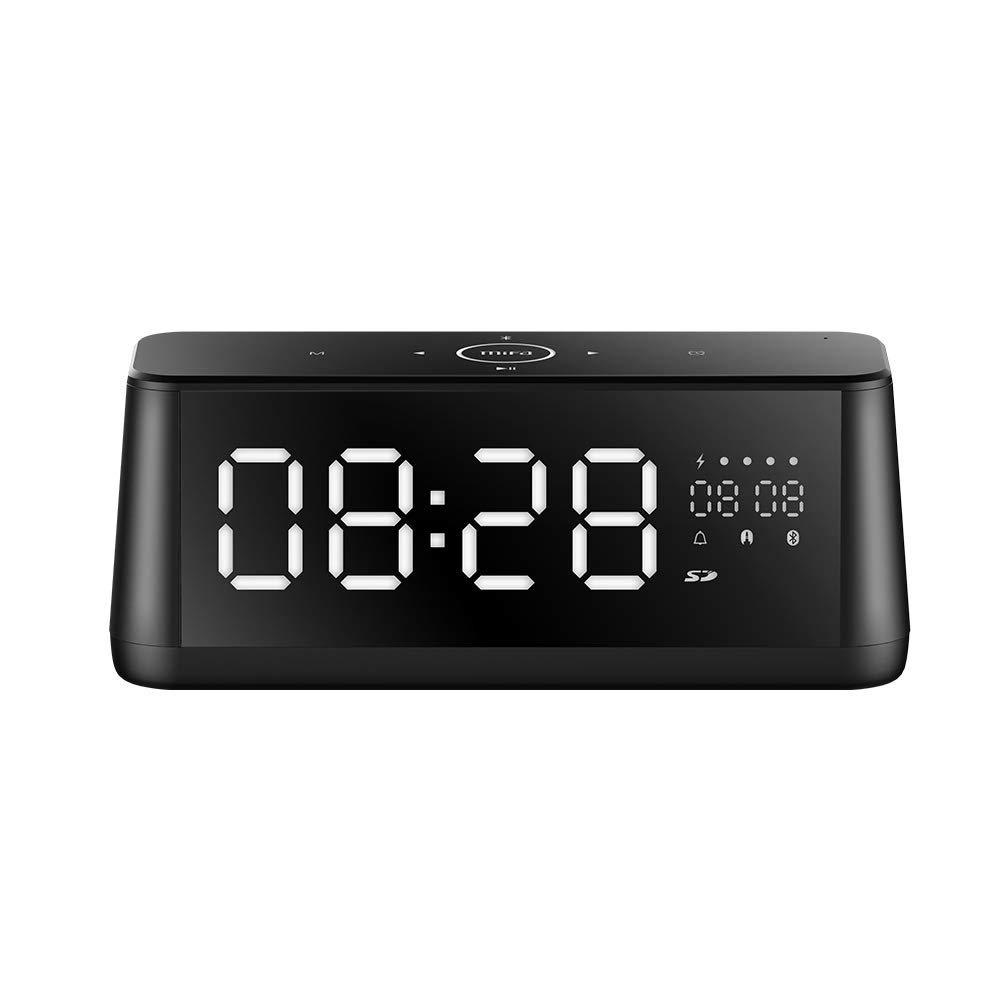
Imej 1.1: Depan view of the MIFA A30 Bluetooth Speaker, displaying the time on its large LED screen.
2. Maklumat Keselamatan
- Jangan dedahkan pembesar suara kepada suhu yang melampau, cahaya matahari langsung atau kelembapan yang tinggi.
- Elakkan daripada menjatuhkan atau menundukkan pembesar suara kepada impak yang kuat.
- Do not disassemble, repair, or modify the device yourself. Contact authorized service personnel for any repairs.
- Keep the speaker away from water and other liquids, despite its waterproof rating, to prevent damage to ports when open.
- Gunakan hanya kabel pengecas dan penyesuai yang dinyatakan.
- Bersihkan pembesar suara dengan kain lembut dan kering. Jangan gunakan pembersih yang kasar.
3. Kandungan Pakej
Sila semak pakej untuk item berikut:
- MIFA A30 Bluetooth Speaker
- Kabel Pengecas USB
- Kabel Audio 3.5mm
- Manual Pengguna (dokumen ini)
4. Produk Lebihview
4.1. Komponen
The MIFA A30 speaker features a robust design with advanced audio components for high-quality sound reproduction.

Imej 4.1: Meletup view illustrating the internal components of the MIFA A30, including two 15-watt drivers and two low-frequency passive radiators.
4.2. Control Panel and Ports
The speaker's top panel features capacitive touch controls, and the rear panel houses various connectivity ports.
Imej 4.2: Atas-bawah view of the MIFA A30 control panel, indicating the functions of each touch button for mode, playback, volume, and clock adjustment.
- Butang M (Mod): Short press to switch between Bluetooth, TF Card, and AUX modes.
- Kawalan Bluetooth: Long press to turn off Bluetooth, short press to turn on.
- Butang Lagu Sebelumnya: Tekan pendek untuk pergi ke trek sebelumnya.
- Play/Pause/Hands-Free Button: Tekan sebentar untuk main/jeda muzik. Tekan sebentar untuk jawab/tamatkan panggilan. Tekan lama untuk tolak panggilan.
- Butang Laluan Seterusnya: Tekan pendek untuk pergi ke trek seterusnya.
- Butang Jam: Long press for clock adjustment.
- Kelantangan: Putar mengikut arah jam untuk meningkatkan kelantangan.
- Perlahankan suara: Putar lawan arah jam untuk mengurangkan kelantangan.
- Mic: Mikrofon terbina dalam untuk panggilan bebas tangan.
- Paparan led: Shows time, date, battery level, and current mode.
5. Persediaan
5.1. Mengisi Speaker
Before first use, fully charge the speaker. Connect the provided USB charging cable to the speaker's charging port and the other end to a USB power adapter (not included) or a computer's USB port. The LED display will indicate charging status.
5.2. Menghidupkan/Mematikan
- Untuk Menghidupkan: Press and hold the Play/Pause button until the LED display lights up.
- Untuk Mematikan: Press and hold the Play/Pause button until the LED display turns off. The speaker will automatically screen out and power off to save battery after a period of inactivity.
6. Arahan Operasi
6.1. Berpasangan Bluetooth
- Ensure the speaker is powered on and in Bluetooth mode (indicated by the Bluetooth icon on the LED display). If not, short press the 'M' button to switch to Bluetooth mode.
- Pada telefon pintar atau tablet anda, dayakan Bluetooth dan cari peranti yang tersedia.
- Select "MIFA A30" from the list of devices.
- Setelah dipasangkan, pembesar suara akan mengeluarkan bunyi pengesahan dan ikon Bluetooth pada paparan akan berhenti berkelip.
- The speaker will automatically re-connect to the last paired device when powered on, if the device is within range.
6.2. Main balik Audio
- Main/Jeda: Tekan sebentar butang Main/Jeda.
- Lagu Seterusnya: Short press the Next Track button.
- Trek Sebelumnya: Short press the Previous Track button.
- Pelarasan Kelantangan: Putar kawalan kelantangan mengikut arah jam untuk meningkatkan kelantangan, lawan arah jam untuk mengurangkan kelantangan.
6.3. Panggilan Bebas Tangan
Apabila disambungkan melalui Bluetooth ke telefon pintar:
- Jawab Panggilan: Tekan sebentar butang Main/Jeda.
- Tamatkan Panggilan: Tekan sebentar butang Main/Jeda semasa panggilan.
- Tolak Panggilan: Long press the Play/Pause button when a call comes in.
6.4. Main Semula Kad TF
- Insert a Micro-SD (TF) card with supported audio files (FLAC/APE/MP3/WMA/WAV) into the TF card slot.
- Short press the 'M' button to switch to TF Card mode. The speaker will automatically begin playing music from the card.
6.5. Input AUX
- Connect one end of the 3.5mm audio cable to the speaker's AUX input port and the other end to the audio output of your device (e.g., MP3 player, computer).
- Short press the 'M' button to switch to AUX mode.
- Audio kini akan dimainkan melalui pembesar suara daripada peranti anda yang disambungkan.
6.6. Clock and Display Settings
- Pelarasan Jam: Long press the Clock button to enter time setting mode. Use the Next/Previous buttons to adjust values and the Play/Pause button to confirm.
- Display Luminance: The LED display has 7 adjustable luminance levels. Refer to the full product documentation for specific adjustment steps, typically involving short presses of the Clock button or a combination with volume controls.
7. Penyelenggaraan
- Pembersihan: Wipe the speaker's surface with a soft, dry, lint-free cloth. Do not use liquid or aerosol cleaners.
- Storan: Apabila tidak digunakan untuk tempoh yang lama, simpan pembesar suara di tempat yang sejuk dan kering, jauh dari cahaya matahari langsung dan suhu yang melampau.
- Penjagaan Bateri: Untuk memanjangkan hayat bateri, elakkan daripada menyahcas sepenuhnya bateri dengan kerap. Cas pembesar suara dengan kerap, walaupun tidak digunakan.
8. Penyelesaian masalah
| Masalah | Kemungkinan Punca | Penyelesaian |
|---|---|---|
| Speaker tidak dihidupkan. | Bateri lemah. | Cas pembesar suara selama sekurang-kurangnya 2 jam. |
| Tiada bunyi. | Kelantangan terlalu rendah; mod salah; peranti tidak disambungkan. | Increase speaker and device volume. Ensure correct mode (Bluetooth/AUX/TF Card). Re-pair Bluetooth device or check AUX cable connection. |
| Gandingan Bluetooth gagal. | Pembesar suara tidak dalam mod berpasangan; peranti terlalu jauh; gangguan. | Ensure speaker is in Bluetooth mode. Move device closer to speaker. Turn off other Bluetooth devices. Try forgetting "MIFA A30" on your device and re-pairing. |
| TF Card not playing. | Mod salah; tidak disokong file format; card error. | Switch to TF Card mode. Ensure files are FLAC/APE/MP3/WMA/WAV. Reinsert TF card or try a different card. |
9. Spesifikasi
| Ciri | Perincian |
|---|---|
| Nama Model | A30 |
| Jenis Pembesar Suara | Rak buku |
| Teknologi Ketersambungan | Bluetooth 4.2, Auxiliary (3.5mm), Micro-SD (TF Card) |
| Mod Keluaran Audio | Stereo |
| Kuasa Output Maksimum Pembesar Suara | 30 Watt (2 x pemacu 15W) |
| Peningkatan Bass | Two low-frequency boosters |
| Kapasiti Bateri | 4000 mAh |
| Masa bermain | Up to 10-12 hours (depending on volume and content) |
| Kaedah Kawalan | Panel Sentuh Kapasitif |
| Paparan | 7.2" x 2.8" Mirror LED Screen with 106 LEDs, 7-level adjustable luminance |
| Format Audio yang Disokong | FLAC/APE/MP3/WMA/WAV |
| Mikrofon Terbina dalam | Ya, untuk panggilan bebas tangan |
| Kalis air | Yes (Note: Ensure ports are covered for water resistance) |
| warna | Hitam |
| Jenis Pemasangan | Pemasangan Atas Meja |
10. Waranti dan Sokongan
The MIFA A30 Bluetooth Speaker typically comes with a 30-day warranty from the date of purchase, covering manufacturing defects. Please retain your proof of purchase for warranty claims.
For technical support, troubleshooting assistance beyond this manual, or warranty inquiries, please contact MIFA customer service through their official website or the retailer where the product was purchased. Provide your product model (A30) and purchase details when seeking support.


