1. Pengenalan
Thank you for choosing the Matrix PG 2000i-USB Inverter Generator. This generator is designed to provide reliable and clean power for various applications, from sensitive electronics to power tools. Its inverter technology ensures a pure sine wave output, making it safe for charging smartphones, laptops, and other delicate devices. This manual provides essential information for the safe operation, maintenance, and troubleshooting of your generator.
2. Arahan Keselamatan
Read all safety warnings and instructions carefully before operating the generator. Failure to follow these instructions may result in electric shock, fire, serious injury, or death.
- Bahaya Karbon Monoksida: Generators produce carbon monoxide, a colorless, odorless, poisonous gas. Operate the generator outdoors only, far away from windows, doors, and vents. Never operate indoors or in partially enclosed spaces.
- Bahaya Kebakaran: Gasoline is highly flammable. Refuel in a well-ventilated area with the engine off and cool. Do not smoke or allow flames or sparks near the generator or fuel tank.
- Bahaya Kejutan Elektrik: Do not operate the generator in wet conditions. Ensure all electrical connections are secure and dry. Never touch electrical components with wet hands.
- Permukaan Panas: The generator engine and muffler become very hot during operation and remain hot for a while after stopping. Avoid touching hot surfaces to prevent burns.
- Kanak-kanak dan Haiwan Kesayangan: Jauhkan kanak-kanak dan haiwan peliharaan daripada penjana semasa operasi.
- Pengudaraan yang Betul: Ensure adequate airflow around the generator to prevent overheating.
3. Kandungan Pakej
Your Matrix PG 2000i-USB Inverter Generator package should include the following items:
- Matrix PG 2000i-USB Inverter Generator
- Manual Pengguna
- Perengkuh Palam Pencucuh
- Corong Minyak
- Pemutar skru
- 12V Battery Charging Cables

Figure 3.1: Generator with included accessories.
4. Produk Lebihview
Familiarize yourself with the components of your Matrix PG 2000i-USB Inverter Generator.

Rajah 4.1: Depan view of the Matrix PG 2000i-USB Inverter Generator.
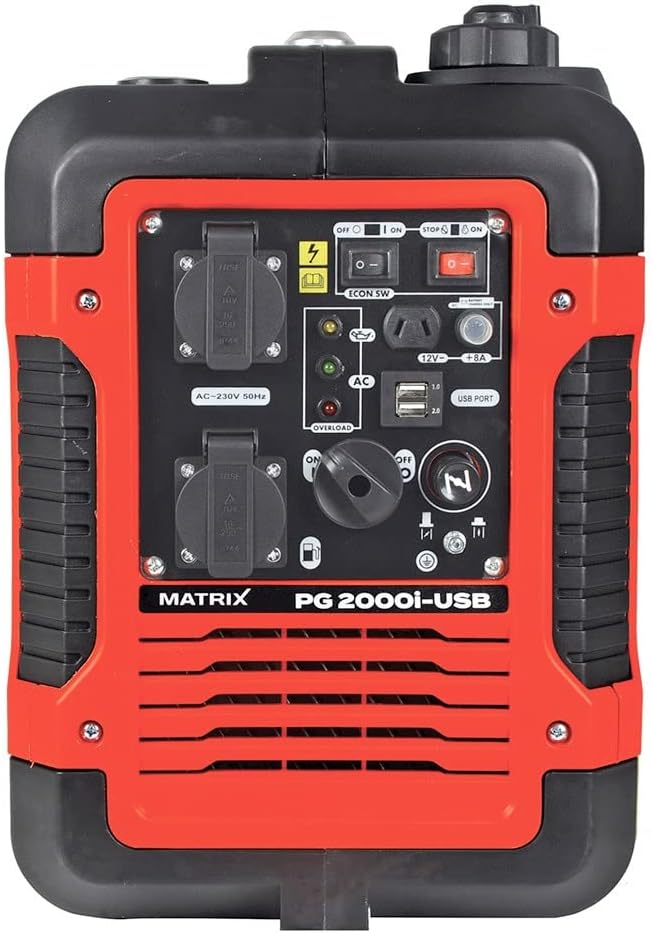
Rajah 4.2: Terperinci view daripada panel kawalan.
Komponen Utama:
- AC 230V Outlets: Two standard 230V outlets for connecting electrical appliances.
- Port USB: Two USB ports (1.0 and 2.0) for charging sensitive devices like smartphones and tablets.
- DC 12V / 8A Output: Untuk mengecas bateri 12V.
- Suis Mesin: Controls the engine's power (ON/OFF).
- Eco Switch: Activates Eco Mode for fuel efficiency and reduced noise.
- Tuas Tercekik: Digunakan untuk menghidupkan enjin sejuk.
- Penutup Bahan Api: For filling the gasoline tank.
- Oil Fill Cap/Dipstick: For adding and checking engine oil.
- Pull Start Handle: Untuk menghidupkan enjin secara manual.
- Lampu Penunjuk: Oil warning, overload warning, AC output indicator.

Figure 4.3: USB ports for charging devices.

Rajah 4.4: Atas view with carrying handle and fuel cap.
5. Persediaan
5.1. Menambah Minyak Enjin
The generator is shipped without engine oil. You must add the correct amount of oil before first use.
- Letakkan penjana pada permukaan yang rata.
- Locate and remove the oil fill cap/dipstick.
- Using the provided funnel, slowly add approximately 330 ml of 15W-40 engine oil. Do not overfill.
- Reinsert the dipstick and check the oil level. It should be at the upper mark.
- Pasang semula penutup isi minyak dengan selamat.
5.2. Menambah Bahan Api
Use unleaded gasoline only. Do not use E85 or mixed fuels. Ensure the engine is off and cool before refueling.
- Buka penutup penutup minyak.
- Carefully pour unleaded gasoline into the fuel tank. The tank capacity is 4 liters.
- Do not fill above the red indicator inside the tank. Leave space for fuel expansion.
- Gantikan penutup bahan api dengan selamat.
6. Arahan Operasi
6.1. Memulakan Penjana
- Ensure the generator is on a level surface and all electrical devices are disconnected.
- Putar injap bahan api ke kedudukan 'ON'.
- Move the choke lever to the 'CHOKE' position (for cold starts). For warm starts, the choke may not be necessary.
- Putar suis enjin ke kedudukan 'ON'.
- Tarik pemegang starter undur dengan kuat sehingga enjin dihidupkan.
- Setelah enjin dihidupkan, perlahan-lahan gerakkan tuil pencekik ke kedudukan 'RUN'.
- Biarkan enjin panas selama beberapa minit sebelum menyambungkan beban elektrik.
6.2. Menghentikan Penjana
- Putuskan sambungan semua beban elektrik daripada penjana.
- Biarkan enjin berjalan selama beberapa minit tanpa beban menyejuk.
- Putar suis enjin ke kedudukan 'OFF'.
- Putar injap bahan api ke kedudukan 'MATI'.
6.3. Mod Eko
The Eco Mode switch allows the generator to automatically adjust engine speed to match the electrical load. This reduces fuel consumption and noise levels when less power is required.
- To activate Eco Mode, press the 'ECON SW' switch to the 'ON' position.
- To deactivate Eco Mode (for full power output), press the 'ECON SW' switch to the 'OFF' position.
6.4. Menghubungkan Peranti
Connect your devices to the appropriate outlets:
- AC 230V: Plug appliances directly into the 230V outlets. Ensure the total wattage does not exceed the generator's continuous output (1700W).
- Port USB: Use standard USB cables to charge compatible devices.
- DC 12V: Use the provided 12V charging cables to connect to a 12V battery.

Figure 6.1: The generator can power various outdoor tools and appliances.
7. Penyelenggaraan
Regular maintenance is crucial for the longevity and optimal performance of your generator. Always ensure the engine is off and cool before performing any maintenance.
7.1. Jadual Penyelenggaraan
| item | Setiap Penggunaan | Setiap 25 Jam / Bulanan | Setiap 100 Jam / Setiap Tahun |
|---|---|---|---|
| Semak Paras Minyak Enjin | ✓ | ||
| Penapis Udara Bersih | ✓ | ||
| Tukar Minyak Enjin | First 20 hours, then | ✓ | |
| Periksa Palam Pencucuh | ✓ | ||
| Periksa Penapis Bahan Api | ✓ |
7.2. Penukaran Minyak
Drain the old oil and refill with fresh 15W-40 engine oil. Refer to section 5.1 for oil filling instructions.
7.3. Pembersihan Penapis Udara
Remove the air filter cover, take out the foam filter element, and clean it with warm, soapy water. Rinse thoroughly and allow to air dry completely before reinstallation. Replace if damaged.
7.4. Pemeriksaan Palam Pencucuh
Remove the spark plug using the provided wrench. Inspect for wear, carbon buildup, or damage. Clean or replace as necessary. Ensure the gap is correct according to specifications.
7.5. Penyimpanan
For long-term storage, drain the fuel tank and carburetor to prevent fuel degradation. Change the engine oil, clean the air filter, and store the generator in a clean, dry place.
8. Penyelesaian masalah
Bahagian ini membincangkan isu biasa yang mungkin anda hadapi dengan penjana anda.
| Masalah | Kemungkinan Punca | Penyelesaian |
|---|---|---|
| Enjin tidak akan dihidupkan | Tiada bahan api Suis enjin OFF Tercekik tidak ditetapkan dengan betul Paras minyak rendah Isu palam pencucuh | Tambah bahan api Hidupkan suis enjin Laraskan tercekik Tambah minyak Periksa/gantikan palam pencucuh |
| Tiada output kuasa | Lebihan beban Pemutus litar tersandung Mod Eko diaktifkan dengan beban tinggi | Kurangkan beban Tetapkan semula pemutus litar Turn off Eco Mode for full power |
| Enjin berjalan kasar | Bahan api basi Penapis udara kotor Isu palam pencucuh | Toskan dan isi semula dengan bahan api baharu Bersihkan/ganti penapis udara Periksa/gantikan palam pencucuh |
| Penunjuk lebihan dihidupkan | Connected devices exceed capacity | Disconnect devices, reduce load, restart generator |
9. Spesifikasi Teknikal
| Ciri | Spesifikasi |
|---|---|
| Model | PG 2000i-USB (Reference: 160100034) |
| Jenis Enjin | 4-stroke, Air-cooled |
| Anjakan Enjin | 79 cm³ |
| Kuasa Enjin | 3 HP (2.6 ch) |
| Output Kuasa Maks | 1900 W |
| Output Kuasa Berterusan | 1700 W |
| Voltage | 230 V AC, 12 V DC |
| Kekerapan | 50 Hz |
| Jenis Bahan Api | Petrol tanpa plumbum |
| Kapasiti Tangki Bahan Api | 4 Liter |
| Masa Jalan (pada beban 50%) | lebih kurang 6 jam |
| Jenis Minyak | 15W-40 |
| Kapasiti Minyak | lebih kurang 330 ml |
| Paras Bunyi (pada 5m) | 59 dB |
| Dimensi (L x W x H) | 50 x 33 x 45 cm |
| Berat badan | 23 kg |
| Ciri Khas | Inverter Technology, Eco Mode, USB Port |
10. Waranti dan Sokongan
For warranty information and customer support, please refer to the warranty card included with your product or contact Matrix customer service directly. Keep your purchase receipt as proof of purchase.


