pengenalan
Thank you for choosing the Yaheetech Multistore 2002 Computer Desk. This manual provides detailed instructions for assembly, operation, maintenance, and troubleshooting to ensure safe and efficient use of your new desk. Please read this manual thoroughly before beginning assembly or use, and retain it for future reference.
Maklumat Keselamatan
- Jauhkan semua bahagian dan bahan pembungkusan daripada capaian kanak-kanak.
- Pasang meja pada permukaan yang lembut dan bersih untuk mengelakkan calar.
- Pastikan semua skru dan pengikat diketatkan dengan kukuh sebelum digunakan. Periksa secara berkala dan ketatkan semula jika perlu.
- Do not overload the desk. Refer to the "Specifications" section for weight capacities.
- Avoid placing hot items directly on the desk surface.
- Use caution when moving the desk, especially on uneven surfaces. Ensure casters are unlocked if moving.
Senarai Bahagian
Sebelum pemasangan, sahkan bahawa semua komponen yang disenaraikan di bawah ada dan tidak rosak. Jika mana-mana bahagian yang hilang atau rosak, sila hubungi sokongan pelanggan.

Rajah 1: Meletup view of the desk showing main components and their names. This image highlights the heavy MDF boards, thickened frame, smooth steel ball drawer, open middle shelf, open bottom shelf, and lockable casters.
- A: Top Board (1 pc)
- B: Middle Shelf (1 pc)
- C: Bottom Shelf (1 pc)
- D: Side Frames (2 pcs)
- E: Drawer Front (1 pc)
- F: Drawer Sides (2 pcs)
- G: Drawer Back (1 pc)
- H: Drawer Bottom (1 pc)
- I: Drawer Slides (2 sets)
- J: Casters (4 pcs, 2 lockable)
- K: Hardware Pack (Screws, bolts, Allen wrench)
Arahan Perhimpunan
Ikuti langkah-langkah ini dengan teliti untuk pemasangan yang betul. Adalah disyorkan untuk mempunyai dua orang untuk perhimpunan.
- Step 1: Attach Casters to Side Frames.
Carefully attach the four casters (J) to the bottom of the two side frames (D). Ensure the two lockable casters are placed on the front side for easy access. Tighten securely with the provided wrench.

Rajah 2: Detail of a caster wheel attached to the desk's metal frame. This shows the sturdy connection point and the wheel's design.
- Langkah 2: Pasang Kerangka Utama.
Connect the bottom shelf (C) and middle shelf (B) to the side frames (D) using the appropriate screws from the hardware pack (K). Do not fully tighten screws until all parts are aligned.
- Langkah 3: Pasang Laci.
Assemble the drawer components (E, F, G, H) using the provided screws. Ensure the drawer bottom (H) slides into the grooves correctly. Attach the drawer slides (I) to the sides of the assembled drawer.

Rajah 3: The desk's pull-out drawer, shown partially open, revealing its interior space. This image demonstrates the drawer's functionality and capacity.
- Step 4: Install Drawer Slides to Desk Frame.
Attach the other part of the drawer slides (I) to the designated points on the desk's main frame, just below where the top board will sit. Ensure they are level and aligned.

Rajah 4: A terperinci view of the smooth steel ball drawer slide mechanism. This highlights the quality of the sliding components for the drawer.
- Step 5: Attach the Top Board.
Place the top board (A) onto the assembled frame and secure it with screws. Ensure all pre-drilled holes align.
- Step 6: Insert the Drawer.
Carefully slide the assembled drawer into the installed drawer slides until it clicks into place.
- Langkah 7: Pengetatan Akhir.
Once all components are in place and aligned, fully tighten all screws and fasteners. Do not overtighten.
Arahan Operasi
The Yaheetech Multistore 2002 Computer Desk is designed for versatile use in various settings, including home offices, living rooms, or bedrooms.

Rajah 5: The computer desk positioned next to a sofa in a living room, demonstrating its compact size and suitability for small spaces. A laptop is placed on the top surface.
- penempatan: Position the desk on a flat, stable surface. If using on carpet, ensure the casters can move freely.
- Mobiliti: To move the desk, unlock the two lockable casters by flipping their levers. Push or pull the desk gently to its desired location. Once in place, lock the casters to prevent accidental movement.
- Storan:
- The top surface is suitable for laptops, monitors, or writing.
- The pull-out drawer provides enclosed storage for small items like pens, notebooks, or external hard drives.
- The open middle shelf is ideal for books, documents, or small electronic devices.
- The open bottom shelf can accommodate larger items such as a CPU tower, printer, or storage boxes.
- Kapasiti Berat: Adhere to the maximum weight capacities specified in the "Specifications" section to prevent damage.
Penyelenggaraan
Regular maintenance will help prolong the life and appearance of your Yaheetech Multistore 2002 Computer Desk.
- Pembersihan: Lap permukaan dengan lembut, damp kain. Elakkan daripada menggunakan bahan kimia yang keras, pembersih yang melelas, atau pengilat yang boleh merosakkan kemasan.
- Tumpahan: Clean up spills immediately to prevent staining or damage to the MDF boards.
- Pengikat: Periksa semua skru dan pengikat secara berkala untuk memastikan ia kekal ketat. Ketatkan semula jika perlu untuk mengekalkan kestabilan.
- Kastor: Keep casters free of debris (hair, dust, etc.) to ensure smooth movement.
- Sunlight/Heat: Elakkan pendedahan berpanjangan kepada cahaya matahari langsung atau haba melampau, yang boleh menyebabkan pudar atau melengkung.
Menyelesaikan masalah
Jika anda menghadapi sebarang masalah dengan meja anda, rujuk masalah dan penyelesaian biasa berikut:
| Masalah | Kemungkinan Punca | Penyelesaian |
|---|---|---|
| Meja bergoyang. | Pengikat longgar; lantai tidak rata. | Ensure all screws are fully tightened. Move desk to a level surface or use shims if necessary. |
| Laci tidak meluncur dengan lancar. | Drawer slides misaligned; debris in tracks. | Check that drawer slides are correctly installed and aligned. Clean tracks of any dust or debris. |
| Roda tidak bergolek dengan bebas. | Casters locked; debris in wheels. | Unlock casters if they are engaged. Remove any hair or debris from the wheels. |
| Bahagian hilang selepas membuka kotak. | Ralat pembungkusan. | Hubungi khidmat pelanggan Yaheetech dengan butiran pembelian anda dan bahagian tertentu yang hilang. |
Spesifikasi
Detailed dimensions and material information for the Yaheetech Multistore 2002 Computer Desk.
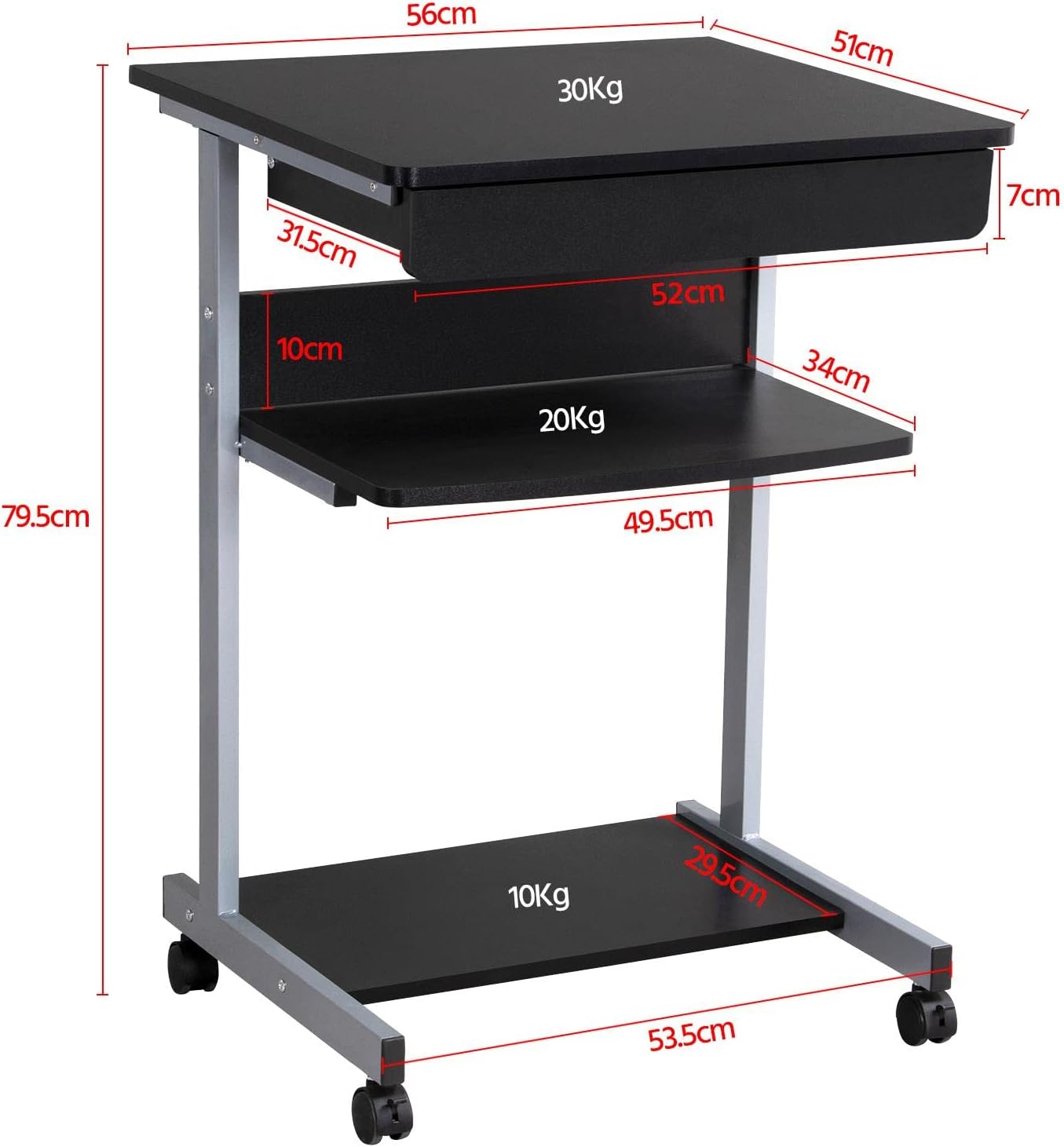
Rajah 6: Detailed dimensional drawing of the desk, including measurements for overall height, width, depth, and individual shelf and drawer dimensions. Also shows weight capacities for each surface.
| Ciri | Perincian |
|---|---|
| Nombor Model | YA-00097936 |
| Dimensi Keseluruhan (L x W x H) | 56 x 51 x 79.5 cm (22 x 20.1 x 31.3 inci) |
| Top Board Dimensions | 56 x 51 cm (22 x 20.1 inci) |
| Drawer Dimensions (Inner) | 45 x 30 x 6 cm (17.7 x 11.8 x 2.4 inci) |
| Middle Shelf Dimensions | 50 x 34 cm (19.7 x 13.4 inci) |
| Dimensi Rak Bawah | 50 x 30.5 cm (19.7 x 12 inci) |
| bahan | MDF (Medium Density Fiberboard) with Metal Frame |
| warna | Hitam |
| Berat Bersih | lebih kurang 10.9 kg (24 paun) |
| Max. Load Capacity (Top Board) | 30 kg (66 lbs) |
| Max. Load Capacity (Middle Shelf) | 20 kg (44 lbs) |
| Max. Load Capacity (Bottom Shelf) | 10 kg (22 lbs) |
| Pemutus | 4 (2 with locking mechanism) |
Waranti dan Sokongan
Yaheetech products are manufactured to high-quality standards. For specific warranty information, please refer to the warranty card included with your product or visit the official Yaheetech website. If you have any questions, require assistance with assembly, or need to report missing/damaged parts, please contact our customer support team:
- Webtapak: www.yaheetech.com (Sila semak untuk serantau webtapak)
- e-mel: Refer to your purchase documentation for customer service email.
- telefon: Refer to your purchase documentation for customer service phone number.
When contacting support, please have your model number (YA-00097936) and purchase date ready.