1. Pengenalan
This manual provides detailed instructions for the installation, operation, and maintenance of your Corehan 7-inch Double Din Android Car Stereo. This unit features a 7-inch touch screen, Bluetooth, WiFi, and GPS navigation, running on Android 8.1. It supports steering wheel controls (SWC), rear camera input, and FM radio. The system allows for downloading additional applications from the Google Play Store to expand its functionality.

Figure 1: Corehan 7-inch Double Din Android Car Stereo Unit
2. Apa yang ada di dalam Kotak
Sila sahkan bahawa semua item yang disenaraikan di bawah disertakan dalam pakej anda:
- Car Stereo (x1)
- Wiring Harness (x1)
- RCA Cables (x1)
- Kabel USB (x1)
- Antena GPS (x1)
- User & Installation Manual (x1)

Figure 2: All components included in the Corehan car stereo package.
3. Persediaan dan Pemasangan
Installation of the car stereo requires technical knowledge and should ideally be performed by a qualified professional. Refer to the included Installation Manual for detailed wiring diagrams and specific steps for your vehicle model. Ensure the vehicle's power is disconnected before beginning installation.
3.1. Basic Wiring Connections
- Sambungan Kuasa: Connect the main power harness to your vehicle's power supply, ensuring correct positive, negative, and accessory wire connections.
- Sambungan Pembesar Suara: Connect the speaker wires from the stereo harness to your vehicle's speakers.
- Antena GPS: Pasang antena GPS di lokasi yang jelas view langit, biasanya pada papan pemuka atau di bawah cermin depan.
- Kabel USB: Connect the provided USB cables for external media or device charging.
- Kabel RCA: Sambungkan kabel RCA untuk luaran amplifiers, subwoofers, or video output to headrest monitors.
- Input Kamera Belakang: If installing a rear camera, connect its video and power cables to the designated inputs on the stereo.
- Kawalan Roda Stereng (SWC): Connect the SWC wires to your vehicle's steering wheel control interface (if applicable) to enable control from your steering wheel.
3.2. Permulaan Kuasa
After all connections are secure, reconnect the vehicle's power. The unit should power on automatically or by pressing the power button. Follow any on-screen prompts for initial setup, such as language selection and time zone.
4. Arahan Operasi
4.1. Kesambungan Bluetooth
The unit features built-in Bluetooth for hands-free calling and audio streaming. To connect your device:
- Go to the Bluetooth settings on the stereo.
- Dayakan Bluetooth pada peranti mudah alih anda dan cari peranti yang tersedia.
- Select the stereo's name (e.g., "Corehan Car Stereo") from your device's list.
- Sahkan kod gandingan pada kedua-dua peranti.
Setelah dipasangkan, anda boleh membuat/menerima panggilan dan menstrim muzik secara wayarles.

Figure 3: Bluetooth interface on the Corehan car stereo, showing a connected smartphone.
4.2. Navigasi GPS
The stereo includes a built-in GPS module and an external GPS antenna. It supports most navigation applications with offline map capabilities. This allows for navigation even in areas without mobile data signals.

Figure 4: GPS navigation displayed on the Corehan car stereo screen.
4.3. Fungsi Pautan Cermin
The Mirror Link feature allows you to cast the screen of your Android or iOS device directly onto the head unit's display. This enables viewing content from your smartphone on the larger screen.

Figure 5: Mirror Link feature showing a smartphone screen mirrored on the car stereo.
4.4. Main Balik Multimedia
The unit supports various multimedia channels including USB drives, micro SD cards, and Bluetooth for music and video playback. You can also download music and video applications from the Google Play Store.

Figure 6: Music playback interface on the Corehan car stereo.
4.5. Output Video
The Android car stereo supports video output to external displays, such as headrest monitors. This allows passengers to view videos simultaneously.
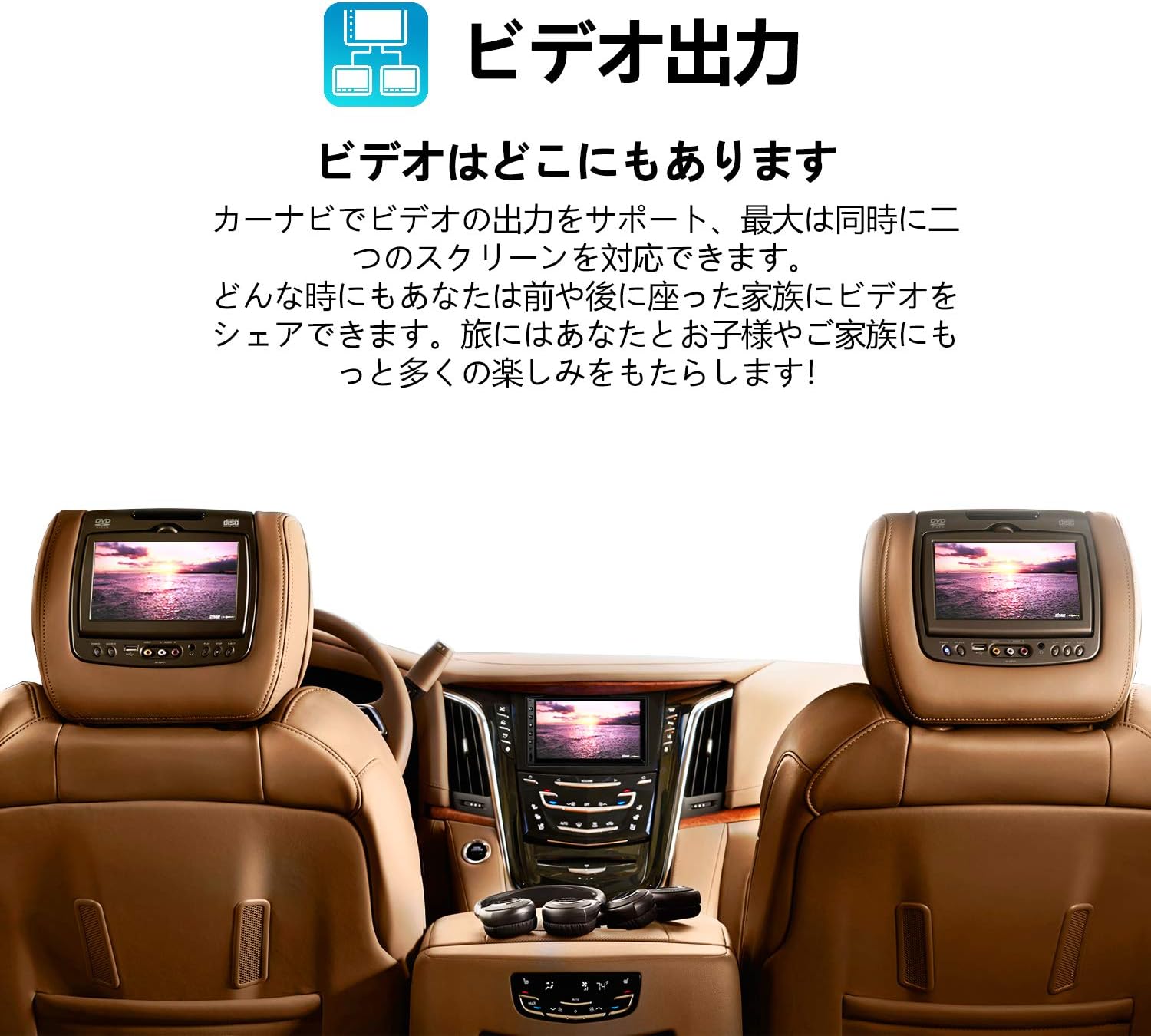
Figure 7: Car interior showing the Corehan stereo and two headrest monitors displaying the same video content.
4.6. OBDII Scanner Support
The unit supports connection to an OBDII scanner (sold separately), allowing you to monitor vehicle diagnostics and engine information directly on the stereo display.
5. Penyelenggaraan
5.1. Membersihkan Skrin
Gunakan kain lembut yang tidak berbulu untuk mengelap skrin sentuh dengan lembut. Untuk calitan degil, sedikit dampen kain dengan air atau pembersih selamat skrin. Elakkan bahan kimia yang keras atau bahan yang melelas.
5.2. Kemas Kini Perisian
Semak kemas kini perisian secara berkala untuk memastikan prestasi optimum dan akses kepada ciri baharu. Kemas kini biasanya boleh didapati melalui tetapan sistem atau tetapan pengeluar website. Follow the on-screen instructions carefully during the update process.
6. Penyelesaian masalah
If you encounter issues with your car stereo, try the following basic troubleshooting steps:
- Tiada Kuasa: Periksa semua sambungan kuasa dan fius. Pastikan penyalaan kenderaan dihidupkan.
- Tiada Bunyi: Sahkan sambungan pembesar suara, tahap kelantangan dan pemilihan sumber audio.
- Isu Sambungan Bluetooth: Ensure Bluetooth is enabled on both devices and try re-pairing. Clear previous pairings if necessary.
- Kehilangan Isyarat GPS: Pastikan antena GPS mempunyai jernih view langit dan disambungkan dengan selamat.
- Skrin Sentuh Tidak Responsif: Try restarting the unit. If the issue persists, a factory reset may be required (note: this will erase all user data).
- Sistem Lambat/Pembekuan: Close unnecessary applications. A system restart or factory reset can often resolve performance issues.
For more complex problems, refer to the detailed troubleshooting section in the full User & Installation Manual or contact customer support.
7. Spesifikasi
| Ciri | Spesifikasi |
|---|---|
| Dimensi Produk | 5.7 x 7 x 4 inci |
| Berat Barang | 1.98 paun |
| Nombor Model | COCS-JD-AN-03 |
| Sistem Operasi | Android 8.1 (as per product title, though specifications list Android 7) |
| RAM | 2 GB |
| Komunikasi Tanpa Wayar | Bluetooth, WiFi |
| Teknologi Ketersambungan | Bluetooth, USB, Wi-Fi |
| GPS | Supported (Built-in module and external antenna) |
| Ciri Khas | Bluetooth, Touchscreen, Mirror Link, Video Output, OBDII Support |
| Resolusi Paparan | 1024 x 600 |
| Saiz Skrin | 7 Inci |
| Pengeluar | Corehan Technology |

Figure 8: Diagram illustrating the internal hardware of the Corehan car stereo.
8. Waranti dan Sokongan
Corehan provides detailed installation instructions and video tutorials to assist with the setup of your unit. For any technical assistance, installation queries, or operational problems, 7*24 hours of after-sales technical support is available.
Please refer to the contact information provided in your product packaging or on the official Corehan webtapak untuk butiran sokongan.


