1. Pengenalan
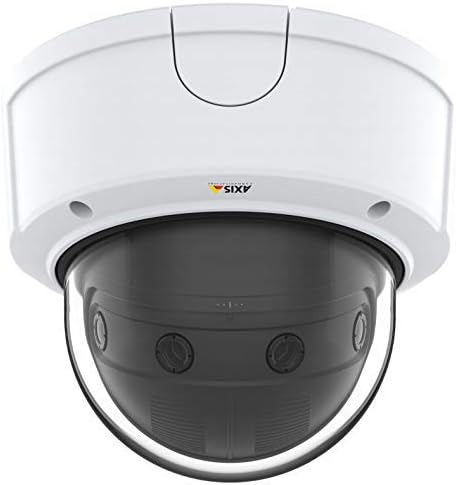
This manual provides essential information for the installation, operation, and maintenance of your Axis Communications P3807-PVE Network Camera. The P3807-PVE is a fixed dome camera featuring multiple sensors designed to deliver a seamless 180-degree panoramic overview with 90-degree vertical coverage. It offers high-quality video at 8.3 MP resolution and up to 30 frames per second, incorporating Axis Lightfinder and Forensic WDR technologies for optimal performance in various lighting conditions. Axis Zipstream technology is included to reduce bandwidth and storage requirements.

Rajah 1: Depan view of the Axis Communications P3807-PVE Panoramic Dome Camera.
2. Maklumat Keselamatan
Please read these safety instructions carefully before installing or operating the product. Failure to follow these instructions may result in damage to the product, injury, or void the warranty.
- Pemasangan: Pemasangan mesti dilakukan oleh kakitangan yang berkelayakan mengikut semua kod dan peraturan tempatan.
- Sumber Kuasa: Use only Power over Ethernet (PoE Class 3) compliant power sources. Ensure the power supply meets the camera's specifications.
- Persekitaran: The camera is rated IP67 for protection against dust and water. However, avoid exposing the camera to extreme temperatures outside its operating range or corrosive environments.
- Pembersihan: Disconnect power before cleaning. Use a soft, dry cloth. Do not use harsh chemicals or abrasive cleaners.
- Pengubahsuaian: Do not attempt to open or modify the camera. This will void the warranty and may cause damage.
3. Kandungan Pakej
Sahkan bahawa semua komponen terdapat dalam pakej sebelum meneruskan pemasangan:
- Axis Communications P3807-PVE Network Camera
- Panduan Pemasangan
- Pendakap pelekap dan perkakasan
- Templat gerudi
- Resistorx T20 tool
4. Persediaan
4.1 Pemasangan Fizikal
The P3807-PVE camera offers flexible mounting options including recessed, flush, pendant, and back-to-back configurations. Use the provided drill template to mark and prepare the mounting surface.
- Select a suitable mounting location that provides the desired panoramic view and is structurally sound.
- Use the drill template to mark the screw holes and cable entry point.
- Drill the necessary holes and secure the mounting bracket using the provided hardware.
- Route the Ethernet cable through the cable entry point.
- Attach the camera to the mounting bracket, ensuring it is securely fastened.
- Adjust the camera's position as needed to achieve the desired field of view.
Gambar 2: Cthample of a dome camera mounted for surveillance.
4.2 Kuasa dan Sambungan Rangkaian
The camera is powered via Power over Ethernet (PoE Class 3). Connect a standard Ethernet cable from a PoE-enabled switch or injector to the camera's network port. This single cable provides both power and data connectivity.
- Ensure the Ethernet cable is securely connected to both the camera and the network device.
- The camera supports Gigabit Ethernet (GbE) for high-speed data transfer.
4.3 Tatarajah Awal
After physical installation and power-up, the camera can be accessed via a web browser for initial configuration.
- Use Axis IP Utility or a similar tool to discover the camera's IP address on your network.
- Buka a web browser and enter the camera's IP address.
- Follow the on-screen prompts to set a strong password for the root user and configure basic network settings.
- Refer to the Axis Communications website for detailed software configuration guides and the latest firmware.
5. Mengendalikan Kamera
5.1 Pemantauan Video
The P3807-PVE provides a comprehensive panoramic view. Access the live video feed through a compatible Video Management Software (VMS) or directly via the camera's web antara muka.
- Panoramik View: The camera delivers a seamless 180-degree horizontal and 90-degree vertical field of view.
- Resolusi: Enjoy high-definition surveillance with 8.3 Megapixel resolution at full frame rate (up to 30 fps).
- Lightfinder: This technology ensures excellent image quality in low-light conditions, providing color images even in near darkness.
- Forensic WDR: Wide Dynamic Range technology optimizes video for forensic purposes, ensuring details are visible in both bright and dark areas of a scene.
- Zipstream: Axis Zipstream technology intelligently analyzes the video stream to reduce bandwidth and storage requirements without compromising important forensic details.
5.2 Audio Capabilities
The camera is equipped with audio capabilities, allowing for audio monitoring in conjunction with video surveillance. Refer to the camera's web interface for audio input/output configuration and settings.
6. Penyelenggaraan
6.1 Pembersihan
Regular cleaning helps maintain optimal image quality. Disconnect power before cleaning.
- Gently wipe the dome cover with a soft, lint-free cloth dampdisapu dengan air atau larutan pembersih lembut.
- Avoid using abrasive materials, solvents, or strong detergents that could scratch or damage the lens or housing.
6.2 Kemas Kini Perisian Tegar
Axis Communications regularly releases firmware updates to improve performance, add features, and address security vulnerabilities. It is recommended to keep your camera's firmware up to date.
- Visit the official Axis Communications website for the latest firmware versions for the P3807-PVE model.
- Follow the instructions provided with the firmware update package for a safe and successful update process.
7. Penyelesaian masalah
This section addresses common issues you might encounter. For more complex problems, refer to the Axis Communications support resources.
| Masalah | Kemungkinan Punca | Penyelesaian |
|---|---|---|
| No power/Camera not starting | Incorrect PoE connection; Faulty Ethernet cable; PoE switch issue. | Verify Ethernet cable connection. Ensure PoE switch is active and providing power (PoE Class 3). Try a different port or cable. |
| Tiada suapan video | Network connectivity issue; Incorrect IP address; Firewall blocking access; VMS configuration error. | Check network cable. Confirm camera's IP address. Temporarily disable firewalls. Verify VMS settings. |
| Kelipan atau herotan imej | Outdated firmware; Environmental interference; Camera settings. | Update to the latest firmware. Check for strong electromagnetic interference. Adjust camera's image settings (e.g., exposure, WDR). |
| Kualiti imej yang buruk dalam cahaya malap | Lightfinder not optimized; Environmental factors. | Ensure Lightfinder is enabled and configured correctly in settings. Verify sufficient ambient light for optimal performance. |
8. Spesifikasi
Key technical specifications for the Axis Communications P3807-PVE Network Camera:
- Nombor Model: 01048-001
- Faktor Bentuk: Kubah
- Jenis Pemasangan: Pemasangan Siling
- Resolusi Pegun yang Berkesan: 8.3 MP
- Resolusi Tangkapan Video: 4K (4320 x 1920)
- Kadar Bingkai: 30 fps
- Pemampatan Video: MJPEG, H.264, AVC
- Teknologi Cahaya Rendah: Day/Night, Lightfinder, Forensic WDR
- Ketersambungan: Gigabit Ethernet (GbE), Wi-Fi (Wireless Communication Technology)
- Sumber Kuasa: PoE Class 3 (Corded Electric)
- Wattage: 3.7 watt
- Penilaian Perlindungan Antarabangsa: IP67
- Dimensi Produk (L x W x H): 9.45 x 27.17 x 0.98 inci
- Berat Barang: 4.4 paun (2 Kilogram)
- Suhu Operasi: Refer to official Axis documentation for exact range.
9. Waranti dan Sokongan
9.1 Maklumat Waranti
Axis Communications products are covered by a limited warranty. The specific terms and duration of the warranty may vary by region and product. Please refer to the warranty statement included with your product or visit the official Axis Communications weblaman web untuk maklumat jaminan terperinci.
9.2 Sokongan Teknikal
For technical assistance, troubleshooting, or product inquiries, please contact Axis Communications support:
- Sokongan dalam talian: Visit the Axis Communications support portal on their official website for FAQs, documentation, and software downloads.
- Maklumat Hubungan: Find regional contact details for phone and email support on the Axis Communications webtapak.