1. Pengenalan
Terima kasih kerana membeliasing the BeamZ SLIMPAR 30 LED PAR Projector. This compact and powerful lighting fixture is designed for a variety of applications, from stage lighting to architectural uplighting. It features 6 high-power 3W RGB LEDs, offering vibrant color mixing and a range of dynamic effects. This manual provides essential information for safe operation, setup, and maintenance of your device.
Key features include DMX control, multiple pre-programmed shows, sound-activated mode with adjustable sensitivity, and an auto mode with adjustable speed. Its robust design and versatile functionality make it an ideal choice for DJs, bands, event organizers, and venues.

Image 1.1: The BeamZ SLIMPAR 30 LED PAR Projector, showcasing its compact design and six bright green LEDs.
2. Arahan Keselamatan
AMARAN: To reduce the risk of electric shock, do not open this unit. There are no user-serviceable parts inside. Refer all servicing to qualified service personnel.
- Read this manual thoroughly before operating the unit.
- Simpan manual ini untuk rujukan masa hadapan.
- Sentiasa sambungkan unit ke soket kuasa yang dibumikan.
- Disconnect from mains power before cleaning or servicing.
- Jangan dedahkan unit kepada hujan atau lembapan.
- Pastikan pengudaraan yang mencukupi di sekeliling unit.
- Do not look directly into the light source when the unit is on.
- Gunakan hanya vol yang ditentukantage (230Vac / 50Hz).
3. Kandungan Pakej
Upon opening the box, ensure all items listed below are present and in good condition:
- 1x BeamZ SLIMPAR 30 LED PAR Projector
- 1x Double Mounting Bracket
- 1x Kabel Kuasa
- 1x Manual Pengguna (dokumen ini)
- 1x IRC Remote Control (if included with your specific package)
Jika ada barang yang hilang atau rosak, sila hubungi pengedar anda dengan segera.
4. Persediaan
4.1 Pemasangan
The SLIMPAR 30 comes with a double mounting bracket for versatile positioning. It can be placed on a flat surface, mounted to a truss using a clamp (not included), or attached to a wall/ceiling.
- Ensure the mounting surface or truss can support the weight of the fixture.
- Always use a safety cable when mounting overhead.
- Adjust the bracket to the desired angle and secure it with the locking knobs.
4.2 Sambungan Kuasa
Connect the supplied power cable to the power input on the rear of the unit and then to a suitable 230Vac / 50Hz grounded power outlet.
4.3 Sambungan DMX (Pilihan)
For DMX control, connect a 3-pin XLR DMX cable from your DMX controller's output to the DMX IN port of the SLIMPAR 30. For multiple units, daisy-chain them by connecting the DMX OUT of the first unit to the DMX IN of the next, and so on.
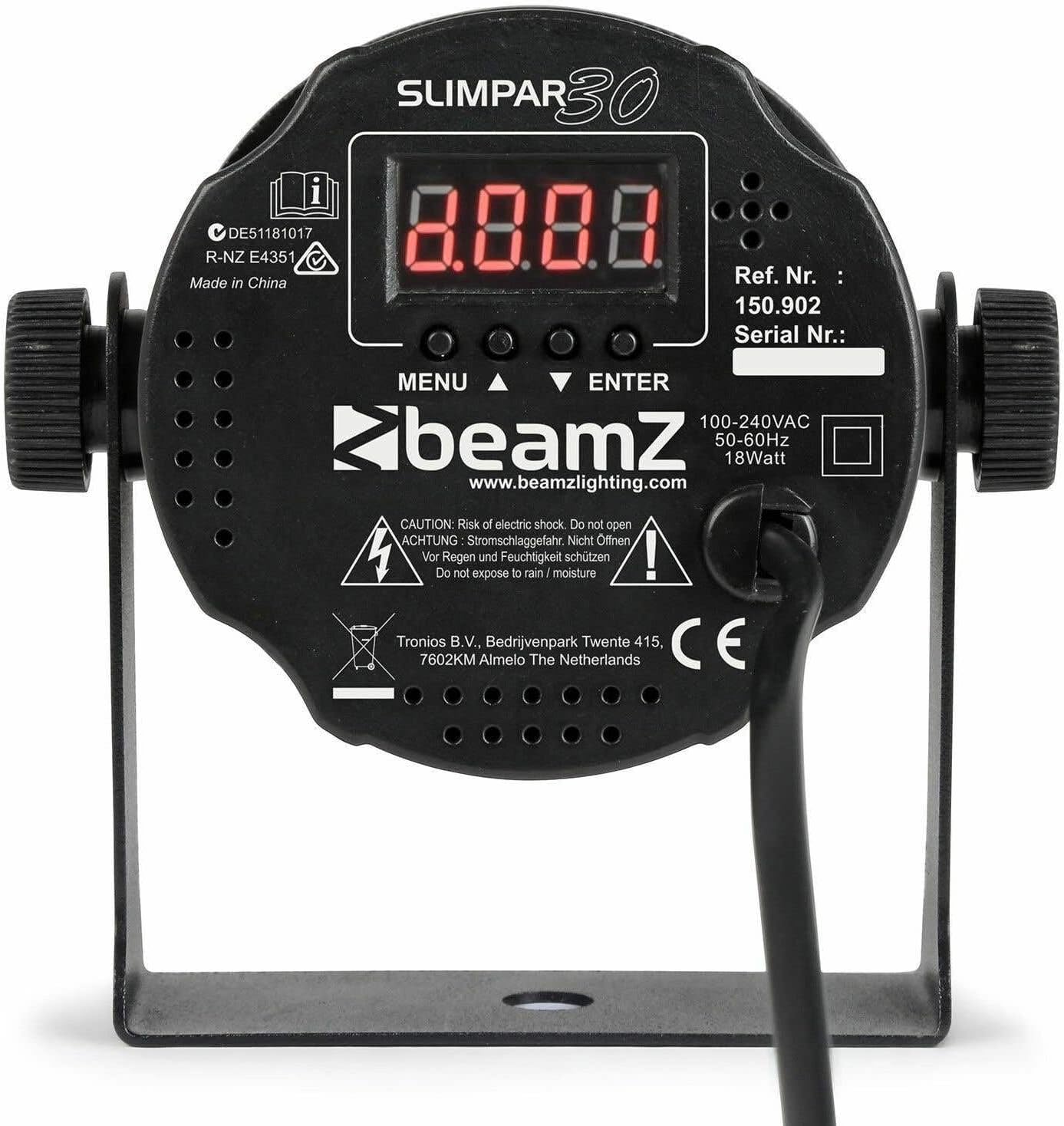
Imej 4.1: Belakang view of the BeamZ SLIMPAR 30, showing the control panel with LED display, DMX input/output, and power connection.
5. Beroperasi
5.1 Panel Kawalan Selesaiview
The SLIMPAR 30 features a 4-digit LED display and four control buttons on its rear panel:
- MENU: Menelusuri pilihan menu utama.
- ATAS BAWAH: Navigates through sub-menus or adjusts parameter values.
- MASUK: Confirms the selected option or value.
5.2 Mod Pengendalian
The SLIMPAR 30 offers several operating modes:
- Mod DMX: Allows control via an external DMX controller. Select the desired DMX channel mode (3, 4, or 7 channels) and set the DMX address.
- Mod Auto: The unit runs through pre-programmed light shows automatically. Speed can be adjusted.
- Mod Diaktifkan Bunyi: The light shows react to music or sound detected by the built-in microphone. Sensitivity can be adjusted.
- Mod Tuan/Hamba: Link multiple SLIMPAR 30 units together. One unit acts as the master, controlling all other slave units.
- Mod Warna Manual: Allows direct selection of static colors or manual mixing of RGB values.

Image 5.1: Visual representation of the BeamZ SLIMPAR 30's pre-programmed shows and auto mode with adjustable speed, demonstrating dynamic lighting effects.

Image 5.2: The BeamZ SLIMPAR 30 demonstrating its ability to produce various colored lighting effects, suitable for different event atmospheres.

Image 5.3: The BeamZ SLIMPAR 30 effectively illuminating a room, showcasing its suitability for architectural and event lighting.
5.3 Remote Control (IRC)
If your package includes the IRC remote control, you can conveniently operate the SLIMPAR 30 from a distance. The remote allows access to various functions such as mode selection (Auto, Sound, DMX), color selection, strobe, and blackout.

Image 5.4: The IRC remote control for the BeamZ SLIMPAR 30, showing buttons for various functions like auto mode, sound mode, DMX, color selection, and strobe.
6. Penyelenggaraan
6.1 Pembersihan
Regular cleaning helps maintain optimal light output and extends the lifespan of the unit.
- Sentiasa putuskan sambungan unit daripada kuasa sebelum membersihkannya.
- Use a soft, lint-free cloth to wipe the exterior casing.
- Clean the lens regularly with a soft cloth and a mild glass cleaner to ensure clear light projection.
- Jangan gunakan pembersih atau pelarut yang melelas.
6.2 Penyimpanan
When not in use, store the unit in a dry, dust-free environment, preferably in its original packaging or a suitable carrying case.
7. Penyelesaian masalah
| Masalah | Kemungkinan Punca | Penyelesaian |
|---|---|---|
| Tiada kuasa | Kabel kuasa terputus; tiada kuasa dari soket. | Periksa sambungan kabel kuasa; uji soket dengan peranti lain. |
| Tiada keluaran cahaya | Unit in blackout mode; incorrect DMX setting; internal fault. | Check remote/control panel for blackout; verify DMX address/mode; contact support if fault persists. |
| DMX not working | Incorrect DMX address; wrong DMX mode; faulty cable; DMX terminator missing. | Verify DMX address and channel mode; check DMX cables; use a DMX terminator on the last unit. |
| Sound mode not reacting | Sensitivity too low; no sound input. | Increase sound sensitivity; ensure sound source is loud enough and close to the unit. |
If the problem persists after trying these solutions, please contact BeamZ customer support or your dealer.
8. Spesifikasi
| Ciri | Perincian |
|---|---|
| Sumber Cahaya | 6 x 3W 3-in-1 RGB LEDs |
| Sudut Rasuk | 12° |
| Sudut Medan | 29° |
| Intensiti Bercahaya | 3642 lx @ 1m |
| Kelajuan Denyar | 1 - 21 fps |
| Saluran DMX | 3, 4, atau 7 saluran |
| Sambungan DMX | 3-pin XLR Masuk/Keluar |
| Mod Pengendalian | DMX, Auto, Sound-Activated, Master/Slave, Manual Color |
| Bekalan Kuasa | 230Vac / 50Hz |
| Penggunaan Kuasa | 18 Watt (Maksimum) |
| Dimensi (L x W x H) | 13 x 8.5 x 12.5 cm |
| Berat badan | 0.25 kg (250 g) |
| Pengeluar | Tronios BV |
| Nombor Model | SlimPar30 (Ref. 150902) |
9. Waranti dan Sokongan
This product is covered by a manufacturer's warranty against defects in materials and workmanship. For specific warranty terms and conditions, please refer to the warranty card included with your product or contact your local dealer.
For technical support, troubleshooting assistance, or spare parts, please contact your authorized BeamZ dealer or visit the official BeamZ webtapak untuk maklumat hubungan.
Sila simpan bukti pembelian anda untuk sebarang tuntutan waranti.


