pengenalan
The Darkglass Hyper Luminal Bass Compressor Pedal is a state-of-the-art hybrid compressor designed for bass guitarists. It combines an analog VCA with a digital side-chain, allowing it to emulate the characteristics of legendary compressors while maintaining a pure analog signal path. This manual provides essential information for setting up, operating, maintaining, and troubleshooting your Hyper Luminal pedal.
Produk Selesaiview

Rajah 1: Atas view of the Hyper Luminal pedal, highlighting its primary controls and indicators.

Rajah 2: Sisi view of the pedal, illustrating the micro-USB port for connectivity.
Ciri-ciri Utama:
- Reka bentuk Hibrid: Analog VCA with digital side-chain for versatile compression.
- Three Compression Modes: BUS (SSL Bus compressor emulation), FET (1176 emulation), and SYM (Super Symmetry emulation).
- Kawalan Campuran: Mixes clean and compressed signals for transparent results.
- Kawalan Masa: Adjusts attack and release settings for dynamic response.
- Kawalan Mampatan: Sets the amount of compression applied.
- Ratio Control: Adjustable compression ratio from 2:1 to 20:1 via touch sensor.
- Meter Pengurangan Keuntungan: 10-segment LED meter for visual feedback.
- Antaramuka USB: For firmware updates and Darkglass Suite software integration.
- Reka bentuk padat: Lightweight and pedalboard-friendly.
Persediaan
Keperluan Kuasa:
The Hyper Luminal pedal requires a 9V DC power supply (center negative). Ensure the power supply provides sufficient current for stable operation. The pedal does not operate on internal batteries.
Sambungan:
- Connect your instrument (bass guitar) to the INPUT bicu di sebelah kanan pedal.
- Sambungkan OUTPUT bicu di sebelah kiri pedal ke amppenunjuk atau pedal seterusnya dalam rantai isyarat.
- Connect a 9V DC power supply to the 9VDC input.
- (Optional) Connect a micro-USB cable from the pedal's USB port to your computer for firmware updates and Darkglass Suite software integration.
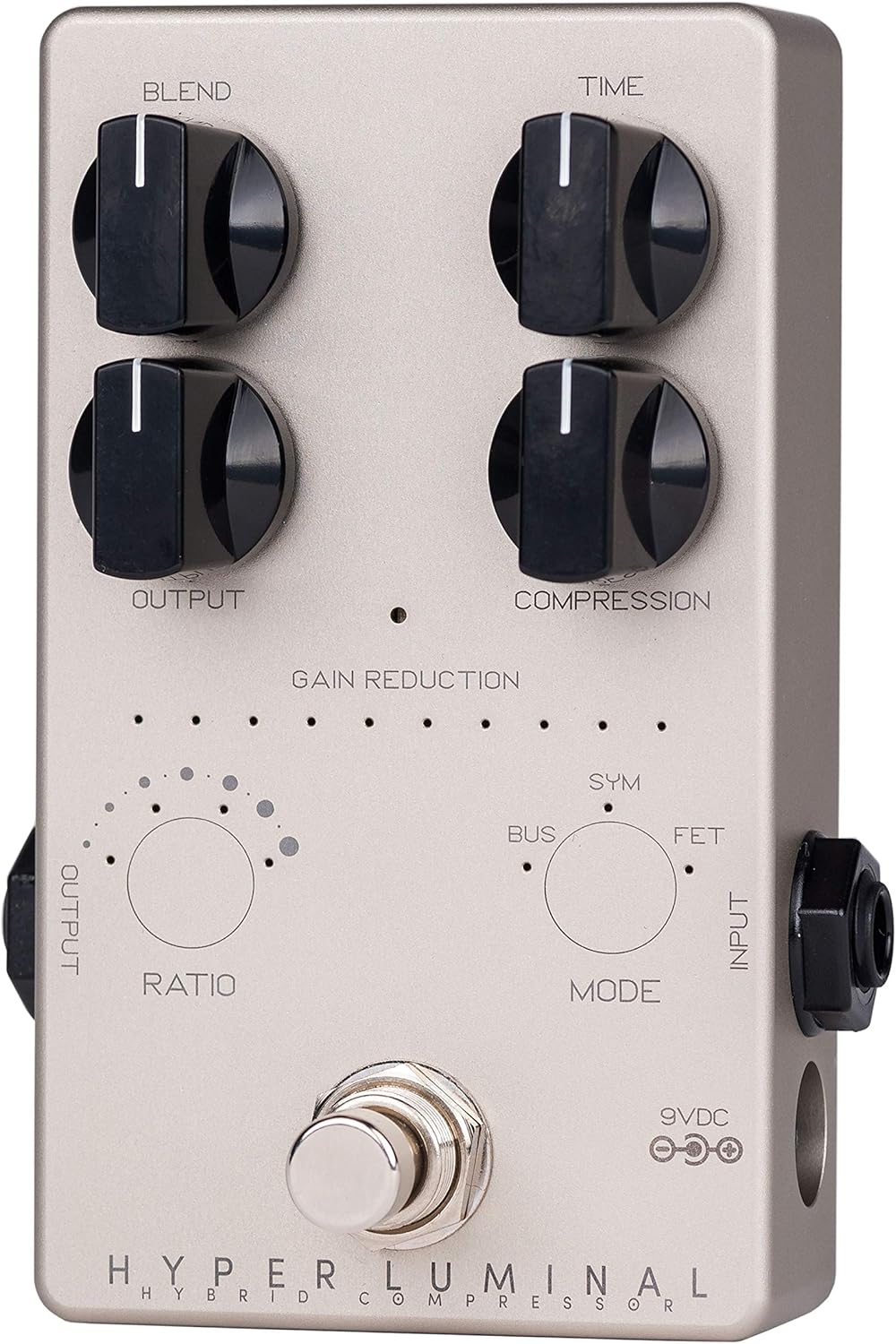
Figure 3: Input, Output, and Power connections.
Mengendalikan Pedal
Kawalan:
- campuran: Controls the mix between the clean (uncompressed) signal and the compressed signal. Turn clockwise for more compressed signal, counter-clockwise for more clean signal.
- Masa: Adjusts the attack and release characteristics of the compressor. This control dynamically adapts based on the selected compression mode.
- Output: Sets the overall output volume of the pedal.
- Mampatan: Determines the amount of gain reduction applied. Turn clockwise for more compression.
- Ratio (Touch Sensor): Tap this sensor to cycle through different compression ratios. The available ratios depend on the selected compression mode.
- Mode (Touch Sensor): Tap this sensor to select one of the three compression modes: BUS, FET, or SYM.
Mod Mampatan:
- BAS: Modeled after the classic SSL Bus compressor, known for its transparent and glue-like compression.
- FET: Inspired by the iconic 1176 compressor, offering fast attack and release times with a distinct character. This mode also supports the "all-button" or "British" mode by tapping the Ratio sensor four times until all four LEDs are lit.
- SYM: Based on Darkglass's own Super Symmetry compressor, providing a unique and modern compression feel.
Meter Pengurangan Keuntungan:
The 10-segment LED meter visually indicates the amount of gain reduction occurring. More LEDs lit signifies greater compression.
Darkglass Suite Software:
Connect the pedal to your computer via the micro-USB port to access the Darkglass Suite software. This software allows for firmware updates and advanced configuration of the pedal's parameters, including custom compression settings and future model additions.
Penyelenggaraan
- Keep the pedal clean by wiping it with a soft, dry cloth. Avoid abrasive cleaners or solvents.
- Simpan pedal di persekitaran yang kering, jauh daripada suhu dan kelembapan yang melampau.
- Ensure all cable connections are secure to prevent signal loss or damage.
- Regularly check for firmware updates via the Darkglass Suite software to ensure optimal performance and access to new features.
Menyelesaikan masalah
| Masalah | Kemungkinan Punca | Penyelesaian |
|---|---|---|
| Tiada bunyi dari pedal. | Incorrect power supply; incorrect cable connections; faulty cables. | Verify 9V DC center-negative power supply is connected and functioning. Check input/output cable connections. Test with different cables. |
| Pedal not compressing signal. | Compression knob set too low; incorrect mode/ratio selected; low input signal. | Tingkatkan Mampatan knob setting. Experiment with different Mod dan Nisbah settings. Ensure adequate input signal from your instrument. |
| Bunyi atau desisan yang tidak diingini. | High gain settings; ground loop; faulty power supply. | Kurangkan Keluaran or Mampatan settings. Use a high-quality, isolated power supply. Check for ground loop issues in your setup. |
| Isu sambungan USB. | Incorrect USB cable; driver issues; Darkglass Suite software not running. | Ensure you are using a standard micro-USB data cable. Install necessary drivers. Launch Darkglass Suite software before connecting. |
Spesifikasi
- model: HYL (Hyper Luminal)
- Dimensi (L x W x H): Kira-kira 10 x 7 x 5 inci
- Berat: 8.1 auns (230 gram)
- Keperluan Kuasa: 9V DC (center negative), 100mA minimum (Alkaline battery not applicable for operation, external power required)
- Format Isyarat: Analog
- Antara muka perkakasan: USB (Micro-USB)
- warna: Perak
Waranti dan Sokongan
For warranty information and technical support, please refer to the official Darkglass Electronics webtapak atau hubungi perkhidmatan pelanggan mereka secara langsung. Simpan resit pembelian anda sebagai bukti pembelian untuk tuntutan waranti.
Darkglass Electronics Official Webtapak: www.darkglass.com


