1. Pengenalan
This manual provides essential information for the safe and efficient operation of your Go Power! GP-ISW2000-24V Industrial Pure Sine Wave Inverter. This inverter is designed to convert 24 Volt DC battery power into 120 Volt AC household power, suitable for a wide range of applications including recreational vehicles, marine, and off-grid systems. It delivers 2000 watts of continuous pure sine wave power, ensuring compatibility with sensitive electronics.
Please read this manual thoroughly before installation and use to ensure proper function and to prevent damage to the unit or connected devices.
2. Maklumat Keselamatan
Sentiasa patuhi langkah berjaga-jaga keselamatan berikut untuk mengurangkan risiko renjatan elektrik, kebakaran atau kecederaan:
- Baca semua arahan: Before operating the inverter, read all instructions and cautionary markings on the inverter, the batteries, and all appropriate sections of this manual.
- Work in a well-ventilated area: Batteries can produce explosive gases. Ensure adequate ventilation and avoid open flames or sparks near the battery bank.
- Elakkan kelembapan: Do not expose the inverter to rain, snow, spray, or bilge water.
- Pembumian yang betul: The inverter must be properly grounded. Refer to the installation section for details.
- Use correct cables: Ensure DC input cables are of adequate gauge and length to handle the current and minimize voltage penurunan.
- Putuskan kuasa: Always disconnect the inverter from the battery before performing any maintenance or cleaning.
- Kakitangan yang berkelayakan: Installation and servicing should be performed by qualified personnel familiar with electrical systems and safety procedures.
- Do not open the inverter: There are no user-serviceable parts inside. Opening the inverter voids the warranty.
3. Produk Lebihview
The Go Power! GP-ISW2000-24V inverter is a robust power conversion device. Familiarize yourself with its components:

Image 1: Front Panel (AC Output Side)
This image displays the front panel of the Go Power! GP-ISW2000-24V inverter. Key features visible include two GFCI-equipped AC output receptacles, a power ON/OFF switch, and a remote port. Also visible are ventilation grilles and a DIP switch for configuration.
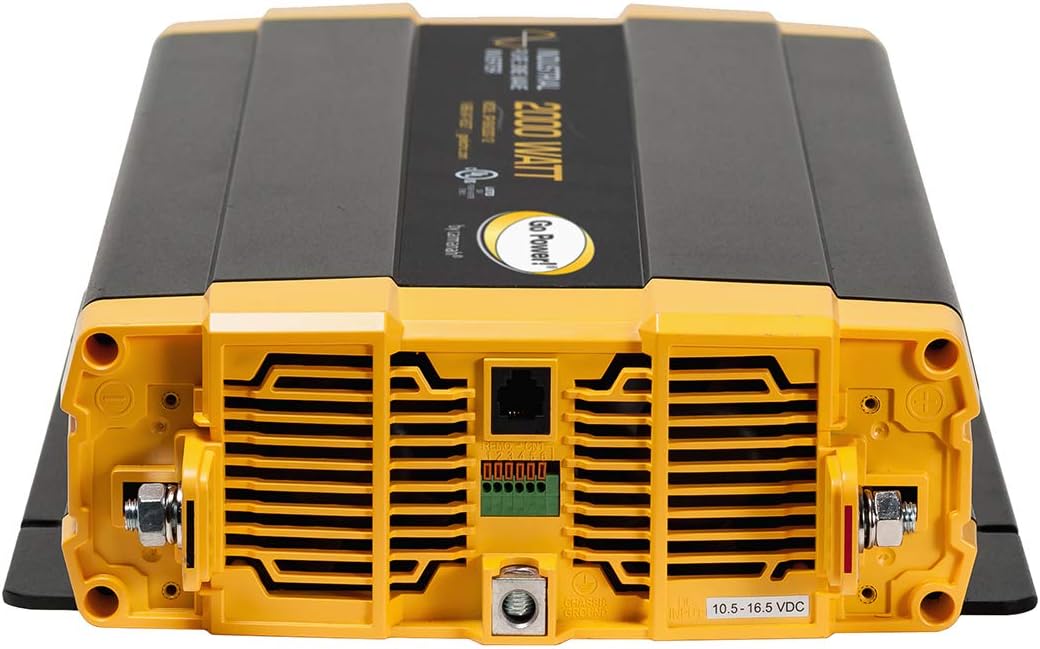
Image 2: Rear Panel (DC Input Side)
This image shows the rear panel of the Go Power! GP-ISW2000-24V inverter. Prominently featured are the heavy-duty DC input terminals for connecting to a 24V battery bank, clearly marked for positive (+) and negative (-) connections. A grounding lug is also visible, along with additional ventilation and a terminal block for remote control wiring.
Ciri-ciri Utama:
- 2000 Watts Continuous Power Output
- 24 Volt DC Input
- Pure Sine Wave Output for sensitive electronics
- Two GFCI-equipped AC Outlets
- Durable, low-profile reka bentuk
- Port Jauh untuk kawalan jauh pilihan
4. Pemasangan dan Persediaan
Proper installation is critical for the safe and efficient operation of your inverter. Consult a qualified electrician if you are unsure about any steps.
4.1 Memasang Penyongsang
- Mount the inverter in a dry, cool, and well-ventilated area.
- Ensure there is at least 6 inches of clear space around the inverter for proper airflow.
- Mount the inverter horizontally on a flat, non-combustible surface.
- Avoid mounting near flammable materials, fuel tanks, or in battery compartments where explosive gases may accumulate.
4.2 DC Input Connections (to Battery Bank)
AMARAN: Before making any connections, ensure the inverter's power switch is in the OFF position and disconnect the battery bank's negative terminal.
- Saiz Kabel: Use appropriately sized DC cables for your 24V battery bank. For a 2000W inverter, heavy gauge cables are required to minimize voltage drop and prevent overheating. Consult a cable sizing chart or a qualified professional.
- Fuse/Breaker: Install a properly rated DC fuse or circuit breaker (e.g., 100A for 24V systems) as close to the battery positive terminal as possible.
- Sambungkan Negatif: Connect the negative (-) DC cable from the battery bank to the negative (-) terminal on the inverter (refer to Image 2). Ensure a secure connection.
- Sambung Positif: Connect the positive (+) DC cable from the battery bank, through the fuse/breaker, to the positive (+) terminal on the inverter (refer to Image 2). Ensure a secure connection.
- Sambung semula Bateri: Once all connections are secure, reconnect the negative terminal of your battery bank.
PERHATIAN: Loose connections can cause excessive voltage drop and overheating of cables and terminals, potentially leading to fire.
4.3 AC Output Connections
The inverter provides two standard GFCI-equipped 120V AC outlets (refer to Image 1). You can plug your AC appliances directly into these outlets.
- Pastikan jumlah wattage daripada peralatan yang disambungkan tidak melebihi penarafan output berterusan penyongsang (2000W).
- For hardwiring to an AC distribution panel, consult a qualified electrician to ensure compliance with local electrical codes and proper transfer switch installation.
4.4 Pembumian
The inverter must be properly grounded. Connect a heavy-gauge wire from the inverter's grounding lug (refer to Image 2) to a reliable earth ground (e.g., vehicle chassis, boat hull ground, or an earth ground rod).
4.5 Alat Kawalan Jauh (Pilihan)
The inverter features a remote port for connecting an optional remote control panel. This allows for convenient power management from a distance. Refer to the remote control's specific manual for installation and operation instructions.
5. Arahan Operasi
5.1 Turning the Inverter On/Off
- Untuk Menghidupkan: Ensure all DC and AC connections are secure. Flip the ON/OFF switch on the inverter's front panel (refer to Image 1) to the "ON" position. The inverter will perform a self-test, and the indicator lights will illuminate.
- Untuk Mematikan: Disconnect any AC loads from the inverter. Flip the ON/OFF switch to the "OFF" position.
If using an optional remote control, ensure the inverter's main switch is set to the "Remote On/Off" position (if available, consult your remote manual), and then use the remote to control power.
5.2 Connecting AC Loads
- Plug your 120V AC appliances directly into the GFCI outlets on the inverter's front panel.
- Always ensure the total continuous power draw of all connected appliances does not exceed 2000 watts.
- For appliances with high surge requirements (e.g., motors, refrigerators), ensure the inverter's surge capacity can handle the initial startup current.
5.3 Understanding Indicators and Alarms
The inverter is equipped with indicator lights and audible alarms to communicate its status and potential issues. While specific details are in the full product manual, common indicators include:
- LED hijau: Normal operation, AC output present.
- Red LED / Fault Light: Indicates a fault condition (e.g., overload, over-temperature, low battery voltage, vol bateri tinggitage, short circuit). An audible alarm may accompany this.
- Audible Beeps: Often signal a low battery warning or a fault condition. Consult the troubleshooting section for specific beep patterns.
6. Penyelenggaraan
The Go Power! GP-ISW2000-24V inverter requires minimal maintenance to ensure long-term reliable operation.
- Pembersihan: Periodically clean the exterior of the inverter with a dry cloth. Ensure ventilation openings are free from dust and debris. Do not use liquid cleaners or solvents.
- Sambungan: Annually inspect all DC and AC connections for tightness. Loose connections can lead to overheating and poor performance.
- Persekitaran: Ensure the inverter remains in a cool, dry, and well-ventilated environment. High temperatures can reduce the inverter's lifespan.
- Penyelenggaraan Bateri: Regularly check your battery bank's charge level and condition. Follow the battery manufacturer's maintenance guidelines.
7. Penyelesaian masalah
This section addresses common issues you might encounter with your inverter. For problems not listed here, contact Go Power! technical support.
| Masalah | Kemungkinan Punca | Penyelesaian |
|---|---|---|
| No AC output, inverter OFF. | Inverter switch is OFF. No DC input power. Blown DC fuse/breaker. | Turn inverter ON. Check battery connections. Check and replace DC fuse/reset breaker. |
| Inverter shuts down, red fault light, audible alarm. | Overload. Low battery voltage. Over-temperature. Short circuit on AC output. | Reduce AC load. Recharge/check battery bank. Ensure adequate ventilation. Disconnect AC loads, check wiring. |
| AC appliance not working. | Appliance faulty. GFCI tripped. Inverter not providing enough power. | Test appliance on known good AC source. Reset GFCI outlet on inverter. Check appliance wattage against inverter capacity. |
| Remote control issues (e.g., incorrect voltage display, beeping). | Faulty remote cable or unit. Inverter not set to remote mode. | Ensure remote cable is securely connected. Verify inverter's main switch is in "Remote On/Off" position. If issues persist, contact Go Power! support. |
8. Spesifikasi
Technical specifications for the Go Power! GP-ISW2000-24V Industrial Pure Sine Wave Inverter:
| Ciri | Spesifikasi |
|---|---|
| Nombor Model | GP-ISW-2000-24 |
| Kuasa Keluaran Berterusan | 2000 Watt |
| Input DC Voltage | 24 Volts DC (Nominal) |
| Keluaran AC Voltage | 120 Voltan AC |
| Bentuk Gelombang Output | Gelombang Sinus Tulen |
| Kedai AC | Two GFCI-equipped |
| Dimensi (L x W x H) | 19 x 6 x 12 inci |
| Berat badan | 1 paun |
| Penggunaan yang Disyorkan | Camping, Household appliances, Recreational Vehicle |
| warna | Hitam |
9. Maklumat Waranti
The Go Power! GP-ISW2000-24V Industrial Pure Sine Wave Inverter comes with a Waranti 2 tahun dari tarikh pembelian. Waranti ini melindungi kecacatan pada bahan dan mutu kerja di bawah penggunaan dan perkhidmatan biasa.
Please retain your proof of purchase for warranty claims. The warranty does not cover damage caused by improper installation, misuse, abuse, unauthorized modifications, or natural disasters. For full warranty terms and conditions, please refer to the official Go Power! webtapak atau hubungi perkhidmatan pelanggan mereka.
10. Sokongan Pelanggan
If you require technical assistance, have questions about installation, or need to report a problem with your Go Power! GP-ISW2000-24V inverter, please contact Go Power! customer support.
For the most up-to-date contact information, please visit the official Go Power! webtapak:
When contacting support, please have your inverter model number (GP-ISW-2000-24) and proof of purchase readily available.


