1. Pengenalan
The WyreStorm EX-70-G2 is a 4K UHD Extender Set designed to transmit high-definition audio and video signals over long distances using a single Cat5e/6/7 cable. This set supports 4K/60Hz (4:2:0 8bit) and 1080p resolutions, making it compatible with a wide range of modern media sources and displays. It features HDCP 2.2 compliance, 2-way Power over HDBaseT (PoH) for flexible installation, and CEC Passthrough for convenient control.
The EX-70-G2 is ideal for extending HDMI signals up to 492 feet for 1080p content and up to 394 feet for 4K content, ensuring signal integrity and quality over extended runs. Its compact design allows for discreet installation in various environments.
2. Apa yang ada di dalam Kotak
Upon opening your WyreStorm EX-70-G2 package, you should find the following components:
- 1x EX-70-G2 Transmitter Unit
- 1x EX-70-G2 Receiver Unit
- 1x 18V DC 1A Power Adapter (for Transmitter)
- 1x IR Emitter Cable (smaller jack)
- 1x IR Receiver Cable (larger jack)
- 2x RS-232 Push Connectors
- 2x Sets of Mounting Ears with Screws
- 1x Manual Pengguna

Image: WyreStorm EX-70-G2 Extender Set components, including transmitter, receiver, power adapter, and cables.
Video: An unboxing demonstration of the 4KEX70-H2, a similar model to the EX-70-G2, showing the contents of the package.
3. Key Features & Specifications
Ciri-ciri Utama:
- Sokongan 4K UHD: Compatible with 4K/60Hz (4:2:0 8bit) and 1080p sources.
- Julat Lanjutan: Transmits 1080p signals up to 492 feet (150m) and 4K signals up to 394 feet (120m) over Cat5e/6/7 cable.
- HDCP 2.2 Compliant: Ensures compatibility with the latest content protection standards.
- 2-Way Power over HDBaseT (PoH): Power can be supplied from either the Transmitter (TX) or Receiver (RX) unit, requiring only one power adapter for the entire system.
- Kawalan Dwiarah: Supports IR, RS-232, and CEC Passthrough for simultaneous source and display control.
- Reka bentuk padat: Pro langsingfile (15mm thick) for flexible and discreet installation.
Spesifikasi:
- Dimensi Produk: 9.25 x 7 x 2.5 inci
- Berat Barang: 1.65 paun
- Resolusi Video: Up to 4096x2160p 60Hz 4:2:0 8bit
- HDCP: 2.2
- Kuasa: 18V DC 1A
- Jenis Penyambung: HDMI, RJ45 (HDBaseT)
- Peranti Serasi: Television, Computer, Gaming Console
4. Persediaan & Pemasangan
Follow these steps to correctly set up your WyreStorm EX-70-G2 Extender Set:
- Sambungkan Kuasa: Connect the 18V DC 1A power adapter to the Transmitter (TX) unit.
- Sambungkan Sumber HDMI: Connect your HDMI source (e.g., Blu-ray player, Apple TV, gaming console) to the HDMI IN port on the Transmitter unit using a high-quality HDMI cable.
- Connect IR Emitter (Optional): If you wish to control your source device from the display location, connect the smaller IR Emitter cable to the IR OUT port on the Transmitter unit. Position the IR blaster head near the IR sensor of your source device.
- Sambungkan Kabel Ethernet: Run a single Cat5e/6/7 Ethernet cable from the HDBaseT OUT port on the Transmitter unit to the HDBaseT IN port on the Receiver (RX) unit. Ensure the cable is properly terminated.
- Sambungkan Paparan HDMI: Connect your HDMI display (e.g., TV, projector) to the HDMI OUT port on the Receiver unit using a high-quality HDMI cable.
- Connect IR Receiver (Optional): If you wish to control your display device from the source location, connect the larger IR Receiver cable to the IR IN port on the Receiver unit. Position the IR receiver head to face your remote control.
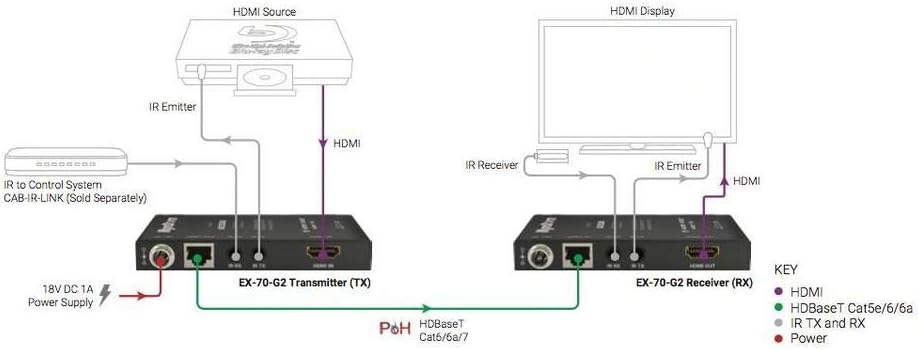
Image: Connection diagram illustrating the setup of the WyreStorm EX-70-G2 extender set, showing HDMI source, transmitter, Cat cable, receiver, and HDMI display connections.
Video: A detailed guide on how to set up an HDBaseT HDMI extender, demonstrating cable connections and power supply.
5. Arahan Operasi
Once all connections are securely made and power is supplied to the Transmitter unit, the EX-70-G2 system will automatically begin transmitting the HDMI signal.
- Operasi automatik: The system is designed for plug-and-play functionality. The Transmitter and Receiver units will establish a connection and begin transmitting the video and audio signal automatically.
- Kawalan IR: Use your existing remote control at the display location to control your source device. The IR Receiver on the display side will capture the signal, transmit it over the Cat cable to the Transmitter, and the IR Emitter will then send the command to your source device. The reverse is also true for controlling the display from the source location.
- CEC Passthrough: If your connected devices support Consumer Electronics Control (CEC), basic control commands (e.g., power on/off, input switching) may be passed through the extender automatically.
- Kawalan RS-232: For advanced control systems, the RS-232 ports allow for bidirectional serial communication, enabling integration with third-party control processors.
6. Penyelenggaraan
To ensure optimal performance and longevity of your WyreStorm EX-70-G2 Extender Set, follow these maintenance guidelines:
- Pembersihan: Keep the units clean and free from dust. Use a soft, dry cloth for cleaning. Avoid liquid cleaners or abrasive materials.
- Pengudaraan: Ensure the units have adequate ventilation. Do not block the ventilation slots on the sides and bottom of the units.
- Pengurusan Kabel: Ensure all cables (HDMI, Ethernet, IR, power) are securely connected and not under excessive strain. Avoid sharp bends or kinks in the cables.
- Keadaan Persekitaran: Operate the units within their specified temperature and humidity ranges. Avoid exposing them to extreme temperatures, direct sunlight, or moisture.
7. Penyelesaian masalah
If you encounter issues with your EX-70-G2 Extender Set, refer to the following troubleshooting steps:
- Tiada Isyarat Video/Audio:
- Verify all HDMI and Ethernet cables are securely connected.
- Ensure the power adapter is correctly connected to the Transmitter unit and receiving power.
- Check the status LEDs on both the Transmitter and Receiver units. Refer to the user manual for LED indicator meanings.
- Test with different HDMI cables and a different Ethernet cable (preferably Cat6 or Cat7) to rule out cable issues.
- Ensure your source and display devices are powered on and set to the correct HDMI input/output.
- Scrambled/Intermittent Picture:
- This can often be due to HDCP incompatibility or signal degradation over long distances.
- Ensure your source and display devices are HDCP 2.2 compliant.
- Check the quality and length of your Ethernet cable. Using a higher-grade cable (Cat6a/7) can improve signal stability over longer runs.
- Try reducing the video resolution from your source device to see if the signal stabilizes.
- IR Control Not Working:
- Ensure the IR Emitter and IR Receiver cables are correctly plugged into their respective ports (IR OUT on TX, IR IN on RX).
- Verify that the IR blaster head of the Emitter is directly aligned with the IR sensor of the device you wish to control.
- Check that the IR Receiver head is positioned to effectively capture signals from your remote control.
8. Waranti & Sokongan
The WyreStorm EX-70-G2 4K UHD Extender Set comes with an 18-month warranty from the date of purchase. Please retain your proof of purchase for warranty claims.
For technical support, further assistance, or to inquire about warranty services, please visit the official WYRESTORM website or contact their customer support team. Detailed contact information can typically be found in the included user manual or on the brand's webtapak.


