1. Pengenalan
The Aftershokz Air Bone Conduction Wireless Bluetooth Headphones offer a unique open-ear listening experience, designed to keep you connected to your audio while remaining aware of your surroundings. Utilizing advanced bone conduction technology, these headphones transmit sound through your cheekbones, leaving your ears open to ambient sounds. This design is ideal for athletes, outdoor enthusiasts, and anyone who prioritizes situational awareness.

Image 1: Aftershokz Air Bone Conduction Wireless Bluetooth Headphones in Slate Grey. These lightweight headphones feature a flexible band and transducers that rest on the cheekbones.
The lightweight titanium frame ensures comfortable long-term wear, while features like PremiumPitch technology deliver rich audio. Integrated reflective strips enhance visibility during low-light activities, making them a safe choice for various environments.

Image 2: Two individuals running outdoors, demonstrating the open-ear design of the Aftershokz Air headphones, allowing them to hear their surroundings while enjoying audio.
2. Apa yang ada di dalam Kotak
Upon opening your Aftershokz Air package, you should find the following components:
- Aftershokz Air Headphone
- Kes Pelindung
- Kabel Pengecasan
- Earplugs (for use in noisy environments, if desired)
3. Panduan Persediaan
3.1 Pengecasan Awal
Before first use, fully charge your Aftershokz Air headphones. Connect the provided charging cable to the charging port on the headphones and plug the other end into a USB power source. The LED indicator will show charging status. A full charge provides up to 6 hours of continuous use.
3.2 Berpasangan Bluetooth
- Hidupkan kuasa: Tekan dan tahan butang kuasa selama 2 saat.
- Aktifkan Bluetooth: Pada peranti anda (telefon pintar, tablet, komputer), dayakan Bluetooth.
- Pilih Peranti: Look for "Aftershokz Air" in the list of available Bluetooth devices and select it.
- Sahkan Sambungan: Once paired, the LED indicator will turn solid blue, and a voice prompt will confirm "Connected."
The headphones support multipoint pairing, allowing connection to two devices simultaneously. To use this feature, pair with the first device, then enter pairing mode again and pair with the second device. The headphones will automatically switch between devices.
4. Arahan Operasi
4.1 Wearing Your Headphones
Place the headphones with the transducers resting on your cheekbones, just in front of your ears. The band should wrap around the back of your head. Adjust for a comfortable and secure fit. The lightweight titanium material ensures minimal pressure.

Image 3: A man demonstrating the correct placement of the Aftershokz Air headphones, with the band resting comfortably around the back of his head and the transducers on his cheekbones.
4.2 Kawalan Asas
- Hidupkan/Mati Kuasa: Tekan dan tahan butang kuasa selama 2 saat.
- Kelantangan Naik/Turun: Use the volume buttons located on the side of the headphones.
- Main/Jeda: Tekan butang pelbagai fungsi sekali.
- Langkau Laluan: Double-press the multi-function button for next track, triple-press for previous track.
- Jawab/Tamatkan Panggilan: Tekan butang berbilang fungsi sekali semasa panggilan masuk atau panggilan aktif.
- Pembantu Suara: Press and hold the multi-function button for 2 seconds to activate your device's voice assistant (e.g., Siri, Google Assistant).
The dual noise-canceling microphones ensure clear calls even in noisy environments.

Image 4: A close-up of a man wearing the Aftershokz Air headphones, emphasizing the discreet design and the quality of the audio experience provided by the PremiumPitch technology and dual noise-canceling microphones.
5. Media Produk
5.1 Video Produk Rasmi
Video 1: "Push yourself Beyond Your Limits with Trekz Air". This video showcases the Aftershokz Air headphones in various active scenarios, highlighting their open-ear design, comfort, and suitability for sports and outdoor activities.
5.2 Additional Product Images

Image 5: A woman exercising, demonstrating the water-resistant capabilities of the Aftershokz Air headphones, making them suitable for intense workouts and various weather conditions.
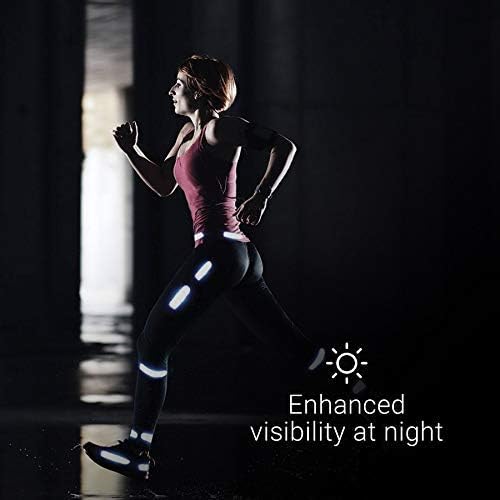
Image 6: A person running at night, illustrating the enhanced visibility provided by the reflective strips that can be adhered to clothing or gear, improving safety in low-light conditions.
6. Penyelenggaraan
6.1 Pembersihan
To maintain the longevity and hygiene of your headphones, regularly wipe them with a soft, damp kain. Elakkan penggunaan bahan kimia yang keras atau bahan yang kasar. Pastikan port pengecasan kering sebelum mengecas.
6.2 Penyimpanan
When not in use, store your Aftershokz Air headphones in the provided protective case to prevent damage from dust, dirt, and impacts. Store in a cool, dry place away from extreme temperatures.
6.3 Penjagaan Bateri
For optimal battery life, avoid fully discharging the headphones frequently. Charge them regularly, even if not in constant use. If storing for an extended period, charge them to about 50% before storage.
7. Penyelesaian masalah
| Masalah | Kemungkinan Punca | Penyelesaian |
|---|---|---|
| Tiada Bunyi | Headphones not powered on or paired; volume too low; device volume too low. | Ensure headphones are on and paired. Increase headphone and device volume. |
| Tidak Boleh Berpasangan | Fon kepala tiada dalam mod berpasangan; peranti Bluetooth dimatikan; gangguan. | Ensure headphones are flashing red/blue. Turn device Bluetooth off/on. Move closer to device. |
| Isu Pengecasan | Cable or power source issue; charging port dirty. | Try a different cable or USB port. Clean charging port gently. |
| Kualiti Audio Tidak Baik | Di luar julat Bluetooth; gangguan; bateri lemah. | Move closer to your device. Avoid strong electromagnetic fields. Charge headphones. |
If problems persist, please refer to the support section or visit the official Aftershokz webtapak untuk bantuan lanjut.
8. Spesifikasi
| Nama Model | AfterShokz Air Open-Ear |
| Nombor Model | AS650SG-BR |
| Teknologi Ketersambungan | Bluetooth v4.2 |
| Julat Bluetooth | 10 Meter |
| Jenis Pemacu Audio | Pemacu Pengaliran Tulang |
| Julat Kekerapan | 20 Hz hingga 20,000 Hz |
| Hayat Bateri | 6 Jam |
| Masa Mengecas | (Not specified in input, omit or state typical) |
| Berat Barang | 30 Gram (1.06 auns) |
| bahan | titanium |
| Tahap Ketahanan Air | Kalis Air (Kalis Peluh) |
| Mikrofon | Included, Noise Cancellation |
| Peranti Serasi | Telefon pintar atau tablet sedia Bluetooth iOS dan Android serta komputer dan komputer riba Mac dan PC |
| Kaedah Kawalan | Sentuh, Suara |
| warna | Kelabu Batu Tulis |
| UPC | 811071030540 |
| Pengeluar | Aftershokz Limited Corporation |
9. Waranti dan Sokongan
For detailed warranty information and customer support, please refer to the warranty card included with your product or visit the official Aftershokz website. You can also find FAQs and additional resources there to help you with your Aftershokz Air headphones.
Sokongan dalam talian: Aftershokz Official Store on Amazon


