1. Pengenalan
This manual provides detailed instructions for the setup, operation, and maintenance of your DIERYA DK68 60% Wireless Mechanical Gaming Keyboard. Please read this manual thoroughly before using the product to ensure proper functionality and to maximize your user experience.

Image 1.1: DIERYA DK68 keyboard highlighting its main features.
2. Kandungan Pakej
Sahkan bahawa semua item terdapat dalam pakej:
- DIERYA DK68 60% Wireless Mechanical Gaming Keyboard
- Kabel USB-C ke USB-A
- Penarik Kekunci
- Manual Pengguna (dokumen ini)
3. Produk Lebihview
The DIERYA DK68 is a compact 60% mechanical keyboard designed for versatility and performance. It features a 68-key layout, tri-mode connectivity, RGB backlighting, and durable mechanical switches.
Ciri-ciri Utama:
- Kesambungan Tri-Mod: Menyokong sambungan berwayar Bluetooth 5.0, tanpa wayar 2.4GHz dan USB-C.
- Reka Letak Kompak 68-Key: Saves desk space while retaining essential keys.
- Clicky Blue Mechanical Switches: Provide tactile feedback and an audible click, ideal for typing and gaming.
- Pencahayaan latar RGB: Customizable lighting with multiple modes and brightness levels.
- Penggulingan N-Key & Anti-Ghosting: Ensures accurate registration of multiple simultaneous key presses.
- Bateri 3000mAh: Long-lasting rechargeable battery for extended wireless use.
- Kap Kunci Tangkapan Ganda: Durable and fade-resistant keycaps.
- Reka bentuk ergonomik: Features two-stage adjustable feet and anti-slip pads for comfortable and stable use.

Image 3.1: Details of the Clicky Blue Mechanical Switches.

Image 3.2: Ergonomic features including double-shot keycaps, adjustable feet, and anti-slip pads.
4. Persediaan
The DK68 keyboard offers three connection modes: wired, 2.4GHz wireless, and Bluetooth. Choose the mode that best suits your device and needs.
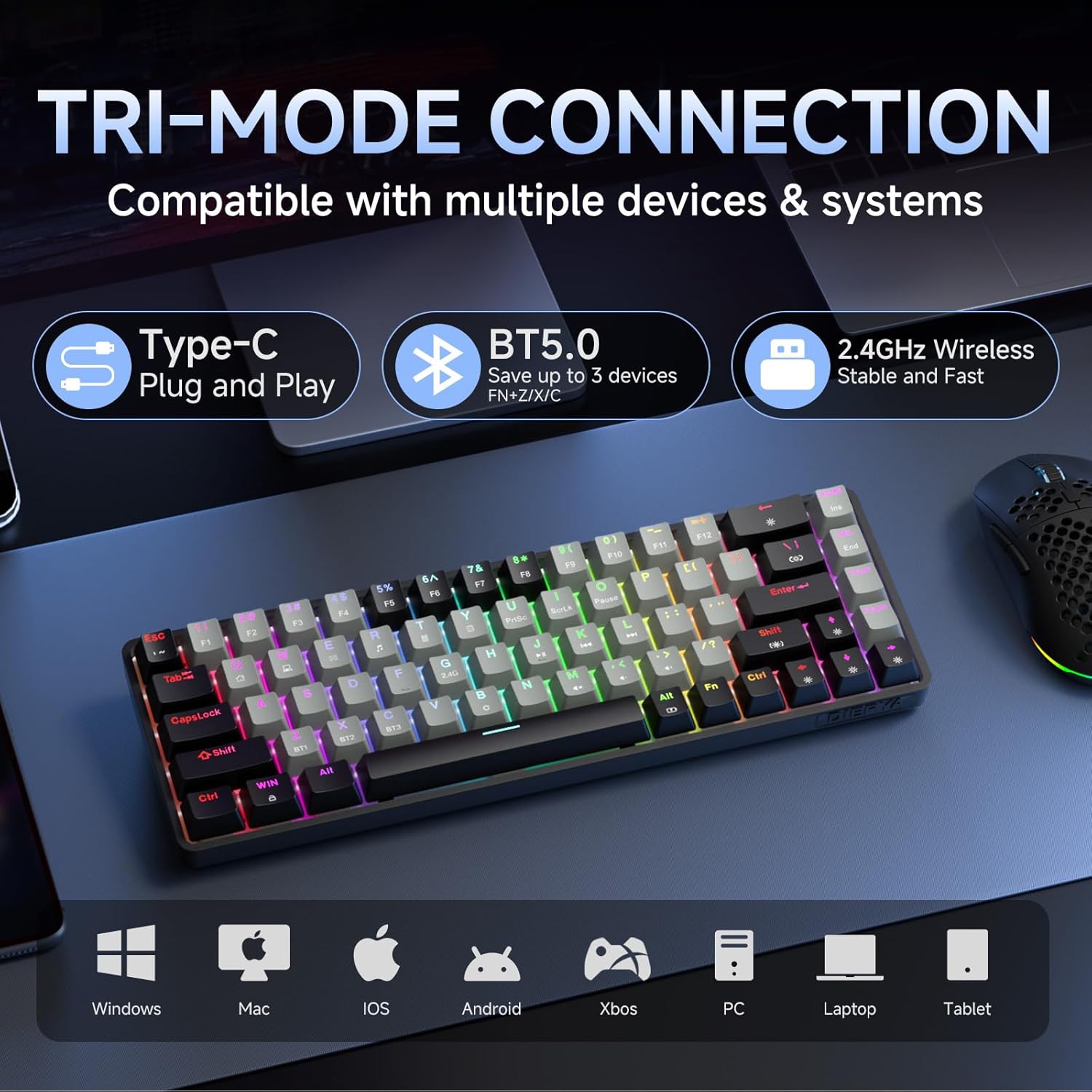
Image 4.1: Tri-mode connectivity and device compatibility.
4.1 Sambungan Berwayar (USB-C)
- Sambungkan kabel USB-C yang disediakan ke port USB-C papan kekunci.
- Sambungkan hujung kabel USB-A ke port USB yang tersedia pada komputer anda.
- The keyboard will automatically be recognized and ready for use. The keyboard will also charge in this mode.
4.2 Sambungan Wayarles 2.4GHz
- Locate the 2.4GHz USB receiver (usually stored in a compartment on the keyboard or included separately).
- Palamkan penerima USB 2.4GHz ke dalam port USB yang tersedia pada komputer anda.
- Hidupkan papan kekunci. Papan kekunci sepatutnya bersambung secara automatik ke penerima.
- Jika sambungan tidak diwujudkan, tekan Fn + 2.4G (usually indicated by a specific keycap legend) to activate 2.4GHz pairing mode.
4.3 Sambungan Bluetooth
The keyboard supports connecting to up to three Bluetooth devices.
- Pastikan papan kekunci dihidupkan.
- Tekan dan tahan Fn + BT1, Fn + BT2, atau Fn + BT3 for 3-5 seconds until the corresponding key (BT1, BT2, or BT3) flashes rapidly. This indicates pairing mode.
- Pada peranti anda (komputer, tablet, telefon pintar), buka tetapan Bluetooth dan cari peranti baharu.
- Select "DIERYA DK68" (or similar name) from the list of available devices to pair.
- Once paired, the BT key will stop flashing and remain steadily lit.
- Untuk bertukar antara peranti Bluetooth yang dipasangkan, hanya tekan Fn + BT1/BT2/BT3.
5. Arahan Operasi
5.1 Kawalan Pencahayaan Latar RGB
The DK68 features dynamic RGB backlighting with multiple modes and customization options.
- Fn + Ruang Belakang: Turn backlighting on/off.
- Fn + Shift: Switch between different lighting colors (for static modes).
- Fn + \|: Cycle through 20 different lighting modes.
- Fn + ↓: Kurangkan kecerahan.
- Fn + ↑: Tingkatkan kecerahan.
- Fn + ←: Decrease lighting speed (for dynamic modes).
- Fn + →: Increase lighting speed (for dynamic modes).

Image 5.1: RGB Backlighting control key combinations.
5.2 Kombinasi Kekunci Fungsi
Due to its compact 60% layout, many functions are accessed via the Fn kekunci digabungkan dengan kekunci lain.
- Fn + F1-F12: Access multimedia and system functions (e.g., volume, media control). Specific functions are often indicated by secondary legends on the keycaps.
- Fn + Menang: Kunci/Buka Kunci Windows.
- Fn + P: Skrin Cetak.
- Fn + [: Rumah.
- Fn + ]: tamat.
- Fn + ;: Halaman Atas.
- Fn + ': Halaman bawah.
- Fn + Enter: Sisipkan.
- Fn + Padam: Padam.
- Fn + Bar Ruang: Check battery indicator (when wired, it pulsates blue while charging).
5.3 Mengecas
The keyboard is equipped with a 3000mAh rechargeable lithium battery.
- Connect the keyboard to a USB power source using the provided USB-C cable.
- The spacebar will typically indicate charging status (e.g., pulsating blue).
- A full charge provides approximately 12 hours of use with backlighting on, or up to 333 hours with backlighting off.
- The keyboard features an auto-stop function after 3 minutes of inactivity to conserve battery.

Image 5.2: Battery life and charging information.
6. Penyelenggaraan
Penyelenggaraan yang betul memastikan ketahanan dan prestasi papan kekunci anda.
- Membersihkan Kap Kunci: Gunakan penarik penutup kekunci yang disediakan untuk menanggalkan penutup kekunci dengan berhati-hati. Bersihkannya dengan kain lembutamp kain dan sabun lembut jika perlu. Pastikan ia kering sepenuhnya sebelum dipasang semula.
- Membersihkan Badan Papan Kekunci: Use a soft, dry cloth to wipe down the keyboard body. For dust between keys, use compressed air.
- Elakkan Cecair: Do not expose the keyboard to excessive moisture or liquids. If spills occur, immediately disconnect the keyboard and allow it to dry completely before reuse.
- Storan: Simpan papan kekunci di tempat yang sejuk dan kering jauh dari cahaya matahari langsung dan suhu yang melampau.
7. Penyelesaian masalah
If you encounter issues with your DIERYA DK68 keyboard, refer to the following common solutions:
- Papan kekunci tidak bertindak balas:
- Ensure the keyboard is charged. Connect it via USB-C cable to check if it works in wired mode.
- For wireless modes, ensure the keyboard is powered on and correctly paired (2.4GHz receiver plugged in, or Bluetooth paired to the correct channel).
- Cuba mulakan semula komputer atau peranti anda.
- Isu sambungan Bluetooth:
- Pastikan Bluetooth didayakan pada peranti anda.
- Forget the keyboard in your device's Bluetooth settings and re-pair it.
- Pastikan tiada peranti lain yang mengganggu isyarat Bluetooth.
- 2.4GHz wireless lag or disconnection:
- Ensure the 2.4GHz receiver is plugged into a direct USB port, not a hub.
- Move the keyboard closer to the receiver.
- Avoid placing large metal objects between the keyboard and receiver.
- Lampu latar RGB tidak berfungsi:
- Tekan Fn + Backspace to ensure backlighting is turned on.
- Increase brightness using Fn + ↑.
- Keys not registering correctly (ghosting):
- The keyboard features N-Key rollover, so this should be rare. Ensure no debris is under the keycap.
- If the issue persists, try resetting the keyboard (refer to manufacturer's website for specific reset procedures if available).
8. Spesifikasi
| Ciri | Spesifikasi |
|---|---|
| Model | DK68 |
| Susun atur | 68-Key (60% Compact) |
| Jenis Suis | Suis Mekanikal Biru Clicky |
| Daya Penggerak | 60gf (±15gf) |
| Keystroke Travel | 2.3mm (±0.6mm) |
| Tukar Jangka Hayat | 50 Juta Klik |
| Ketersambungan | Bluetooth 5.0, Tanpa Wayar 2.4GHz, Berwayar USB-C |
| Pencahayaan latar | RGB (20 Mod) |
| Kapasiti Bateri | Polimer Lithium 3000mAh |
| Hayat Bateri (Lampu Menyala) | lebih kurang 12 jam |
| Hayat Bateri (Lampu Dimatikan) | lebih kurang 333 jam |
| Tidur Auto | 3 minit tidak aktif |
| Guling Kunci | N-Key Rollover |
| Dimensi (L x W x H) | 372 x 115 x 51 mm (14.65 x 4.53 x 2.01 inci) |
| Berat badan | 820 g (1.79 paun) |
| OS yang serasi | Windows, macOS, Linux, iOS, Android |

Image 8.1: Keyboard dimensions.
9. Waranti dan Sokongan
DIERYA products are designed for reliability and performance. For warranty information and technical support, please refer to the official DIERYA webtapak atau hubungi perkhidmatan pelanggan mereka secara langsung.
- rasmi Webtapak: Visit the DIERYA Store on Amazon
- Perkhidmatan Pelanggan: Rujuk maklumat perhubungan yang diberikan pada pembungkusan produk atau maklumat rasmi webtapak untuk sokongan.
Sila simpan bukti pembelian anda untuk tuntutan waranti.


