pengenalan
Thank you for choosing the 360 Robot Vacuum and Mop Cleaner. This intelligent cleaning device is designed to provide efficient and thorough cleaning for your home, featuring advanced laser navigation, powerful suction, and smart app control. This manual will guide you through the setup, operation, and maintenance of your new robot vacuum to ensure optimal performance and longevity.

The 360 Robot Vacuum and Mop Cleaner, Model S6, shown with its companion mobile application interface.
Maklumat Keselamatan
- Baca semua arahan dengan teliti sebelum menggunakan perkakas.
- Jangan benarkan kanak-kanak mengendalikan vakum robot. Awasi kanak-kanak dan haiwan peliharaan semasa robot beroperasi.
- Ensure the charging dock is placed on a flat surface against a wall, with clear space around it.
- Do not use the robot vacuum in wet environments or near liquids.
- Tanggalkan sebarang kabel yang longgar, objek kecil atau barang rapuh dari lantai sebelum membersihkannya untuk mengelakkan kekusutan atau kerosakan.
- Do not use the robot vacuum to pick up large debris, sharp objects, or burning/smoking materials.
- Only use the original charger and battery provided by the manufacturer.
- Lakukan penyelenggaraan secara berkala seperti yang diterangkan dalam manual ini untuk memastikan operasi yang selamat dan cekap.
Kandungan Pakej
Sahkan bahawa semua komponen terdapat dalam pakej:
- 360 Robot Vacuum and Mop Cleaner (S6)
- Dok Pengecasan
- Penyesuai Kuasa
- Tangki Air
- Kain Mop
- Berus Sisi (2 pasang)
- Alat Pembersihan
- Manual Pengguna
- Bateri (dipasang sebelumnya)
- Penapis (dipasang terlebih dahulu)
Produk Selesaiview
Familiarize yourself with the main components of your 360 Robot Vacuum and Mop Cleaner.

Berakhirview of the robot vacuum's intelligent features including anti-collision, anti-drop sensors, long-lasting battery, LDS laser navigation, and SLAM algorithm for mapping.
Atas View:
- LDS Laser Navigation Sensor: For accurate mapping and navigation.
- Butang Kuasa/Bersih: Press to start/pause cleaning, long press to turn on/off.
- Recharge Button: Press to send the robot back to the charging dock.
- Dustbin Compartment: Located under the top cover.
Bawah View:
- Berus Utama: Untuk membersihkan karpet dan lantai keras.
- Berus Sisi: Untuk menyapu serpihan dari tepi dan sudut.
- Roda Memandu: For movement across various surfaces.
- Omni-directional Wheel: For steering.
- Mengecas Kenalan: To connect with the charging dock.
- Penderia Cliff: To prevent falling down stairs.
- Wall Sensor: To sweep along walls and corners effectively.
Persediaan
1. Charging the Robot Vacuum
- Place the charging dock on a hard, level surface against a wall. Ensure there is at least 0.5 meters (1.6 feet) of clear space on both sides and 1.5 meters (4.9 feet) in front of the dock.
- Connect the power adapter to the charging dock and plug the other end into a power outlet.
- Place the robot vacuum onto the charging dock, ensuring the charging contacts align. The robot will announce that it is charging. For first use, fully charge the robot before operation.
2. Connecting to the 360 Robot App
- Download the "360 Robot" app from the App Store (iOS) or Google Play Store (Android).
- Buka aplikasi dan buat akaun atau log masuk.
- Follow the in-app instructions to add your device. This typically involves selecting your robot model, connecting to its Wi-Fi hotspot, and then connecting the robot to your home Wi-Fi network (2.4GHz only).
- Setelah disambungkan, anda boleh mengawal robot, view cleaning maps, set schedules, and access advanced features through the app.
Beroperasi
Memulakan Kitaran Pembersihan
- Melalui Butang Robot: Press the Power/Clean button on the robot once to start a cleaning cycle. Press again to pause.
- Melalui Apl: Open the 360 Robot app and tap the "Clean" button. You can also select specific cleaning modes (e.g., Spot cleaning, Proximity cleaning) or set schedules.
- Melalui Perintah Suara (Alexa): If integrated with Alexa, you can use voice commands like "Alexa, ask 360 Robot to start cleaning."
Mod Pembersihan

The robot vacuum is capable of both sweeping (vacuuming) and mopping, utilizing its main brush, side brushes, and mop cloth.
- Pembersihan Auto: The robot intelligently maps your home and cleans systematically. It identifies carpet and automatically switches to Max Mode with 1800Pa suction power for deep cleaning.
- Pembersihan Tempat: Mengarahkan robot untuk membersihkan kawasan kecil tertentu secara intensif.
- Proximity Cleaning: Cleans a designated area around the robot.
- Mod Mengemop: Attach the water tank with a damp mop cloth. The robot will mop hard floors. Note: The mopping function is designed for light mopping and not for heavy stains.
Ciri Apl Lanjutan
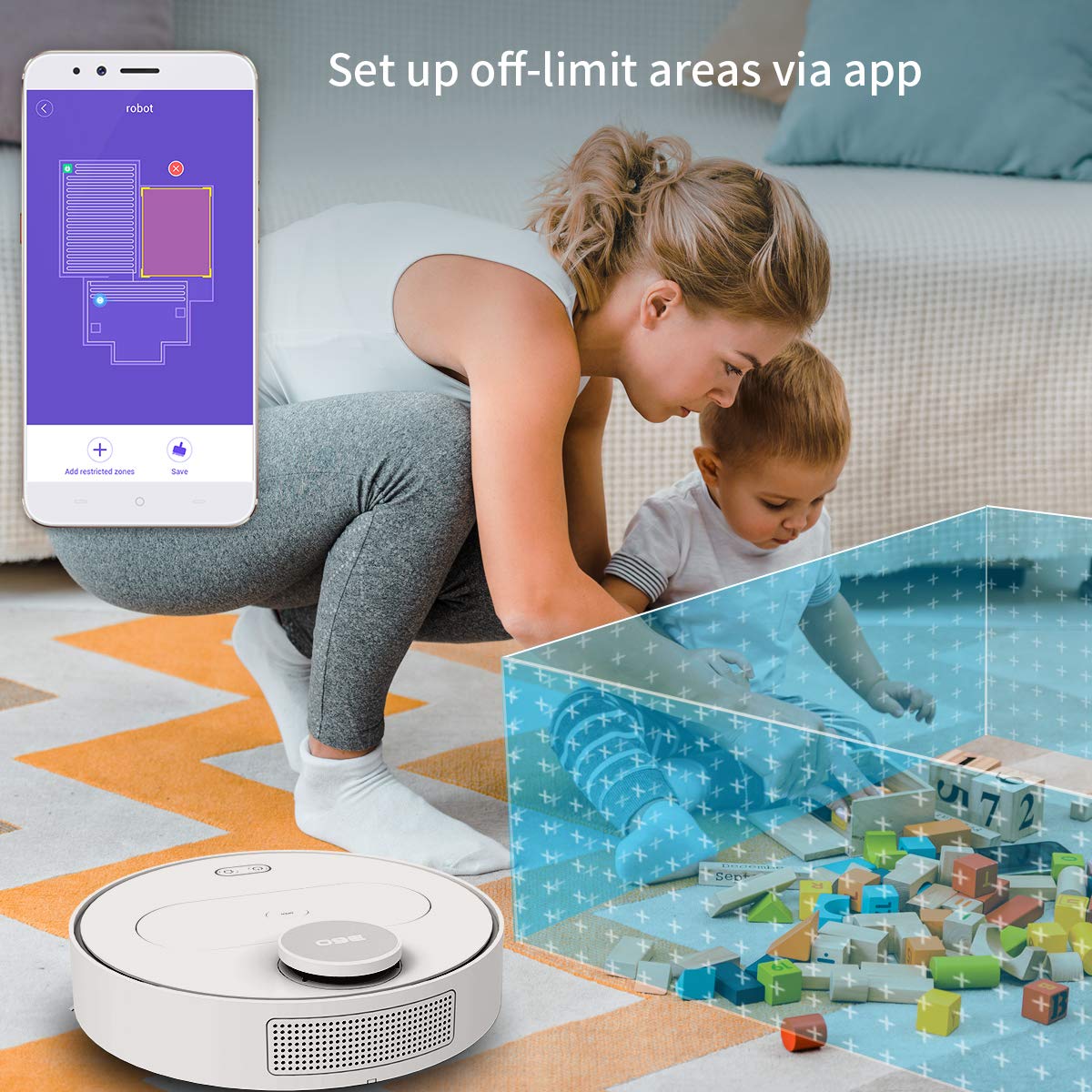
The 360 Robot app allows users to define and set up off-limit areas on the cleaning map, preventing the robot from entering specific zones.
- Multi-map Management: Save and manage multiple floor plans for different levels of your home.
- Off-limit Area: Draw virtual boundaries or no-go zones on the map to prevent the robot from entering specific areas.
- Penjadualan: Tetapkan masa tertentu untuk robot mula membersihkan secara automatik.
- Kawalan Jauh: Manually control the robot's movement using the app.
- Pembersihan Trek: Monitor the robot's real-time cleaning path and progress on the map.
- Tahap sedutan: Adjust suction power (Quiet, Normal, Powerful, Max) according to your cleaning needs.
Automatic Recharge and Breakpoint Resume
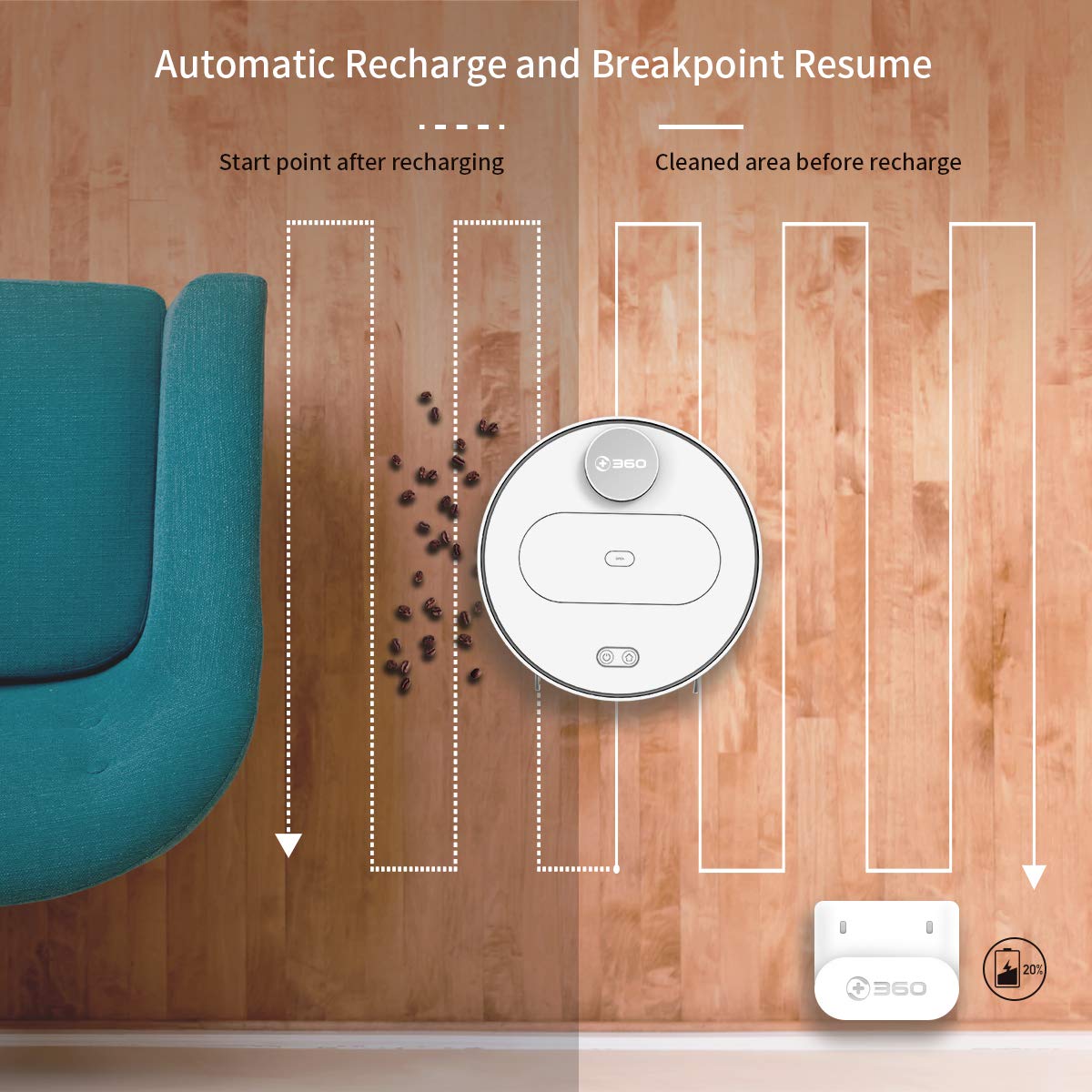
The robot automatically returns to its charging dock when the battery is low and resumes cleaning from the last uncleaned spot after recharging.
When the battery level is low during a cleaning cycle, the robot will automatically return to its charging dock. Once fully recharged, it will resume cleaning from where it left off, ensuring complete coverage of your home.
Penyelenggaraan
Regular maintenance is crucial for optimal performance and longevity of your robot vacuum.
1. Mengosongkan Tong Sampah
- Buka penutup atas robot dan keluarkan tong sampah.
- Buka penutup tong sampah dan kosongkan kandungannya ke dalam tong sampah.
- It is recommended to empty the dustbin after each cleaning cycle.
2. Membersihkan Penapis

The 360 Robot Vacuum features a washable HEPA filter, which helps maintain high filtration efficiency and contributes to cleaner indoor air.
- Keluarkan penapis dari tong sampah.
- Tap the filter gently to remove loose dirt.
- Rinse the filter under running water. Ensure it is completely dry before reinserting it into the dustbin. Do not use a brush or other tools to clean the filter, as this may damage it.
- It is recommended to clean the filter weekly and replace it every 3-6 months, depending on usage.
3. Berus Pembersih
- Berus Utama: Remove the main brush cover and then the main brush. Use the provided cleaning tool to remove hair and debris tangled around the brush. Reinstall the brush and cover. Clean weekly.
- Berus Sisi: Check side brushes for tangled hair or debris. If necessary, remove them (they can be pulled off) and clean. Reinstall, ensuring they click into place. Replace if worn or damaged. Clean monthly.
4. Membersihkan Penderia dan Mengecas Kenalan
- Wipe the cliff sensors (on the bottom of the robot), wall sensor (on the side), and charging contacts (on the robot and charging dock) with a clean, dry cloth. This ensures proper navigation and charging. Clean monthly.
5. Water Tank and Mop Cloth Maintenance
- After mopping, remove the water tank and empty any remaining water.
- Remove the mop cloth and wash it thoroughly. Allow it to air dry completely before reattaching or storing.
- Do not leave water in the tank when the robot is not in use for extended periods.
Menyelesaikan masalah
| Masalah | Kemungkinan Punca | Penyelesaian |
|---|---|---|
| Robot tidak dihidupkan. | Bateri hampir habis atau habis. | Place the robot on the charging dock and ensure it is charging. |
| Robot tidak boleh menyambung ke Wi-Fi. | Incorrect Wi-Fi password; 5GHz network; robot too far from router. | Ensure correct 2.4GHz Wi-Fi password. Move robot closer to router. Restart robot and router. |
| Robot kerap tersangkut. | Obstacles on the floor; narrow spaces. | Clear obstacles. Use the app to set off-limit areas for problematic zones. |
| Prestasi pembersihan yang lemah. | Dustbin full; filter clogged; brushes tangled. | Kosongkan tong sampah. Bersihkan atau gantikan penapis. Bersihkan berus utama dan sisi. |
| Robot tidak kembali ke dok pengecasan. | Charging dock obstructed; charging contacts dirty. | Ensure clear space around the dock. Clean charging contacts on both robot and dock. |
Spesifikasi
| Ciri | Perincian |
|---|---|
| Jenama | 360 |
| Nama Model | S6 |
| Ciri Khas | Anti-Collision, Anti-Fall, Washable Filter |
| warna | Pelbagai warna |
| Jenis Penapis | kain |
| Hayat Bateri | 110 Minit |
| Sumber Kuasa | Dikuasakan Bateri |
| Kaedah Kawalan | Apl |
| Peranti Serasi | Alexa |
| Berat Barang | 3 kg 490 g |
| Dimensi Item (LxWxH) | 35 x 35 x 10 Sentimeter |
Waranti dan Sokongan
For warranty information and technical support, please refer to the warranty card included in your product packaging or visit the official 360 SmartAI website. You can also contact customer service through the 360 Robot app for assistance.
Untuk sumber tambahan dan Soalan Lazim, sila layari 360 Store on Amazon.


