Produk Selesaiview
The beFree Sound BFS-555X is a versatile and portable party speaker designed for robust audio performance and dynamic visual effects. It features a 12-inch woofer and 4-inch tweeters, both equipped with integrated party lights, delivering powerful, clear sound with vibrant illumination. This speaker offers multiple connectivity options including Bluetooth, USB, TF card, and AUX inputs, along with an FM radio. For enhanced portability, it includes hard-mounted top handles, an extendable handle, and caster wheels. The system comes complete with a wireless microphone and a remote control, making it ideal for various audio applications, from music playback to public address.

Figure 1: The beFree Sound BFS-555X Portable Party Speaker, showcasing its main unit, wireless microphone, and remote control.
Maklumat Keselamatan
Please read all safety instructions carefully before using this product. Retain this manual for future reference.
- Jangan dedahkan unit kepada hujan atau lembapan untuk mengelakkan kebakaran atau kejutan elektrik.
- Do not open the speaker enclosure. There are no user-serviceable parts inside. Refer all servicing to qualified personnel.
- Pastikan pengudaraan yang betul di sekeliling unit. Jangan sekat sebarang bukaan pengudaraan.
- Gunakan hanya penyesuai kuasa yang dibekalkan dengan unit.
- Jauhkan unit daripada sumber haba seperti radiator, daftar haba, dapur, atau radas lain (termasuk amppenghidup) yang menghasilkan haba.
- Bersihkan hanya dengan kain kering.
- Produk ini mengandungi bahan kimia yang diketahui oleh Negeri California untuk menyebabkan kanser dan kecacatan kelahiran atau bahaya pembiakan lain.
Apa yang ada dalam Kotak
Sahkan bahawa semua item ada semasa membongkar:
- beFree Sound BFS-555X Portable Party Speaker
- Mikrofon Tanpa Wayar
- Alat Kawalan Jauh
- Penyesuai Kuasa
- Manual Pengguna (dokumen ini)
Ciri-ciri
- Output Audio yang Berkuasa: Equipped with a 12-inch woofer and 4-inch tweeters for strong, clear sound.
- Dynamic Party Lights: Integrated LED lights on both the woofer and tweeters that react to music.
- Pelbagai Pilihan Kesambungan: Supports Bluetooth wireless streaming, USB drive playback, TF (microSD) card playback, and AUX input.
- Radio FM: Built-in FM tuner for radio station listening.
- Input Mikrofon: Includes one wireless microphone and an additional wired microphone input for dual microphone use.
- Reka Bentuk Mudah Alih: Features hard-mounted top handles, an extendable handle, and caster wheels for easy transport.
- Adjustable Sound Controls: Independent controls for treble, bass, echo, and master volume.
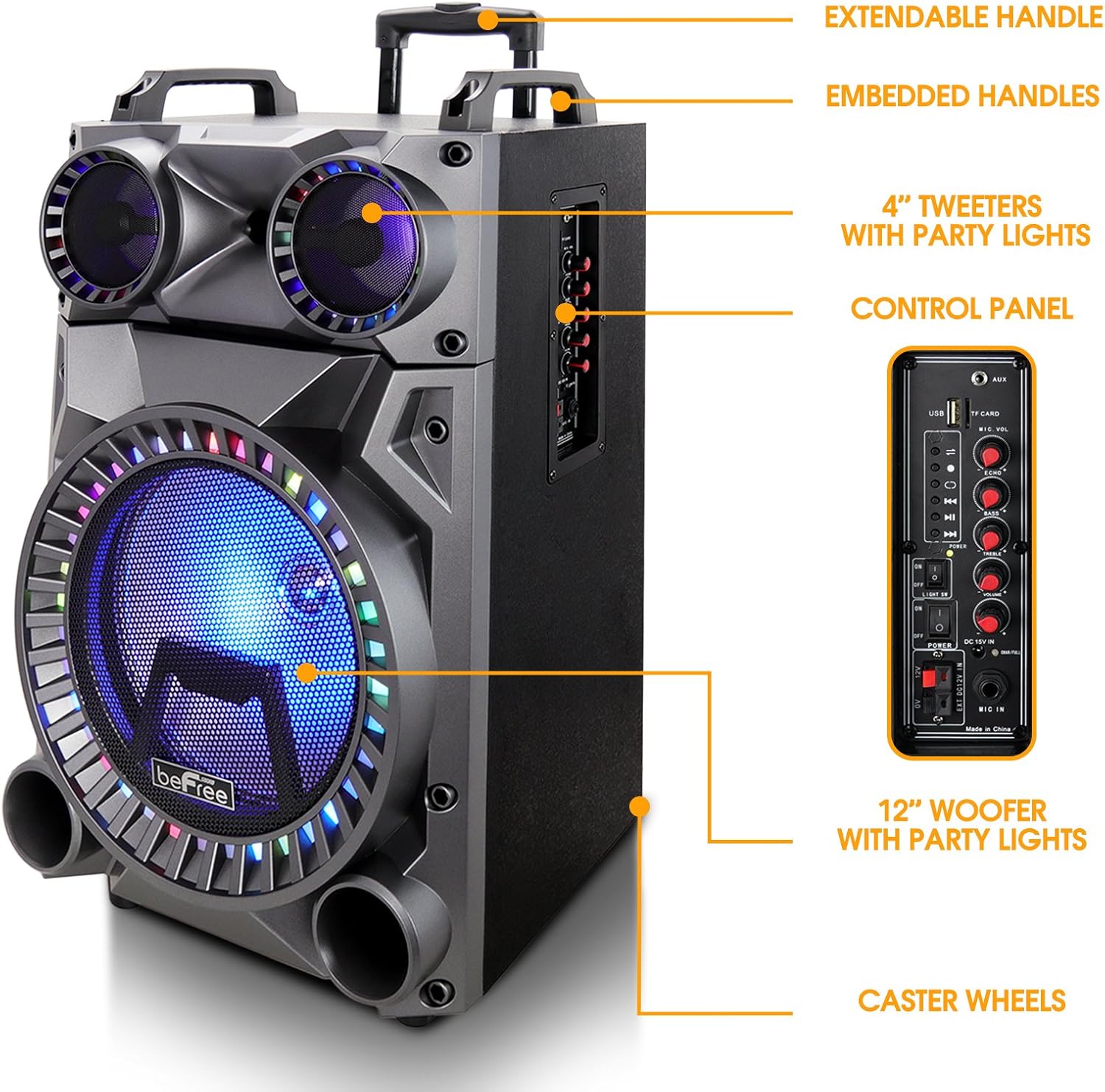
Rajah 2: Sisi view highlighting key components such as the extendable handle, embedded handles, 4-inch tweeters with party lights, control panel, 12-inch woofer with party lights, and caster wheels for portability.
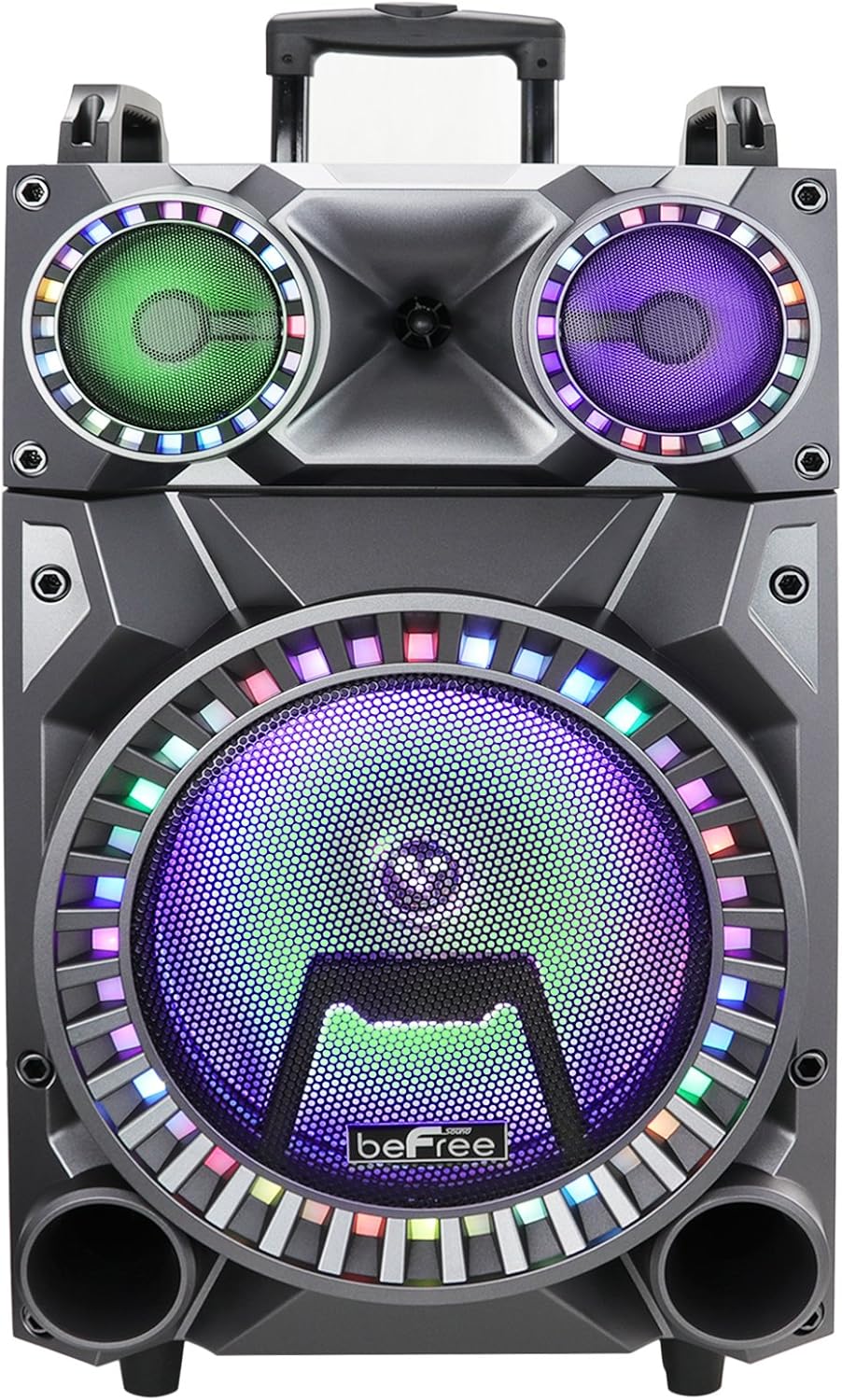
Rajah 3: Dekat hadapan view of the speaker's illuminated woofer and tweeters, showcasing the vibrant party lights.
Persediaan
1. Membongkar dan Meletakkan
Carefully remove the speaker and all accessories from the packaging. Place the speaker on a stable, flat surface. Ensure there is adequate space around the unit for ventilation.
2. Mengisi Speaker
Before first use, fully charge the speaker's internal battery. Connect the supplied power adapter to the DC IN port on the speaker's control panel and plug the other end into a standard wall outlet. The charging indicator light will illuminate. Once fully charged, the light may change color or turn off, depending on the model. A full charge typically takes several hours.
3. Menghidupkan/Mematikan
Locate the POWER switch on the control panel. Flip the switch to the "ON" position to power on the speaker. To power off, flip the switch to the "OFF" position.
4. Connecting the Wireless Microphone
The included wireless microphone is pre-paired with the speaker. Ensure the microphone has fresh batteries installed. Turn on the microphone. The speaker should automatically detect and connect to the microphone. Adjust the microphone volume using the "MIC VOL" knob on the control panel.
Arahan Operasi
1. Berpasangan Bluetooth
- Power on the speaker. The speaker will automatically enter Bluetooth pairing mode, indicated by a flashing Bluetooth indicator or an audible prompt.
- Pada peranti mudah alih anda (telefon pintar, tablet, komputer riba), dayakan Bluetooth dan cari peranti yang tersedia.
- Select "beFree Sound" or "BFS-555X" from the list of devices.
- Once paired, the speaker will confirm with an audible tone, and the Bluetooth indicator will stop flashing.
- Anda kini boleh memainkan audio daripada peranti anda melalui pembesar suara.
2. Main Semula Kad USB/TF
- Insert a USB flash drive or TF (microSD) card into the respective port on the control panel.
- Pembesar suara akan bertukar secara automatik ke mod USB/TF dan mula memainkan audio yang serasi files (cth, MP3).
- Use the playback controls (Play/Pause, Next/Previous Track) on the speaker or remote control to manage your music.
3. Input AUX
- Connect an external audio device (e.g., MP3 player, computer) to the AUX IN port on the speaker using a 3.5mm audio cable (not included).
- Pembesar suara secara automatik akan bertukar kepada mod AUX.
- Kawal main balik daripada peranti anda yang disambungkan.
4. Radio FM
- Press the "MODE" button on the control panel or remote control until "FM" mode is selected.
- Press and hold the "Play/Pause" button to initiate an automatic scan for FM stations. The speaker will save all found stations.
- Use the "Next/Previous Track" buttons to navigate between saved stations.
5. Penggunaan Mikrofon
In any mode, the microphone can be used simultaneously with music playback. Adjust the "MIC VOL" knob for microphone volume and "ECHO" knob for echo effect.
6. Kawalan Cahaya
The party lights can be toggled on or off using the "LIGHT ON/OFF" switch on the control panel.
7. Pelarasan Bunyi
Use the dedicated knobs on the control panel to adjust:
- MASTER VOL: Overall speaker volume.
- Treble: Melaraskan bunyi frekuensi tinggi.
- ASAS: Melaraskan bunyi frekuensi rendah.
- ECHO: Mengawal kesan gema untuk mikrofon.
Penyelenggaraan
1. Pembersihan
Lap bahagian luar pembesar suara dengan kain lembut dan kering. Jangan gunakan pembersih, lilin atau pelarut yang kasar kerana ia boleh merosakkan kemasannya. Elakkan menyembur cecair terus ke atas pembesar suara.
2. Penyimpanan
When not in use for extended periods, store the speaker in a cool, dry place, away from direct sunlight and extreme temperatures. It is recommended to partially charge the battery every few months to maintain its health.
3. Penjagaan Bateri
To prolong battery life, avoid fully discharging the battery frequently. Recharge the speaker when the low battery indicator appears or when sound quality degrades. Do not leave the speaker uncharged for very long periods.
Menyelesaikan masalah
| Masalah | Kemungkinan Punca | Penyelesaian |
|---|---|---|
| Tiada kuasa | Battery is depleted; Power switch is off; Power adapter not connected. | Charge the speaker; Ensure power switch is ON; Check power adapter connection. |
| Tiada bunyi | Kelantangan terlalu rendah; Mod input salah dipilih; Peranti tidak disambungkan dengan betul. | Increase MASTER VOL; Press MODE button to select correct input (Bluetooth, USB, AUX, FM); Reconnect device. |
| Bluetooth tidak berpasangan | Speaker not in pairing mode; Device too far; Bluetooth disabled on device. | Ensure speaker is in Bluetooth mode (flashing indicator); Move device closer to speaker; Enable Bluetooth on your device. |
| Mikrofon tidak berfungsi | Microphone is off; Batteries are low/dead; MIC VOL is too low. | Turn on microphone; Replace microphone batteries; Increase MIC VOL knob. |
| Lampu parti tidak berfungsi | Suis lampu dimatikan. | Ensure LIGHT ON/OFF switch is in the ON position. |
Spesifikasi
| Ciri | Perincian |
|---|---|
| Nombor Model | BFS-555X |
| Saiz Pembesar Suara | 12-inch Woofer, 4-inch Tweeters |
| Teknologi Ketersambungan | Bluetooth, AUX, USB, Kad TF, Radio FM |
| Input Audio | USB, TF, AUX, Microphone (XLR/Aux type) |
| Sumber Kuasa | Elektrik Bertali (Bateri Boleh Dicas Semula) |
| bahan | Logam, Plastik |
| Berat Barang | 26 Paun (lebih kurang 11.8 kg) |
| Dimensi Pakej | 30.6 x 18.2 x 16.9 inci (lebih kurang 77.7 x 46.2 x 42.9 cm) |
| warna | Hitam |
| Peranti Serasi | Telefon Pintar, Tablet, Komputer riba |
| Termasuk Aksesori | Wireless Microphone, Remote Control |

Figure 4: Approximate dimensions of the beFree Sound BFS-555X speaker: 27 inches (height), 15 inches (width), and 12 inches (depth).
Waranti dan Sokongan
For warranty information and technical support, please contact beFree Sound customer service. Details can typically be found on the manufacturer's official webtapak atau pada pembungkusan produk.
Please have your model number (BFS-555X) and purchase information ready when contacting support.


