1. Pengenalan
This manual provides essential information for the safe and correct operation of your Shinco SO3A 32-inch HD Ready LED TV. Please read all instructions carefully before using the television and retain this manual for future reference.
The Shinco SO3A offers a 32-inch HD Ready display with a resolution of 1366x768p, a 60Hz refresh rate, and a 178-degree viewing angle. It features an A+ Grade Panel, 16.7 million colors, noise reduction, and multiple picture modes. Connectivity options include 2 HDMI ports, 2 USB ports, and 1 VGA port. Audio is delivered through 20W speakers with surround sound capability. Additional features include USB to USB copy, Dynamic Light Control, Eco Vision, and Eye Safe Feature.
2. Maklumat Keselamatan
Sentiasa patuhi langkah keselamatan berikut untuk mengelakkan kejutan elektrik, kebakaran atau kerosakan pada televisyen.
- Sumber Kuasa: Sambungkan TV hanya ke soket kuasa AC dengan volum yang betultage seperti yang ditunjukkan pada label TV.
- Pengudaraan: Pastikan pengudaraan yang mencukupi di sekeliling TV. Jangan sekat bukaan pengudaraan.
- Air dan Kelembapan: Jangan dedahkan TV kepada hujan atau lembapan. Jangan letakkan objek yang diisi dengan cecair, seperti pasu, di TV.
- Pembersihan: Cabut plag TV sebelum membersihkan. Gunakan kain lembut dan kering. Jangan gunakan pembersih cecair atau pembersih aerosol.
- penempatan: Place the TV on a stable, level surface or mount it securely to a wall. Avoid placing it in direct sunlight or near heat sources.
- kilat: During lightning storms or when unused for long periods, unplug the TV from the wall outlet.
3. Kandungan Pakej
Sahkan bahawa semua item terdapat dalam pakej:
- 1 x Shinco SO3A LED TV Unit
- 1 x Table Stand Pair
- 1 x Alat Kawalan Jauh
- 1 x Kad Waranti
- 1 x Manual Pengguna (dokumen ini)
- 1 x Wall Mount Kit (includes screws and anchors)

4. Persediaan
4.1 Membongkar
Carefully remove the TV from its packaging. It is recommended to keep the original packaging for future transport or service needs.
4.2 Stand Installation (Table Mount)
- Letakkan TV menghadap ke bawah pada permukaan yang lembut dan bersih untuk mengelakkan kerosakan skrin.
- Align the table stand legs with the corresponding screw holes on the bottom of the TV.
- Selamatkan kaki pendirian menggunakan skru yang disediakan. Pastikan ia diketatkan dengan kuat.

4.3 Pemasangan Pemasangan Dinding
If you choose to wall mount your TV, ensure you use the included wall mount kit and follow the instructions provided with the kit. Professional installation is recommended for wall mounting.

4.4 Menyambung Peranti
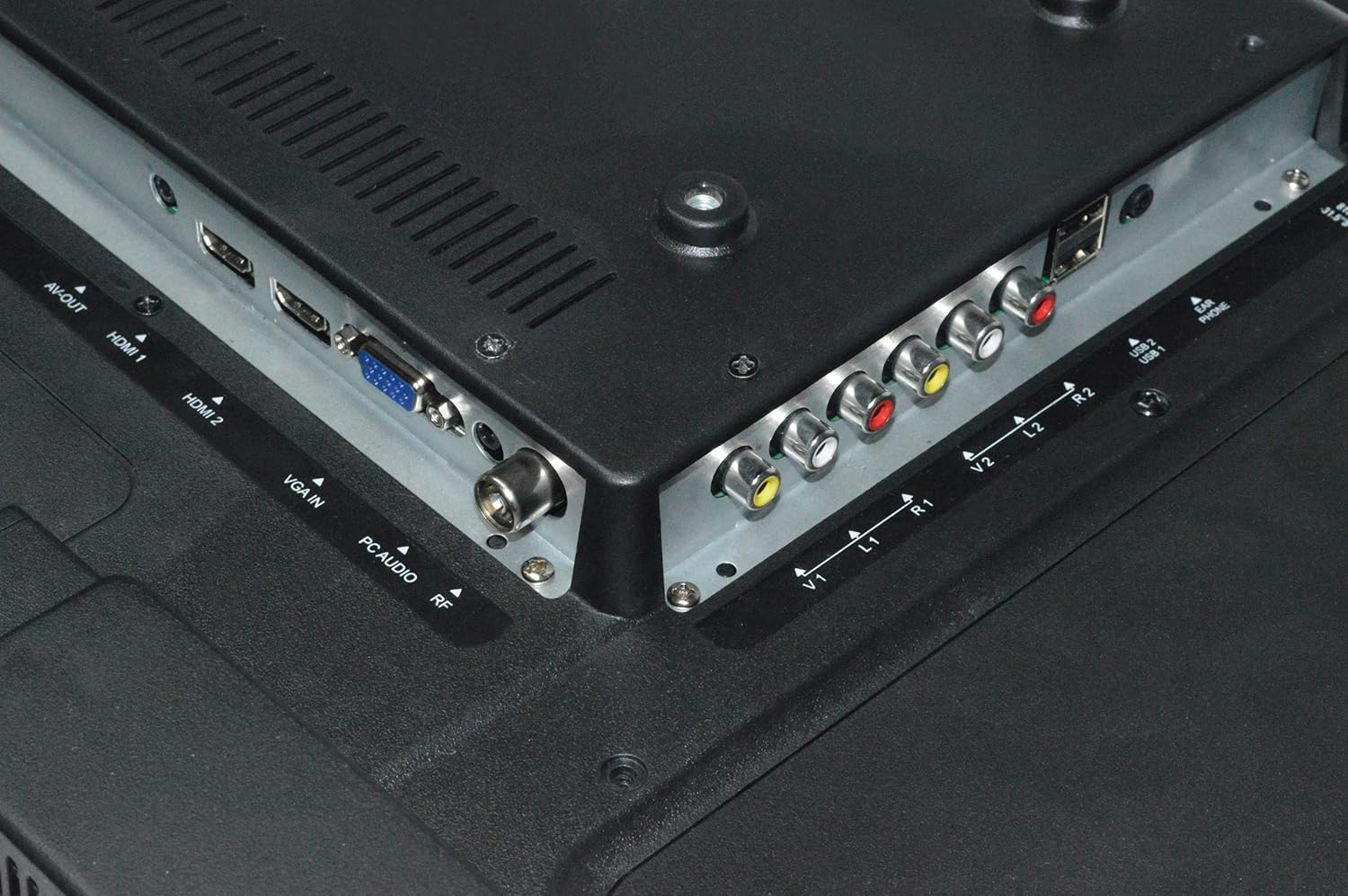
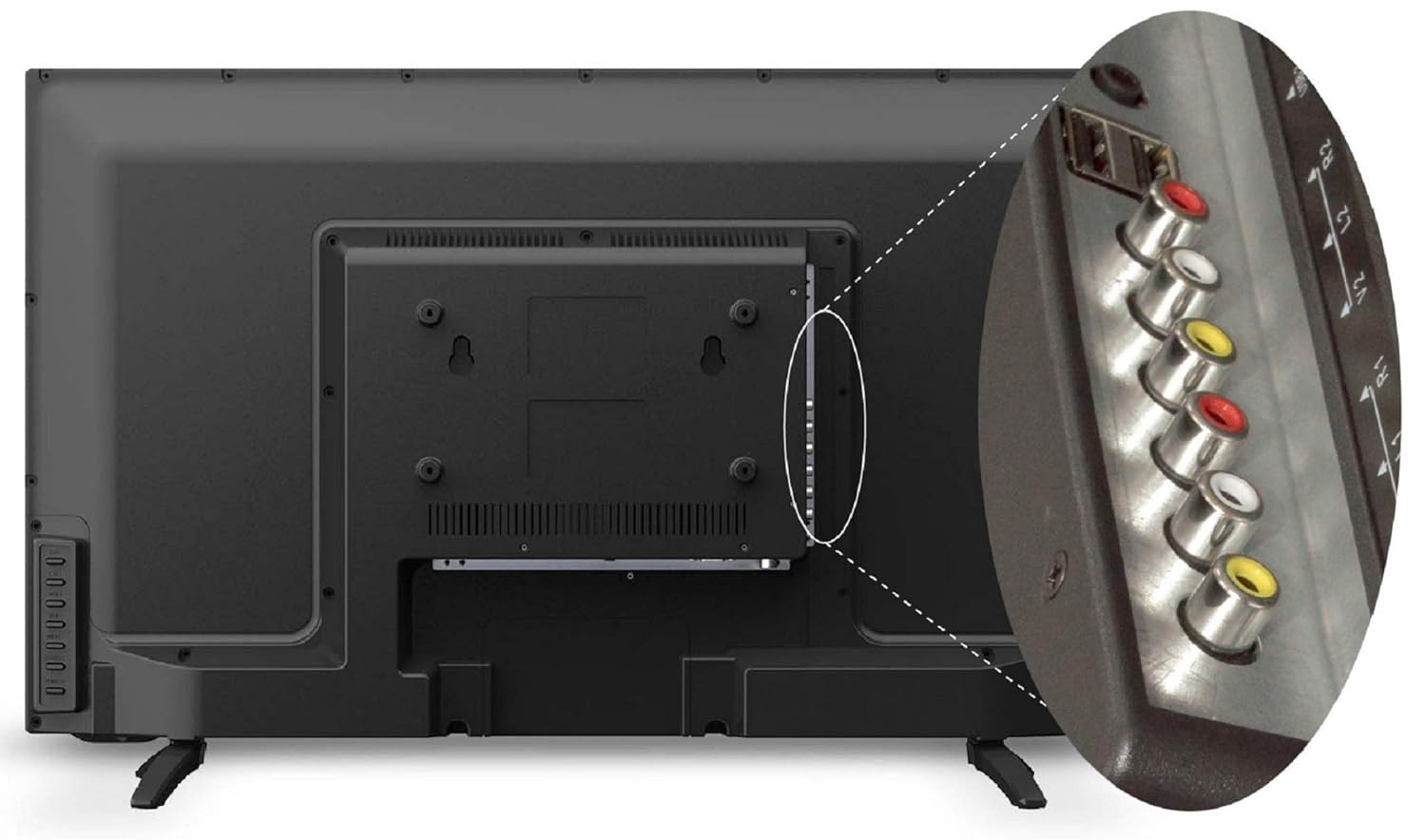
TV menawarkan pelbagai port untuk menyambungkan peranti luaran:
- Port HDMI (x2): Sambungkan kotak set-top, pemain Blu-ray, konsol permainan atau peranti lain yang didayakan HDMI.
- Port USB (x2): Connect USB storage devices for media playback or USB to USB copy function.
- VGA Port (x1): Sambungkan komputer atau komputer riba.
- Input AV: Sambungkan peranti lama menggunakan video komposit dan kabel audio stereo.
- Input RF: Sambungkan antena atau kabel untuk siaran TV.
4.5 Sambungan Kuasa
After connecting all necessary cables, plug the power cord into a wall outlet. The TV will enter standby mode.
5. Arahan Operasi
5.1 Fungsi Kawalan Jauh
The remote control allows you to operate all TV functions. Insert two AAA batteries (not included) into the remote control, ensuring correct polarity.

- KUASA: Menghidupkan atau mematikan TV (mod siap sedia).
- SUMBER: Selects input source (HDMI1, HDMI2, AV, VGA, USB, TV).
- VOL +/-: Melaraskan tahap kelantangan.
- CH +/-: Menukar saluran.
- MENU: Mengakses menu utama.
- OK: Mengesahkan pilihan dalam menu.
- Butang Navigasi (Atas/Bawah/Kiri/Kanan): Menavigasi melalui menu dan pilihan.
- MATI: Mutes or restores sound.
- ECO: Activates Eco Vision mode for power saving.
- ASPEK: Menukar nisbah bidang skrin.
5.2 Persediaan Kali Pertama
Upon first power-on, the TV will guide you through initial setup steps:
- Pemilihan Bahasa: Pilih bahasa pilihan anda.
- Pilihan Negara: Pilih wilayah anda.
- Imbasan Saluran: The TV will automatically scan for available channels if an antenna or cable is connected.
5.3 Fungsi Asas TV
- Hidupkan/Mati Kuasa: Press the POWER button on the remote or the TV's control panel.
- Pemilihan Sumber Input: Press the SOURCE button to cycle through available inputs (HDMI, AV, USB, TV, VGA).
- Pelarasan Kelantangan: Use VOL +/- buttons.
- Perubahan Saluran: Use CH +/- buttons for sequential change or number buttons for direct input.
5.4 Tetapan Gambar
Access the Picture menu to adjust display settings:
- Mod Gambar: Select from Standard, Dynamic, Mild, or User to suit your viewkeutamaan.
- Kecerahan: Laraskan kecerahan keseluruhan skrin.
- Kontras: Adjust the difference between light and dark areas.
- warna: Adjust color saturation.
- Ketajaman: Laraskan kejelasan tepi imej.
- Dynamic Light Control: Automatically adjusts backlight based on content.
- Pengurangan Bunyi: Reduces visual noise in the picture.
- Eye Safe Feature: Reduces blue light emission for comfortable viewing.
5.5 Tetapan Bunyi
Access the Sound menu to adjust audio settings:
- Mod Suara: Select from Standard, Music, Movie, or User.
- Penyama: Customize audio frequencies in User mode.
- Bunyi sekeliling: Enable or disable virtual surround sound.
- Baki: Laraskan keseimbangan pembesar suara kiri/kanan.
5.6 Main Semula Media USB
Insert a USB storage device into one of the USB ports. The TV will detect the device and prompt you to open the media browser. You can play supported audio (MP3), image (JPEG), and video files.
- USB to USB Copy: This feature allows direct copying of files between two USB devices connected to the TV.
6. Penyelenggaraan
6.1 Membersihkan TV
- Sentiasa cabut plag TV sebelum membersihkan.
- Gunakan kain lembut, kering dan bebas serabut untuk mengelap skrin dan kabinet.
- Untuk tanda degil, ringankan dampen the cloth with water or a mild, non-abrasive screen cleaner. Do not spray liquid directly onto the TV.
- Avoid using chemical cleaners, as they may damage the TV's finish.
6.2 Penjagaan Alat Kawalan Jauh
- Pastikan alat kawalan jauh kering.
- Elakkan daripada menjatuhkan atau dikenakan impak yang kuat.
- Replace batteries when the remote's range decreases or it stops responding.
7. Penyelesaian masalah
Jika anda menghadapi masalah dengan TV anda, rujuk masalah dan penyelesaian biasa berikut:
| Masalah | Penyelesaian yang Mungkin |
|---|---|
| Tiada kuasa | Periksa sama ada kord kuasa dipasang dengan selamat ke dalam TV dan alur keluar dinding. Pastikan alur keluar dinding mempunyai kuasa. |
| Tiada gambar, tetapi bunyi hadir | Check the input source. Ensure the external device (set-top box, DVD player) is turned on and connected correctly. |
| Tiada bunyi, tetapi ada gambar | Check the volume level and ensure the TV is not muted. Check audio settings in the menu. |
| Alat kawalan jauh tidak berfungsi | Periksa dan gantikan bateri. Pastikan tiada halangan antara alat kawalan jauh dan sensor IR TV. |
| Kualiti gambar yang buruk | Adjust picture settings (brightness, contrast, sharpness). Check antenna connection for broadcast TV. Ensure the source device is outputting a high-quality signal. |
8. Spesifikasi
Key technical specifications for the Shinco SO3A 32-inch HD Ready LED TV:
| Ciri | Spesifikasi |
|---|---|
| Jenama | Shinco |
| Model | SO3A |
| Saiz Skrin | 32 Inci (80 cm) |
| Teknologi Paparan | LED |
| Resolusi | Sedia HD (1366x768 Piksel) |
| Kadar Segar Semula | 60 Hz |
| Viewsudut | 178 Darjah |
| Jenis Paparan | Panel Gred A+ |
| Port HDMI | 2 |
| Port USB | 2 |
| Port VGA | 1 |
| Output Audio | 20 Watt |
| Dimensi Produk (LxWxH) | 73.6 x 19 x 47.4 cm |
| Berat Barang | 6.35 kg |
| Sumber Kuasa | AC |
| Tahun Model | 2019 |


9. Maklumat Waranti
Your Shinco SO3A LED TV comes with a Waranti pengeluar standard 1 tahun dari tarikh pembelian. Waranti ini meliputi kecacatan pembuatan di bawah penggunaan biasa.
For any product defects, damage, or features not matching the description provided, this product is eligible for replacement within 10 hari penghantaran. Please contact customer support for assistance.
10. Sokongan
For technical assistance, service, or warranty claims, please contact the manufacturer:
Pengeluar: Videotex International Pvt Ltd
Alamat: 347-C, Ecotech-3, Udyog Kendra -2, Greater, Noida - 201306, Uttar Pradesh, India
Nombor Perhubungan: 8882569569


