1. Pengenalan
Thank you for choosing the VILTROX VL-200T Ultra Thin Bi-Color Dimmable LED Video Light. This manual provides detailed instructions to help you effectively set up, operate, and maintain your device. Please read this manual thoroughly before use to ensure optimal performance and longevity of your product.
2. Apa yang ada di dalam Kotak
Sahkan bahawa semua item yang disenaraikan di bawah disertakan dalam pakej anda:
- 1 x VILTROX VL-200T LED Light Panel
- 1 x Penyesuai Bekalan Kuasa
- 1 x Alat Pengawal Jauh Wayarles
- 1 x Universal 1/4" Cold Shoe Adapter
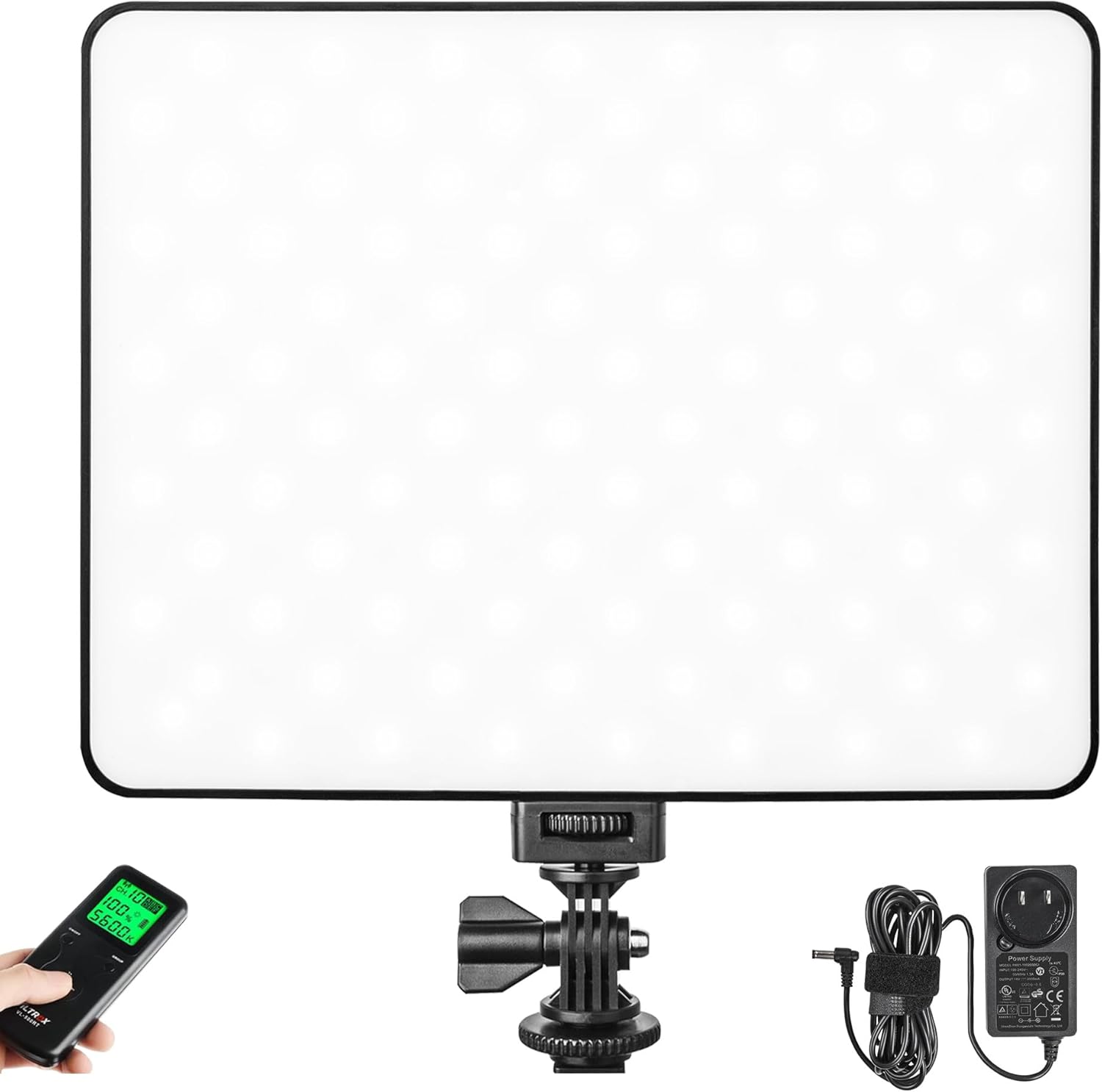
Image: The VILTROX VL-200T LED Video Light, showing the main panel, remote controller, and power supply.
3. Ciri-ciri Produk
The VILTROX VL-200T LED Video Light offers a range of features designed for professional and amateur photographers and videographers:
- Bi-color Dimmable LED: Equipped with 96pcs (3300K) and 96pcs (5600K) SMD lamp beads, providing a versatile lighting source. Adjust color temperature from 3300K (warm yellow) to 5600K (cool white) and brightness from 20% to 100%. Max. Brightness: 2500LM. Power: 30W.
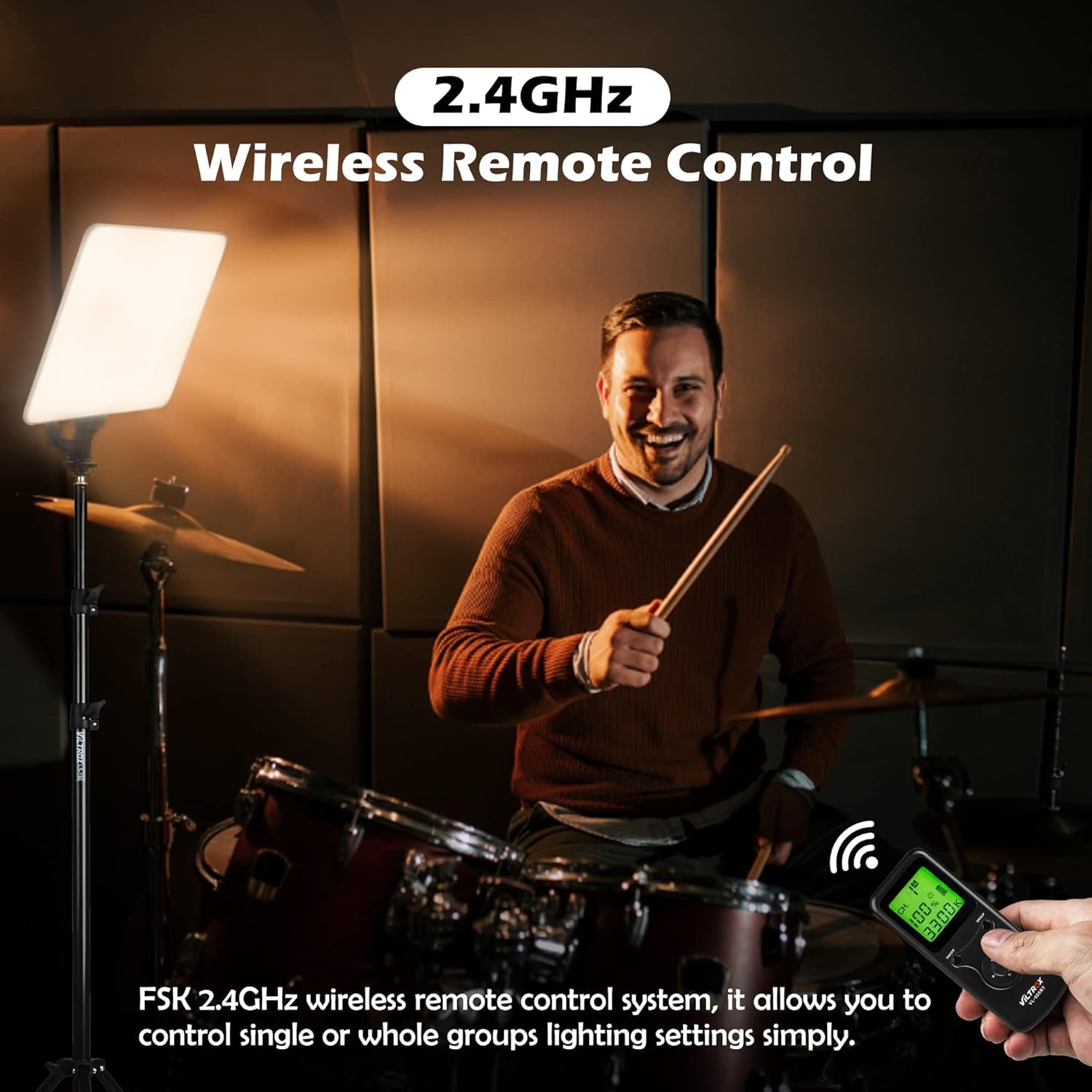
- Kawalan Jauh Wayarles: Features an FSK 2.4GHz wireless remote control system with a range of up to 20 meters. Supports 6 groups and 19 channels for professional multi-light setups.
- Mod Bekalan Kuasa Dwi: Can be powered by the included DC power adapter for indoor use or by NP-F series batteries (not included) for outdoor portability.
- Built-in LCD Display: A clear LCD screen displays brightness, color temperature, channel (CH), and battery level for easy monitoring.
- Padat dan Mudah Alih: Super lightweight and thin (260mm x 200mm x 22mm), making it convenient for travel and on-location shoots.
- Pemasangan Universal: Includes a 1/4" cold shoe adapter for secure mounting on light stands, tripods, cameras, camcorders, or light brackets, allowing for various lighting angles.
- Indeks Paparan Warna Tinggi (CRI): CRI 95+ ensures accurate color rendition and clear photographic images.
Imej: Terperinci view of the VILTROX VL-200T's features, including its 360-degree rotation capability, efficient heat dissipation design, clear built-in LCD display, and intuitive knob adjustment for settings.
4. Panduan Persediaan
4.1 Menghidupkan Lampu
The VL-200T offers two power options:
- DC Power Adapter (Included):
For continuous indoor use, connect the provided DC power adapter to the light's DC input port and plug it into a standard wall outlet. Ensure the power switch on the light is in the "OFF" position before connecting.
- NP-F Series Batteries (Not Included):
For portable outdoor use, insert two compatible NP-F series lithium-ion batteries (e.g., NP-F550/570/960/970) into the battery slots on the back of the light. Ensure the batteries are fully charged and inserted correctly according to polarity markings.
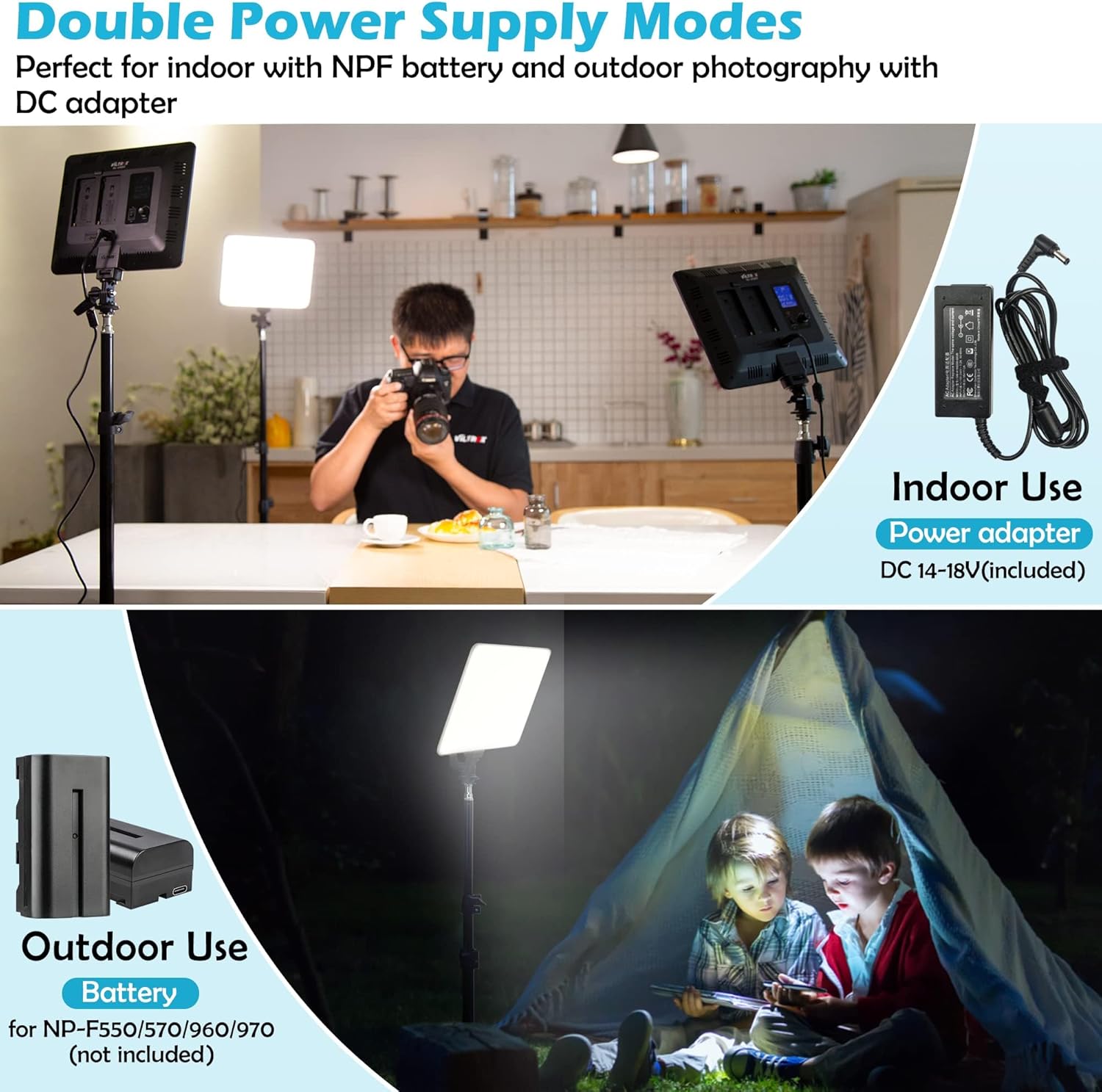
Image: Illustration of the dual power supply options for the VL-200T, highlighting both the DC power adapter for indoor use and the battery slots for portable outdoor operation.
4.2 Memasang Cahaya
The VL-200T comes with a universal 1/4" cold shoe adapter for flexible mounting:
- Attach the 1/4" cold shoe adapter to the bottom mounting point of the VL-200T.
- Secure the adapter onto a light stand, tripod, camera hot shoe, or other compatible mounting bracket. Tighten the locking knob to ensure stability.
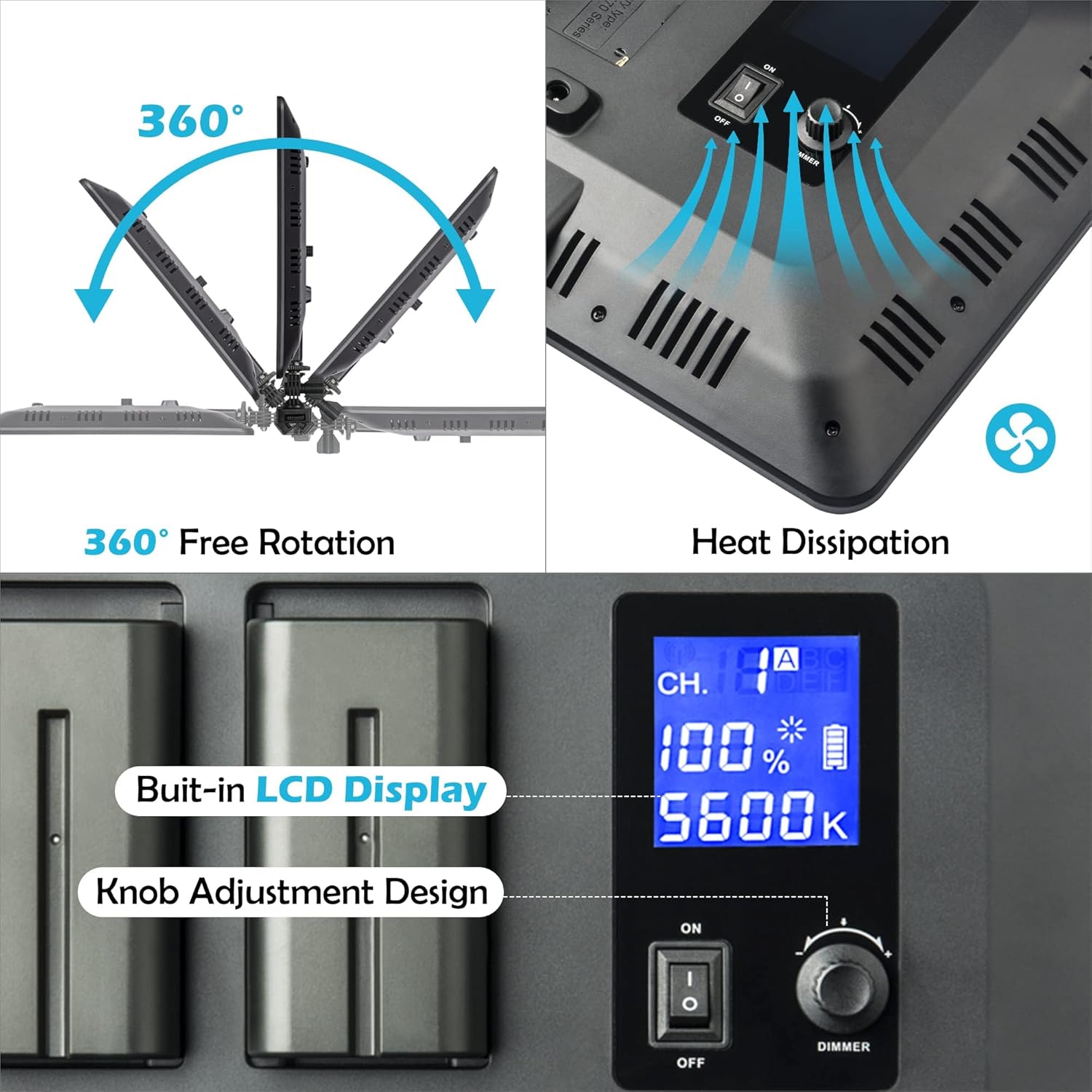
Image: The VILTRO0X VL-200T mounted on a light stand, illustrating its compact size and how it can be integrated into a portable lighting setup.
5. Arahan Operasi
5.1 Operasi Asas
- Hidupkan/Mati Kuasa: Flip the power switch on the back of the light to the "ON" position to turn it on. The LCD screen will illuminate. Flip to "OFF" to power down.
- Melaraskan Kecerahan: Rotate the "DIMMER" knob on the back of the light to adjust the brightness level from 20% to 100%. The current brightness percentage akan dipaparkan pada skrin LCD.
- Melaraskan Suhu Warna: Press the "SET" button (or the central button on the knob) to switch between brightness and color temperature adjustment modes. Once in color temperature mode, rotate the "DIMMER" knob to change the color temperature from 3300K to 5600K. The current Kelvin value will be displayed.
Image: Close-up of the VL-200T's control panel, illustrating the LCD display and the multi-function knob for adjusting brightness and color temperature.
5.2 Menggunakan Alat Kawalan Jauh Wayarles
The included remote control allows for convenient adjustment of light settings from a distance.
- Memadankan Alat Jauh: If the remote is not already paired, ensure both the light and remote are powered on. On the remote, press and hold the "GROUP" button until the display flashes. On the light, press and hold the "SET" button until the display flashes. They should then pair automatically.
- Selecting Group/Channel: Use the "CH" button on the remote to cycle through channels (1-19) and the "GROUP" button to select a group (A-F). This allows you to control multiple lights individually or as a synchronized group.
- Adjusting Brightness/Color Temperature: Use the "B+" / "B-" buttons to increase/decrease brightness and "T+" / "T-" buttons to increase/decrease color temperature.
- Power On/Off (Remote): Use the "ON/OFF" button on the remote to turn the light on or off. Note: The light's internal LCD screen may remain dimly lit even when turned off via remote. For complete power off, use the physical switch on the light.

Image: A user demonstrating the wireless remote control functionality of the VL-200T, highlighting its convenience for adjusting light settings remotely in a photography setup.
5.3 Video Produk Rasmi
Tonton video ini untuk cepat selesaiview of the VILTROX VL-200T LED light's features and operation:
Video: A #GenuineReview of Viltrox VL-200T Ultra Thin LED Light. This video provides a user's perspective on the light's features, including its simple controls, battery options, and universal mounting capabilities. It also demonstrates the light's brightness and how it can be toned down.
6. Penyelenggaraan
To ensure the longevity and optimal performance of your VILTROX VL-200T LED Video Light, follow these maintenance guidelines:
- Pembersihan: Use a soft, dry cloth to clean the light panel and body. Do not use abrasive cleaners or solvents, as they may damage the surface or internal components.
- Storan: When not in use, store the light in a cool, dry place, away from direct sunlight and extreme temperatures. If using batteries, remove them for long-term storage to prevent leakage.
- Pengendalian: Handle the light with care. Avoid dropping it or subjecting it to strong impacts, which can damage the LED beads or internal circuitry.
- Pengudaraan: Ensure the ventilation slots on the back of the light are not obstructed during operation to allow for proper heat dissipation.
7. Penyelesaian masalah
If you encounter issues with your VILTROX VL-200T, refer to the following common problems and solutions:
| Masalah | Kemungkinan Punca | Penyelesaian |
|---|---|---|
| Cahaya tidak menyala. | No power, loose connection, or depleted batteries. |
|
| Alat kawalan jauh tidak berfungsi. | Remote not paired, incorrect channel/group, or dead remote batteries. |
|
| Light is too bright even at minimum setting. | This light has a minimum brightness of 20%. |
|
| LCD screen remains dimly lit after turning off with remote. | Normal operation for remote standby. | For complete power off and to extinguish the LCD screen, use the physical power switch on the light panel. |
8. Spesifikasi
| Ciri | Perincian |
|---|---|
| Model | VL-200T |
| Dimensi Produk | 10.24 x 7.87 x 0.87 inci |
| Berat Barang | 2.26 paun |
| kuasa | 30W |
| Maks. Kecerahan | 2500LM |
| Suhu Warna | 3300K - 5600K (Bi-color) |
| Pelarasan Kecerahan | 20% - 100% |
| CRI (Indeks Paparan Warna) | 95+ |
| Sistem Kawalan Jauh | FSK 2.4GHz (6 groups, 19 channels) |
| Bekalan Kuasa | DC power adapter (included) or NP-F series batteries (not included) |
| Pengeluar | FANSHANG |
| Tarikh Mula-mula Tersedia | 14 Jun 2018 |
9. Waranti dan Sokongan
For warranty information and technical support, please refer to the official VILTROX webtapak atau hubungi perkhidmatan pelanggan mereka secara langsung. Simpan resit pembelian anda sebagai bukti pembelian untuk sebarang tuntutan waranti.
VILTROX Official Store: Visit VILTROX Store on Amazon


