1. Pengenalan
The Temtop H2 is a professional air quality detector designed for real-time monitoring of Formaldehyde (HCHO) and Total Volatile Organic Compounds (TVOC). This device provides accurate readings to help assess indoor air quality. This manual provides essential information for the safe and effective use of your Temtop H2 detector.

Image: Temtop H2 Air Quality Detector and accessories in its box.
2. Maklumat Keselamatan
- Baca semua arahan dengan teliti sebelum mengendalikan peranti ini.
- Do not attempt to disassemble or modify the device. This may cause damage and void the warranty.
- Jauhkan peranti daripada air, kelembapan tinggi dan suhu yang melampau.
- Avoid placing the device near strong chemical sources or in areas with high dust concentration, as this may affect sensor accuracy.
- Use only the specified batteries and charging cable.
3. Komponen Produk
The Temtop H2 package includes the following items:
- Temtop H2 Air Quality Detector
- Kabel Pengecasan
- Tetapkan Semula Pin
- Manual Pengguna (dokumen ini)
Peranti Lebihview
The Temtop H2 features a clear display, intuitive control buttons, and a high-accuracy sensor for detecting HCHO and TVOC levels.

Imej: Jarak dekat view of the Temtop H2 detector showing the high-accuracy sensor for HCHO/TVOC.

Imej: Belakang view of the Temtop H2 detector, showing the sensor vent and battery compartment cover.
4. Persediaan
4.1. Pemasangan Bateri
- Locate the battery compartment on the back of the Temtop H2 detector.
- Geser buka penutup petak bateri.
- Insert 3 AA batteries (included), ensuring correct polarity (+/-).
- Tutup penutup petak bateri dengan selamat.

Image: The open battery compartment of the Temtop H2, showing the placement for 3 AA batteries.
4.2. Kuasa Awal Hidup
After installing the batteries, press and hold the red power button (U) located on the front of the device to turn it on. The device will perform a brief self-check before displaying readings.
5. Arahan Operasi
5.1. Hidupkan/Mati Kuasa
- To power on: Press and hold the red power button (U) sehingga skrin menyala.
- To power off: Press and hold the red power button (U) until the screen turns off.
5.2. Paparan Maklumat
The device's screen displays real-time measurements and status indicators:
- HCHO: Formaldehyde concentration in milligrams per cubic meter (mg/m³).
- TVOC: Total Volatile Organic Compounds concentration in milligrams per cubic meter (mg/m³).
- Penunjuk Bateri: Menunjukkan paras bateri semasa.
- Audio Alarm Icon: Indicates if the audible alarm is active.
- Backlight Icon: Indicates if the screen backlight is active.

Image: The Temtop H2 detector displaying real-time HCHO and TVOC readings in an indoor setting.
5.3. Fungsi Butang
The control panel features several buttons for device operation:

Image: Close-up of the Temtop H2 control buttons, including Set, OK, Up, Down, Speaker, and Backlight.
- Butang Tetapkan: Enters the settings menu.
- Butang OK: Confirms selections or exits menus.
- Butang Anak Panah Atas/Bawah: Menavigasi pilihan menu atau melaraskan nilai.
- Speaker Icon Button: Toggles the audible alarm on or off.
- Lightbulb Icon Button: Toggles the screen backlight on or off.
5.4. Penggera Audio
The Temtop H2 is equipped with an audible alarm that activates when HCHO or TVOC levels exceed preset thresholds. To enable or disable the alarm, press the Speaker Icon Button. When enabled, an alarm icon will appear on the display.
5.5. Health Parameter Guide
Refer to the following guide for understanding the health implications of detected HCHO and TVOC levels:
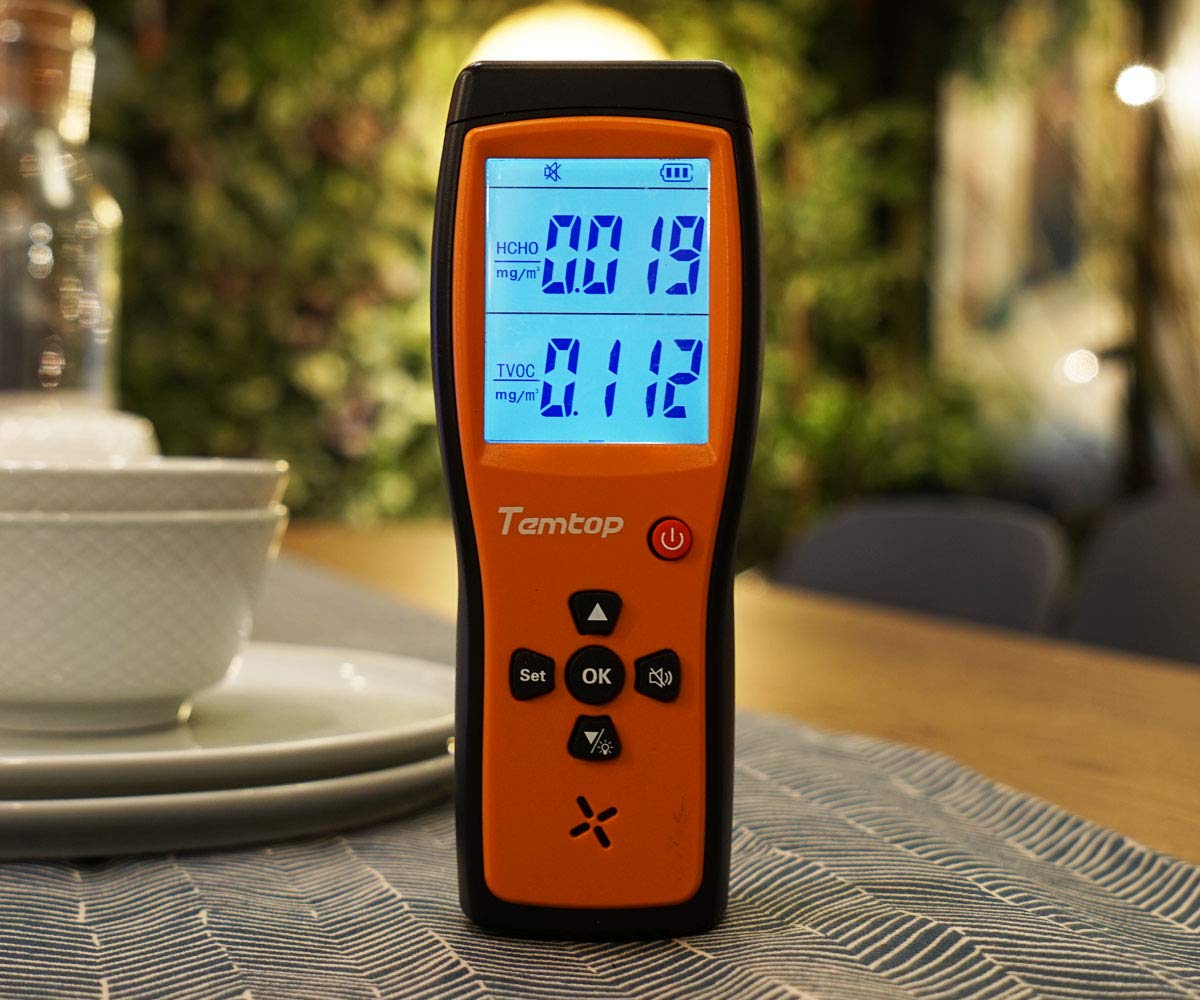
Image: A table illustrating HCHO and TVOC concentration ranges and their corresponding levels of health concern (Healthy or Unhealthy).
| HCHO (mg/m³) | TVOC (mg/m³) | Tahap Keprihatinan Kesihatan |
|---|---|---|
| 0 - 0.1 | 0 - 0.5 | Sihat |
| > 0.1 | > 0.5 | tak sihat |
6. Penyelenggaraan
6.1. Pembersihan
To clean the device, gently wipe the exterior with a soft, dry cloth. Do not use liquid cleaners, abrasive materials, or solvents, as these can damage the device or affect sensor performance.
6.2. Penyimpanan
When not in use for extended periods, store the Temtop H2 in a cool, dry place, away from direct sunlight and extreme temperatures. Remove batteries if storing for several months to prevent leakage.
6.3. Penggantian Bateri
Replace the 3 AA batteries when the low battery indicator appears on the screen to ensure continuous and accurate operation. Follow the battery installation steps outlined in Section 4.1.
7. Penyelesaian masalah
- Peranti tidak dihidupkan:
Check if the batteries are installed correctly with the right polarity. Ensure the batteries have sufficient charge. Try replacing the batteries. - Readings appear inaccurate or fluctuate significantly:
Allow the device to stabilize for at least 5-10 minutes after powering on, especially in a new environment. Ensure the device is not placed near strong sources of chemicals (e.g., cleaning products, fresh paint) or in areas with high airflow that could interfere with readings. - Alarm sounds continuously:
Check the HCHO and TVOC readings on the display. If levels are genuinely high, ventilate the area. If readings appear normal but the alarm persists, try resetting the device using the provided reset pin by inserting it into the reset hole. - Screen is dim or off:
Tekan ke Lightbulb Icon Button to toggle the screen backlight. Check battery level and replace if low.
8. Spesifikasi
| Ciri | Spesifikasi |
|---|---|
| Jenama | Temtop |
| Model | H2 |
| Jenis Sensor | HCHO, TVOC |
| Sumber Kuasa | Battery Powered (3 AA batteries required, 1 Lithium Metal battery included) |
| Berat Barang | 0.49 Kilogram (1.08 paun) |
| Dimensi Produk | 6.02 x 1.81 x 8.86 inci |
| Penggera | Boleh didengari |
| Kelembapan Operasi | Sehingga 90% (tidak pemeluwapan) |
| Penarafan Suhu Atas | 50 Darjah Celsius |
| bahan | plastik |
9. Waranti dan Sokongan
9.1. Maklumat Waranti
Please refer to the warranty card included with your product or visit the official Temtop weblaman web untuk terma dan syarat jaminan terperinci. Simpan resit pembelian anda sebagai bukti pembelian untuk tuntutan jaminan.
9.2. Sokongan Pelanggan
For technical assistance, troubleshooting not covered in this manual, or other inquiries, please contact Temtop customer support. Contact information can typically be found on the official Temtop webtapak atau pada pembungkusan produk.


