pengenalan
This manual provides detailed instructions for the proper setup, operation, and maintenance of your Technical Pro RX45BT Home Theater Receiver and Rockville REQ20 Graphic Equalizer. Please read this manual thoroughly before using the products to ensure optimal performance and safety.
Arahan Keselamatan Penting
Always follow basic safety precautions when using electronic equipment to reduce the risk of fire, electric shock, and injury.
- Jangan dedahkan perkakas ini kepada hujan atau lembapan.
- Jangan tanggalkan penutup. Tiada bahagian yang boleh diservis pengguna di dalam. Rujuk servis kepada kakitangan yang berkelayakan.
- Pastikan pengudaraan yang betul. Jangan sekat bukaan pengudaraan.
- Connect only to a grounded AC power outlet.
- Lindungi kord kuasa daripada berjalan atau tersepit.
- Cabut palam unit semasa ribut petir atau apabila tidak digunakan untuk tempoh yang lama.
- Do not operate near heat sources such as radiators, heat registers, stoves, or other apparatus that produce heat.
Kandungan Pakej
Sahkan bahawa semua item disertakan dalam pakej anda:
- Technical Pro RX45BT Home Theater Receiver
- Rockville REQ20 19" Rack Mount Pro Dual 10 Band Graphic Equalizer
- Remote Control for RX45BT
- Power Cable for REQ20
- Rack Mount Brackets for REQ20 (2 pcs)
- Mounting Screws for Brackets
Technical Pro RX45BT Receiver Overview
Kawalan dan Ciri Panel Depan
The front panel of the RX45BT receiver provides access to various controls and input options.

Imej: Depan view of the Technical Pro RX45BT Home Theater Receiver, showing the main display, input selection buttons, microphone volume, master volume, and various tone controls. The included remote control is also visible next to the receiver.

Imej: Bahagian hadapan bersudut view of the Technical Pro RX45BT Home Theater Receiver, highlighting the illuminated blue display and control knobs.
- Butang Kuasa: Menghidupkan atau mematikan unit.
- Kelantangan Mikrofon: Adjusts the volume for connected microphones.
- Jumlah Induk: Mengawal volum keluaran keseluruhan.
- Pemilih Input: Buttons for Tuner, DVD, AUX/MP3, SD/USB, Bluetooth.
- paparan: Digital fluorescent output display meter showing current status and audio levels.
- Echo, Mic Treble, Mic Bass: Controls for microphone effects and tone.
- Bass, Treble, Balance: Tone controls for main audio output.
- MIC1, MIC2 Inputs: 1/4" microphone input jacks.
- Port USB: Untuk menyambung pemacu kilat USB.
- Slot Kad SD: For inserting SD cards.
- Output Fon Kepala: 1/8'' jack for headphones.
Sambungan Panel Belakang
The rear panel provides all necessary audio input and output connections, along with power input.
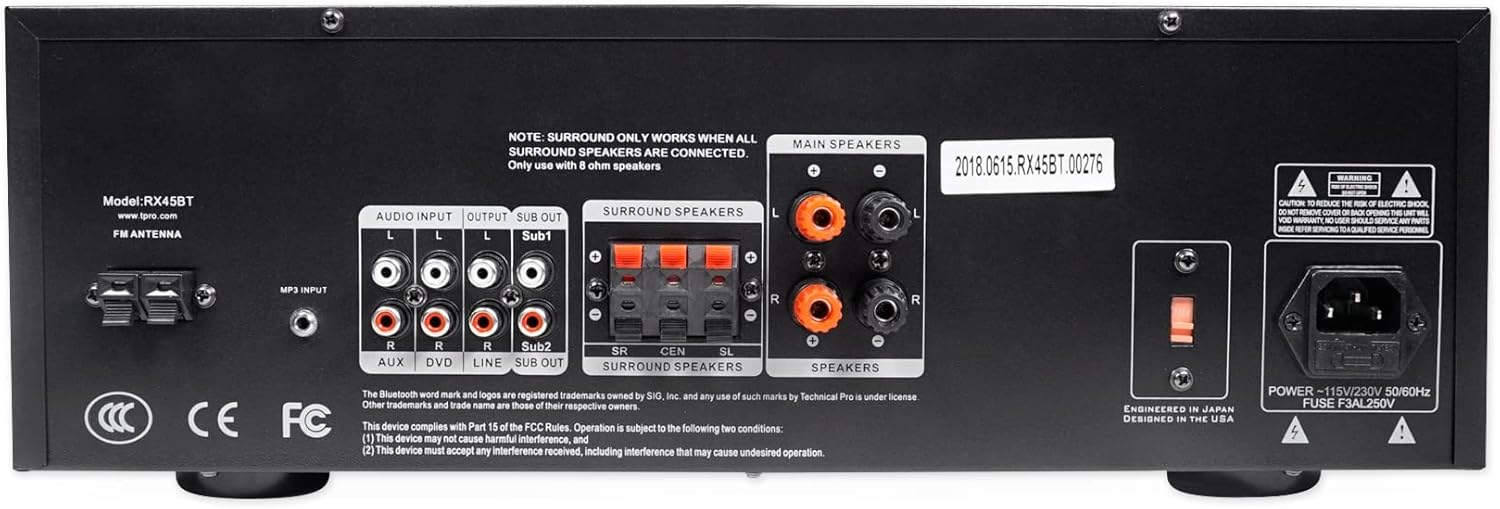
Imej: Belakang view of the Technical Pro RX45BT Home Theater Receiver, showing RCA audio inputs (AUX, DVD), audio outputs (Line Out, Sub Out), speaker terminals (Main, Surround), FM antenna input, and power input with voltagpemilih e.
- ANTENA FM: Sambungan untuk antena FM.
- AUDIO INPUT (RCA): Two sets of RCA inputs for audio sources (AUX, DVD).
- KELUARAN (RCA): Line Out and two Mono RCA Subwoofer Outputs (Sub1, Sub2).
- PENCERAMAH SEKITAR: Push-button terminals for surround speakers. Note: Surround sound only works when all surround speakers are connected and only with 8 ohm speakers.
- PENCERAMAH UTAMA: Banana binding post terminals for main speakers.
- INPUT KUASA: AC power inlet with voltage pemilih (110/220V).
Rockville REQ20 Graphic Equalizer Overview
The Rockville REQ20 is a dual 10-band graphic equalizer designed to fine-tune your audio system's frequency response.
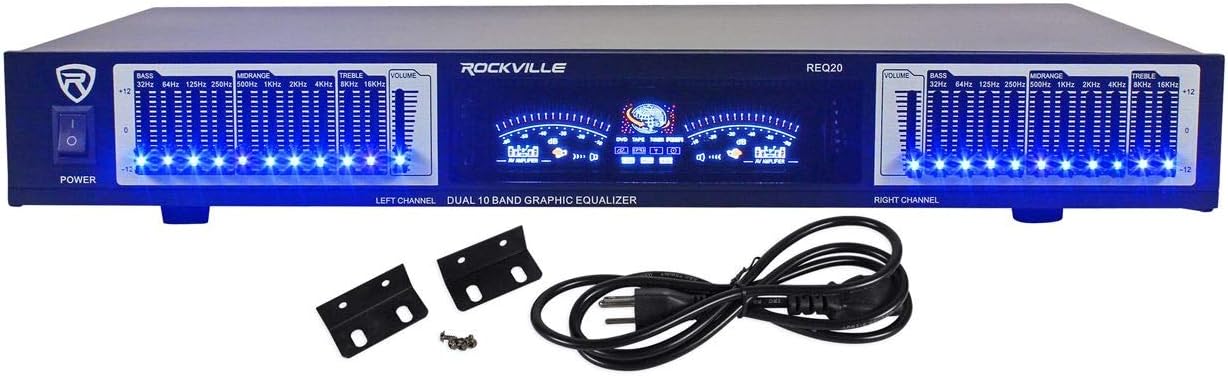
Imej: Depan view of the Rockville REQ20 19" Rack Mount Pro Dual 10 Band Graphic Equalizer, featuring blue LED illuminated slide controls for each frequency band, dual VU meters, and power switch.

Image: The Rockville REQ20 Graphic Equalizer shown with its included rack mount brackets and power cable.
- Suis kuasa: Menghidupkan atau mematikan unit.
- Equalizer Slide Controls: Dual 10-band controls (20 bands total) with blue LEDs for adjusting specific frequency ranges (e.g., 32Hz, 64Hz, 125Hz, 250Hz, 500Hz, 1KHz, 2KHz, 4KHz, 8KHz, 16KHz).
- Meter VU: Dual meters to monitor left and right channel audio levels.
- Volume Gain Control: Separate left/right channel volume gain controls.
- Input Talian RCA: Stereo RCA input for connecting audio sources.
- Output Talian RCA: Stereo RCA output for connecting to an amppenguat atau penerima.
- RCA Line Output for Record: Additional stereo RCA output for recording purposes.
Arahan Persediaan
Follow these steps to properly set up your Technical Pro RX45BT Receiver and Rockville REQ20 Equalizer.
1. penempatan
- Place the receiver and equalizer on a stable, flat surface with adequate ventilation.
- Ensure there is enough space around the units for proper airflow to prevent overheating.
- The REQ20 is designed for 19" rack mounting. Use the included brackets and screws if rack mounting.
2. Connecting Speakers to RX45BT
Connect your speakers to the appropriate terminals on the rear panel of the RX45BT receiver.
- Penceramah Utama: Use banana plugs or bare wire to connect your main left and right speakers to the "MAIN SPEAKERS" binding posts. Ensure correct polarity (+ to + and - to -).
- Pembesar Suara Sekeliling: Connect your surround speakers to the "SURROUND SPEAKERS" push-button terminals. Note that surround sound functionality requires all surround speakers to be connected and they must be 8 ohm speakers.
3. Connecting Audio Sources to RX45BT
Connect your external audio devices to the RCA input jacks on the rear panel.
- Use RCA cables to connect devices like DVD players, CD players, or other audio sources to the "DVD" or "AUX" input jacks.
- For MP3 players or other devices with a 3.5mm output, use an appropriate adapter cable to connect to the "AUX/MP3" input on the front panel.
4. Connecting the Rockville REQ20 Equalizer
To integrate the REQ20 equalizer into your audio system, connect it between your audio source and the RX45BT receiver, or between the receiver's line out and an external amplifier if you are using one.
Typical Connection (Equalizer between source and receiver):
- Connect your audio source (e.g., CD player) to the "RCA Line Input" of the REQ20 using RCA cables.
- Connect the "RCA Line Output" of the REQ20 to one of the "AUDIO INPUT" (e.g., DVD or AUX) jacks on the rear of the RX45BT receiver using RCA cables.
Alternative Connection (Equalizer in a tape loop or processor loop, if available on your receiver):
If your receiver has a dedicated processor loop or tape monitor loop, you can connect the equalizer there. The RX45BT has a "Line Out" which can be used to feed an external amplifier, but not a dedicated processor loop for an equalizer to be inserted directly into the main signal path for all inputs. The recommended method is to place it between a specific source and the receiver.
5. Sambungan Kuasa
- Ensure both the RX45BT and REQ20 are switched off.
- Connect the power cords of both units to a standard AC power outlet.
- Sahkan voltage selector on the RX45BT rear panel is set correctly for your region (110V or 220V).
Operating Instructions - RX45BT Receiver
1. Operasi Asas
- Tekan ke kuasa button to turn on the receiver.
- Pilih sumber audio yang anda inginkan menggunakan Pemilih Input buttons on the front panel (Tuner, DVD, AUX/MP3, SD/USB, Bluetooth).
- Laraskan kelantangan keseluruhan menggunakan Jilid Induk tombol.
- Gunakan Bass, Treble, dan Baki controls to fine-tune the audio output.
2. Berpasangan Bluetooth
- Tekan ke Bluetooth input selector button on the front panel. The display will indicate "Bluetooth" or a pairing mode.
- Dayakan Bluetooth pada peranti mudah alih anda (telefon pintar, tablet, dll.).
- Cari untuk available devices and select "RX45BT" from the list.
- Setelah digandingkan, anda boleh menstrim audio daripada peranti anda ke penerima.
3. USB/SD Card Playback & Recording
The RX45BT supports playback of .mp3, .wav, and .wma files from USB drives and SD cards (up to 32GB).
Main balik:
- Insert a USB flash drive or SD card into the respective slot on the front panel.
- Pilih SD/USB input. The unit will automatically begin playing compatible audio files.
- Use the playback controls (Repeat/Random) on the unit or remote.
Rakaman:
The unit can record .wav files (128 kbps / 32 KHz sampling rate) onto a USB Flash Drive or SD Card from the Tuner or RCA inputs.
- Insert a USB flash drive or SD card.
- Select the desired input source (Tuner or an RCA input like DVD/AUX).
- Tekan ke Rekod button (if available on the unit or remote) to start recording. Press again to stop.
4. Kawalan Mikrofon
Connect up to two microphones to the MIC1 and MIC2 1/4" input jacks on the front panel.
- Laraskan kelantangan mikrofon menggunakan Kelantangan Mikrofon tombol.
- Apply echo effect using the Gema kawalan.
- Adjust microphone tone with Mic Treble dan MicBass kawalan.
5. Operasi Penala FM
Connect the FM antenna to the rear panel for optimal reception.
- Pilih Penala input.
- Use the manual tuning controls (or remote) to find desired FM radio stations.
6. Alat Kawalan Jauh
The included remote control provides convenient access to most receiver functions from a distance.
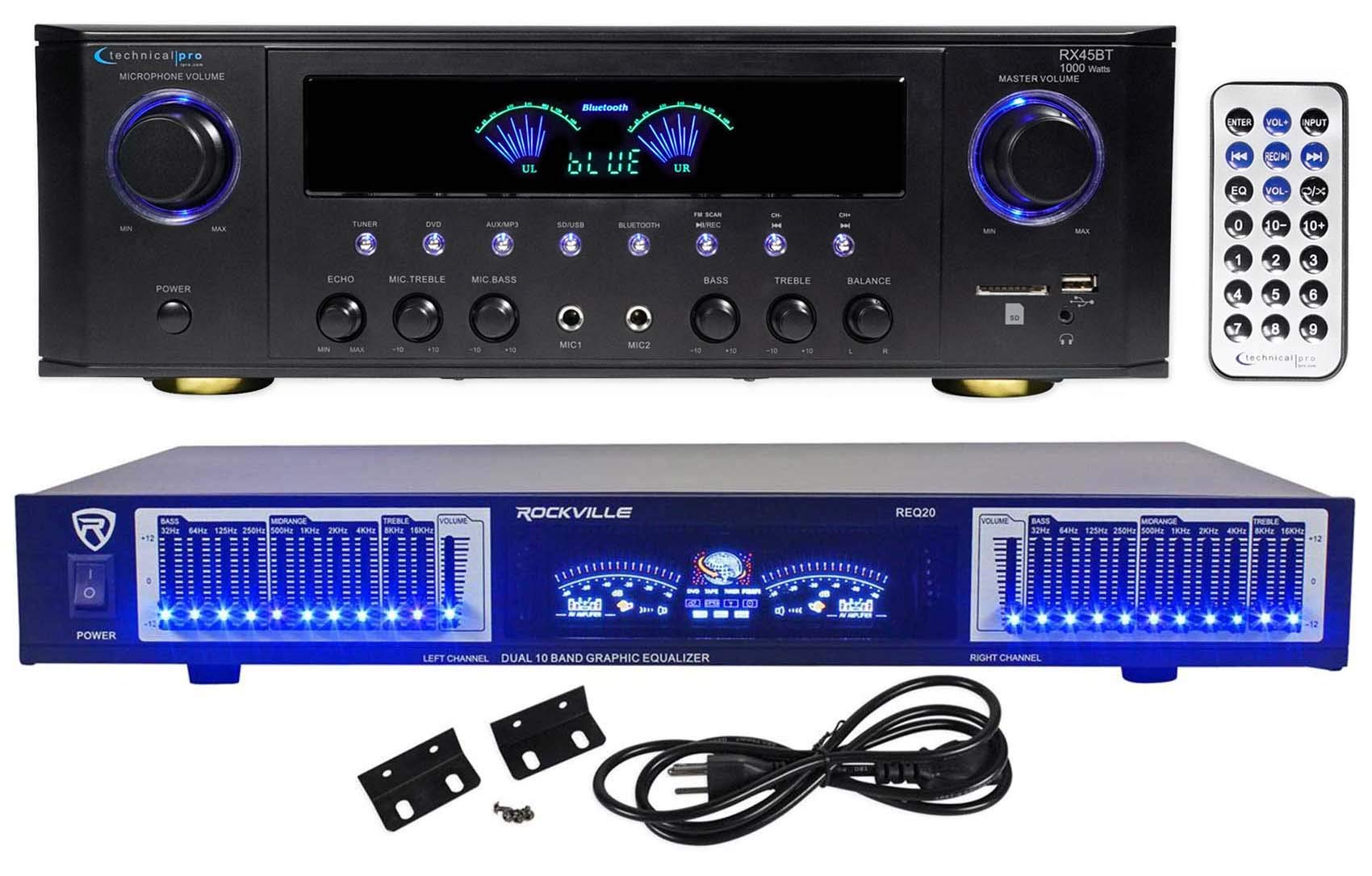
Image: Close-up of the Technical Pro RX45BT remote control, showing buttons for power, input selection, volume, EQ, number pad, and playback controls.
Refer to the button labels on the remote for specific functions such as input selection, volume adjustment, EQ presets, and media playback controls.
Operating Instructions - REQ20 Equalizer
1. Kawalan Penyama
The REQ20 features dual 10-band graphic equalization for precise audio shaping.
- Use the individual slide controls for each frequency band (32Hz to 16KHz) to boost or cut specific frequencies.
- Adjust the left and right channels independently for stereo equalization.
- The blue LEDs on each slider indicate the active status.
2. Meter VU
The dual VU meters provide a visual representation of the audio signal level for both the left and right channels.
- Monitor the meters to ensure your audio levels are not clipping (too high) or too low.
- Adjust the separate Left/Right Channel Volume gain controls to optimize signal levels.
Penyelenggaraan
- Pembersihan: Use a soft, dry cloth to clean the exterior of the units. Do not use liquid cleaners or aerosols.
- Pengudaraan: Pastikan bukaan pengudaraan bersih daripada habuk dan serpihan.
- Storan: If storing the units for an extended period, disconnect them from power and store in a cool, dry place.
Menyelesaikan masalah
| Masalah | Kemungkinan Punca | Penyelesaian |
|---|---|---|
| Tiada kuasa | Kord kuasa tidak disambungkan; Soket kuasa rosak; Voltantage selector incorrect (RX45BT). | Check power cord connection; Try a different outlet; Verify RX45BT voltagtetapan pemilih e. |
| Tiada suara dari pembesar suara | Incorrect input selected; Speaker wires loose or incorrectly connected; Volume too low; Mute activated. | Select correct input; Check speaker connections and polarity; Increase Master Volume; Deactivate Mute. |
| Bluetooth tidak berpasangan | RX45BT not in Bluetooth mode; Device too far; Device already paired with another unit. | Ensure RX45BT is in Bluetooth mode; Move device closer; Disconnect from other devices and try again. |
| Kad USB/SD tidak dimainkan | Tidak disokong file format; Card/drive not inserted correctly; Card/drive capacity too large. | pastikan files are .mp3, .wav, or .wma; Reinsert card/drive; Use card/drive up to 32GB. |
| Equalizer has no effect | REQ20 not powered on; Incorrect connection; EQ sliders at neutral position. | Ensure REQ20 is powered on; Verify RCA connections between source/receiver and REQ20; Adjust EQ sliders. |
Spesifikasi
Technical Pro RX45BT Home Theater Receiver
- Output Kuasa: 150 watts RMS (both channels driven @ 1.0% THD @ 8 ohms), 1000 watts peak power
- Input: RCA (2 audio sources), USB, SD Card, MP3 (AUX)
- Keluaran: Banana binding post (2 speakers), Push Button (surround speakers), RCA (Line Out), 2 Mono RCA (Subwoofer Out)
- USB & SD Card Max Size: 32GB
- Disokong File Jenis: .mp3, .wav, .wma
- Format Rakaman: .wav (128 kbps / 32 KHz sampkadar masa)
- Respons Kekerapan: 20Hz-20KHz
- Kawalan: Bass, Treble, Balance, Dual Mic Inputs with Volume, Echo, Tone
- Penala: FM manual tuner
- Output Fon Kepala: 1/8''
- Voltage: 110/220v Switchable
- Dimensi (Produk): 16.9" L x 11.3" W x 5.8" H
- Weight (Unit): 9.26 paun
Rockville REQ20 Graphic Equalizer
- Jenis: Dual 10 Band Graphic Equalizer (20 Bands Total)
- Respons Kekerapan: 20Hz - 20KHz
- Kawalan: Blue LED on each Equalizer Slide Control, Separate Left/Right Channel Volume gain control
- paparan: Dual VU Meters Level Monitor, Vacuum Fluorescent Display
- Input: Stereo RCA Line Input
- Keluaran: Stereo RCA Line Output, Stereo RCA Line Output for Record
- Nisbah Isyarat kepada Bunyi: >88dB
- Kuasa Input: AC ~ 110V 60Hz / 220V 50Hz (Switchable)
- Dimensi: 19" (rack mountable)
- Berat anggaran: 7.3 paun
Waranti dan Sokongan
Untuk maklumat waranti dan sokongan teknikal, sila rujuk kepada pegawai pengilang webtapak atau hubungi bahagian perkhidmatan pelanggan mereka. Simpan resit pembelian anda sebagai bukti pembelian.
Pengeluar: Pro Teknikal
Nombor Model: RX45BT+REQ20


