pengenalan
This instruction manual provides detailed guidance for the safe and efficient use of your Lenco Xemio-768 Digital Media Player. Please read this manual thoroughly before operating the device and retain it for future reference.
The Lenco Xemio-768 is a versatile digital media player capable of playing MP3/MP4 files, displaying photos, reading e-books, and recording voice memos. It features Bluetooth connectivity for wireless audio and an expandable memory via Micro SD card.
Kandungan Pakej
- Lenco Xemio-768 Digital Media Player
- Kabel USB
- Fon Kepala Dalam Telinga
- 8GB Micro SD Card (pre-installed or included separately)
- Manual Arahan (dokumen ini)
Peranti Lebihview
Familiarize yourself with the various parts and controls of your Xemio-768 player.
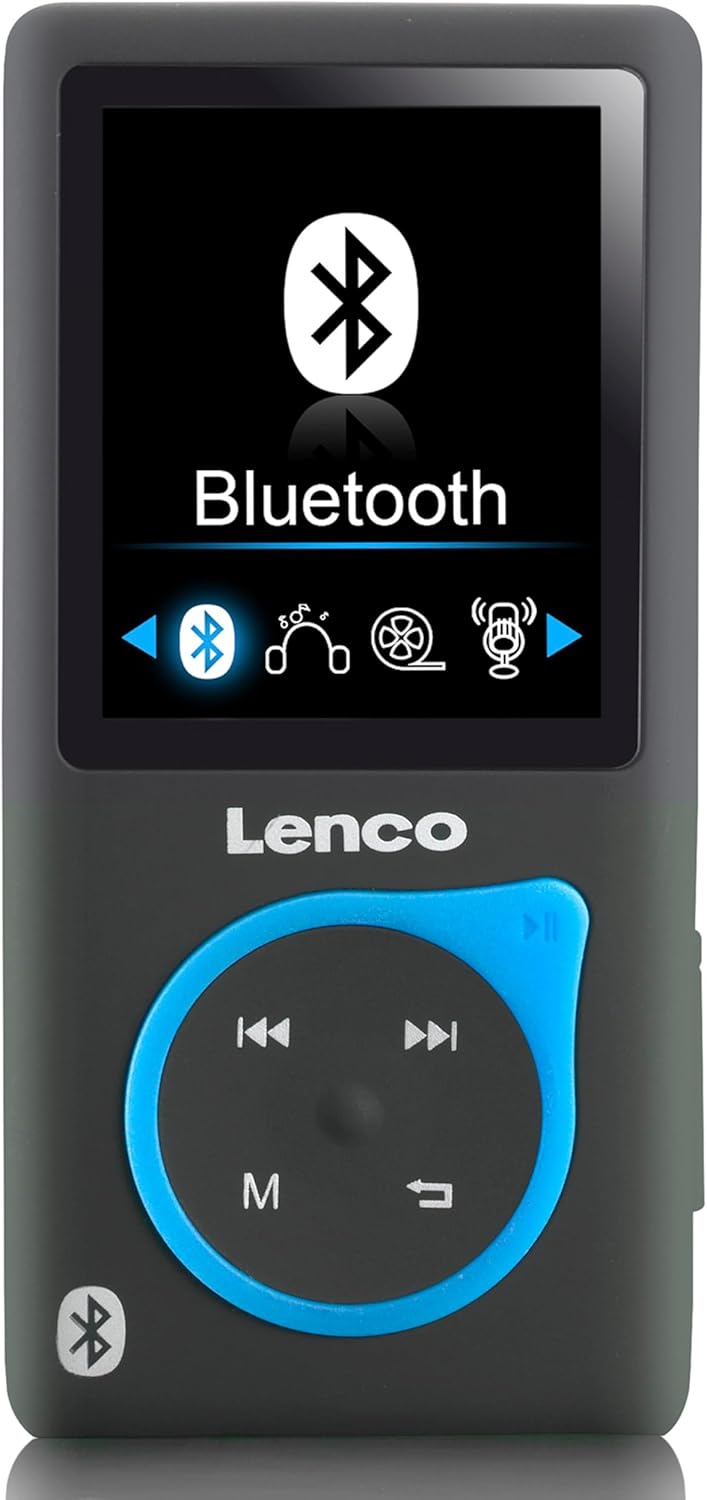
Imej 1: Depan view of the Lenco Xemio-768 Digital Media Player. The screen displays the Bluetooth menu option. Below the screen are the Lenco logo and a circular control pad with playback buttons (previous, next, play/pause) and a menu button (M). A Bluetooth symbol is also visible on the bottom left of the device.
Key Controls and Ports:
- 1.8-inch TFT LCD Screen: Displays menus, media, and settings.
- Pad Kawalan: Navigation and playback controls (Play/Pause, Next/Fast Forward, Previous/Rewind, Menu).
- Port USB Mikro: Untuk pengecasan dan pemindahan data.
- Slot Kad Mikro SD: For memory expansion (supports up to 32GB).
- 3.5 mm Headphone Jack: For wired headphone connection.
- Mikrofon terbina dalam: Untuk rakaman suara.
Persediaan
1. Mengecas Peranti
- Connect the small end of the included USB cable to the Micro USB port on the player.
- Connect the larger end of the USB cable to a powered USB port on a computer or a USB wall adapter (not included).
- Penunjuk bateri pada skrin akan menunjukkan status pengecasan. Pengecasan penuh biasanya mengambil masa kira-kira 3 jam.
- Disconnect the USB cable once fully charged.
2. Memasukkan Kad Mikro SD (Pilihan)
The player comes with an 8GB Micro SD card. If you wish to expand the storage, you can replace it with a card up to 32GB.
- Cari slot kad Micro SD di sisi pemain.
- Masukkan kad Micro SD dengan lembut dengan kenalan emas menghadap ke bawah sehingga ia terkunci di tempatnya.
- Untuk mengalih keluar, tolak kad masuk perlahan-lahan sehingga ia mengklik, kemudian lepaskan dan ia akan keluar.
3. Menyambung Fon Kepala
- Fon Kepala Berwayar: Plug the 3.5 mm jack of the included in-ear headphones (or your own compatible headphones) into the headphone port on the player.
- Fon Kepala/Pembesar Suara Bluetooth: Refer to the "Bluetooth Connectivity" section under Operating for wireless connection instructions.
4. Memindahkan Files
- Sambungkan pemain ke komputer anda menggunakan kabel USB.
- Pemain akan muncul sebagai pemacu cakera boleh tanggal pada komputer anda.
- Drag and drop your desired music (MP3, WMA), videos (AMV, AVI), photos (JPG, BMP, GIF), or e-books (TXT) into the appropriate folders on the player's internal memory or Micro SD card.
- sekali files are transferred, safely eject the removable disk from your computer before disconnecting the USB cable.
Arahan Operasi
Hidupkan/Mati Kuasa
- To power on, press and hold the Power button (usually on the side) until the screen lights up.
- Untuk mematikan kuasa, tekan dan tahan butang Kuasa sehingga peranti dimatikan.
Navigasi Menu
- Use the directional buttons on the control pad to navigate through menu options.
- Press the central button (often Play/Pause) to select an option.
- Press the 'M' (Menu) button to go back to the previous menu or to access context-sensitive options during playback.
Main balik Muzik
- Dari menu utama, pilih "Muzik".
- Browse through your folders and files to find the desired track.
- Press the central button to play the selected track.
- Gunakan Sebelumnya dan Seterusnya butang untuk melangkau trek.
- Press the central button again to pause/resume playback.
Video Main semula
- Dari menu utama, pilih "Video".
- Navigasi ke video anda files (AMV, AVI format).
- Select a video to begin playback.
Foto Viewer
- Dari menu utama, pilih "Foto".
- Layari imej anda files (JPG, BMP, GIF format).
- Pilih imej untuk view ia.
Pembaca Ebook
- From the main menu, select "E-book".
- Navigate to your text files (TXT format).
- Pilih a file untuk membuka dan membaca.
Rakaman Suara
- From the main menu, select "Recorder" or "Voice Memo".
- Select "Start Recording" to begin.
- Press the central button to stop recording.
- Recordings are saved and can be accessed from the "Recordings" menu.
Kesambungan Bluetooth
- Ensure your Bluetooth headphones or speaker are in pairing mode. Refer to their respective manuals for instructions.
- On the Xemio-768, navigate to the "Bluetooth" menu.
- Pilih "Cari untuk Devices" or "Pair New Device".
- Once your device appears in the list, select it to initiate pairing.
- Sahkan pemasangan pada kedua-dua peranti jika digesa.
- Once connected, audio will be routed wirelessly to your Bluetooth device.
Penyelenggaraan
Pembersihan
- Gunakan kain yang lembut, kering dan tidak berbulu untuk membersihkan bahagian luar peranti.
- Jangan gunakan pembersih yang melelas, alkohol atau pelarut, kerana ini boleh merosakkan permukaan.
- Elakkan mendapatkan kelembapan ke dalam mana-mana bukaan.
Penjagaan Bateri
- Untuk memanjangkan hayat bateri, elakkan daripada menyahcas sepenuhnya bateri dengan kerap.
- Cas peranti secara berkala, walaupun tidak digunakan untuk tempoh yang lama.
- Simpan peranti di tempat yang sejuk dan kering jauh dari cahaya matahari langsung dan suhu yang melampau.
Menyelesaikan masalah
| Masalah | Kemungkinan Punca | Penyelesaian |
|---|---|---|
| Peranti tidak dihidupkan. | Bateri habis. | Cas peranti menggunakan kabel USB yang disediakan. |
| Tidak dapat menyambung melalui Bluetooth. | Bluetooth device not in pairing mode; interference; device out of range. | Ensure your Bluetooth headphones/speaker are in pairing mode. Move closer to the player. Try restarting both devices. |
| Files are not recognized or played. | tak betul file format; rosak file; Micro SD card issue. | pastikan files are in supported formats (MP3, WMA, AMV, AVI, JPG, BMP, GIF, TXT). Check if the Micro SD card is properly inserted or try another card. |
| Tiada bunyi dari fon kepala. | Headphones not properly connected; volume too low; corrupted audio file. | Check headphone connection. Increase volume. Test with different headphones or audio files. |
Spesifikasi
- model: Xemio-768
- paparan: LCD TFT 1.8 inci
- Memori Dalaman: 8 GB (via Micro SD card)
- Memori Boleh Dikembangkan: Sehingga 32 GB (kad Mikro SD)
- Format Audio yang Disokong: MP3, WMA
- Format Video yang Disokong: AMV, AVI
- Format Imej yang Disokong: JPG, BMP, GIF
- Format E-buku yang Disokong: TXT
- Ketersambungan: Bluetooth, Micro USB
- Jack fon kepala: 3.5 mm
- Jenis Bateri: Polimer Litium
- Hayat Bateri: Approximately 3 hours (playback)
- Dimensi: 0.09 x 4.15 x 8.5 cm
- Berat: 28.5 g
Waranti dan Sokongan
For warranty information and technical support, please refer to the warranty card included with your product or visit the official Lenco webtapak. Simpan bukti pembelian anda untuk sebarang tuntutan waranti.


