1. Pengenalan
Thank you for choosing the TecTake Corner Computer Desk, Model 402405. This L-shaped workstation is designed to provide a practical and spacious area for your computer and work essentials. Its modern design, featuring a refined tabletop and stable steel construction, ensures durability and a timeless aesthetic. This manual provides essential information for the safe assembly, operation, and maintenance of your new desk.
Sila baca manual ini dengan teliti sebelum pemasangan dan penggunaan, dan simpan untuk rujukan masa hadapan.
2. Arahan Keselamatan
Untuk memastikan penggunaan yang selamat dan mencegah kerosakan, sila patuhi garis panduan keselamatan berikut:
- Perhimpunan: Assemble the desk on a soft, clean surface to prevent scratches. Ensure all components are correctly aligned and securely fastened according to the provided assembly instructions.
- Kestabilan: Do not overload the desk. The maximum load capacity is 100 kg (220 lbs). Distribute weight evenly across the surface.
- penempatan: Place the desk on a level and stable floor. Avoid placing it near heat sources, direct sunlight, or in excessively humid environments.
- Kanak-kanak: Jauhkan bahagian kecil dan bahan pembungkus daripada kanak-kanak untuk mengelakkan bahaya tercekik.
- Penyelenggaraan: Periksa semua skru dan sambungan secara berkala untuk memastikan ia kekal ketat. Ketatkan jika perlu.
- bergerak: Apabila menggerakkan meja, angkat dan bukannya menyeretnya untuk mengelakkan kerosakan pada kaki dan lantai.
3. Kandungan Pakej
Sebelum memulakan pemasangan, sila sahkan bahawa semua bahagian ada dan tidak rosak. Pakej tersebut hendaklah mengandungi:
- 1x Corner Desk (comprising main tabletop sections and frame components)
- 1x Computer Tower Holder
- 1x Illustrated Assembly Instructions
- All necessary screws, fittings, and tools for assembly (as specified in the assembly instructions)

Figure 1: Assembled TecTake Corner Computer Desk (Dark Wood Finish). This image shows the overall L-shaped design, the spacious work surface, and the integrated keyboard tray.
4. Persediaan dan Pemasangan
The TecTake Corner Computer Desk requires assembly. Please follow the detailed, illustrated instructions provided in your package. It is recommended to have two people for assembly to ensure ease and safety.
- Bongkar: Carefully unpack all components and lay them out on a clean, soft surface to prevent damage.
- Kenal pasti Bahagian: Refer to the parts list in the assembly manual to identify each component.
- Ikuti Langkah-langkah: Proceed step-by-step according to the illustrated assembly guide. Ensure all screws and connectors are tightened securely but do not overtighten.
- Dulang Papan Kekunci: Install the sliding keyboard tray as indicated in the instructions. Ensure it slides smoothly.
- Computer Tower Holder: Position the included computer tower holder as desired.
- Semakan Akhir: Once assembled, gently test the desk's stability and ensure all parts are firmly connected.

Rajah 2: Atas-bawah view of the TecTake Corner Computer Desk (White Finish). This perspective highlights the L-shape and the ample surface area for multiple monitors or work items.
5. Arahan Operasi
Your TecTake Corner Computer Desk is designed for efficient and comfortable use. Here are some operational aspects:
- Permukaan Kerja: Utilize the large L-shaped surface for your monitor(s), laptop, documents, and other office supplies. The design provides ample space for multitasking.
- Dulang Papan Kekunci: The integrated sliding keyboard tray allows you to store your keyboard and mouse neatly under the desk when not in use, freeing up valuable desktop space. Gently pull it out for use and push it back in for storage.
- Computer Tower Holder: The included holder is designed to keep your computer tower off the floor, protecting it from dust and allowing for better airflow. It accommodates towers with a maximum width of 25 cm.
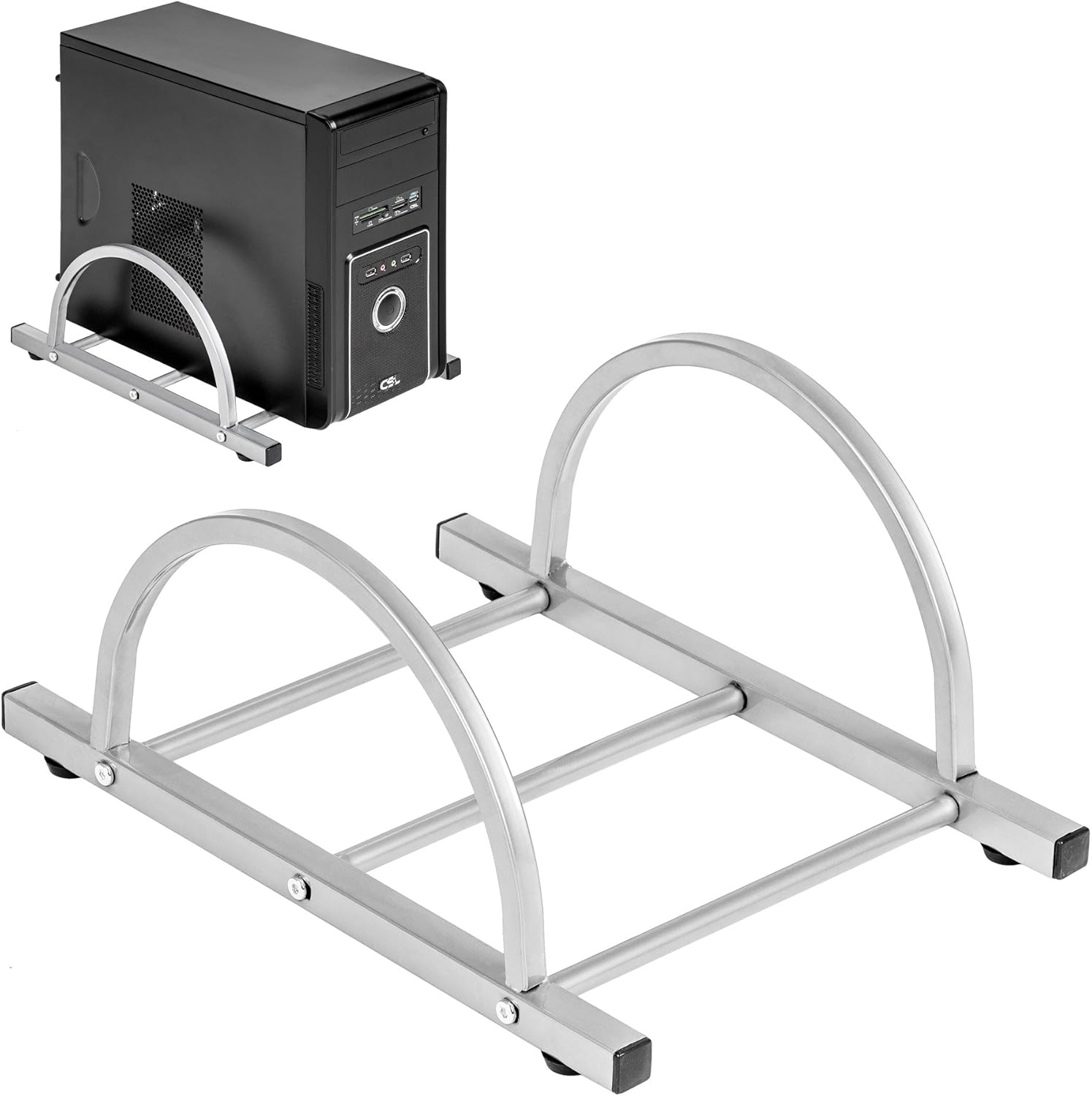
Figure 3: TecTake Computer Tower Holder. This image displays the separate holder designed to keep your PC tower elevated and secure.
6. Penyelenggaraan
Penjagaan yang betul akan memanjangkan hayat dan penampilan meja anda:
- Pembersihan: Lap permukaan dengan lembut, damp cloth. For stubborn marks, use a mild soap solution and immediately dry with a clean cloth. Avoid abrasive cleaners or harsh chemicals.
- Tumpahan: Clean up spills immediately to prevent staining or damage to the MDF surface.
- Perkakasan: Periodically check all screws and fittings for tightness. Re-tighten as necessary to maintain stability.
- Perlindungan: Use coasters for drinks and protective pads under hot items to prevent damage to the tabletop.
7. Penyelesaian masalah
If you encounter issues with your desk, consider the following common solutions:
- Meja goyah:
- Pastikan meja berada pada permukaan yang rata.
- Periksa semua skru dan bolt pemasangan. Ketatkan sebarang sambungan yang longgar.
- Verify that all leg caps are properly installed and making full contact with the floor.
- Keyboard Tray Not Sliding Smoothly:
- Check for any obstructions in the sliding mechanism.
- Ensure the rails are correctly installed and aligned.
- Clean the rails if dust or debris is present.
- Bahagian yang hilang: If you find any parts missing upon unpacking, please refer to the "Warranty and Support" section to contact customer service.
8. Spesifikasi
| Ciri | Perincian |
|---|---|
| Jenama | TecTake |
| Nombor Model | 402405 |
| Dimensi Keseluruhan (L x W x H) | 170 x 135 x 75 cm (66.9 x 53.1 x 29.5 inci) |
| Worktop Height | 75 cm (29.5 inci) |
| Large Tabletop Section (L x W) | 115 x 55 cm (45.3 x 21.7 inci) |
| Small Tabletop Section (L x W) | 80 x 55 cm (31.5 x 21.7 inci) |
| Rounded Corner Section (L x W) | 55 x 55 cm (21.7 x 21.7 inci) |
| Ketebalan Atas Meja | 1.5 cm (0.6 inci) |
| Sliding Keyboard Tray (L x W) | 56.5 x 35 cm (22.2 x 13.8 inci) |
| Steel Tube Dimensions | 3x2 cm; 2x2 cm; 1.5x1.5 cm |
| Computer Tower Holder Width (Max) | 25 cm (9.8 inci) |
| Kapasiti Beban Maksimum | 100 kg (220 lbs) |
| bahan | Veneered MDF surface, powder-coated steel tube frame, plastic feet and end caps |
| Color (as per model) | putih |
9. Waranti dan Sokongan
TecTake products are manufactured with quality and durability in mind. For information regarding warranty coverage, please refer to the warranty card included with your product or visit the official TecTake webtapak.
If you have any questions, require assistance with assembly, or need to report missing/damaged parts, please contact TecTake customer service. Contact details can typically be found on the product packaging, the included assembly instructions, or the official TecTake webtapak.
Sokongan dalam talian: www.tectake.de (Sila semak untuk wilayah anda website for specific contact information).