1. Pengenalan
The ViewSonic PX706HD is a 1080p short throw projector designed for versatile entertainment and gaming. It delivers large, immersive images in various environments, including smaller rooms, thanks to its short throw lens. This manual provides essential information for setting up, operating, and maintaining your projector.
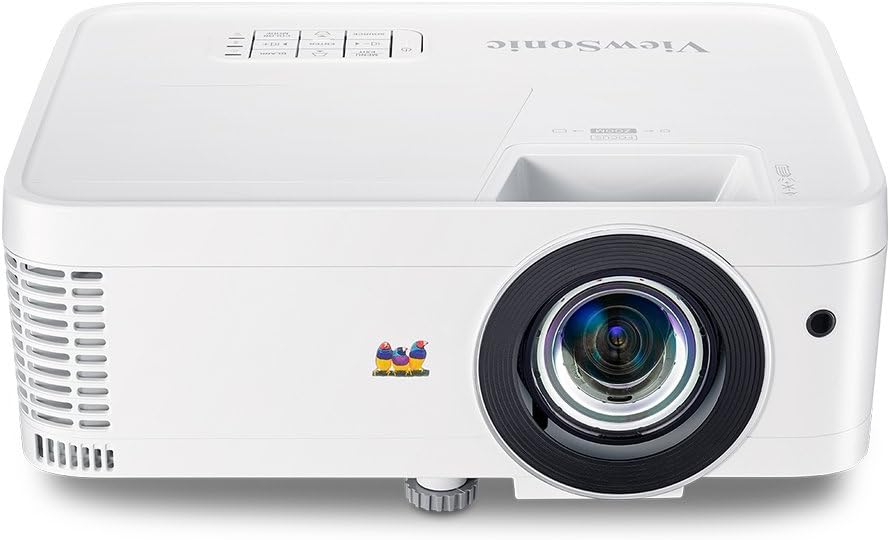
Rajah 1.1: Depan view daripada ViewSonic PX706HD Projector.
2. Kandungan Pakej
Sahkan bahawa semua item yang disenaraikan di bawah disertakan dalam pakej produk anda:
- Projektor PX706HD
- Kord Kuasa
- Kabel USB Type C
- Alat Kawalan Jauh
- Manual Pengguna (dokumen ini)

Figure 2.1: Items included in the PX706HD package.
3. Produk Lebihview
The ViewSonic PX706HD projector offers a range of features for an enhanced viewpengalaman bermain dan permainan:
- Kecerahan & Resolusi Tinggi: 3000 Lumens and Full HD 1920x1080 resolution for vivid, ultra-sharp images.
- Kanta Lempar Pendek: Project large images (up to 100 inches) from a short distance, ideal for smaller rooms.
- Low Input Latency: 16ms input latency ensures faster frame-by-frame action for smooth gameplay without delay.
- Cinematic Colors: Exclusive Color technology provides a wide color gamut for accurate and vibrant image production.
- Kesambungan Fleksibel: Supports various devices via Dual HDMI, USB-C, and other inputs.
- Full HD 3D Compatibility: Enjoy 3D movies and games.
- Penceramah Dalaman: Delivers room-filling sound for an immersive audiovisual experience.

Figure 3.1: High brightness and 1080p resolution for clear images.

Figure 3.2: Low input latency for responsive gaming.
4. Persediaan
4.1 Penempatan Projektor
The PX706HD features a short throw lens, allowing for large images from a close distance. Refer to the diagram below for typical projection distances and screen sizes.
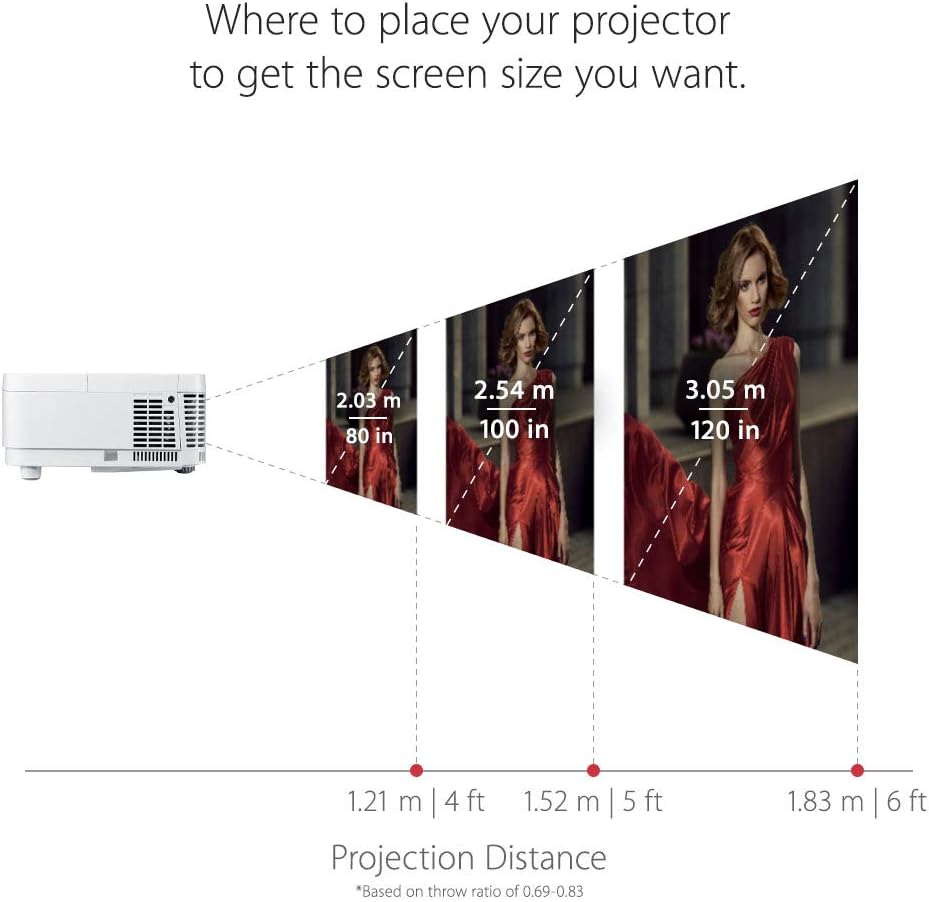
Figure 4.1: Recommended projection distances for various screen sizes.
4.2 Menyambung Peranti
The projector offers multiple connectivity options. Identify the appropriate port for your device:
- HDMI: Connect media players, gaming consoles, PCs, and Macs.
- USB-C: Connect compatible mobile devices for video streaming and gaming.
- VGA: For older computer connections.
- Audio Masuk/Keluar: For external audio systems.

Rajah 4.2: Port sambungan panel belakang.
4.3 Kuasa Awal Hidup
- Sambungkan kord kuasa ke projektor dan salur keluar kuasa.
- Tekan butang kuasa pada projektor atau alat kawalan jauh untuk menghidupkannya.
- Adjust the focus and zoom using the rings on the projector lens.
- Use the menu to adjust keystone correction if the image is distorted.
5. Mengendalikan Projektor
5.1 Hidupkan/Mati Kuasa
Tekan ke kuasa button once to turn the projector on. Press it twice to turn it off. The projector will go through a cool-down cycle before completely shutting down.
5.2 Pemilihan Sumber
Gunakan Sumber button on the remote control or the projector's control panel to cycle through available input sources (HDMI 1, HDMI 2, USB-C, VGA, etc.).
5.3 Pelarasan Imej
Access the On-Screen Display (OSD) menu by pressing the Menu/Keluar button. Navigate using the arrow keys and confirm selections with the Masuk button. Adjust settings such as:
- Kecerahan/Kontras: Fine-tune image luminance and distinction.
- Mod Warna: Select pre-set modes (e.g., Movie, Game, Standard) or customize.
- Batu Kunci: Correct trapezoidal image distortion.
- Nisbah Aspek: Adjust the image display ratio.
6. Ciri-ciri Permainan
The PX706HD is optimized for gaming with features designed to enhance your experience:
- Ultra-Low Input Latency: A 16ms input latency minimizes delay between your input and the on-screen action, crucial for fast-paced games.
- Mod Permainan: Activates enhanced colors and contrast specifically tuned for gaming visuals.
- Kesambungan USB-C: Directly connect compatible mobile devices for large-screen gaming.
Video 6.1: Selesaiview daripada ViewSonic PX706HD's gaming capabilities, highlighting low input lag and immersive experience.
Video 6.2: Demonstrates an ultimate gaming setup using the PX706HD projector with an Xbox 360.
7. Penyelenggaraan
Regular maintenance ensures optimal performance and longevity of your projector:
- Lamp kehidupan: Projektor lamp has a life of up to 15,000 hours in SuperEco Mode. Replace the lamp when its brightness significantly diminishes.
- Pembersihan: Regularly clean the projector lens with a soft, lint-free cloth. Ensure air vents are clear of dust and obstructions to prevent overheating.
- Storan: Apabila tidak digunakan untuk tempoh yang lama, simpan projektor di tempat yang sejuk, kering, dan terlindung daripada habuk.
8. Penyelesaian masalah
If you encounter issues with your projector, try the following basic troubleshooting steps:
- Tiada Kuasa: Ensure the power cord is securely connected and the power outlet is functional.
- Tiada gambar: Verify the input source is correctly selected and the connected device is powered on and outputting a signal. Check all cable connections.
- Imej Kabur: Adjust the focus ring on the projector lens. Ensure the projection surface is flat.
- Herotan Imej: Use the keystone correction feature in the OSD menu to correct trapezoidal images.
- Terlalu panas: Ensure the projector's air vents are not blocked and there is adequate ventilation around the unit.
For more detailed troubleshooting or persistent issues, please refer to the comprehensive user manual provided with your product or contact ViewSokongan pelanggan Sonic.
9. Spesifikasi
| Ciri | Spesifikasi |
|---|---|
| Dimensi Produk | 8.66 x 4.53 x 11.53 inci |
| Berat Barang | 5.94 paun |
| Nombor model item | PX706HD |
| Bateri | 2 bateri AAA diperlukan (untuk alat kawalan jauh) |
| Tarikh Mula-mula Tersedia | 9 April 2018 |
| Pengeluar | ViewSonic |
| Jenama | ViewSonic |
| Kegunaan Disyorkan Untuk Produk | Permainan |
| Ciri Khas | 3D Terbina Dalam |
| Teknologi Ketersambungan | USB, HDMI, VGA |
| Resolusi paparan | 1920 x 1080 (HD Penuh) |

Figure 9.1: Projector dimensions.
10. Waranti dan Sokongan
For warranty information and technical support, please refer to the warranty card included in your product packaging or visit the official ViewSonic webtapak. Simpan resit pembelian anda untuk tuntutan waranti.


