1. Pengenalan
Terima kasih kerana membeliasing the Bytech Massive Bluetooth Long Bar Speaker-BK. This manual provides essential information for the proper setup, operation, and maintenance of your new speaker. Please read this manual thoroughly before using the product to ensure optimal performance and longevity.
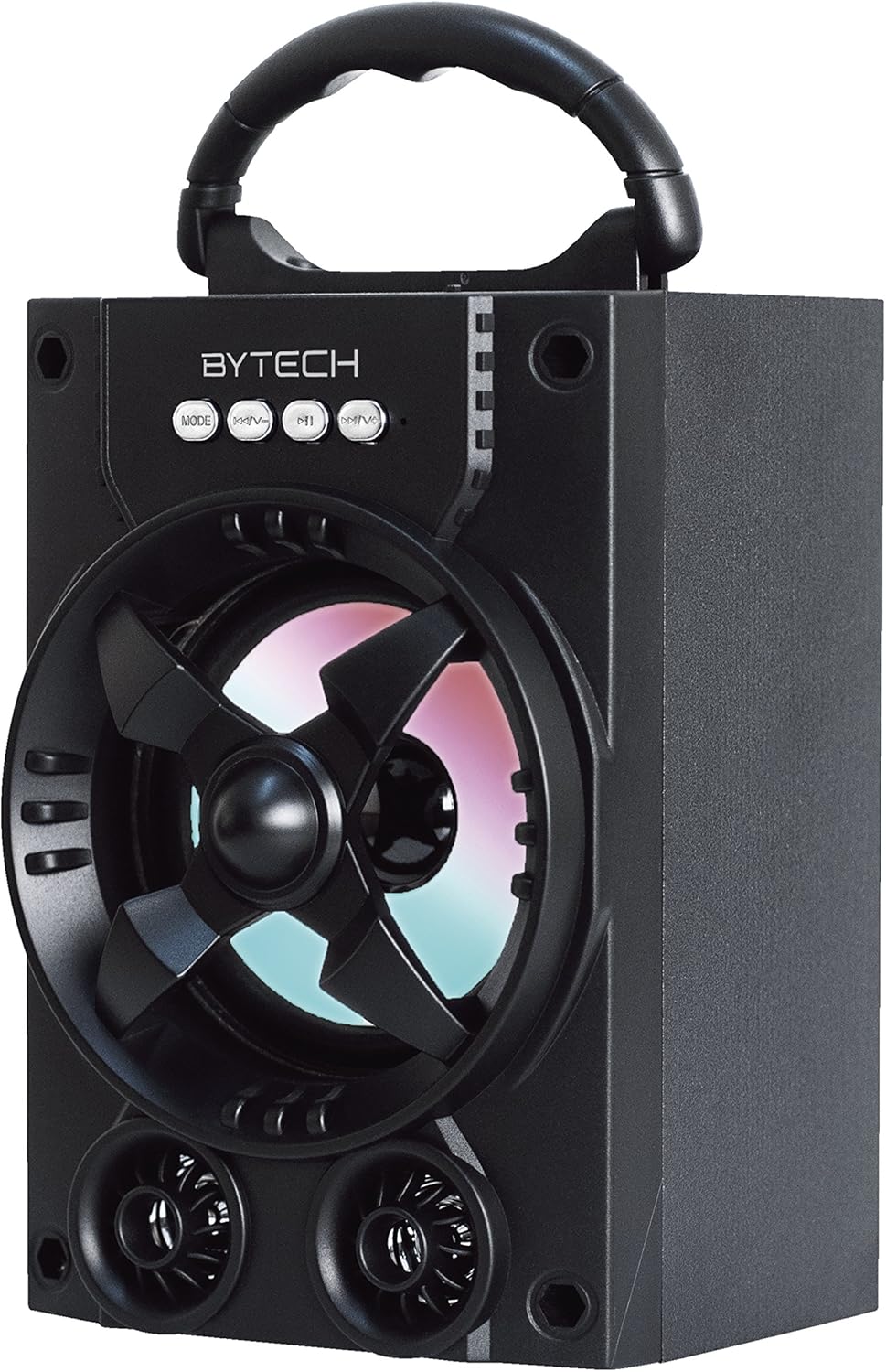
Rajah 1.1: Depan view of the Bytech Massive Bluetooth Long Bar Speaker-BK, showcasing its design, handle, and speaker grille with LED lights.
2. Kandungan Pakej
Sila semak pakej untuk item berikut:
- Bytech Massive Bluetooth Long Bar Speaker-BK
- Kabel Pengecas USB
- Manual Pengguna (dokumen ini)
Jika ada item yang hilang atau rosak, sila hubungi sokongan pelanggan.
3. Ciri-ciri Produk
- LED Performance Lights: Dynamic LED lights that synchronize with your music for an enhanced audio-visual experience.
- Convenient Carrying Handle: Integrated handle for easy portability, allowing you to take your music anywhere.
- Universal Bluetooth Connectivity: Seamlessly connect wirelessly to your smartphone, tablet, or other Bluetooth-enabled devices.
- Bunyi sekeliling: Designed to deliver a high-quality surround sound experience.
- Reka Bentuk Mudah Alih: Ideal for various settings, including parties, outdoor gatherings, and personal use.

Figure 1.2: The speaker shown with its retail packaging, illustrating its key features such as multi-color LED lights, Bluetooth connectivity, and surround sound capability.
4. Kawalan dan Petunjuk
The speaker features intuitive controls and indicators for easy operation:
- Butang MOD: Press to switch between available input modes (e.g., Bluetooth).
- Butang V: Press to decrease volume. Long press to skip to the previous track.
- Butang V+: Press to increase volume. Long press to skip to the next track.
- Butang M: (Function not explicitly detailed, typically for mode or mute)
- Lampu LED: Indicate power status, charging status, and provide dynamic light effects during audio playback.
5. Panduan Persediaan
5.1 Mengecas Speaker
- Sambungkan hujung kecil kabel pengecas USB ke port pengecasan pada pembesar suara.
- Sambungkan hujung besar kabel pengecas USB kepada penyesuai kuasa USB (tidak disertakan) atau port USB komputer.
- Penunjuk LED akan menunjukkan status pengecasan (cth., merah untuk pengecasan, mati apabila dicas sepenuhnya).
- Biarkan kira-kira 3-4 jam untuk cas penuh sebelum penggunaan pertama.
5.2 Menghidupkan/Mematikan
- To power on, press and hold the Power button (location not specified, typically near charging port or on control panel) for a few seconds until you hear an audible prompt or see the LED lights activate.
- Untuk mematikan kuasa, tekan dan tahan butang Kuasa sekali lagi sehingga pembesar suara dimatikan.
5.3 Berpasangan Bluetooth
- Ensure the speaker is powered on and in Bluetooth pairing mode (indicated by a flashing LED light or audible prompt).
- Pada telefon pintar atau tablet anda, navigasi ke tetapan Bluetooth.
- Cari untuk available devices. The speaker will appear as "BYTECH" or a similar name.
- Pilih pembesar suara daripada senarai untuk memulakan penggandingan.
- Once successfully paired, the LED indicator will typically become solid, and you may hear a confirmation tone.
6. Arahan Operasi
6.1 Memainkan Audio melalui Bluetooth
- Selepas pemasangan Bluetooth berjaya, buka aplikasi muzik pilihan anda pada peranti anda yang disambungkan.
- Select and play your desired audio. The sound will be streamed wirelessly to the speaker.
- Use the V+ and V- buttons on the speaker or your connected device to adjust the volume.
- Long press V+ or V- to skip tracks.
6.2 LED Performance Lights
The speaker features integrated LED lights that enhance your listening experience. These lights typically activate automatically when the speaker is powered on and playing audio. Specific controls for light modes are not detailed, but they are designed to provide dynamic visual effects.
6.3 Penukaran Mod
Tekan ke MODE button to cycle through available input modes. While Bluetooth is the primary connectivity, other modes (if available, such as FM radio or AUX input) can be accessed via this button.
7. Penyelenggaraan dan Penjagaan
- Pembersihan: Gunakan kain lembut dan kering untuk membersihkan bahagian luar pembesar suara. Jangan gunakan pembersih, lilin atau pelarut yang kasar.
- Storan: Apabila tidak digunakan untuk tempoh yang lama, simpan pembesar suara di tempat yang sejuk dan kering jauh dari cahaya matahari langsung dan suhu yang melampau.
- Penjagaan Bateri: Untuk memanjangkan hayat bateri, elakkan daripada kerap mencas sepenuhnya bateri. Cas semula pembesar suara secara berkala, walaupun tidak digunakan, untuk mengekalkan kesihatan bateri.
- Tahan Air: Produk ini adalah TIDAK waterproof. Avoid exposure to water, rain, or excessive moisture to prevent damage.
8. Penyelesaian masalah
Jika anda menghadapi masalah dengan pembesar suara anda, rujuk masalah dan penyelesaian biasa berikut:
| Masalah | Kemungkinan Punca | Penyelesaian |
|---|---|---|
| Speaker tidak dihidupkan. | Bateri lemah. | Cas pembesar suara sepenuhnya. |
| Tiada bunyi dari pembesar suara. | Volume too low; Not paired; Incorrect mode. | Increase volume on speaker and device; Ensure successful Bluetooth pairing; Press MODE button to select correct input. |
| Sambungan Bluetooth tidak stabil atau gagal. | Peranti terlalu jauh; Gangguan; Isu berpasangan. | Move device closer to speaker (within 33 ft/10m); Avoid obstacles; Forget device on your phone and re-pair. |
| Lampu LED tidak berfungsi. | Speaker not powered on or playing audio. | Ensure speaker is on and audio is playing. |
9. Spesifikasi
| Ciri | Perincian |
|---|---|
| Jenama | Bytech |
| Nama Model | BYTECH |
| Nombor Model Item | BCAUBS134BK |
| Jenis Pembesar Suara | Bunyi Sekeliling |
| Teknologi Ketersambungan | Bluetooth |
| Teknologi Komunikasi Tanpa Wayar | Bluetooth |
| Peranti Serasi | Telefon pintar |
| Kuasa Output Maksimum Pembesar Suara | 20 Watt |
| Respons Kekerapan | 20 KHz |
| Impedans | 1 Ohm |
| Saiz Pembesar Suara | 5 Inci |
| Sumber Kuasa | Elektrik Bertali (untuk mengecas) |
| Jenis Bateri | 1 Bateri Lithium Ion diperlukan |
| warna | Hitam |
| Dimensi Produk | 4.75 x 5.5 x 8.5 inci |
| Berat Barang | 1.3 paun |
| Adakah Kalis Air | Tidak |
| Negara Asal | China |
| UPC | 805112038121 |
10. Maklumat Waranti
Bytech products are manufactured to the highest quality standards. For specific warranty terms and conditions, please refer to the warranty card included with your purchase or visit the official Bytech webtapak. Simpan bukti pembelian anda untuk tuntutan waranti.
11. Sokongan Pelanggan
For technical assistance, troubleshooting, or general inquiries, please contact Bytech customer support. Contact information can typically be found on the product packaging, the official Bytech webtapak, atau resit pembelian anda.
Nota: Tiada video produk rasmi daripada penjual tersedia untuk dibenamkan berdasarkan data yang diberikan.


