1. Pengenalan
The APC SMC1500IC Line-Interactive 1500VA Uninterruptible Power Supply (UPS) provides reliable power protection for your electronic devices. It delivers pure sine wave output, essential for servers with active power factor corrected (PFC) power supplies, and offers network-grade power conditioning to safeguard against damaging surges and disruptive noise. This UPS ensures continuous operation during power outages and allows for graceful system shutdowns, protecting your valuable equipment and data.

Image: The APC SMC1500IC UPS unit, a compact black device with an LCD screen, positioned next to a black briefcase on a carpeted floor, illustrating its size and typical office environment use.
2. Maklumat Keselamatan
Please read and understand these safety instructions before installing or operating the UPS. Failure to follow these instructions may result in electric shock, fire, or serious injury.
- Keselamatan Elektrik: Unit ini mengandungi voltages. Do not attempt to disassemble the UPS. Servicing should only be performed by qualified personnel.
- Keselamatan Bateri: The UPS contains a sealed lead-acid battery. Do not dispose of batteries in a fire as they may explode. Do not open or mutilate batteries. Released electrolyte is harmful to the skin and eyes.
- Persekitaran Pemasangan: Install the UPS indoors in a controlled environment, away from excessive moisture, direct sunlight, heat sources, or conductive contaminants. Ensure adequate ventilation around the unit.
- Pembumian: UPS mesti disambungkan ke salur keluar kuasa AC yang dibumikan.
- Kapasiti Muatan: Do not overload the UPS. Ensure the total power draw of connected equipment does not exceed the UPS's rated output capacity.
3. Produk Lebihview
Familiarize yourself with the components of your APC SMC1500IC UPS.
Panel Depan
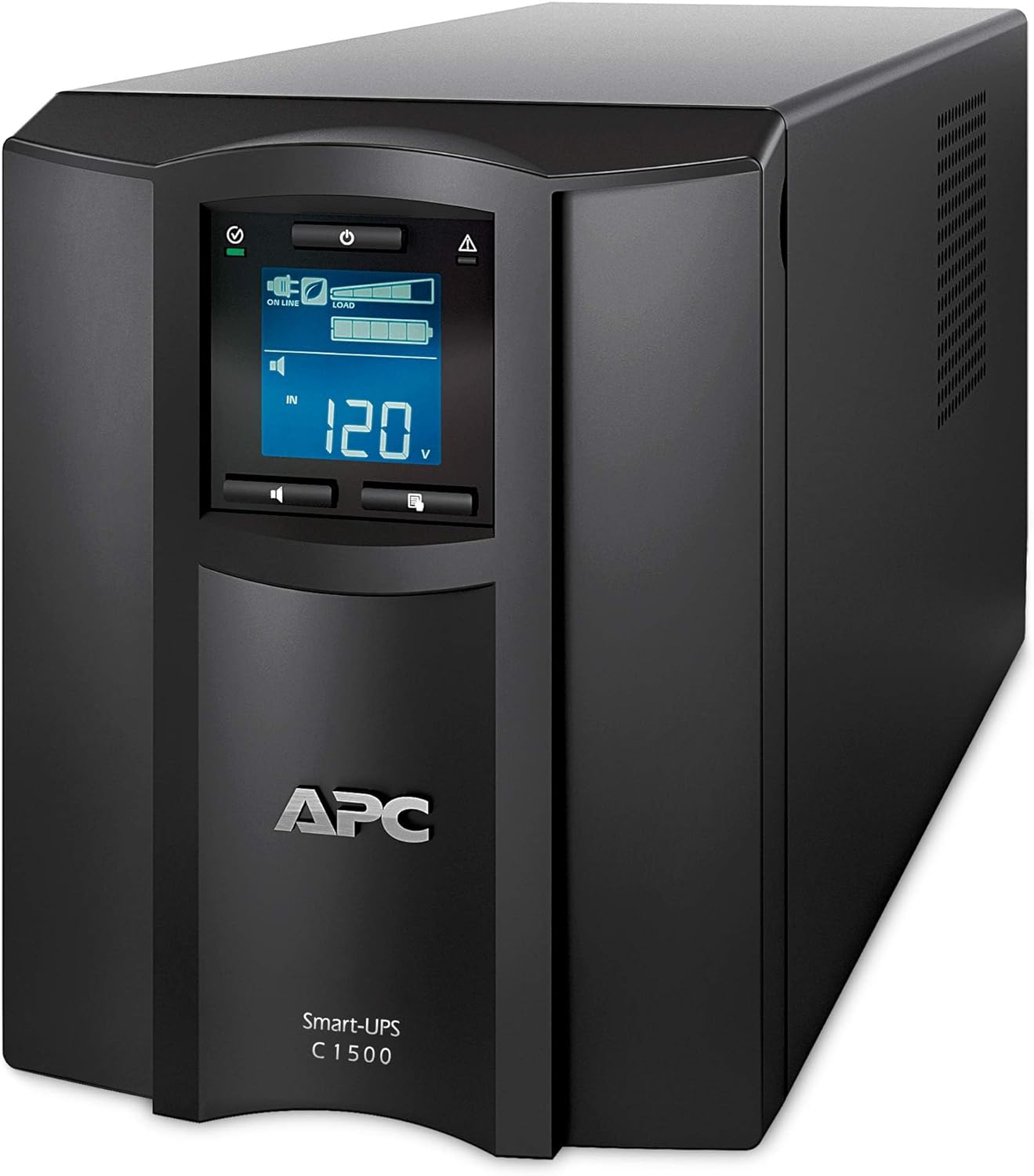
Imej: Bahagian hadapan terperinci view of the APC SMC1500IC UPS, highlighting the central LCD display panel and the power button below it. The unit is black with ventilation grilles on the sides.
- Paparan LCD: Provides real-time status information, configuration options, and alerts.
- Butang Navigasi: Used to navigate menus and adjust settings on the LCD.
- Butang Kuasa: Controls the power to the UPS and connected equipment.
Panel Belakang
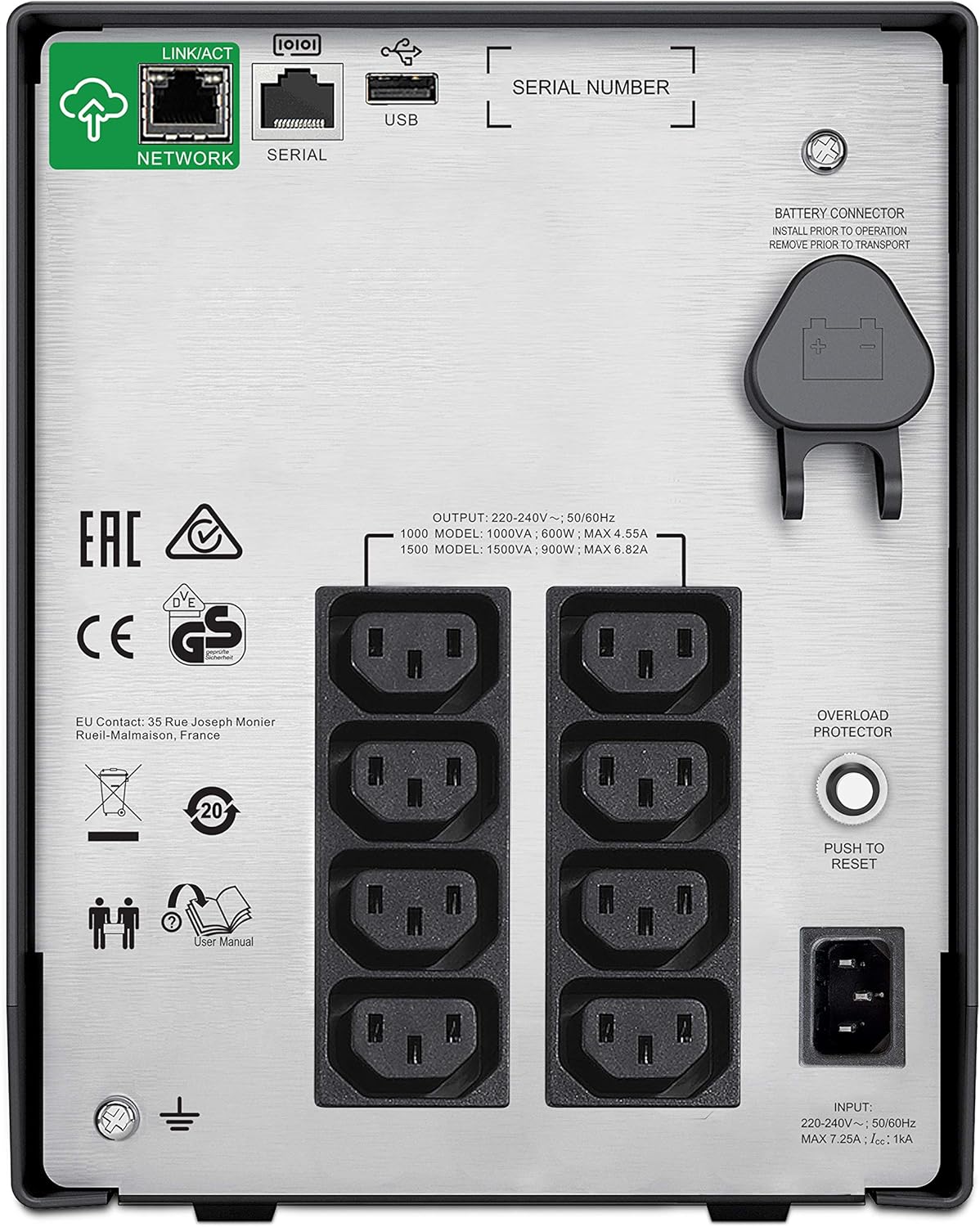
Image: The rear panel of the APC SMC1500IC UPS, displaying multiple AC power outlets, a network port, a serial port, a USB port, an overload protector button, and the battery connector.
- Cawangan AC: Provide battery backup and surge protection for connected devices.
- Network Port (RJ45): For network management and SmartConnect functionality.
- Port Siri (RJ45): For direct communication with a computer or server.
- Port USB: For communication with a computer or server.
- Penyambung Bateri: Connects the internal battery to the UPS.
- Pelindung Lebihan: A resettable circuit breaker.
- Kord Kuasa Input: Connects the UPS to the utility power.

Imej: Dari dekat view of the communication ports on the rear of the APC SMC1500IC UPS, specifically showing the 'NETWORK' (RJ45), 'SERIAL' (RJ45), and 'USB' ports.
4. Persediaan
Follow these steps to set up your UPS for the first time.
- Buka bungkusan UPS: Keluarkan UPS dari pembungkusannya dengan berhati-hati. Periksa sebarang kerosakan penghantaran.
- Sambungkan Bateri: The UPS is shipped with the internal battery disconnected for safety. Locate the battery connector on the rear panel (refer to the 'Rear Panel' image in Section 3) and push it firmly into place until it clicks.
- Letakkan UPS: Place the UPS on a flat, stable surface in a well-ventilated area. Avoid placing it near heat sources or in direct sunlight. Ensure there is sufficient space around the unit for airflow.
- Sambungkan Peralatan: Plug your computer, monitor, network devices, and other critical electronics into the AC outlets on the rear panel of the UPS. Ensure the total load does not exceed the UPS's capacity.
- Sambung ke Kuasa Utiliti: Plug the UPS's input power cord into a grounded wall outlet.
- Caj Permulaan: Allow the UPS to charge for at least 3 hours before connecting any critical equipment or expecting full runtime. The battery will charge whether the UPS is turned on or off.
- Sambungkan Kabel Komunikasi (Pilihan): For advanced monitoring and management, connect a USB cable from the UPS to your computer, or an Ethernet cable to your network for SmartConnect functionality.
5. Beroperasi
This section describes how to operate your UPS and understand its status indicators.
Menghidupkan/Mematikan
- Untuk Menghidupkan: Tekan butang kuasa pada panel hadapan. LCD akan menyala dan UPS akan menjalankan ujian kendiri.
- Untuk Mematikan: Tekan dan tahan butang kuasa sehingga UPS dimatikan.
LCD Display and Navigation
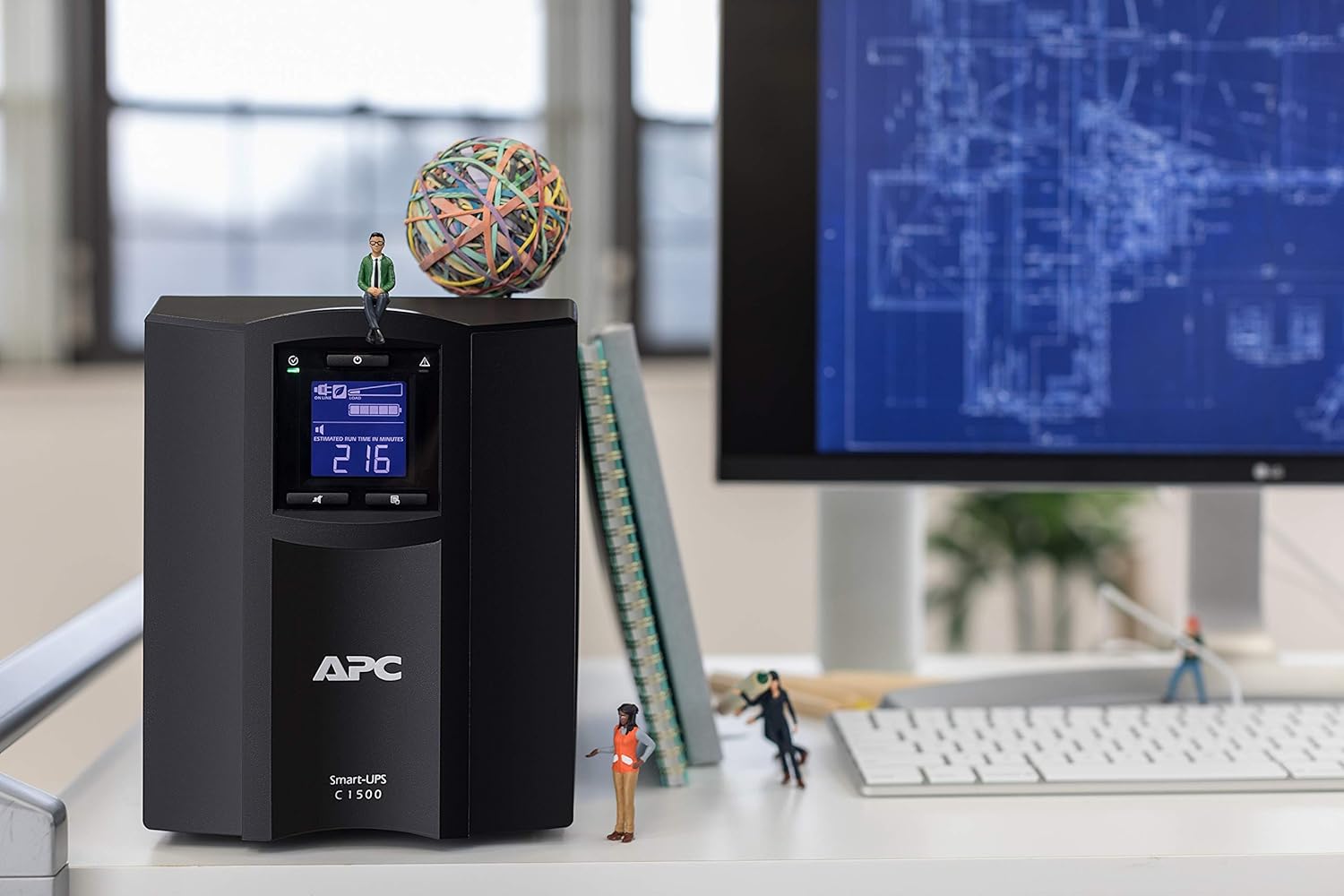
Image: A close-up of the APC SMC1500IC UPS's LCD screen, displaying 'ON LINE' status, input voltage (124V), and battery charge level, along with other status icons.
The intuitive LCD interface provides clear information and allows you to configure the UPS locally using the navigation keys. You can view various parameters such as input/output voltage, peratusan bebantage, battery charge level, and estimated runtime.
SmartConnect Functionality

Image: A composite image showing the APC SmartConnect dashboard interface displayed on a desktop monitor, a tablet, and a smartphone, illustrating remote monitoring capabilities.
The SMC1500IC features APC SmartConnect, allowing you to monitor the health and status of your UPS from any web-enabled device. Connect the UPS to your network via the RJ45 network port and follow the instructions provided with your unit to register it with the SmartConnect portal. This enables remote management, alerts, and firmware updates.
Tetapan Boleh Diprogram
The UPS offers over 15 different programmable settings, including switched outlet group control. These settings allow for application-specific configurations, thresholds, and notifications. Refer to the detailed user manual available on the APC website for a complete list and instructions on how to adjust these settings via the LCD or SmartConnect interface.
6. Penyelenggaraan
Penyelenggaraan yang betul memastikan jangka hayat dan prestasi UPS anda yang optimum.
- Penggantian Bateri: The internal lead-acid battery has a finite lifespan. When the UPS indicates a battery fault or low runtime, the battery should be replaced. Contact APC support or an authorized service provider for replacement batteries. Always ensure the UPS is powered off and disconnected from utility power before attempting battery replacement.
- Pembersihan: Periodically clean the exterior of the UPS with a soft, dry cloth. Ensure ventilation openings are free from dust and debris to maintain proper airflow. Do not use liquid cleaners or solvents.
- Ujian Kendiri: Regularly perform a self-test (usually initiated via the LCD menu) to ensure the battery and internal components are functioning correctly.
7. Penyelesaian masalah
Bahagian ini menyediakan penyelesaian kepada isu biasa yang mungkin anda hadapi dengan UPS anda.
| Masalah | Kemungkinan Punca | Penyelesaian |
|---|---|---|
| UPS tidak dihidupkan | Battery not connected; No utility power; Faulty unit | Ensure battery is fully connected; Check wall outlet and power cord; Contact support if issue persists. |
| UPS beeps continuously / Overload alarm | Peralatan yang disambungkan melebihi kapasiti UPS | Disconnect non-essential equipment; Press the Overload Protector button on the rear panel to reset if tripped. |
| Masa penggunaan bateri yang singkat | Bateri tidak dicas sepenuhnya; Bateri hampir tamat hayat | Allow UPS to charge for 3 hours; Replace battery if old or faulty. |
| UPS not communicating with computer/network | Incorrect cable; Driver issue; Network configuration | Ensure correct USB/Ethernet cable is used; Install necessary drivers; Verify network settings for SmartConnect. |
For more detailed troubleshooting or issues not listed here, refer to the comprehensive user manual on the APC weblaman web atau hubungi sokongan teknikal APC.
8. Spesifikasi
Key technical specifications for the APC SMC1500IC UPS.
| Ciri | Spesifikasi |
|---|---|
| Jenama | APC |
| Model | SMC1500IC |
| Output Wattage | 900 Watt |
| Voltage | 300 Volts (Input/Output dependent on region) |
| Jenis Bateri | Bateri Asid Plumbum |
| Masa Mengecas | 3 Jam |
| Dimensi Produk (D x W x H) | 21.9 x 43.9 x 17.1 cm |
| Berat Barang | 20 Kilogram |
| Tahap Kebisingan | 45 Desibel |
| Jumlah Port USB | 1 |
| Faktor Bentuk | Menara |
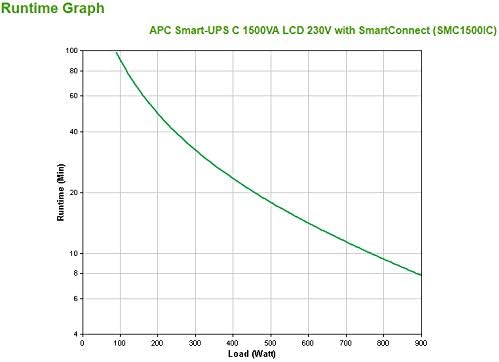
Image: A runtime graph illustrating the battery backup duration (in minutes) versus the load (in Watts) for the APC Smart-UPS C 1500VA LCD 230V with SmartConnect (SMC1500IC).
9. Waranti dan Sokongan
For warranty information, technical support, or to access the full user manual, please visit the official APC webtapak atau hubungi bahagian perkhidmatan pelanggan mereka. Simpan resit pembelian anda sebagai bukti pembelian untuk tuntutan waranti.
Pegawai APC Webtapak: www.apc.com