1. Pengenalan
This manual provides comprehensive instructions for the setup, operation, and maintenance of your ELECOM DEFT PRO Trackball Mouse, model M-DPT1MRBK. This high-performance trackball mouse offers versatile connectivity options including wired, 2.4GHz wireless, and Bluetooth, designed for enhanced precision and ergonomic comfort across various operating systems.

Tetikus Bola Jejak ELECOM DEFT PRO, tunjukkancasing reka bentuk ergonomik dan bebola trek merah yang menonjol.
2. Kandungan Pakej
Sahkan bahawa semua item terdapat dalam pakej produk anda:
- ELECOM DEFT PRO Trackball Mouse (M-DPT1MRBK)
- Kabel USB-A ke USB-C (untuk sambungan berwayar dan pengecasan)
- USB Wireless Receiver (2.4GHz)
- Lithium Polymer Battery (pre-installed or included separately)
- Manual Pengguna (dokumen ini)

The trackball mouse accompanied by its USB-A to USB-C cable for wired connection and charging, and a USB wireless receiver for 2.4GHz wireless mode.
3. Produk Lebihview
Familiarize yourself with the components of your ELECOM DEFT PRO Trackball Mouse:
- Bola jejak: Untuk pergerakan kursor.
- Butang Klik Kiri/Kanan: Fungsi tetikus standard.
- Roda Tatal: For vertical scrolling and tilt for horizontal scrolling.
- Butang Suis DPI: Adjusts cursor speed.
- Function Buttons (Fn1, Fn2, Fn3, etc.): Programmable buttons for custom actions.
- Connectivity Mode Switch: Selects Wired, Wireless (2.4GHz), or Bluetooth mode.
- Suis kuasa: Menghidupkan/mematikan peranti.
- Port USB-C: For wired connection and battery charging.
- Wireless Receiver Storage: Compartment for the USB wireless receiver.
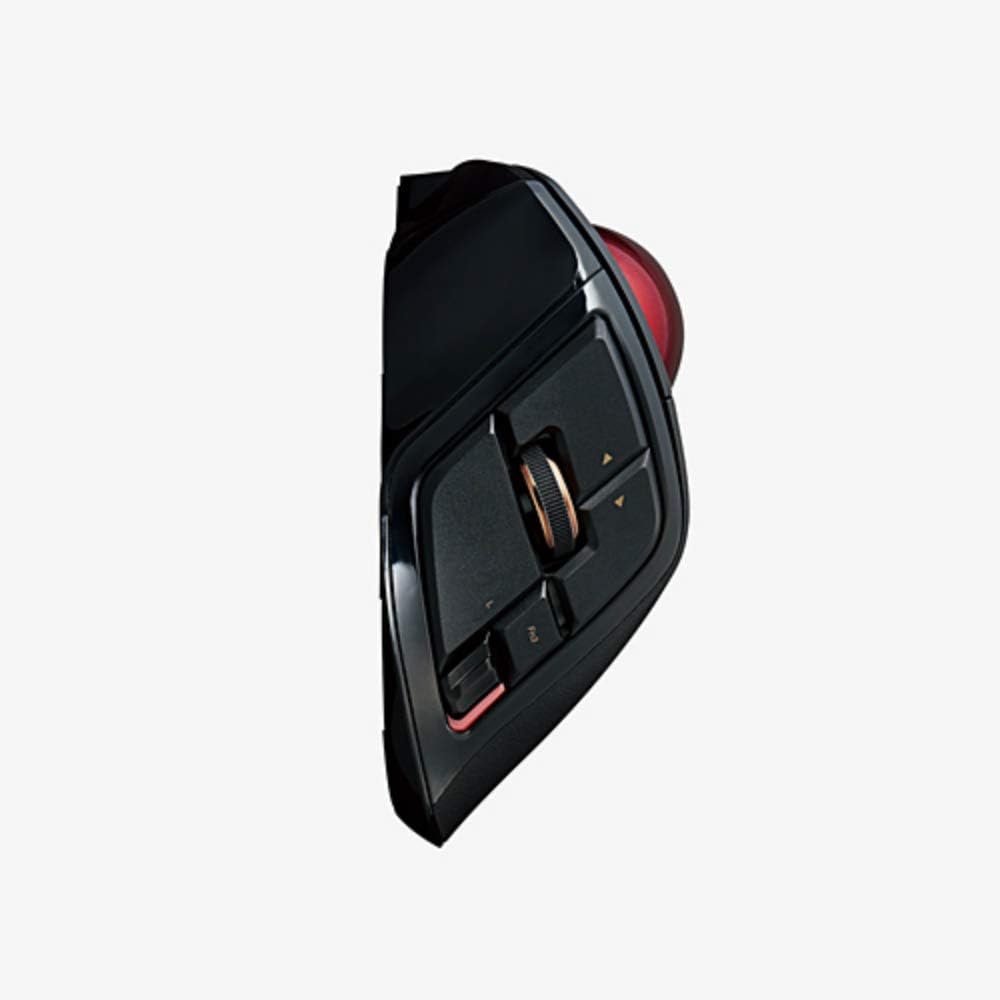
Seorang pro sampinganfile of the trackball mouse, illustrating the placement of the scroll wheel, tilt functions, and programmable side buttons.

A terperinci view of the ELECOM DEFT PRO's buttons, including the main click buttons, scroll wheel, and additional programmable function buttons.
4. Persediaan
4.1. Pemasangan dan Pengecasan Bateri
The ELECOM DEFT PRO uses a Lithium Polymer battery. If not pre-installed, open the battery compartment and insert the battery according to the polarity indicators. To charge, connect the mouse to a USB power source using the provided USB-A to USB-C cable. The LED indicator will show charging status.
4.2. Pilihan Kesambungan
The mouse supports three connection methods:
- Sambungan Berwayar: Connect the mouse directly to your computer using the USB-A to USB-C cable.
- Sambungan Wayarles 2.4GHz:
- Masukkan penerima wayarles USB ke dalam port USB yang tersedia pada komputer anda.
- Set the connectivity mode switch on the mouse to the 'Wireless' position.
- Turn on the mouse using the power switch. The mouse should automatically connect.
- Sambungan Bluetooth:
- Set the connectivity mode switch on the mouse to the 'Bluetooth' position.
- Hidupkan tetikus menggunakan suis kuasa.
- Pada komputer atau peranti anda, navigasi ke tetapan Bluetooth dan cari peranti baharu.
- Select 'ELECOM DEFT PRO' from the list of available devices to pair.
4.3. Software Installation (ELECOM Mouse Assistant)
For full customization of buttons and advanced settings, download and install the ELECOM Mouse Assistant software from the official ELECOM website. This software allows you to remap buttons, adjust DPI settings, and configure other functions specific to your workflow. Ensure you download the correct version for your operating system (Windows or macOS).
5. Operasi
5.1. Kawalan Kursor Asas
Use your fingers to roll the red trackball to move the cursor on the screen. The optical tracking technology provides precise and smooth cursor movement.

An illustration of a hand comfortably resting on the ELECOM DEFT PRO Trackball Mouse, showing the natural finger placement for operating the trackball and buttons.
5.2. Fungsi Butang
The ELECOM DEFT PRO features 8 physical buttons and scroll wheel tilt functionality. Default functions are:
- Klik Kiri/Kanan: Standard primary and secondary click actions.
- Roda Tatal: Penatalan menegak.
- Scroll Wheel Tilt (Left/Right): Horizontal scrolling.
- Suis DPI: Cycles through DPI settings (500, 1000, 1500).
- Programmable Buttons (Fn1, Fn2, Fn3, etc.): Customizable via ELECOM Mouse Assistant.
5.3. Pelarasan DPI
Press the DPI switch button located near the trackball to cycle through the available cursor speeds: 500 DPI, 1000 DPI, and 1500 DPI. Select the sensitivity that best suits your task or preference.
6. Penyelenggaraan
6.1. Membersihkan Trackball
Regular cleaning of the trackball and its bearings is essential for optimal performance. Dust and debris can accumulate and affect cursor smoothness.
- Matikan tetikus menggunakan suis kuasa.
- Locate the small hole on the underside of the mouse.
- Gently push the trackball out from the bottom using a pen or similar blunt object.
- Lap bebola jejak dengan kain lembut dan tidak berbulu.
- Clean the three ruby ball bearings inside the trackball housing with a cotton swab lightly dampened with isopropyl alcohol. Ensure no residue remains.
- Masukkan semula bebola trek ke dalam perumahnya.
7. Penyelesaian masalah
- Kursor tidak bergerak atau tidak menentu:
- Ensure the mouse is powered on and the correct connectivity mode (Wired, Wireless, Bluetooth) is selected.
- Periksa tahap bateri dan cas jika perlu.
- For wireless, ensure the USB receiver is securely plugged in. For Bluetooth, verify pairing in your device's settings.
- Clean the trackball and its bearings as described in Section 6.1.
- Butang tidak bertindak balas:
- Verify the mouse is connected and powered on.
- If using custom button assignments, check the ELECOM Mouse Assistant software for correct configuration.
- Software issues (ELECOM Mouse Assistant):
- Ensure you have downloaded the latest version of the software for your operating system.
- Mulakan semula komputer anda selepas pemasangan.
- Jika masalah berterusan, cuba pasang semula perisian tersebut.
8. Spesifikasi
| Ciri | Perincian |
|---|---|
| Nombor Model | M-DPT1MRBK |
| Ketersambungan | Wired (USB), 2.4GHz Wireless (USB Receiver), Bluetooth |
| Tetapan DPI | 500 / 1000 / 1500 count (switchable) |
| Butang | 8 physical buttons + Scroll Wheel Tilt |
| Pengesanan Pergerakan | Optical, Trackball |
| Dimensi (W x L x H) | 3.6" x 5.3" x 2.3" (91.4mm x 133.4mm x 57.3mm) |
| Berat badan | 5.7 oz (tanpa bateri) |
| Bateri | 1 bateri Polimer Litium (termasuk) |
| Keperluan Sistem | Windows 7, 8, 10 atau lebih baharu; macOS 10.13 atau lebih baharu |

An image comparing the dimensions of various ELECOM trackball mouse models, with the DEFT PRO (M-DPT1MRBK) positioned in the center, showing its length, width, and height.
9. Waranti dan Sokongan
For warranty information, technical support, or further assistance, please refer to the official ELECOM website or contact ELECOM customer service. Keep your proof of purchase for warranty claims.