1. Pengenalan
Thank you for choosing the ASAKUKI Smart Wi-Fi Essential Oil Diffuser. This device combines aromatherapy with smart technology, allowing you to control it via a mobile application or voice commands. It is designed to humidify and purify the air, creating a relaxing atmosphere in your home or office.
This manual provides detailed instructions for the safe and efficient use of your diffuser. Please read it thoroughly before operation and retain it for future reference.

Image: The ASAKUKI Smart Wi-Fi Essential Oil Diffuser is versatile for various environments, including nurseries, family rooms, bedrooms, yoga studios, and workspaces.
2. Langkah-langkah Keselamatan
Untuk memastikan operasi yang selamat dan mencegah kerosakan, sila patuhi perkara berikut:
- Always place the diffuser on a flat, stable surface.
- Do not exceed the maximum water fill line (500ml).
- Use only clean tap water or distilled water. Avoid using hot water.
- Add essential oils carefully to avoid spilling on the exterior of the unit.
- Jauhkan peresap daripada kanak-kanak dan haiwan peliharaan.
- Do not cover the mist outlet during operation.
- Unplug the device from the power outlet before cleaning or refilling.
- Jangan rendam unit ke dalam air atau cecair lain.
- If the unit is damaged, do not attempt to repair it yourself. Contact customer support.
- The diffuser features an automatic shut-off when water runs out, but it is recommended to monitor water levels.
3. Kandungan Pakej
Sahkan bahawa semua item terdapat dalam pakej anda:
- ASAKUKI Smart Wi-Fi Essential Oil Diffuser (Model DF010)
- Penyesuai Kuasa
- Manual Pengguna
- Measuring Cup (may be included)
4. Produk Lebihview
Familiarize yourself with the main components of your diffuser:

Image: The ASAKUKI Smart Wi-Fi Essential Oil Diffuser, showing its sleek design and the accompanying mobile app for control.
- Tudung: Top cover of the diffuser.
- Mist Outlet: Where the mist is released.
- Tangki Air: Holds up to 500ml of water.
- Max Water Line: Indicates the maximum fill level.
- Ultrasonic Plate: Located at the bottom of the water tank, responsible for mist generation.
- Saluran Udara: Located on the base.
- Drain Side: Indicated for proper water drainage.
- Butang Cahaya: Controls the LED light functions.
- Mist/Wi-Fi Button: Controls mist output and initiates Wi-Fi pairing.
- Bicu Kuasa: Untuk menyambungkan penyesuai kuasa.
5. Arahan Persediaan
Ikuti langkah ini untuk persediaan awal:
- Letakkan Penyebar: Position the diffuser on a flat, stable, and water-resistant surface.
- Keluarkan Tudung: Gently lift the top lid off the diffuser.
- Tambah Air: Using a measuring cup, fill the water tank with clean tap water or distilled water up to the maximum water line (500ml). Do not overfill.
- Tambah Minyak Pati: Add 3-5 drops of your preferred essential oil directly into the water tank. Adjust the amount based on personal preference and room size.
- Gantikan Tudung: Securely place the lid back onto the diffuser.
- Sambungkan Kuasa: Plug the power adapter into the power jack at the base of the diffuser, then plug the adapter into a wall outlet.
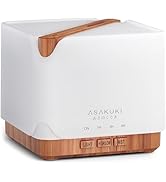
Image: Simple setup guide illustrating connecting power, app pairing, and wireless control.
6. Arahan Operasi
6.1 Kawalan Manual
- Kawalan Kabus: Tekan ke Mist/Wi-Fi button once for continuous mist. Press again for intermittent mist (30 seconds on, 30 seconds off). Press a third time to turn off the mist.
- Kawalan Cahaya: Tekan ke Cahaya button once to turn on the LED light with automatic color cycling. Press again to fix the light to a specific color. Continue pressing to cycle through colors. Press and hold the Light button to turn off the light.
6.2 Smart Wi-Fi and App Control
The diffuser can be controlled remotely using the TuyaSmart app.
- Muat turun Apl: Cari untuk "TuyaSmart" di gedung aplikasi telefon pintar anda (iOS atau Android) dan muat turunnya.
- Daftar/Log Masuk: Buka aplikasi dan daftar akaun baharu atau log masuk jika anda sudah mempunyai akaun.
- Masukkan Mod Berpasangan: With the diffuser plugged in, press and hold the Mist/Wi-Fi button for 5 seconds until the indicator light flashes rapidly. This indicates the diffuser is in pairing mode.
- Tambah Peranti: In the TuyaSmart app, tap "Add Device" or the "+" icon. Select "Small Home Appliance" > "Diffuser" (Wi-Fi).
- Sambung ke Wi-Fi: Follow the in-app instructions to connect the diffuser to your 2.4GHz Wi-Fi network. Ensure your phone is also connected to the same 2.4GHz network during setup.
- Kawalan: Once successfully paired, you can control the mist, light, set timers, and create schedules directly from the TuyaSmart app.

Image: The mobile app allows for convenient control of the diffuser's functions.
6.3 Kawalan Suara dengan Alexa
The diffuser is compatible with Amazon Alexa for voice control.
- Dayakan Kemahiran: In the Alexa app, search for and enable the "TuyaSmart" skill.
- Pautkan Akaun: Link your TuyaSmart account to your Alexa account.
- Cari Peranti: Minta Alexa untuk "Temui peranti" atau temui peranti itu secara manual dalam apl Alexa.
- Perintah Suara: Once discovered, you can use commands such as:
- "Alexa, turn on the diffuser."
- "Alexa, turn off the diffuser."
- "Alexa, set the diffuser to red."
- "Alexa, set diffuser brightness to 50%."

Image: Voice control with Alexa allows hands-free operation of the diffuser.
7. Penyelenggaraan
Regular cleaning helps maintain optimal performance and extends the lifespan of your diffuser.
7.1 Pembersihan
Bersihkan diffuser selepas setiap 5-6 penggunaan atau setiap 3-5 hari, terutamanya apabila menukar minyak pati.
- Cabut plag: Disconnect the diffuser from the power outlet.
- Air Kosong: Remove the lid and carefully pour out any remaining water from the drain side of the water tank.
- Lap Bersih: Use a soft cloth or cotton swab with a small amount of mild dish soap to gently wipe the inside of the water tank and the ultrasonic plate.
- Bilas: Rinse the water tank with clean water, being careful not to get water into the air outlet.
- kering: Wipe all parts dry with a clean, soft cloth.
- Deep Clean (Optional): For stubborn residue, add a small amount of white vinegar to the water tank and let it sit for 10-15 minutes before wiping and rinsing.
7.2 Penyimpanan
When not in use for an extended period, ensure the diffuser is clean and completely dry. Store it in a cool, dry place away from direct sunlight.
8. Penyelesaian masalah
Jika anda menghadapi masalah, rujuk kepada masalah dan penyelesaian biasa berikut:
| Masalah | Kemungkinan Punca | Penyelesaian |
|---|---|---|
| Tiada kabus atau output kabus yang rendah |
|
|
| Diffuser does not power on |
|
|
| Tidak dapat menyambung ke Wi-Fi/Apl |
|
|
| Kebocoran air |
|
|
9. Spesifikasi
| Ciri | Perincian |
|---|---|
| Jenama | ASAKUKI |
| Nombor Model | DF010 |
| Kapasiti | 500 mililiter |
| Dimensi | 6"L x 6"W x 7"H |
| bahan | Akrilonitril Butadiena Stirena (ABS), Polipropilena (PP) |
| Sumber Kuasa | Elektrik Bertali |
| Wattage | 10 watt |
| Kawasan Liputan | Sehingga 323 Kaki Persegi |
| Ciri Khas | App Control, Automatic Shut-Off, Multiple Light Settings, Multiple Mist Settings, Voice Control (Alexa) |
| Tahap Kebisingan | Lower than 35 dB |
| Runtime (Full Capacity) | Up to 16 hours (on weak mist setting) |
10. Waranti dan Sokongan
The ASAKUKI Smart Wi-Fi Essential Oil Diffuser comes with a 1-year technical support warranty. This warranty covers manufacturing defects and issues arising from normal use.
For technical assistance, troubleshooting, or warranty claims, please contact ASAKUKI customer support through the retailer where you purchased the product or visit the official ASAKUKI webtapak untuk maklumat hubungan.
Please have your model number (DF010) and proof of purchase ready when contacting support.


