1. Pengenalan
Terima kasih kerana membeliasing the Ematic EMHD130LED HD 16GB Music Player. This compact and portable device allows you to enjoy your favorite music on the go. Featuring a 1.3-inch OLED display and a MicroSD slot for expanded storage, it is designed for ease of use and portability. This manual provides detailed instructions for setting up, operating, and maintaining your music player.
2. Maklumat Keselamatan Penting
- Jangan dedahkan peranti kepada suhu yang melampau, cahaya matahari langsung atau kelembapan yang tinggi.
- Elakkan daripada menjatuhkan atau meletakkan peranti kepada kesan yang kuat.
- Jangan cuba membuka atau membaiki peranti ini sendiri. Rujuk semua servis kepada kakitangan yang berkelayakan.
- Jauhkan peranti daripada air dan cecair lain.
- Gunakan hanya aksesori yang diluluskan pengilang.
- Buang peranti dan baterinya secara bertanggungjawab mengikut peraturan tempatan.
3. Kandungan Pakej
Sila semak pakej untuk item berikut:
- Ematic EMHD130LED HD 16GB Music Player
- Manual Pengguna (dokumen ini)
- Note: A USB charging/data transfer cable is typically required and may be sold separately.
4. Produk Lebihview
Familiarize yourself with the components and controls of your Ematic music player.
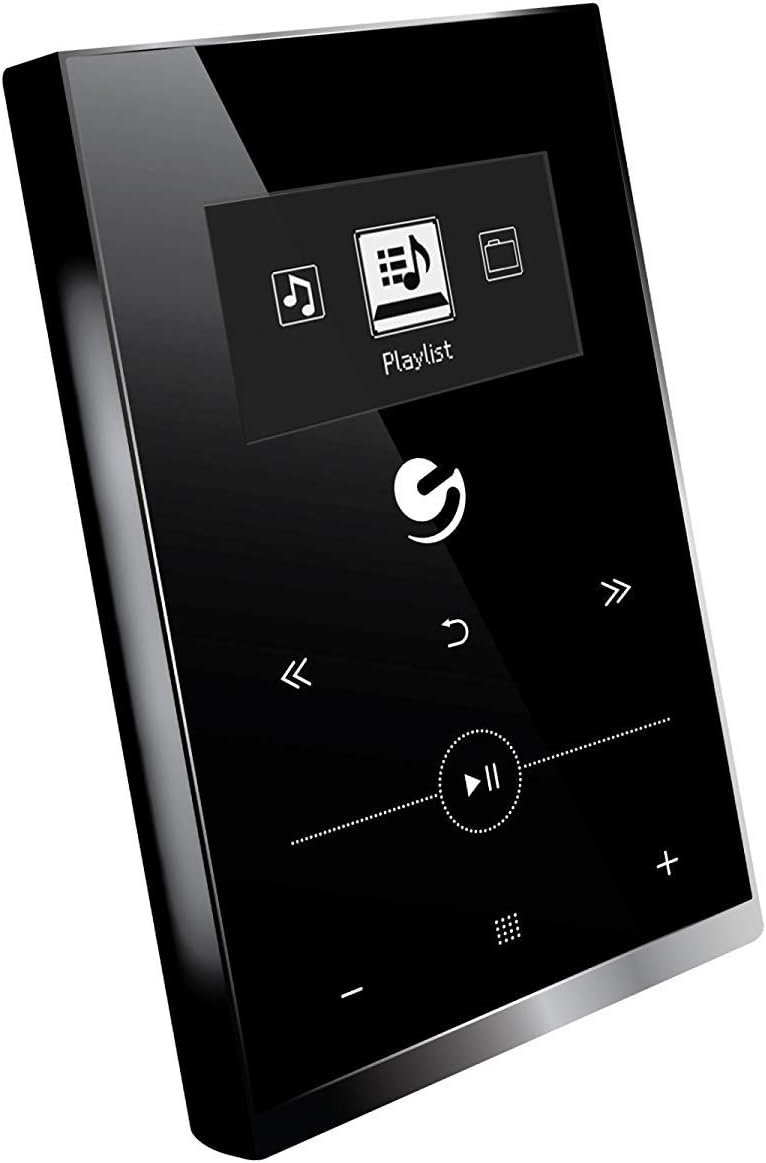
Rajah 4.1: Depan view of the Ematic EMHD130LED Music Player, highlighting its 1.3-inch OLED display and touch-sensitive controls for navigation and playback.

Rajah 4.2: The Ematic EMHD130LED Music Player shown in a typical usage scenario, demonstrating its small form factor suitable for connection to a computer for media transfer.
Kawalan dan Pelabuhan:
- Paparan OLED: 1.3-inch screen for track information and menu navigation.
- Butang Navigasi: (Implied from image) Up, Down, Left, Right, Select/Play/Pause.
- Kawalan Kelantangan: (Implied from image) Plus (+) and Minus (-) buttons for adjusting audio output.
- Slot MicroSD: For expanding storage capacity beyond the internal 16GB.
- Port USB: For connecting to a computer for charging and data transfer.
5. Persediaan
5.1 Mengecas Peranti
Before first use, fully charge your music player. Connect the device to a computer's USB port or a compatible USB wall adapter using a USB cable. The OLED display will indicate charging status. A full charge typically takes a few hours.
5.2 Loading Music
The Ematic EMHD130LED has 16GB of internal storage. You can add more music using a MicroSD card (sold separately).
- Melalui Komputer: Plug your media player directly into your computer using a USB cable. The device will appear as a removable drive. Drag and drop your MP3 audio files into the player's music folder.
- Via MicroSD Card: Insert a MicroSD card into the designated slot on the player. You can transfer music files directly to the MicroSD card via a card reader on your computer, or transfer them to the card once it's in the player and connected to the computer.
6. Arahan Operasi
6.1 Hidupkan/Mati Kuasa
Press and hold the Power button (location not specified, typically a side button or integrated with Play/Pause) for a few seconds to turn the device on or off.
6.2 Navigasi Asas
Use the navigation buttons (Up, Down, Left, Right) to browse through menus and select options on the 1.3-inch OLED display. Press the central Select button to confirm a selection or play a track.
6.3 Main balik Muzik
- From the main menu, navigate to 'Music' or 'Playlist'.
- Browse through your stored music by artist, album, genre, or all songs.
- Select a track and press the Play/Pause button to begin playback.
- Use the Skip Forward/Backward buttons to change tracks.
- Adjust the volume using the Volume Up (+) and Volume Down (-) buttons.
6.4 Using the MicroSD Card
Once a MicroSD card is inserted and contains music, the player will automatically detect it. You can typically switch between internal storage and MicroSD card content through the music menu settings.
7. Penyelenggaraan
- Pembersihan: Use a soft, dry, lint-free cloth to clean the device. Do not use abrasive cleaners or solvents.
- Storan: Apabila tidak digunakan untuk tempoh yang lama, simpan peranti di tempat yang sejuk dan kering jauh dari cahaya matahari langsung.
- Penjagaan Bateri: Untuk memanjangkan hayat bateri, elakkan daripada kerap mencas sepenuhnya bateri. Cas peranti secara berkala, walaupun tidak digunakan.
8. Penyelesaian masalah
| Masalah | Kemungkinan Punca | Penyelesaian |
|---|---|---|
| Peranti tidak dihidupkan. | Bateri habis. | Cas peranti selama sekurang-kurangnya 30 minit. |
| Tiada bunyi. | Volume is too low or muted; Headphones not connected properly. | Increase volume; Ensure headphones are fully plugged in. |
| Tidak boleh memindahkan files. | Incorrect USB connection; Driver issue; Corrupted files. | Ensure USB cable is securely connected; Try a different USB port or cable; Restart computer and player; Check file format (hanya MP3 yang disokong). |
| Paparan kosong atau beku. | Gangguan perisian. | Tekan dan tahan butang Kuasa selama 10-15 saat untuk memaksa mula semula. |
9. Spesifikasi
| Ciri | Perincian |
|---|---|
| Jenama | Ematic |
| Model | EMHD130LED |
| Nama Model | 16GB High Definition Music Player with 1.3-inch OLED Display |
| Kapasiti Penyimpanan Memori | 16 GB (Dalaman) |
| Kapasiti Storan Digital | 16 GB |
| Peranti Serasi | Komputer riba, Komputer Peribadi |
| Jenis Paparan | OLED |
| Saiz Skrin | 1.3 Inci |
| Jenis Penyambung | USB |
| Jenis Media yang Serasi | MP3 |
| Jenis Media | SD mikro |
| Dimensi Produk | 11.99 x 8.48 x 2.84cm; 312.98g |
| Komposisi Sel Bateri | Litium Ion |
| Bateri boleh dicas semula | ya |
| Pengeluar | Shaghai LTD |
| Tarikh Tersedia Pertama | 26 Mac 2018 |
10. Waranti dan Sokongan
For warranty information and customer support, please refer to the warranty card included with your product or visit the official Ematic website. You may also contact Ematic customer service directly for assistance with product issues or inquiries.
Ematic Official Webtapak: www.ematic.us (Note: This is a general placeholder link for Ematic's website. Please verify the correct support URL untuk wilayah anda.)


