1. Introduction and Important Safety Information
This manual provides essential instructions for the safe and efficient operation, maintenance, and troubleshooting of your Dyson V7 Animal Cord-Free Bagless Handheld Stick HEPA Vacuum. Please read all instructions carefully before use and retain this manual for future reference.
Amaran Keselamatan Penting
- Always disconnect the appliance from the charger before cleaning or performing maintenance.
- Jangan gunakan dengan kord atau palam yang rosak. Jika perkakas tidak berfungsi sebagaimana mestinya, telah terjatuh, rosak, ditinggalkan di luar atau terjatuh ke dalam air, kembalikan ke pusat servis.
- Do not use to pick up water or other liquids.
- Jangan ambil objek yang terbakar atau berasap, seperti rokok, mancis, atau abu panas.
- Jauhkan rambut, pakaian longgar, jari dan semua bahagian badan daripada bukaan dan bahagian yang bergerak.
- Gunakan hanya seperti yang diterangkan dalam manual ini. Gunakan hanya lampiran yang disyorkan Dyson.
- Jangan gunakan tanpa tong jernih dan penapis di tempatnya.
2. Apa yang ada di dalam Kotak
Your Dyson V7 Animal vacuum comes with several components designed for various cleaning tasks. Please ensure all items are present.
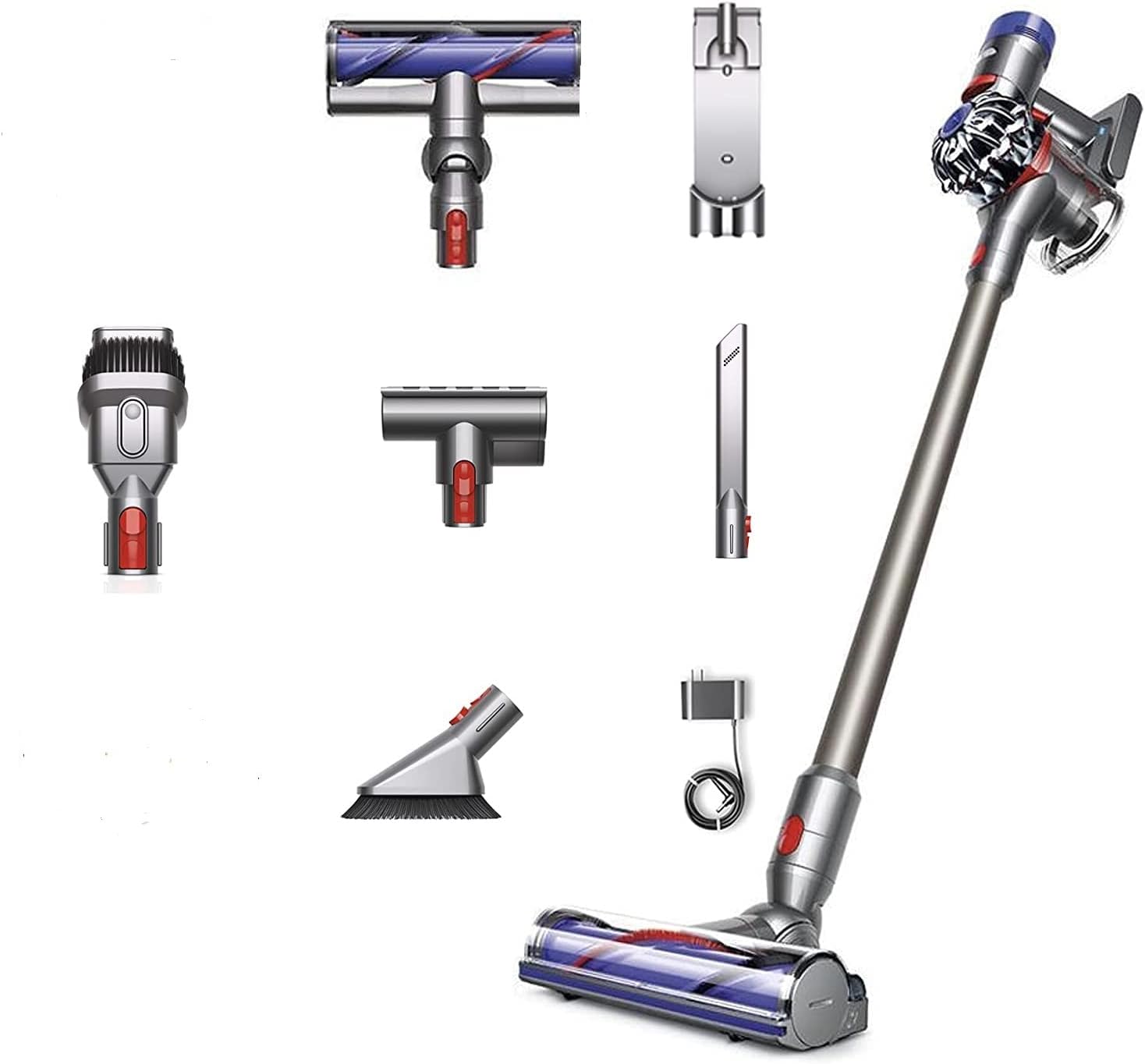
Image: The Dyson V7 Animal main unit, extension wand, charger, and various cleaning attachments including the Motorhead, Mini Motorized Tool, Combination Tool, and Crevice Tool.
Komponen yang Disertakan:
- Dyson V7 Animal Main Unit (with motor and clear bin)
- Tongkat Sambungan
- Direct-drive cleaner head (Motorhead)
- Alat Bermotor Mini
- Combination Tool (brush and wide nozzle)
- Alat Celah
- Stesen dok
- Pengecas
- Penapis HEPA (prapasang)
3. Pemasangan dan Persediaan
Follow these steps to assemble your Dyson V7 Animal vacuum and prepare it for first use.
3.1 Memasang Vakum
- Pasangkan Tongkat: Align the extension wand with the main unit's intake and push until it clicks securely into place.
- Attach a Cleaner Head: Select your desired cleaner head (e.g., Direct-drive cleaner head) and align it with the end of the extension wand. Push until it clicks securely. For handheld use, attachments can be connected directly to the main unit.
3.2 Memasang Stesen Docking
The docking station allows for convenient storage and charging.
- Choose a suitable location near an electrical outlet.
- Secure the docking station to the wall using appropriate screws and anchors (not included). Ensure it is mounted at a height that allows the vacuum to hang freely.
- Connect the charger cable to the docking station.
4. Mengecas Bateri
Before first use, fully charge the vacuum's battery. The battery is a Lithium-Ion type.
- Connect the charger directly to the main unit or to the docking station if installed.
- Palamkan pengecas ke salur keluar dinding.
- The blue indicator light on the handle will illuminate during charging and turn off when fully charged.
- A full charge typically takes approximately 3.5 hours. The vacuum provides up to 30 minutes of fade-free suction in normal mode.
5. Arahan Operasi
Learn how to effectively use your Dyson V7 Animal vacuum for various cleaning tasks.
5.1 Menghidupkan/Mematikan
- Press and hold the power trigger to start the vacuum. Release the trigger to turn it off.
5.2 Mod Sedutan
Your vacuum has two suction modes:
- Mod Standard: Provides up to 30 minutes of powerful, fade-free suction for everyday cleaning.
- Mod MAX: For more demanding tasks, slide the switch on the top of the main unit to 'MAX'. This provides increased suction for up to 7 minutes.
5.3 Menggunakan Lampiran
Different attachments are designed for specific cleaning needs:
- Direct-drive cleaner head: Ideal for carpets and hard floors, driving bristles deep into carpet pile to remove ground-in dirt.
- Alat Bermotor Mini: Removes pet hair and ground-in dirt from upholstery and confined spaces.
- Alat Gabungan: A wide nozzle and brush tool in one, for quick switching between cleaning and dusting tasks.
- Alat Celah: Direka untuk pembersihan tepat di sekitar tepi dan celah sempit.
6. Penyelenggaraan
Regular maintenance ensures optimal performance and extends the life of your Dyson V7 Animal vacuum.
6.1 Mengosongkan Tong Kosong
Empty the bin as soon as the dirt reaches the MAX level mark. Do not overfill.
- Hold the vacuum over a trash can.
- Push the red lever down firmly until the bin base opens and the dirt empties.
- Close the bin base securely until it clicks into place.
6.2 Mencuci Penapis
Your vacuum has a washable HEPA filter. Wash the filter at least once a month, or more frequently if used heavily.
- Twist the filter counter-clockwise from the top of the main unit and lift it out.
- Wash the filter under cold running water until the water runs clear. Do not use detergents.
- Shake excess water from the filter and leave it to dry completely for at least 24 hours in a warm, dry place. Do not dry in a tumble dryer, microwave, or near a naked flame.
- Pastikan penapis benar-benar kering sebelum menggantikannya.
6.3 Clearing Blockages
If the vacuum loses suction, check for blockages.
- Turn off and disconnect the vacuum from the charger.
- Remove any attached tools or the wand.
- Inspect the main unit's intake, the wand, and the cleaner head for any obstructions.
- Clear any blockages carefully. Do not use sharp objects.
7. Penyelesaian masalah
Rujuk bahagian ini untuk penyelesaian kepada isu biasa yang mungkin anda hadapi.
| Masalah | Kemungkinan Punca | Penyelesaian |
|---|---|---|
| Vakum tidak dihidupkan | Battery not charged; Trigger not held | Charge the battery fully; Ensure the trigger is held down during operation. |
| Kehilangan sedutan | Bin full; Filter dirty; Blockage | Empty the clear bin; Wash and dry the filter; Check for and clear blockages in the wand or cleaner head. |
| Bateri tidak dicas | Charger not connected properly; Faulty outlet | Ensure charger is securely plugged into both the vacuum and the wall outlet; Try a different outlet. |
| Cleaner head not spinning | Blockage in cleaner head; Brush bar jammed | Turn off and disconnect. Remove cleaner head and clear any hair or debris from the brush bar. |
8. Spesifikasi Produk
Key technical details for the Dyson V7 Animal Cord-Free Bagless Handheld Stick HEPA Vacuum.
- Jenama: Dyson
- model: V7 Haiwan
- Ciri Khas: Bagless, HEPA filtration
- Jenis Penapis: Penapis HEPA
- Tanpa wayar: ya
- Faktor Bentuk: Genggam / Tongkat
- Dimensi Produk: 29"L x 10.5"W x 6"H
- Jenis Bateri: Litium-Ion
- Hayat Bateri: Up to 30 minutes (standard mode)
- Tahap Bunyi: 78 dB
- Kuasa Kuda Motor: 0.47 kuasa kuda
- Kaedah Kawalan: Touch (Push Button Trigger)
- Bilangan Kelajuan: 2 (Standard, MAX)
- Berat Barang: 11.13 paun
- Penggunaan Dalaman/Luar: Dalaman
- UPC: 885609010809
9. Waranti dan Sokongan
Dyson products are engineered for performance and durability. For information regarding your product's warranty, please refer to the warranty card included with your purchase or visit the official Dyson website. For technical support, replacement parts, or service inquiries, please contact Dyson customer support directly.
Dyson Official Webtapak: www.dyson.com


