1. Pengenalan
Thank you for choosing the Impex Thunder T2 Plus 80W 2.0 Channel Multimedia Speaker. This speaker system is designed to deliver a rich and powerful audio experience for your home entertainment needs. It features versatile connectivity options including Bluetooth, USB, SD/TF card, FM Radio, and AUX input, along with a wireless microphone for karaoke. Please read this manual carefully before using the product to ensure proper operation and to maximize its performance.

Figure 1.1: Impex Thunder T2 Plus Speaker System in a home environment.
2. Maklumat Keselamatan
Untuk memastikan operasi yang selamat dan mengelakkan kerosakan, sila patuhi langkah berjaga-jaga keselamatan berikut:
- Do not expose the speaker to water or moisture. This product is not water-resistant.
- Jauhkan pembesar suara daripada cahaya matahari langsung, sumber haba dan nyalaan terbuka.
- Ensure proper ventilation around the speaker to prevent overheating.
- Gunakan hanya penyesuai kuasa yang dibekalkan dengan unit.
- Jangan cuba membuka atau membaiki pembesar suara sendiri. Rujuk semua servis kepada kakitangan yang berkelayakan.
- Jauhkan daripada kanak-kanak.
- Cabut palam pembesar suara semasa ribut petir atau apabila tidak digunakan untuk tempoh yang lama.
3. Kandungan Pakej
Sahkan bahawa semua item terdapat dalam pakej:
- 1 x Pembesar Suara Aktif
- 1 x Pembesar Suara Pasif
- 1 x Manual Pengguna dengan Kad Waranti
- 1 x Kabel Audio
- 1 x Alat Kawalan Jauh
- 1 x Antena FM
- 1 x Mikrofon Tanpa Wayar
- 1 x Wireless Microphone Battery
- Speaker Legs (for assembly)
4. Ciri-ciri Produk
The Impex Thunder T2 Plus offers a range of features for a comprehensive audio experience:
- 2.0 Channel Tower Speaker System
- 80W RMS Output Power
- Kesambungan Bluetooth untuk penstriman audio wayarles
- USB Input for playing music from flash drives
- SD/MMC Card Slot for playing music from memory cards
- Radio FM terbina dalam
- AUX Input for connecting external audio devices (e.g., smartphones, laptops, TVs)
- Wireless Microphone for Karaoke function
- Two Wired Microphone Inputs
- Alat Kawalan Jauh fungsi penuh
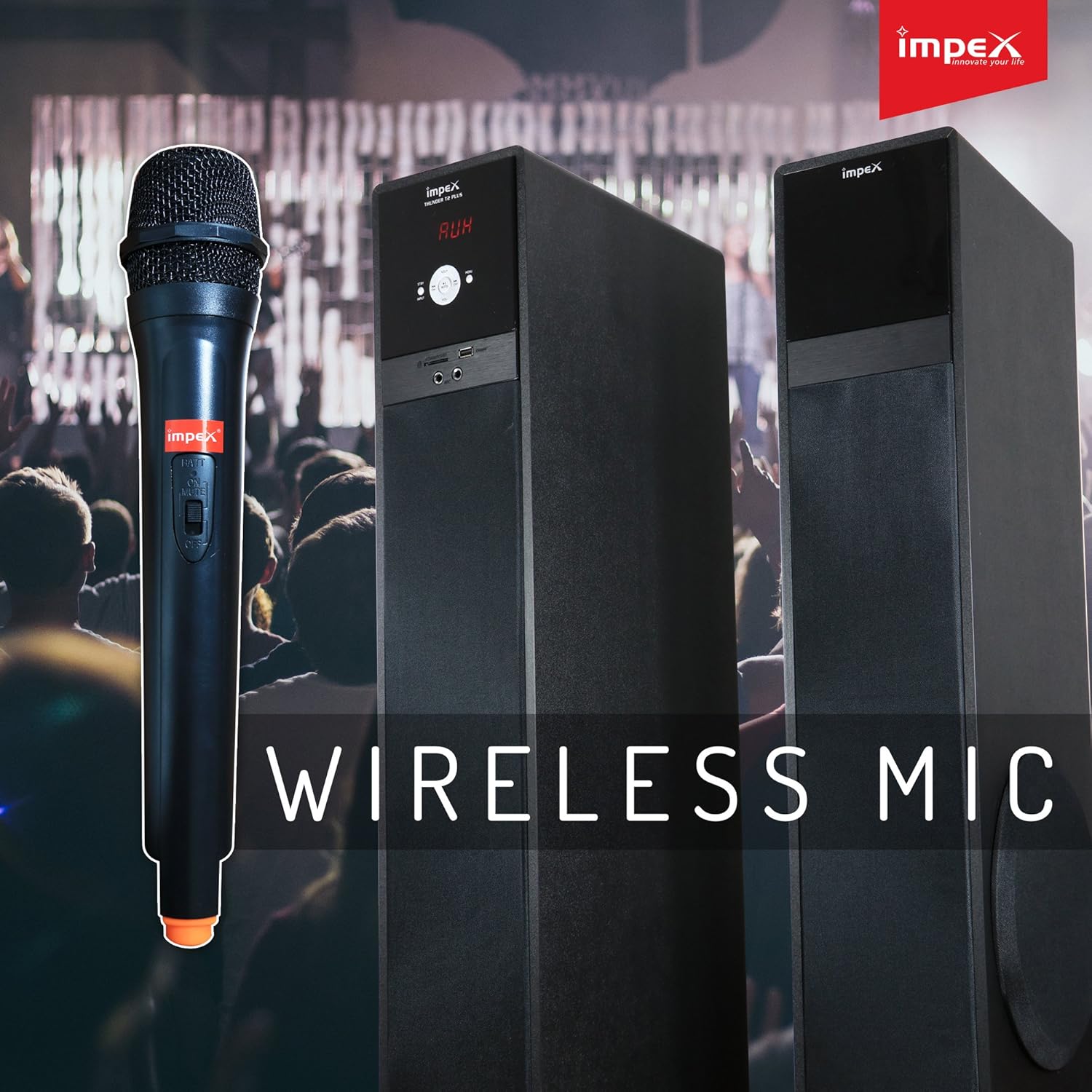
Figure 4.1: Wireless Microphone for Karaoke functionality.
5. Arahan Persediaan
5.1 Penempatan Pembesar Suara
Place the active and passive speakers on a flat, stable surface. Ensure they are positioned to provide optimal sound distribution in your listening area. Maintain some distance from walls for better bass response.
5.2 Menyambung Pembesar Suara
- Connect the passive speaker to the active speaker using the provided speaker cable. The connection ports are typically located on the rear of each speaker.
- Pastikan sambungan selamat.
5.3 Sambungan Kuasa
- Plug the AC power cord into the power input on the active speaker.
- Insert the other end of the power cord into a standard AC power outlet.
5.4 Menyambungkan Sumber Audio
The Thunder T2 Plus offers multiple ways to connect your audio devices:
5.4.1 Input AUX
- Use the provided audio cable (3.5mm to RCA or 3.5mm to 3.5mm, depending on your device) to connect your external audio source (e.g., TV, laptop, smartphone) to the AUX input port on the speaker.
- Select 'AUX' mode on the speaker.
5.4.2 USB / SD/TF Card
- Insert a USB flash drive or an SD/TF card containing MP3 audio files into the respective slot on the speaker.
- The speaker should automatically switch to USB/SD mode and begin playback. If not, select 'USB' or 'SD' mode.
Antena 5.4.3 FM
- Connect the FM antenna to the FM antenna port on the rear of the active speaker.
- Panjangkan antena untuk penerimaan yang lebih baik.

Figure 5.1: Input panel with USB, SD/MMC, and Microphone ports.
6. Arahan Operasi
6.1 Hidupkan/Mati Kuasa
Press the Power button on the front panel of the active speaker or on the remote control to turn the unit ON or OFF.
6.2 Pemilihan Mod
Press the 'MODE' button on the front panel or remote control to cycle through available input modes: Bluetooth, USB, SD/TF, FM Radio, and AUX.
6.3 Kawalan Kelantangan
Use the master volume knob on the active speaker or the 'VOL+' / 'VOL-' buttons on the remote control to adjust the overall volume.
6.4 Operasi Bluetooth
- Switch the speaker to Bluetooth mode. The display will show 'BT' and a pairing indicator will flash.
- Dayakan Bluetooth pada telefon pintar, tablet atau peranti lain anda.
- Cari untuk 'THUNDER T2 PLUS' in the list of available devices and select it to pair.
- Once paired, the speaker will confirm the connection, and you can play audio from your device.
6.5 USB / SD/TF Playback
When a USB drive or SD/TF card is inserted, the speaker will automatically switch to the corresponding mode and begin playing audio files. Use the 'PLAY/PAUSE', 'PREV', and 'NEXT' buttons on the speaker or remote control to manage playback.
6.6 Operasi Radio FM
- Tukar pembesar suara kepada mod FM.
- Press the 'SCAN' button on the remote control to automatically scan and save available FM stations.
- Use the 'PREV' and 'NEXT' buttons to navigate through the saved stations.
6.7 Penggunaan Mikrofon (Karaoke)
- For the wireless microphone, ensure a battery is inserted and turn it ON.
- For wired microphones, connect them to the 'MIC' input ports on the speaker.
- Adjust the microphone volume using the dedicated 'MIC VOL' control (if available) or the main volume.
6.8 Fungsi Kawalan Jauh
The remote control provides convenient access to all speaker functions:
- Kuasa: Turn the speaker ON/OFF.
- Mod: Switch between input sources (Bluetooth, USB, SD, FM, AUX).
- Jilid +/-: Laraskan kelantangan induk.
- Main/Jeda: Kawal main balik media.
- Sebelum/Seterusnya: Skip tracks or FM stations.
- EQ: Select equalizer presets (if available).
- Redam: Redamkan atau nyahredamkan audio.
- Ulang: Repeat current track or playlist.
- Kekunci angka: Direct track selection (USB/SD mode) or FM station input.

Figure 6.1: Full-function Remote Control.
7. Penyelenggaraan
Proper maintenance ensures the longevity and performance of your speaker system:
- Pembersihan: Gunakan kain lembut dan kering untuk membersihkan bahagian luar pembesar suara. Jangan gunakan pembersih cecair atau bahan yang melelas.
- Storan: If storing the speaker for an extended period, unplug it from the power outlet and store it in a cool, dry place, away from dust and extreme temperatures.
- Pengudaraan: Ensure that the speaker's ventilation openings are not blocked to prevent overheating.
8. Penyelesaian masalah
If you encounter issues with your Impex Thunder T2 Plus speaker, refer to the following common problems and solutions:
| Masalah | Kemungkinan Punca | Penyelesaian |
|---|---|---|
| Tiada kuasa | Power cord not connected; Power outlet not working; Speaker is OFF. | Check power cord connection; Try a different outlet; Press the Power button. |
| Tiada bunyi | Volume too low; Incorrect input mode; Audio cable loose/damaged; Bluetooth not connected. | Increase volume; Select correct input mode; Reconnect audio cable; Re-pair Bluetooth device. |
| Kegagalan berpasangan Bluetooth | Speaker not in pairing mode; Device Bluetooth is OFF; Speaker too far from device. | Ensure speaker is in BT mode; Turn on device Bluetooth; Move device closer to speaker (within 10m). |
| Kad USB/SD tidak dimainkan | tak betul file format; Card/drive not inserted correctly; Corrupted files. | pastikan files are MP3; Reinsert card/drive; Try a different card/drive. |
| Penerimaan FM yang lemah | Antenna not connected/extended; Weak signal. | Connect and extend FM antenna; Reposition antenna or speaker. |
| Alat kawalan jauh tidak berfungsi | Batteries drained/incorrectly inserted; Obstruction between remote and speaker; Remote too far. | Replace batteries; Ensure clear line of sight; Move closer to speaker. |
Jika masalah berterusan selepas mencuba penyelesaian ini, sila hubungi sokongan pelanggan.
9. Spesifikasi
Detailed technical specifications for the Impex Thunder T2 Plus speaker system:
| Ciri | Spesifikasi |
|---|---|
| Nama Model | Pembesar Suara Multimedia 2.0 |
| Nombor Model | THUNDER T2 PLUS |
| Jenama | Impex |
| Jenis Pembesar Suara | Woofer |
| Teknologi Ketersambungan | Berwayar, Wayarles (Bluetooth) |
| Mod Keluaran Audio | Keliling |
| Konfigurasi Saluran Bunyi Sekeliling | 2.0 |
| Kuasa Output Pembesar Suara Maksimum | 80 Watt |
| Sumber Kuasa | AC |
| Kaedah Kawalan | Jauh |
| Peranti Serasi | Smartphone, Tablet, Laptop, TV, Desktop, MP3 Player |
| Jenis Pemasangan | Lantai Berdiri |
| bahan | PC |
| warna | Hitam |
| Berat Barang | 19.9 Kilogram |
| Dimensi Produk | 41 x 38 x 90 cm |
| Tahan Air | Tidak |
| Ciri Khas | Automatic Speaker Setup, Auto EQ, Dolby TrueHD, Multi-room |
| Penggunaan yang Disyorkan | Teater Rumah |
10. Waranti dan Sokongan
Impex products are designed for quality and reliability. This product comes with a warranty as specified in the included warranty card. Please retain your purchase receipt for warranty claims.
Sokongan Pelanggan:
For technical assistance, service, or warranty inquiries, please contact the Impex service helpline:
- Warranty Helpline: 1800 425 9444
- Webtapak: www.impextechnologies.in
Impex offers hassle-free doorstep service for your convenience.

Figure 10.1: Impex Warranty and Service Information.


