1. Pengenalan
Thank you for choosing the Sceptre 32-inch Class FHD (1080P) LED TV with Built-in DVD, Model E325BD-FSR. This manual provides essential information for the proper setup, operation, and maintenance of your new television. Please read this manual thoroughly before using the product and retain it for future reference.
2. Maklumat Keselamatan
Untuk memastikan operasi yang selamat dan mengelakkan kerosakan, sila patuhi langkah berjaga-jaga keselamatan berikut:
- Baca semua arahan sebelum mengendalikan TV.
- Simpan manual ini untuk rujukan masa hadapan.
- Patuhi semua amaran pada perkakas dan dalam arahan pengendalian.
- Ikut semua arahan.
- Bersihkan hanya dengan kain kering.
- Pastikan pengudaraan yang betul. Jangan sekat sebarang bukaan pengudaraan.
- Lindungi kord kuasa daripada berjalan atau tersepit.
- Cabut palam TV semasa ribut petir atau apabila tidak digunakan untuk tempoh yang lama.
- Rujuk semua servis kepada kakitangan perkhidmatan yang berkelayakan.
3. Kandungan Pakej
Sila tandai kotak untuk item berikut:
- Sceptre 32-inch Class FHD (1080P) LED TV with Built-in DVD (Model E325BD-FSR)
- Pendirian TV
- Alat Kawalan Jauh
- Kord Kuasa
- 6ft Indoor 3-Outlet Extension Cord
- Manual Pengguna (dokumen ini)
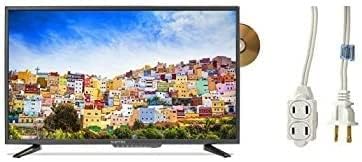
Image: The Sceptre 32-inch Class FHD LED TV with its built-in DVD player visible on the side, accompanied by a 6ft indoor 3-outlet extension cord.
4. Persediaan
4.1 Pemasangan Stand
- Letakkan skrin TV dengan berhati-hati pada permukaan yang lembut dan bersih untuk mengelakkan calar.
- Jajarkan dirian TV dengan lubang pelekap di bahagian bawah TV.
- Selamatkan dirian menggunakan skru yang disediakan. Jangan terlalu ketat.
4.2 Kuasa Penyambung
Plug the power cord into the TV's power input, then connect the other end to a standard electrical outlet. Use the included 6ft indoor 3-outlet extension cord if additional outlets are needed.
4.3 Menyambung Peranti Luaran
Your TV features various input ports for connecting external devices:
- HDMI: Untuk video dan audio definisi tinggi daripada peranti seperti pemain Blu-ray, konsol permainan atau kotak kabel/satelit.
- Antenna/Cable (RF): Untuk menyambungkan antena untuk siaran melalui udara atau sambungan TV kabel.
- USB: Untuk main balik media daripada peranti storan USB.
Connect your devices to the appropriate ports on the back or side of the TV.
5. Arahan Operasi
5.1 Hidupkan/Mati Kuasa
Tekan ke KUASA button on the remote control or on the TV itself to turn the TV on or off.
5.2 Pemilihan Sumber Input
Tekan ke INPUT or SUMBER button on the remote control to cycle through available input sources (e.g., TV, HDMI1, HDMI2, DVD, USB).
5.3 Channel Scan (TV Input)
If using an antenna or cable connection, select the 'TV' input source. Navigate to the TV's menu, find the 'Channel' or 'Setup' section, and initiate an 'Auto Scan' or 'Auto Program' to find available channels.
5.4 Operasi Pemain DVD Terbina Dalam
- Ensure the TV is powered on and the input source is set to 'DVD'.
- Gently insert a DVD disc into the disc slot on the side of the TV, label side facing up. The TV will automatically detect the disc and begin playback.
- Use the DVD control buttons on your remote control (Play, Pause, Stop, Fast Forward, Rewind, Skip) to manage playback.
- Untuk mengeluarkan cakera, tekan butang LEPASKAN butang pada alat kawalan jauh atau TV.
5.5 Menu Navigasi
Tekan ke MENU button on the remote control to access the TV's settings. Use the arrow buttons to navigate and the MASUK or OK button to select options. Press EXIT or MENU sekali lagi untuk menutup menu.
6. Penyelenggaraan
6.1 Membersihkan Skrin
Lap skrin perlahan-lahan dengan kain yang lembut, kering dan tidak berbulu. Untuk tanda degil, ringankan dampen kain dengan air atau pembersih skrin khusus. Jangan sekali-kali menyembur cecair terus ke skrin.
6.2 Membersihkan Bahagian Luar
Wipe the TV's exterior with a soft, slightly damp kain. Elakkan menggunakan bahan kimia yang keras, pembersih yang kasar atau pelarut, kerana ini boleh merosakkan kemasan.
6.3 Penyimpanan
If storing the TV for an extended period, unplug it from the power outlet and store it in a cool, dry place, preferably in its original packaging.
7. Penyelesaian masalah
Sebelum menghubungi sokongan pelanggan, cuba penyelesaian berikut untuk isu biasa:
- Tiada Kuasa: Pastikan kord kuasa dipasang dengan kukuh pada TV dan soket elektrik yang berfungsi. Periksa sama ada soket tersebut mempunyai kuasa.
- Tiada gambar: Verify the correct input source is selected. Check all cable connections (HDMI, antenna) are secure.
- Tiada Bunyi: Check the volume level and ensure the TV is not muted. Verify audio settings in the menu.
- Alat Kawalan Jauh Tidak Berfungsi: Gantikan bateri. Pastikan tiada halangan antara alat kawalan jauh dan penderia IR TV.
- Isu Main Semula DVD: Ensure the disc is clean and free of scratches. Verify the disc is inserted correctly. Confirm the input source is set to 'DVD'.
8. Spesifikasi
| Model | E325BD-FSR |
| Saiz Skrin | 31.5 Inci |
| Resolusi | 1080p (HD Penuh) |
| Ciri Khas | Flat Screen, Built-in DVD Player |
| Teknologi Penala | ATSC |
| Kaedah Kawalan | Jauh |
| Permukaan Skrin | Berkilat |
| Year (Manufacturing) | 2017 |
| Perkhidmatan Internet yang Disokong | Blockbuster |
9. Waranti dan Sokongan
Your Sceptre TV is covered by a manufacturer's warranty. For specific warranty details, please refer to the warranty card included with your product or visit the official Sceptre website. For technical assistance, troubleshooting beyond this manual, or warranty claims, please contact Sceptre customer support.