1. Arahan Keselamatan Penting
Sila baca semua arahan dengan teliti sebelum mengendalikan perkakas ini dan simpannya untuk rujukan pada masa hadapan. Kegagalan mematuhi arahan ini boleh mengakibatkan renjatan elektrik, kebakaran atau kecederaan serius.
- Keselamatan Elektrik: Pastikan bekalan kuasa sepadan dengan voltage specified on the appliance. Do not operate with a damaged power cord or plug. Do not immerse the appliance, cord, or plug in water or other liquids.
- penempatan: Place the ice maker on a stable, level surface away from direct sunlight, heat sources, and corrosive gases. Ensure adequate ventilation around the unit.
- Kualiti Air: Use only potable water. Do not fill with carbonated beverages or other liquids.
- Kanak-kanak dan Haiwan Kesayangan: Keep the appliance out of reach of children and pets. Supervision is necessary when the appliance is used near children.
- Penyelenggaraan: Unplug the appliance before cleaning or performing any maintenance. Do not attempt to repair the appliance yourself; contact qualified service personnel.
- penggunaan: This appliance is intended for household and similar applications only. Do not use outdoors.
2. Kandungan Pakej
Sahkan bahawa semua item yang disenaraikan di bawah disertakan dalam pakej anda. Jika ada item yang hilang atau rosak, sila hubungi sokongan pelanggan.
- TecTake Professional Ice Maker Unit
- Baldi Ais
- Skop Ais
- Manual Pengguna (dokumen ini)

Image: The TecTake Ice Maker with its lid open, revealing the removable ice bucket and the included ice scoop.
3. Produk Lebihview
Familiarize yourself with the main components of your TecTake Professional Ice Maker.

Imej: Depan view of the TecTake Professional Ice Maker, showcasing its sleek silver design and control panel.
Panel Kawalan
The intuitive control panel provides status indicators and operation control.
- ADD WATER Indicator (Red): Menyala apabila takungan air perlu diisi semula.
- FULL ICE Indicator (Red): Bercahaya apabila bakul ais penuh.
- ON/OFF Button (Green LED): Press to turn the ice maker on or off. The green LED indicates power is on.

Imej: A terperinci view of the control panel, showing the 'ADD WATER' and 'FULL ICE' indicator lights, and the 'ON/OFF' button.
4. Persediaan
4.1 Membongkar
- Keluarkan pembuat ais dari pembungkusannya dengan berhati-hati.
- Remove all packing materials, tapes, and labels.
- Inspect the appliance for any damage. Do not operate if damaged.
4.2 Penempatan
- Letakkan pembuat ais di atas permukaan yang rata, stabil dan tahan haba.
- Ensure there is at least 10 cm (4 inches) of space around the unit for proper ventilation.
- Avoid placing the unit near heat sources (e.g., ovens, radiators) or in direct sunlight, as this can affect ice production efficiency.
4.3 First Use & Initial Cleaning
- Before first use, clean the interior of the ice maker. Remove the ice basket and wash it with warm water and a mild detergent. Rinse thoroughly.
- Wipe the interior with a soft cloth.
- Isi takungan air dengan air minuman sehingga paras isian MAKSIMUM. Jangan isi secara berlebihan.
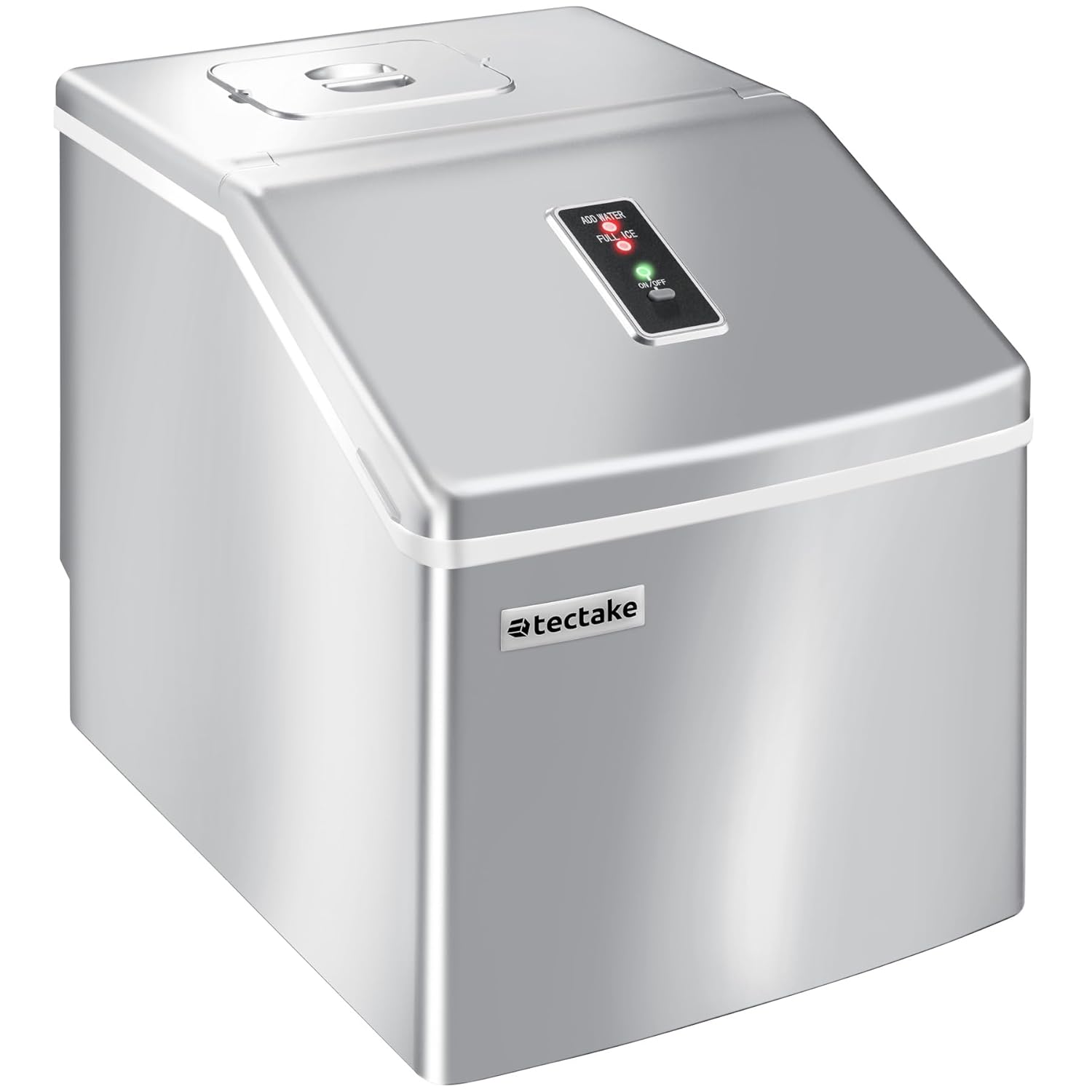
Image: Illustrates the process of filling the water reservoir of the ice maker with a bottle of water.
- Palamkan kord kuasa ke salur keluar elektrik yang dibumikan.
- Press the ON/OFF button to start the ice maker.
- Allow the unit to run for 3-4 cycles, discarding the first few batches of ice to ensure cleanliness.
- Drain the water from the reservoir (refer to Maintenance section for draining instructions) and refill with fresh water before regular use.
5. Arahan Operasi
5.1 Starting Ice Production
- Ensure the water reservoir is filled with potable water.
- Plug the ice maker into a suitable power outlet.
- Press the ON/OFF button. The green LED will illuminate, and the ice production cycle will begin.
5.2 Kitaran Pengeluaran Ais
The ice maker will automatically draw water from the reservoir into the ice-making tray. Ice cubes are formed on the freezing rods. Once formed, the ice cubes are released into the ice basket. Each cycle takes approximately 15 to 30 minutes, depending on ambient temperature and water temperature.

Imej: Dari dekat view of freshly made clear ice cubes collected in the ice basket, ready for use.
5.3 Penunjuk Panel Kawalan
- Sekiranya TAMBAH AIR indicator lights up red, the water level in the reservoir is too low. Refill the reservoir with water. The ice maker will automatically resume operation once water is added.
- Sekiranya AIS PENUH indicator lights up red, the ice basket is full. Remove ice from the basket. The ice maker will automatically resume operation once space is cleared.
5.4 Harvesting Ice
Use the provided ice scoop to remove ice cubes from the basket. For best results, transfer unused ice to a freezer for long-term storage, as the ice maker is not a freezer and ice may melt over time.
6. Penyelenggaraan
Regular cleaning and maintenance will ensure optimal performance and extend the lifespan of your ice maker.
6.1 Pembersihan Berkala
- Unplug the ice maker from the power outlet before cleaning.
- Keluarkan bakul ais.
- Clean the interior liner, water reservoir, and ice basket with a soft cloth dampdibilas dengan air suam dan detergen yang lembut dan tidak kasar.
- Bilas semua permukaan dengan teliti dengan air bersih.
- Lap kering dengan kain bersih dan lembut.
- For stubborn stains, a solution of water and vinegar (1:1 ratio) can be used. Rinse thoroughly afterwards.
6.2 Menyalirkan Air
To drain the water from the reservoir, locate the drain plug at the bottom of the unit. Place a container underneath and remove the plug to allow water to drain completely. Reinsert the plug firmly after draining.

Image: Shows the drain plug on the underside of the ice maker, indicating where to release water from the reservoir.
6.3 Penyimpanan
If the ice maker will not be used for an extended period, drain all water, clean the unit thoroughly, and ensure it is completely dry before storing. Store in a cool, dry place.
7. Penyelesaian masalah
Sebelum menghubungi sokongan pelanggan, sila rujuk jadual berikut untuk isu biasa dan penyelesaiannya.
| Masalah | Kemungkinan Punca | Penyelesaian |
|---|---|---|
| Pembuat ais tidak dihidupkan. | Tiada bekalan kuasa. | Periksa sama ada kord kuasa dipasang dengan selamat ke soket yang berfungsi. Periksa pemutus litar. |
| TAMBAHKAN penunjuk AIR dihidupkan. | Takungan air kosong atau rendah. | Fill the water reservoir with potable water up to the MAX line. |
| FULL ICE indicator is on. | Bakul ais penuh. | Keluarkan ais dari bakul. |
| Ice cubes are small or cloudy. | Water temperature is too high; ambient temperature is too high. | Use colder water. Ensure the unit is in a cool, well-ventilated area. |
| Pengeluaran ais perlahan. | High ambient temperature; poor ventilation. | Ensure adequate space around the unit for ventilation. Avoid direct sunlight or heat sources. |
| Unit mengeluarkan bunyi yang luar biasa. | Bunyi operasi biasa (pemampat, pam air) atau unit tidak mendatar. | Ensure the unit is on a stable, level surface. If noise is excessive or unusual, contact support. |
8. Spesifikasi
Technical specifications for the TecTake Professional Ice Maker.
| Ciri | Spesifikasi |
|---|---|
| Jenama | TecTake |
| Nombor Model | 400162 |
| Dimensi (L x W x H) | 37 x 29 x 35.5 cm (14.57 x 11.42 x 13.98 inci) |
| Kapasiti Tangki Air | 2.2 Liter |
| Kapasiti Pengeluaran Ais | Approx. 13 kg per 24 hours |
| Ice Cubes per Cycle | 24 |
| Masa Kitaran | Lebih kurang 15-30 minit |
| Voltage | 240 Volt |
| Bahan penyejuk | R600a |
| bahan | plastik |
| Pensijilan | Intertek GS certified (Certificate No. 22SHH0265-01) |

Image: The rear of the ice maker, displaying the product label with technical specifications and the cooling fan.
9. Waranti dan Sokongan
TecTake products are manufactured with high-quality materials and undergo strict quality control. This product is covered by a standard manufacturer's warranty against defects in materials and workmanship from the date of purchase. Please refer to your purchase documentation for specific warranty terms and duration.
For technical support, troubleshooting assistance, or warranty claims, please contact TecTake customer service. Have your model number (400162) and purchase receipt ready when contacting support.
Sokongan dalam talian: Visit the official TecTake webtapak untuk Soalan Lazim dan sumber sokongan.
Maklumat Hubungan: Refer to the contact details provided with your purchase or on the official TecTake webtapak.


